
1. הקדמה
Thank you for choosing the 5 Core 4-Channel Audio Mixer (Model MX 4CH ORG). This compact and versatile mixer is designed for various audio applications, including DJ setups, studio recording, karaoke, and live streaming. It features multiple input options, phantom power, Bluetooth connectivity, a USB audio interface, and built-in effects to enhance your sound. Please read this manual thoroughly to ensure proper setup, operation, and longevity of your device.
2. וויכטיק סאַפעטי אינסטרוקציעס
- לייענען די ינסטראַקשאַנז קערפאַלי איידער אַפּערייטינג די מיטל.
- האַלטן דעם מאַנואַל פֿאַר צוקונפֿט רעפֿערענץ.
- היט אַלע וואָרנינגז אויף דעם פּראָדוקט און אין די אַפּערייטינג ינסטראַקשאַנז.
- גיי אַלע ינסטראַקשאַנז.
- דו זאלסט נישט נוצן דעם אַפּאַראַט לעבן וואַסער.
- ריין בלויז מיט אַ טרוקן שטאָף.
- בלאָקירט נישט קיין ווענטילאַציע עפענונגען. אינסטאַלירט לויט די אינסטרוקציעס פונעם פאַבריקאַנט.
- דו זאלסט נישט ינסטאַלירן לעבן קיין היץ קוואלן אַזאַ ווי ראַדיאַטאָרס, היץ רעדזשיסטערז, סטאָוווז אָדער אנדערע אַפּאַראַט (אַרייַנגערעכנט ampליפיערס) וואָס פּראָדוצירן היץ.
- דו זאלסט נישט באַזיגן די זיכערקייַט ציל פון די פּאָולערייזד אָדער גראַונדינג-טיפּ צאַפּן. א פּאָלאַריזעד צאַפּן האט צוויי בלאַדעס מיט איינער ברייט ווי די אנדערע. א גראַונדינג-טיפּ צאַפּן האט צוויי בלאַדעס און אַ דריט גראַונדינג צאָן. די ברייט בלייד אָדער די דריט צאָן זענען צוגעשטעלט פֿאַר דיין זיכערקייַט. אויב די צוגעשטעלט צאַפּן טוט נישט פּאַסיק אין דיין ווענטיל, באַראַטנ אַ ילעקטרישאַן פֿאַר פאַרבייַט פון די פאַרעלטערט ווענטיל.
- באַשיצן די מאַכט שנור פון גיין אויף אָדער פּינטשט, ספּעציעל אין די פּלאַגז, קאַנוויניאַנס רעסאַפּיז און די פונט ווו זיי אַרויסגיין פון די אַפּאַראַט.
- נאָר נוצן אַטאַטשמאַנץ / אַקסעסעריז ספּעסיפיעד דורך דער פאַבריקאַנט.
- אָפּשטויסן דעם אַפּאַראַט בעשאַס בליץ סטאָרמז אָדער ווען אַניוזד פֿאַר לאַנג פּיריאַדז.
- אָפּשיקן אַלע סערוויסעס צו קוואַלאַפייד סערוויס פּערסאַנעל. סערוויס איז פארלאנגט ווען דער אַפּאַראַט איז דאַמידזשד אין קיין וועג, אַזאַ ווי מאַכט צושטעלן שנור אָדער צאַפּן איז דאַמידזשד, פליסיק איז ספּילד אָדער אַבדזשעקץ זענען געפאלן אין די אַפּאַראַט, דער אַפּאַראַט איז יקספּאָוזד צו רעגן אָדער נעץ, אַרבעט נישט נאָרמאַלי , אָדער האט שוין דראַפּט.
3. פּראָדוקט איבערview
The 5 Core 4-Channel Audio Mixer is a compact and powerful tool for audio enthusiasts. It features a user-friendly interface with clearly labeled controls for easy operation.
3.1 שליסל פֿעיִקייטן
- 4-Channel Mixing: Two mono channels and two stereo channels for versatile input options.
- XLR & 1/4" Inputs: Supports both balanced XLR and unbalanced 1/4" inputs.
- +48 וו פאַנטאָם מאַכט: Provides power for condenser microphones on mono channels.
- בלועטאָאָטה 5.4 קאַנעקטיוויטי: Seamless wireless audio streaming from compatible devices.
- USB אַודיאָ צובינד: Connects to a computer for direct recording and playback.
- 2-באַנד עקוואַליזער: High and Low frequency controls on each channel for sound shaping.
- Delay Effects: Built-in delay and repeat effects to add depth to your mix.
- סאָליד און פּאָרטאַטיוו פּלאַן: Lightweight and easy to transport for various setups.
3.2 Mixer Layout and Controls
Familiarize yourself with the various inputs, outputs, and controls on your mixer. Refer to the diagram below for a visual guide.
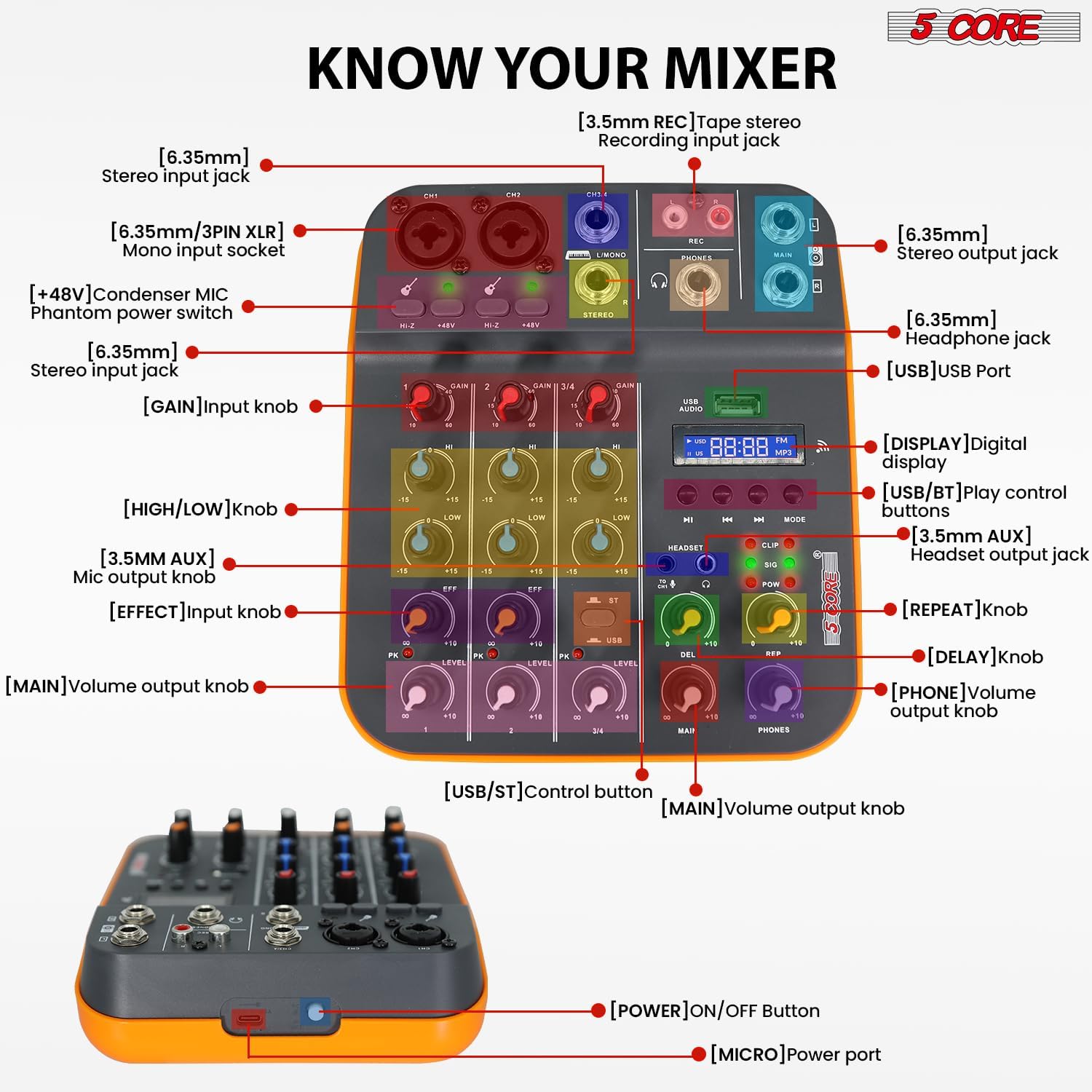
Figure 3.2.1: Front Panel Layout and Controls. This image displays the top view of the 5 Core 4-Channel Audio Mixer with various components labeled, including XLR/1/4" mono input sockets, stereo input jacks, REC output, MAIN output, PHONES output, USB port, digital display, and control knobs for GAIN, HIGH, LOW, EFF (Effect), LEVEL, DEL (Delay), REP (Repeat), MAIN, and PHONES volume. Also shown are the +48V phantom power switches and HI-Z switches.
- [6.35mm/3PIN XLR] Mono input socket: For connecting microphones or mono instruments.
- [HI-Z] Switch: For high impedance inputs, typically for guitars.
- [+48V] Condenser MIC Phantom power switch: אַקטיוויזירט פאַנטאָם מאַכט פֿאַר קאָנדענסער מיקראָפאָנען.
- [6.35mm] Stereo input jack: For connecting stereo line-level devices.
- [GAIN] Input knob: אַדזשאַסטירט די אינפוט סענסיטיוויטי פֿאַר יעדן קאַנאַל.
- [HIGH/LOW] knob: 2-band equalizer for adjusting high and low frequencies.
- [EFF] Effect knob: Controls the amount of effect applied to the channel.
- [LEVEL] Main volume output knob: Adjusts the overall volume of each channel.
- [USB] USB Port: For connecting to a computer or USB drive.
- [DISPLAY] Digital display: ווײַזט איצטיקן מאָדע און טראַק אינפֿאָרמאַציע.
- [USB/BT] Play control buttons: Controls for USB/Bluetooth playback (Play/Pause, Skip, Mode).
- [HEADSET] Headset output jack: פֿאַר קאַנעקטינג כעדפאָונז.
- [DEL] Delay knob: אַדזשאַסטירט די פאַרהאַלטונג צייט פון דעם ווירקונג.
- [REP] Repeat knob: אַדזשאַסטירט די צאָל פון רעפּעטיציעס פֿאַר די פאַרהאַלטונג ווירקונג.
- [MAIN] Volume output knob: Controls the overall main output volume.
- [PHONES] Volume output knob: Controls the headphone output volume.
- [POWER] ON/OFF Button: Located on the side/rear for turning the unit on/off.
- [MICRO] Power port: USB power input.
4. סעטאַפּ גייד
4.1 Powering the Mixer
The mixer can be powered in three ways:
- קאמפיוטער: Connect the mixer to a computer's USB port using a USB cable.
- מאַכט אַדאַפּטער: Use a standard USB power adapter (not included) to connect to a wall outlet.
- מאַכט באַנק: For portable use, connect to a power bank (not included).
Ensure the power source provides sufficient voltage (5V/2A recommended). Once connected, press the [POWER] ON/OFF button to turn on the mixer.
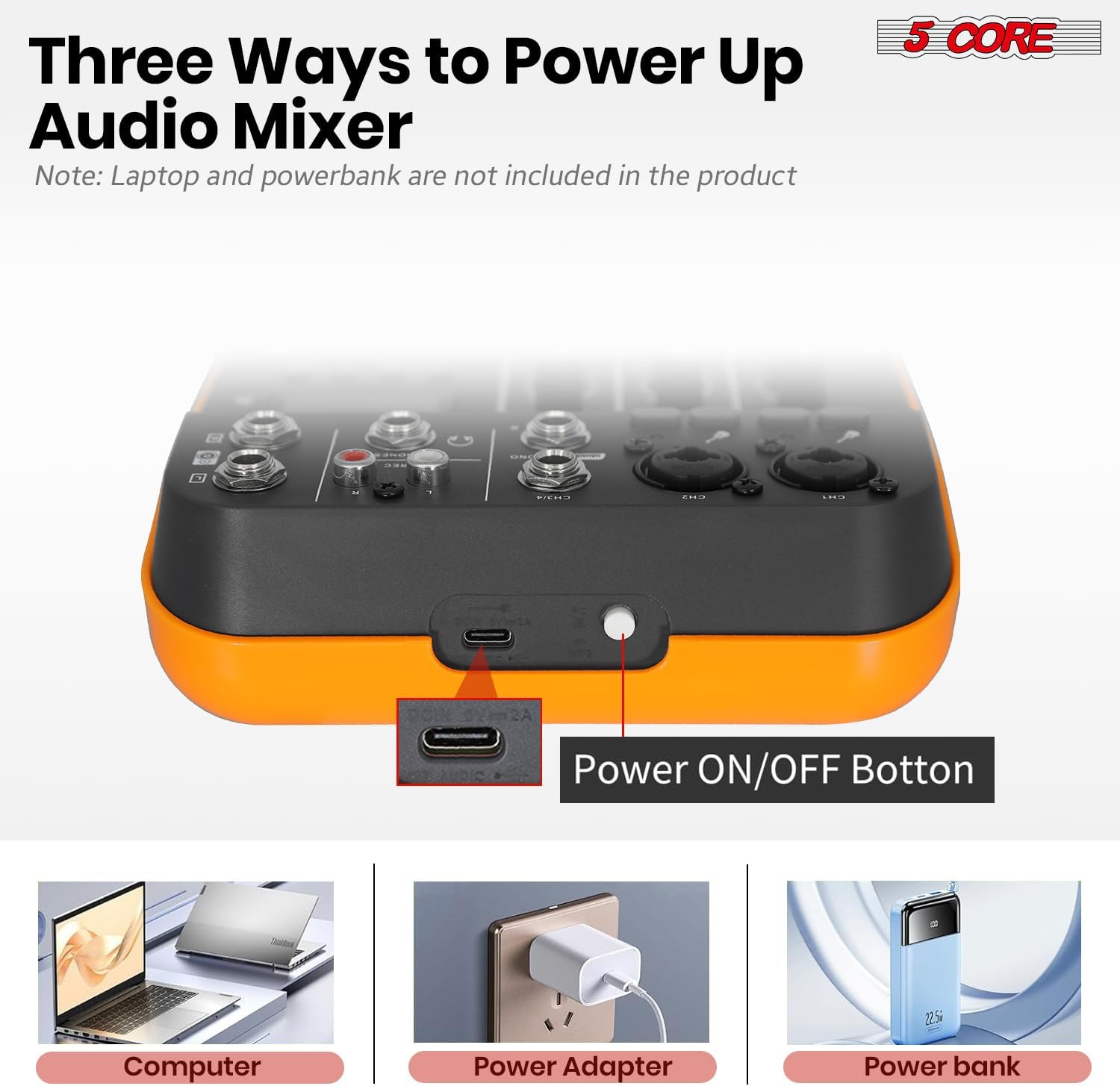
Figure 4.1.1: Powering Options for the Audio Mixer. This image illustrates connecting the mixer to a laptop, a wall adapter, and a power bank for power supply.
4.2 פֿאַרבינדן מיקראָפֿאָנען און אינסטרומענטן
- Mono Inputs (CH1, CH2): Use XLR or 1/4" cables to connect microphones or mono instruments.
- פאַנטאָם מאַכט: פֿאַר קאָנדענסער מיקראָפאָנען, דריק די +48V switch on the respective channel. The indicator light will illuminate. Caution: Do not activate +48V phantom power for dynamic microphones or ribbon microphones unless specified by the manufacturer, as it may cause damage.
- High Impedance (HI-Z): If connecting a guitar or bass directly, press the הי-ז switch for optimal signal.
- Stereo Inputs (CH3/4): Use 1/4" cables to connect stereo line-level devices such as keyboards, media players, or other mixers.

Figure 4.2.1: Phantom Power and Input Connections. This image highlights the +48V phantom power switch and the XLR/1/4" combo inputs for microphones and instruments.
4.3 Connecting to a Computer for Recording (USB Audio Interface)
The mixer features a built-in USB audio interface for direct connection to your computer, enabling recording and playback.
- פֿאַרבינדט דעם מיקסער'ס USB פּאָרט צו אייער קאָמפּיוטער מיט אַ USB קאַבל.
- Your computer should automatically detect the mixer as an audio device. No special drivers are usually required for basic functionality.
- Open your preferred Digital Audio Workstation (DAW) software (e.g., Audacity, GarageBand, Ableton Live).
- In your DAW's audio settings, select the mixer as your input and output device.
- You can now record audio from the mixer into your computer and play back audio from your computer through the mixer.

Figure 4.3.1: USB Audio Interface for PC Recording. This image depicts the mixer connected to a laptop, demonstrating its use as an audio interface for music production.

Figure 4.3.2: Computer to Mixer Audio Signal Flow. This diagram shows how computer music signals can be sent to the audio mixer and how audio mixer signals can be recorded by a computer program, with an emphasis on switching to PC mode.
4.4 בלועטוט קאָנעקטיוויטי
The mixer supports Bluetooth 5.4 for wireless audio streaming from your smartphone, tablet, or other Bluetooth-enabled devices.
- דרוק די מאָדע קנעפל אויפן מיקסער ביז "BT" דערשיינט אויפן דיגיטאלן דיספלעי.
- On your Bluetooth device, search for available devices and select "5 CORE MIXER" (or similar name).
- Once paired, you can stream audio wirelessly to the mixer. Use the play control buttons (PLAY/PAUSE, SKIP) on the mixer to control playback.

Figure 4.4.1: Seamless Wireless Connectivity. This image illustrates the mixer's Bluetooth capability, showing it connected to a smartphone for wireless music streaming.
4.5 רעזולטאַט קאַנעקשאַנז
- Main Output (MAIN): Connect to your main speakers or amplifier using 1/4" cables.
- כעדפאָון אַרויסגאַנג (טעלעפאָנען): Connect your headphones to the 1/4" headphone jack for monitoring.
- REC Output (REC): Use for dedicated recording devices.

Figure 4.5.1: Versatile Compatibility. This image demonstrates the mixer's ability to connect with a wide range of audio equipment, including headphones, smartphones, power amplifiers, and wireless microphones.
5. אַפּערייטינג ינסטרוקטיאָנס
5.1 גרונטלעכע מישונג
- Set GAIN: סטרויערן די געווינען knob for each input channel to achieve an optimal input level. Avoid clipping (indicated by the PK/CLIP light).
- אַדזשאַסטירן EQ: ניצן די הויך און נידעריק knobs to shape the tone of each channel.
- צולייגן יפעקץ: קער די EFF knob to send a portion of the channel's signal to the built-in effects processor.
- שטעלן קאַנאַל לעוועל: סטרויערן די LEVEL knob for each channel to balance the mix.
- בעל באַנד: Control the overall output volume using the MAIN באַנד קנופּ.
5.2 Using Delay Effects
The mixer includes built-in delay and repeat effects.
- DEL (Delay): Adjust this knob to control the delay time.
- איבערחזרן: Adjust this knob to control the number of repetitions for the delay effect.
- פאַרזיכערן די EFF knob on the desired channel is turned up to send signal to the effects processor.
5.3 USB/MP3 שפּיל
אַרייַנלייגן אַ וסב פאָר מיט mp3 files into the USB port. Use the play control buttons (PLAY/PAUSE, SKIP, MODE) to navigate and play tracks. The digital display will show track information.
5.4 מאָניטאָרינג
פאַרבינדן כעדפאָונז צו די פאָנעס jack and adjust the פאָנעס volume knob to monitor your mix without affecting the main output.
6. וישאַלט
- רייניקונג: Use a soft, dry cloth to clean the mixer's surface. Do not use liquid cleaners or solvents.
- סטאָרידזש: האַלט דעם מיקסער אין אַ קיל, טרוקן אָרט אַוועק פון דירעקט זונשייַן און עקסטרעמע טעמפּעראַטורן.
- האַנדלינג: פֿאַרמײַדט צו לאָזן פֿאַלן אָדער אויסשטעלן דעם מיקסער צו שטאַרקע קלאַפּן.
- ווענטילאַטיאָן: ענשור אַז ווענטאַליישאַן אָופּאַנינגז זענען נישט אפגעשטעלט צו פאַרמייַדן אָוווערכיטינג.
7. טראָובלעשאָאָטינג
7.1 קיין קלאַנג אַרויסגאַנג
- Check if the mixer is powered on.
- Ensure all cables are securely connected to the correct inputs and outputs.
- באַשטעטיקן אַז די MAIN volume and individual channel LEVEL knobs are turned up.
- Check the volume levels on your connected speakers or ampליפער.
- If using headphones, ensure the פאָנעס volume knob is turned up.
7.2 Microphone Not Working / Low Volume
- Ensure the microphone is connected to a mono input (CH1 or CH2).
- סטרויערן די געווינען knob for the microphone channel.
- If using a condenser microphone, ensure +48V phantom power is activated for that channel.
- Test the microphone with another device to confirm it is functional.
7.3 בלוטוט פֿאַרבינדונג פּראָבלעמען
- Ensure the mixer is in Bluetooth mode (display shows "BT").
- Make sure your Bluetooth device is within range and Bluetooth is enabled.
- פּרוּווט אָפּצופּאַרן און ווידער צופּאַרן דעם דעווייס.
- Ensure no other devices are actively connected to the mixer via Bluetooth.
7.4 Recording Issues via USB
- Verify the USB cable is properly connected between the mixer and your computer.
- Check your computer's sound settings and your DAW's audio preferences to ensure the mixer is selected as the input device.
- סטרויערן די MAIN output level on the mixer, as this often controls the signal sent to the USB output.
8. ספּעסאַפאַקיישאַנז
| שטריך | דעטאַל |
|---|---|
| סאָרט | 5 קאָר |
| מאָדעל | MX 4CH ORG |
| טשאַננעל נומ. | 4 (2 מאָנאָ, 2 סטערעאָ) |
| מאַטעריאַל טיפּ | פּלאַסטיק |
| Voltage | 100-240V (Input), 5V (Operating) |
| בלועטאָאָטה ווערסיע | 5.4 |
| פּיסי רעקאָרדינג | יאָ (דורך וסב) |
| עקוואַליזער | 2-Band EQ (High, Low) per channel |
| פאַנטאָם מאַכט | +48V |
| וסב קאַנעקטיוויטי | Yes (Audio Interface, MP3 Playback) |
| עפפעקץ | Delay, Repeat |
| אָפטקייַט ענטפער | 20 הערץ - 20 כ"ץ |
| פּראָדוקט דימענשאַנז | 3"ד רענטגענ 8"וו רענטגענ 9"ה |
| UPC | 810144135113 |
9. וואָראַנטי & שטיצן
דער פּראָדוקט קומט מיט אַ 1-חודש וואָראַנטי from the date of purchase. For warranty claims or technical support, please contact 5 Core customer service through the retailer where the product was purchased or visit the official 5 Core webפּלאַץ פֿאַר קאָנטאַקט אינפֿאָרמאַציע.
ביטע באַהאַלטן אייער קויפן-באַווייַז פֿאַר וואָראַנטי וואַלידאַציע.
10. פּראָדוקט ווידעאָס
10.1 5 Core Audio Mixer 4 Channel DJ Soundboard Overview
This video provides a quick overview of the 5 Core 4-Channel Audio Mixer, highlighting its key features such as 2 mono and 2 stereo channels, Bluetooth 5.4, USB connectivity, MP3 playback, +48V phantom power, 2-band EQ, and delay effects. It demonstrates the mixer's suitability for recording, mixing, and performance.
10.2 Audio Mixer USB Interface XLR Mixing Console 4 Channel Features
This video showcases the 5 Core 4-Channel Audio Mixer, emphasizing its 2 mono and 2 stereo channels, Bluetooth 5.4, USB and MP3 capabilities, +48V phantom power for studio microphones, 20Hz to 20kHz frequency range, delay effects, and 2-band EQ. It highlights the mixer's lightweight and orange design, suitable for various audio production needs.