
1. הקדמה
Thank you for choosing the Mesqool CR1025 Clock Radio. This device combines an alarm clock, Bluetooth speaker, FM radio, night light, and phone charger into one compact unit. This manual provides detailed instructions for setup, operation, and maintenance to ensure optimal performance and user experience.

Figure 1: Mesqool CR1025 Clock Radio
2. פּראָדוקט איבערview
2.1 שליסל פֿעיִקייטן
- מולטיפונקטיאָנאַל פּלאַן: Alarm Clock, Bluetooth Speaker, FM Radio, Night Light, and Phone Charger.
- בלועטאָאָטה 5.0: For stable and quick wireless audio streaming.
- עפעם ראַדיאָ: 87.5MHz-108.0MHz frequency range with 20 preset stations.
- אַדזשאַסטאַבאַל ברייטנאַס: 5 levels for the LED display.
- אַדזשאַסטאַבאַל באַנד: 16 levels (45dB to 116dB).
- שלאָפן טימער: Allows automatic shutdown of audio playback.
- סנוז פונקציע: 9-minute delay for alarms.
- באַטאַרייע באַקאַפּ: Retains time and alarm settings during power outages.
- צווייענדיק וסב טשאַרדזשינג פּאָרץ: Type-C and USB-A for device charging.
- צייט פֿאָרמאַט: 12-hour and 24-hour display options.
- טאָגליכט שפּאָרן צייט (דסט): Quick adjustment feature.

Figure 2: 5-in-1 Functionality
2.2 פּעקל אינהאַלט
- Mesqool CR1025 Clock Radio
- מאַכט אַדאַפּטער
- וסב קאַבלע
- CR2032 Lithium Battery (pre-installed or separate for backup)
- באַניצער מאַנואַל (דעם דאָקומענט)

פיגורע 3: פּעקל אינהאַלט
3. קאָנטראָלן און אַרויסווייַזונג
Familiarize yourself with the buttons and ports on your Mesqool CR1025 Clock Radio.
3.1 אויבערשטע פּאַנעל קאָנטראָלס
- Sleep Timer Knob: Rotate to set sleep timer duration. Press to confirm.
- שרעק קנעפּל: Press to set or activate/deactivate alarms.
- Time/12/24 Button: Press to set time. Hold to switch between 12/24-hour format.
- Dimmer/DST Button: Press to adjust display brightness. Hold to activate/deactivate Daylight Saving Time.
- שלאָף/ליכט קנעפּל: Press to snooze alarm or turn night light on/off.
- Preset/Pair Button: Press to cycle through FM presets. Hold to enter Bluetooth pairing mode.
- Play/Mode Button: Press to play/pause in Bluetooth mode. Hold to switch between FM/Bluetooth modes.
- Power/Scan Knob: Rotate to adjust volume. Press to power on/off. Hold to auto-scan FM stations.
3.2 הינטערשטע פּאַנעל פּאָרטן
- דק אין: מאַכט אַרייַנשרייַב פּאָרט.
- וסב- א רעזולטאַט: פֿאַר טשאַרדזשינג עקסטערנע דעוויסעס.
- טיפּ-C רעזולטאַט: פֿאַר טשאַרדזשינג עקסטערנע דעוויסעס.
4. סעטאַפּ
4.1 מאַכט קאַנעקשאַן
- Connect the power adapter to the DC IN port on the back of the clock radio.
- שטעקט אריין דעם מאַכט אַדאַפּטער אין אַ נאָרמאַלער וואַנט אַוטלעט. דער עקראַן וועט זיך אָנצינדן.

פיגורע 4: מאַכט קאַנעקשאַן
4.2 באַטעריע באַקאַפּ
The CR2032 battery provides backup for time and alarm settings during a power outage. The display will not show time, and alarms will not sound until power is restored.
- Ensure the battery insulator tab is removed if the battery was pre-installed.
- If replacing, open the battery compartment on the bottom and insert a new CR2032 battery with the correct polarity.
4.3 באַשטעטיקן די צייט
- דריקן און האַלטן די Time/12/24 קנעפּל ביז די שעה ציפערן בליצן.
- דרייען די מאַכט / יבערקוקן קנופּ צו סטרויערן די שעה.
- דרוק די Time/12/24 button again to confirm the hour, and the minute digits will flash.
- דרייען די מאַכט / יבערקוקן knob to adjust the minutes.
- דרוק די Time/12/24 button to save the time setting.
4.4 12/24-Hour Format
צו בייטן צווישן 12-שעה און 24-שעה צייט פֿאָרמאַטן, דריק די Time/12/24 button briefly while the time is displayed.

Figure 5: 12H/24H and DST Display
4.5 זומערצייט (DST)
To activate or deactivate DST, press and hold the Dimmer/DST button. The 'DST' indicator will appear or disappear on the display.
5. אַפּערייטינג ינסטרוקטיאָנס
5.1 באַשטעטיקן די שרעק
- דריקן און האַלטן די שרעק קנעפּל ביז די אַלאַרם שעה ציפערן בליצן.
- דרייען די מאַכט / יבערקוקן knob to adjust the alarm hour.
- דרוק די שרעק button again to confirm the hour, and the minute digits will flash.
- דרייען די מאַכט / יבערקוקן knob to adjust the alarm minutes.
- דרוק די שרעק קנעפּל צו ראַטעווען די אַלאַרם צייט.
- צו אַקטיווירן/דעאַקטיווירן דעם אַלאַרם, דריק די שרעק קנעפּל קורץ. אן אלארם אייקאן וועט דערשיינען/פארשווינדן אויפן דיספלעי.
5.2 סנוז פונקציע
ווען דער שרעק סאָונדס, דריקן די SNOOZE / LIGHT button to activate the 9-minute snooze function. The alarm will sound again after 9 minutes. This can be repeated up to 9 times. To stop the alarm completely, press the שרעק קנעפּל.

Figure 6: Snooze Function
5.3 FM ראַדיאָ אָפּעראַציע
- דרוק די Play/Mode קנעפּל צו באַשטימען צו FM ראַדיאָ מאָדע.
- אויטאָ-סקען: דריקן און האַלטן די מאַכט / יבערקוקן knob to automatically scan and save available FM stations (up to 20 presets).
- מאַנואַל טונינג: Briefly rotate the מאַכט / יבערקוקן קנעפּל צו פיין-טונען די פרעקווענץ.
- אויסקלייַבן פּריסעט: דרוק די Preset/Pair קנעפּל צו דורכגיין די געהיטענע סטאנציעס.
- באַנד אַדזשאַסטמאַנט: דרייען די מאַכט / יבערקוקן knob to adjust the volume (16 levels).

Figure 7: FM Radio Features
5.4 בלועטוט רעדנער אָפּעראַציע
- דרוק די Play/Mode button to switch to Bluetooth mode. The 'BT' icon will flash on the display.
- On your mobile device, enable Bluetooth and search for 'CR1025'.
- Select 'CR1025' to pair. Once connected, the 'BT' icon will stop flashing.
- שפּילט אַודיאָ פֿון אײַער מיטל. ניצט די Play/Mode קנעפּל צו שפּילן / פּויזע.
- באַנד אַדזשאַסטמאַנט: דרייען די מאַכט / יבערקוקן קנופּ צו סטרויערן די באַנד.

פיגור 8: בלועטוט 5.0 קאָנעקטיוויטי
5.5 Night Light Operation
דרוק די SNOOZE / LIGHT button to turn the night light on or off. The night light provides a soft, warm glow.

Figure 9: Warm Night Light
5.6 ווייַז ברייטנאַס אַדזשאַסטמאַנט
דרוק די Dimmer/DST button repeatedly to cycle through 5 levels of display brightness, from off to brightest.
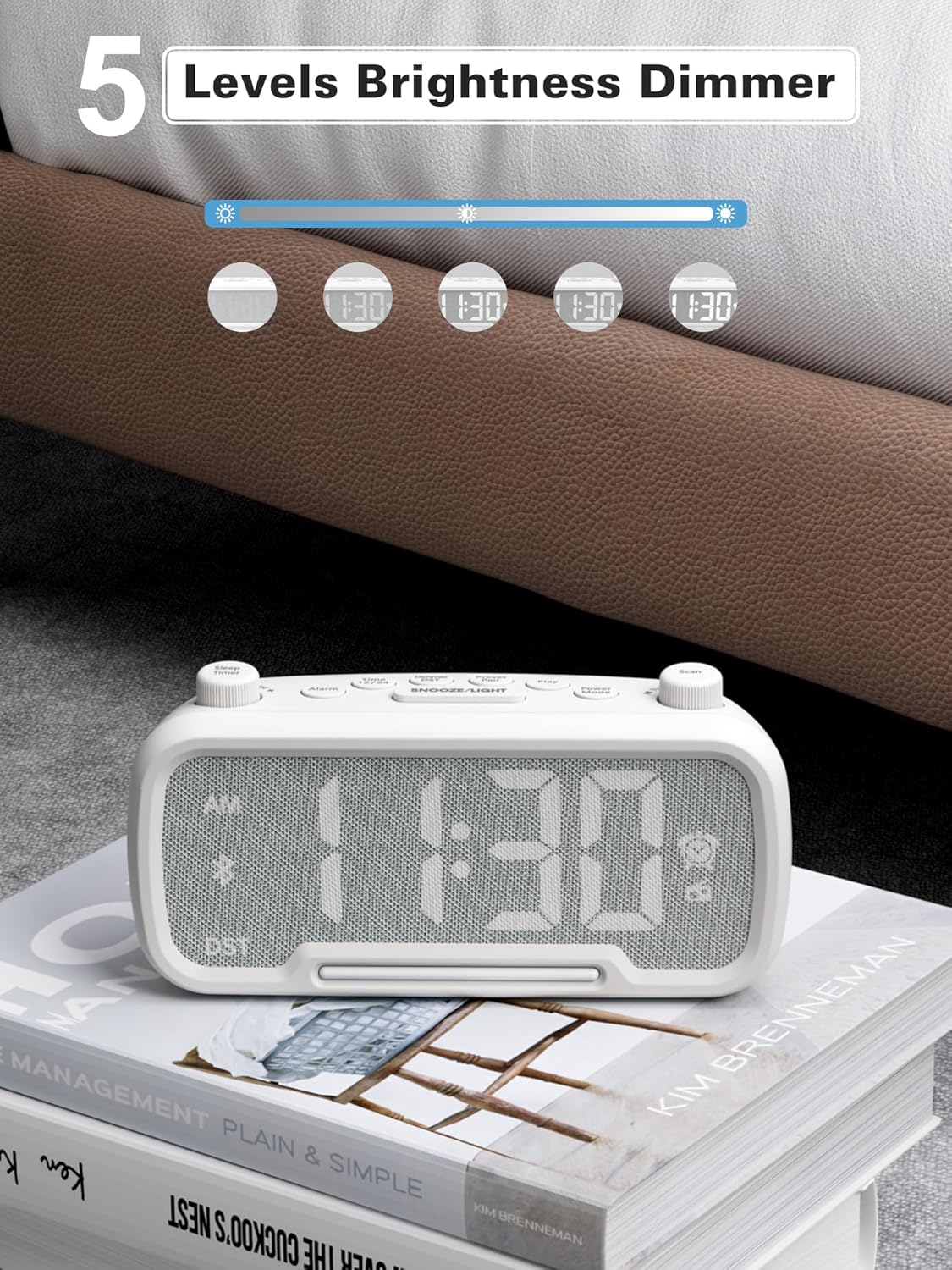
Figure 10: 5 Levels Brightness Dimmer
5.7 שלאָפן טיימער
The sleep timer allows you to set a duration after which the radio or Bluetooth audio will automatically turn off.
- While playing FM radio or Bluetooth audio, rotate the שלאָף טיימער knob to select the desired sleep duration (e.g., 15, 30, 60, 90 minutes).
- The display will show the remaining sleep time. The audio will turn off automatically when the timer expires.
5.8 טעלעפאָן טשאַרדזשינג
The clock radio features two USB charging ports (Type-C and USB-A) for convenient charging of your mobile devices.
- Connect your device's charging cable to either the USB-A or Type-C port on the back of the clock radio.
- Connect the other end of the cable to your mobile device. Charging will begin automatically.

Figure 11: Dual USB Charging Ports
6. וישאַלט
- רייניקט דעם אַפּאַראַט מיט אַ ווייכן, טרוקענעם שטאָף. ניצט נישט קיין שרײַבנדיקע רייניגערס אדער סאָלווענטן.
- האַלט דעם אַפּאַראַט אַוועק פון דירעקט זונשייַן, היץ קוועלער און נעץ.
- פאַרזיכערן געהעריק ווענטאַליישאַן אַרום די אַפּאַראַט.
- If the unit will not be used for an extended period, unplug it from the power outlet.
7. טראָובלעשאָאָטינג
| פּראָבלעם | מעגלעך סיבה | לייזונג |
|---|---|---|
| קיין מאַכט/דיספּליי אויסגעלאָשן | מאַכט אַדאַפּטער נישט פארבונדן אָדער דעפעקטיוו. | Ensure power adapter is securely plugged into the unit and wall outlet. Check outlet functionality. |
| שרעק טוט נישט געזונט | אַלאַרם נישט אַקטיוויזירט אָדער פאַלש געשטעלט. | Verify alarm time is set and the alarm icon is visible on the display. Check alarm volume. |
| נעבעך עפעם ראַדיאָ אָפּטראָג | שוואַכער סיגנאַל אָדער שטערונג. | Adjust the unit's position. Try auto-scanning again. |
| בלועטאָאָטה איז נישט פּערינג | די דעווייס איז נישט אין פּערינג מאָדע אדער צו ווייט. | Ensure the clock radio is in Bluetooth mode (BT icon flashing). Move device closer. Forget device on phone and re-pair. |
| וסב טשאַרדזשינג איז נישט ארבעטן | Cable faulty or device incompatible. | Try a different USB cable. Ensure the clock radio is powered on. |
8. ספּעסאַפאַקיישאַנז
- מאָדעל: CR1025
- מאַכט אַרייַנשרייַב: אַק 100-240 וו, 50/60 הז
- באַטאַרייע באַקאַפּ: 1 רענטגענ CR2032 (אַרייַנגערעכנט)
- עפעם אָפטקייַט: 87.5 - 108.0 מעגהערץ
- בלועטאָאָטה ווערסיע: 5.0
- USB רעזולטאַט: USB-A, Type-C (Charging only)
- ווייַז ברייטנאַס: 5 לעוועלס
- באַנד לעוועלס: 16 levels (45dB - 116dB)
- דימענסיעס: 5.9 X 3.81 X 8.4 סענטימעטער (2.32 X 1.5 X 3.31 אינטשעס)
- וואָג: 216 ג (0.48 לבס)
פיגור 12: פּראָדוקט דימענסיעס
9. וואָראַנטי און שטיצן
Mesqool products are designed and manufactured to the highest quality standards. For warranty information, technical support, or customer service inquiries, please refer to the contact information provided on the product packaging or visit the official Mesqool webפּלאַץ.
Webפּלאַץ: Mesqool Official Store