
1. הקדמה
Thank you for choosing the AromaTech Ambience Scent Diffuser. This waterless nebulizing diffuser is designed to disperse essential oil blends and fragrances efficiently, covering areas up to 1000 sq ft. Featuring Bluetooth connectivity for app control and ambient LED lighting, the Ambience diffuser provides a consistent and enjoyable scenting experience without heat or water. Please read this manual thoroughly before operation to ensure proper use and maintenance.

Image: The AromaTech Ambience Diffuser positioned on a coffee table in a living room, demonstrating typical placement.
2. זיכערקייַט אינפֿאָרמאַציע
- לייענען אַלע ינסטראַקשאַנז איידער ניצן די אַפּפּליאַנסע.
- האַלטן די דיפפוסער אויס פון דערגרייכן פון קינדער און פּעץ.
- Use only AromaTech essential oil blends or fragrances. Other oils may damage the device.
- Do not immerse the diffuser in water or any other liquid.
- זיכער מאַכן אַז דער מאַכט אַדאַפּטער איז קאָמפּאַטיבל מיט אייער לאָקאַלער מאַכט צושטעל.
- Unplug the diffuser from the power outlet before cleaning or when not in use for extended periods.
- בלאָקירט נישט די לופט ווענטילאַציעס בעת אָפּעראַציע.
- Avoid placing the diffuser on unstable surfaces.
3. פּעקל אינהאַלט
באַשטעטיקן אַז אַלע זאכן זענען פאַראַן אין פּעקל:
- AromaTech Ambience Scent Diffuser (White Stone Resin)
- מאַכט אַדאַפּטער
- Empty 60ml Diffuser Oil Bottle (for your chosen fragrance oil, not included)
- באַניצער מאַנואַל (דעם דאָקומענט)
4. פּראָדוקט איבערview
Familiarize yourself with the components of your AromaTech Ambience Scent Diffuser.
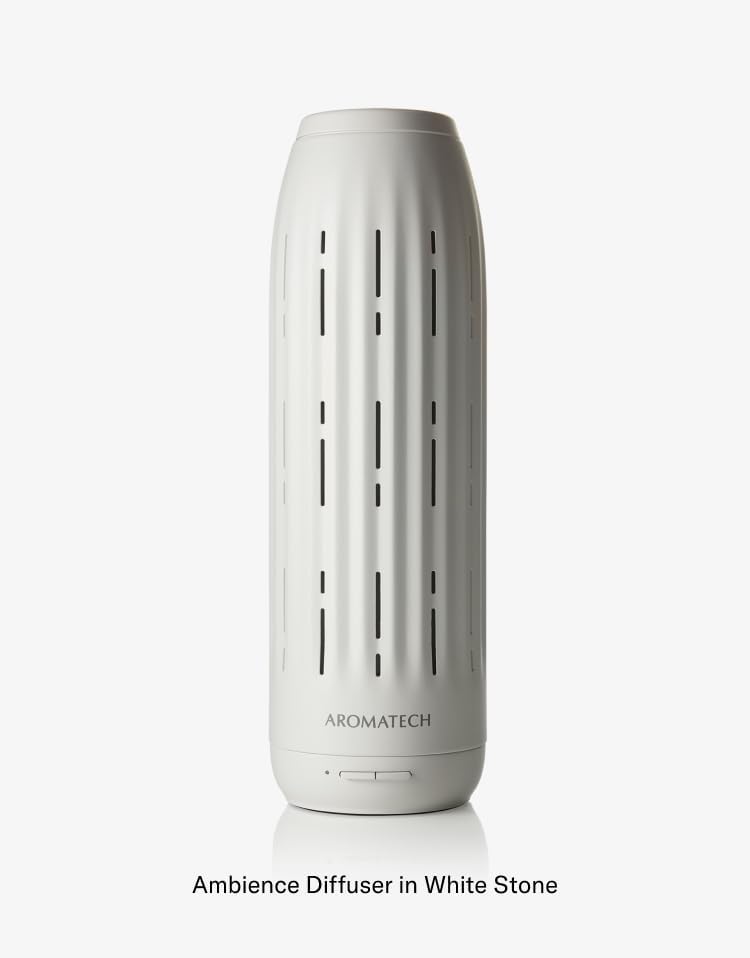
בילד: א דעטאַלירטע view of the Ambience Diffuser, highlighting its design and the AromaTech logo.
- Diffuser Body: The main unit housing the nebulizing technology.
- קאָנטראָל קנעפּלעך: Located at the base for basic operation (e.g., power, LED).
- Oil Compartment: Area where the essential oil bottle is inserted.
- לופט ווענט: Openings for scent dispersion.
- מאַכט פּאָרט: פֿאַר קאַנעקטינג די מאַכט אַדאַפּטער.
5. סעטאַפּ
- אַנפּאַק: קערפאַלי באַזייַטיקן אַלע קאַמפּאָונאַנץ פון די פּאַקקאַגינג.
- אָרט: Place the diffuser on a flat, stable surface in your desired area. Ensure it is away from direct sunlight, heat sources, and out of reach of children and pets.
- Prepare Oil Bottle: Unscrew the cap from your AromaTech essential oil blend or fragrance bottle. If using the empty 60ml bottle, fill it with your chosen AromaTech oil.
- Insert Oil Bottle: Locate the oil compartment on the diffuser. Carefully screw the oil bottle into the designated port until secure. Do not overtighten.
- פאַרבינדן מאַכט: Plug the power adapter into the diffuser's power port, then plug the adapter into a suitable electrical outlet.
6. אַפּערייטינג ינסטרוקטיאָנס
6.1 מאַכט אויף / אַוועק
- To power on the diffuser, press the power button located at the base of the unit.
- צו מאַכט אַוועק, דריקן די מאַכט קנעפּל ווידער.
6.2 Bluetooth Connectivity and AromaTech App
The AromaTech Ambience diffuser can be controlled via the AromaTech App on your smartphone (compatible with Apple and Android devices).
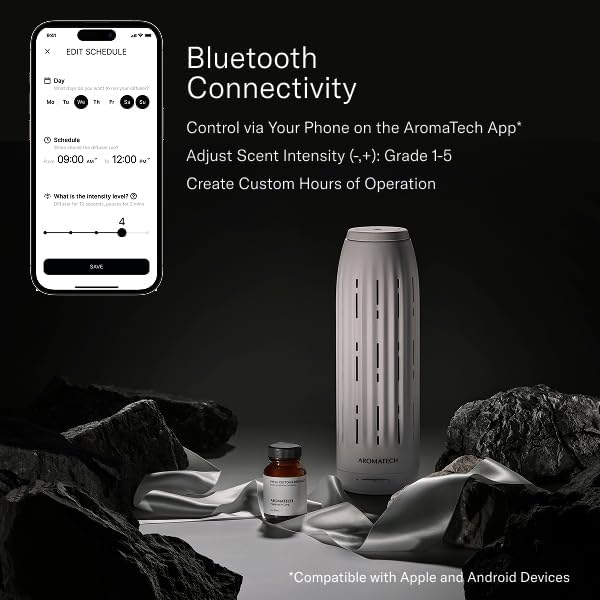
Image: A smartphone displaying the AromaTech App's scheduling and intensity control interface, alongside the Ambience diffuser and a bottle of fragrance oil.
- אראפקאפיע אַפּ: Download the "AromaTech" app from your device's app store (Apple App Store or Google Play Store).
- געבן בלועטאָאָטה: מאַכן זיכער אַז בלועטאָאָטה איז ענייבאַלד אויף דיין סמאַרטפאָנע.
- פּאָר דיווייס: Open the AromaTech App and follow the on-screen instructions to pair with your Ambience diffuser.
- Adjust Scent Intensity: Within the app, you can adjust the scent intensity from Grade 1 to 5.
- שאַפֿן סקעדזשולז: Set custom operating hours and days for the diffuser to automatically turn on and off.
6.3 Ambient LED Lighting
The diffuser features ambient LED lighting. Refer to the AromaTech App for specific controls to turn the LED light on/off or adjust its settings, if available.
7. וישאַלט
7.1 Cleaning the Diffuser
Regular cleaning ensures optimal performance and extends the lifespan of your diffuser.
- מאַכט אַוועק און אָפּשטויסן: שטענדיק קער אַוועק און אָפּשטעקן די דיפפוסער איידער רייניקונג.
- Remove Oil Bottle: Carefully unscrew and remove the essential oil bottle.
- ווישן עקסטעריאָר: ניצן אַ ווייך, דamp cloth to wipe the exterior of the diffuser. Do not use abrasive cleaners or solvents.
- Clean Nozzle (if necessary): If you notice reduced scent output or clogging, you may need to clean the nebulizing nozzle. Consult AromaTech support for specific instructions or use a small amount of rubbing alcohol on a cotton swab to gently clean the nozzle opening. Ensure it is completely dry before reassembling.
- גאָר טרוקן: Ensure all parts are completely dry before reassembling and reconnecting power.
7.2 Refilling/Replacing Oil
- When the oil bottle is empty, power off and unplug the diffuser.
- Carefully unscrew the empty bottle.
- Screw in a new bottle of AromaTech essential oil blend or fragrance.
- Reconnect power and resume operation.
8. טראָובלעשאָאָטינג
| פּראָבלעם | מעגלעך סיבה | לייזונג |
|---|---|---|
| Diffuser does not turn on. | No power; Power adapter not connected properly. | Ensure the power adapter is securely plugged into both the diffuser and a working electrical outlet. |
| No scent or weak scent output. | Oil bottle empty; Oil bottle not inserted correctly; Nozzle clogged; Incorrect intensity setting. | Check oil level and replace if empty. Ensure bottle is securely screwed in. Clean the nebulizing nozzle as per maintenance instructions. Adjust scent intensity via the AromaTech App. |
| בלועטאָאָטה קשר ישוז. | Bluetooth not enabled on phone; Diffuser too far from phone; App not updated. | Ensure Bluetooth is active on your device. Move closer to the diffuser. Restart the AromaTech App or reinstall it. |
| Diffuser making unusual noise. | Diffuser not on a flat surface; Internal component issue. | Place the diffuser on a stable, flat surface. If noise persists, contact AromaTech customer support. |
9. ספּעסאַפאַקיישאַנז
- סאָרט: AromaTech
- מאָדעל נאָמען: אַמביאַנס
- קאַווערידזש: אַרויף צו 1000 סק ft
- טעכנאָלאָגיע: Waterless Nebulizing
- קאַנעקטיוויטי: Bluetooth (AromaTech App)
- מאַטעריאַל: Resin (White Stone finish)
- ספּעציעלע פֿעיִקייטן: Timer Setting, Ambient LED Lighting
- אָיל קאַפּאַציטעט: Compatible with 60ml AromaTech oil bottles
10. וואָראַנטי און שטיצן
For warranty information, technical support, or customer service inquiries, please visit the official AromaTech webזייטל אדער קאנטאקט זייער קאסטומער שטיצע מאַנשאַפֿט גלייך.
AromaTech Official Webפּלאַץ: www.aromatech.com