
1. הקדמה
א דאנק פארן קויפןasing the Philco Portable CD Player Boombox. This versatile audio system combines modern and classic audio playback options, including CD, cassette, FM radio, and Bluetooth connectivity. This manual provides essential information for safe and efficient use of your device.
2. וויכטיק סאַפעטי אינסטרוקציעס
- לייענען אַלע ינסטראַקשאַנז איידער אַפּערייטינג די מיטל.
- האַלטן דעם מאַנואַל פֿאַר צוקונפֿט רעפֿערענץ.
- שטעלט נישט אויס דעם אַפּאַראַט צו רעגן אָדער פייכטקייט כּדי צו פאַרמייַדן פייער אָדער עלעקטרישע קלאַפּן.
- זאָרגט פֿאַר געהעריקע ווענטילאַציע; פֿאַרשטאָפּט נישט קיין ווענטילאַציע עפענונגען.
- ניצן בלויז אַטאַטשמאַנץ / אַקסעסעריז ספּעסיפיעד דורך דער פאַבריקאַנט.
- אָפּשטעקן די אַפּאַראַט בעשאַס בליץ סטאָרמז אָדער ווען אַניוזד פֿאַר לאַנג פּיריאַדז.
- אָפּשיקן אַלע סערוויסעס צו קוואַלאַפייד סערוויס פּערסאַנעל.
- נישט עפענען דעם סיasinג; עס זענען נישטאָ קיין באַניצער-סערוויסאַבאַל טיילן אינעווייניק.
- פֿאַרמײַדט צו שטעלן דעם אַפּאַראַט לעבן היץ־קוואַלן ווי ראַדיאַטאָרן, היץ־רעגיסטערס, אויוון, צי אַנדערע אַפּאַראַטן (אַרײַנגערעכנט ampליפיערס) וואָס פּראָדוצירן היץ.
3. פּראָדוקט קאָמפּאָנענטן און קאָנטראָלן
Familiarize yourself with the various parts and controls of your Philco Portable CD Player Boombox.
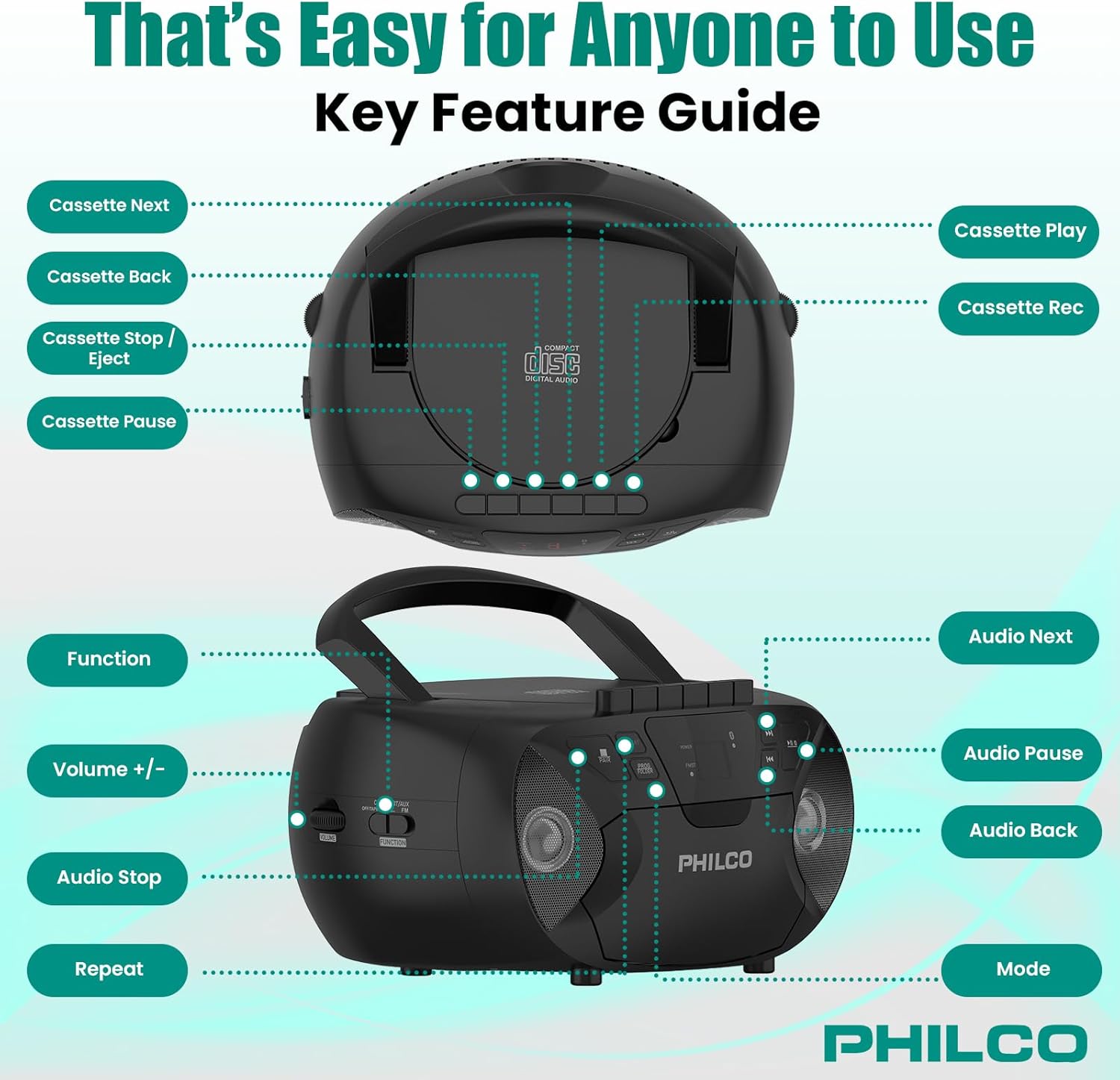
בילד 3.1: שפּיץ און זייַט view of the Philco Boombox with key controls labeled. This image shows the layout of buttons for cassette functions (Next, Back, Stop/Eject, Pause, Play, Record) and audio controls (Next, Pause, Back, Mode, Volume, Function, Stop, Repeat).
פראָנט פּאַנעל קאָנטראָלס:
- POWER קנעפּל: טורנס די אַפּאַראַט אויף אָדער אַוועק.
- מאָדע קנעפּל: Switches between CD, Cassette, FM Radio, Bluetooth, and AUX modes.
- PLAY/PAUSE Button (CD/Bluetooth): סטאַרץ אָדער פּאָזאַז פּלייבאַק.
- STOP Button (CD/Bluetooth): סטאַפּס פּלייבאַק.
- איבערשפרינגען/זוכן קנעפלעך (<< / >>): איבערשפּרינגען לידער אָדער שנעל פאָרויס/צוריקשפּילן.
- VOLUME קאָנטראָל: אַדזשאַסץ די אַודיאָ רעזולטאַט מדרגה.
- FM TUNER Dial: Selects FM radio stations.
קאַסעטע דעק קאָנטראָלס:
- שפּיל קנעפּל: Starts cassette playback.
- רעקאָרד קנעפּל: Initiates cassette recording (from CD, FM, or AUX).
- REWIND/FAST FORWARD Buttons: Rewinds or fast forwards the tape.
- שטאָפּ/אַרויסוואַרפֿן קנעפּל: Stops tape playback/recording and opens the cassette door.
- PAUSE קנעפּל: Temporarily pauses cassette playback/recording.
הינטערשטע/זייטיקע פּאַנעל קאַנעקשאַנז:
- אַק מאַכט אַרייַנשרייַב: קאַנעקץ די אַק מאַכט שנור.
- באַטערי אָפּטייל: Holds 6 x 'C' size batteries (not included) for portable use.
- AUX אין דזשעק (3.5 מ״מ): קאַנעקץ פונדרויסנדיק אַודיאָ דעוויסעס.
- HEADPHONE Jack (3.5mm): פֿאַר פּריוואַט צוהערן מיט כעדפאָונז.
- FM אַנטענע: אויסשטרעקבארע אַנטענע פֿאַר פֿאַרבעסערט FM אָפּנאַם.
4. סעטאַפּ
4.1 אנשטעלן דעם איינהייט
Your Philco Boombox can be powered by either AC power or batteries.

בילד 4.1: Illustration of AC power connection and battery installation for the Philco Boombox.
AC מאַכט:
- מאַכן זיכער אַז די אַפּאַראַט איז אויסגעדרייט אַוועק.
- Connect the supplied AC power cord to the AC power input jack on the back of the unit.
- Plug the other end of the AC power cord into a standard wall outlet (AC 120V ~ 60Hz).
באַטאַרייע מאַכט:
- זיכער מאַכן אַז די אַפּאַראַט איז אויסגעלאָשן און אָפּגעטיילט פֿון AC מאַכט.
- Open the battery compartment cover located on the bottom or rear of the unit.
- Insert 6 x 'C' size batteries (not included), observing the correct polarity (+/-) as indicated inside the compartment.
- פאַרמאַכן די באַטאַרייע אָפּטייל דעקן סיקיורלי.
באַמערקונג: When using AC power, batteries are automatically disconnected. Remove batteries if the unit will not be used for an extended period to prevent leakage.
4.2 ערשט מאַכט אויף
דרוק די מאַכט button to turn on the unit. The unit will typically default to the last used mode or CD mode.
5. אָפּעראַציע
5.1 סי-די שפּילער אָפּעראַציע
בילד 5.1: Demonstrating the top-loading CD compartment for disc insertion.
- דרוק די מאָדע קנעפּל ביז "CD" מאָדע איז אויסגעקליבן.
- עפֿנט די טיר פֿון דעם סי-די אָפּטייל דורך זי לײַכט אויפֿהייבן.
- Place a CD (CD-R, CD-RW, MP3, WMA compatible) onto the spindle with the label side facing up.
- Close the CD compartment door securely.
- דרוק די שפּיל / פּויזע קנעפּל צו אָנהייבן פּלייבאַק.
- ניצן די האָפּקען / זוכן קנעפלעך (<< / >>) צו נאַוויגירן צווישן לידער.
- דרוק די האַלטן קנעפּל צו ענדיקן ווידערשפּיל.
- דרוק די איבערחזרן קנעפּל צו איבערחזרן דעם איצטיקן ליד אדער אלע לידער.
5.2 קאַסעטע שפּילער/רעקאָרדער אָפּעראַציע

בילד 5.2: View of the cassette deck with a tape loaded, ready for playback or recording.
שפּילן אַ קאַסעטע:
- דרוק די מאָדע button until "TAPE" or "CASSETTE" mode is selected.
- דרוק די האַלטן / אַרויסוואַרפן קנעפּל צו עפענען די קאַסעט טיר.
- אַרײַנשטעלן אַ קאַסעטע טייפּ מיטן אָפֿענעם ברעג אַרויף און די זײַט וואָס מע וויל שפּילן צו אײַך.
- נאָענט די קאַסעט טיר.
- דרוק די שפּיל קנעפּל צו אָנהייבן פּלייבאַק.
- ניצן REWIND/FAST FORWARD קנעפּלעך צו נאַוויגירן די טייפּ.
- דרוק די האַלטן / אַרויסוואַרפן קנעפּל צו אפשטעלן די ווידערשפּיל און ארויסוואַרפן די טייפּ.
אויפנעמען אויף קאסעטע:
- שטעל אַרײַן אַ ליידיקע קאַסעטע טייפּ אין קאַסעטע דעק.
- Select the desired source (CD, FM Radio, or AUX) using the מאָדע קנעפּל.
- Start playback on the source (e.g., play a CD track, tune to an FM station).
- דרוק די רעקאָרד קנעפל אויף דער קאסעטע דעק. די שפּיל קנעפּל וועט אויך אַקטיוויזירן.
- צו פּויזע רעקאָרדינג, דריקן די פּויזע קנעפל. דריק עס נאכאמאל צו ווייטערגיין.
- צו האַלטן רעקאָרדינג, דריקן די האַלטן / אַרויסוואַרפן קנעפּל.
5.3 FM ראַדיאָ אָפּעראַציע
- דרוק די מאָדע קנעפּל ביז "FM" מאָדע איז אויסגעקליבן.
- Extend the FM telescopic antenna for optimal reception.
- דרייען די עפעם טונער דיאַל צו אויסקלייבן אייער געוואונטשענע ראַדיאָ סטאַנציע.
- סטרויערן די באַנד control to your preferred listening level.
5.4 בלועטוט אודיאָ סטרימינג

בילד 5.3: The Philco Boombox wirelessly connected to a smartphone via Bluetooth for audio streaming.
- דרוק די מאָדע button until "BT" or "BLUETOOTH" mode is selected. The unit will enter pairing mode, indicated by a flashing Bluetooth indicator.
- אויף אייער בלוטוט-פארשטארקטע דעווייס (למשל, סמאַרטפאָון, טאַבלעט), אַקטיווירט בלוטוט און זוכט פֿאַר פאַראַן דעווייסעס.
- Select "PHILCO BOOMBOX" (or similar name) from the list of devices to pair.
- Once paired, the Bluetooth indicator will stop flashing and remain solid.
- Start playing audio on your connected device. The sound will be streamed to the boombox.
- Adjust volume on both the boombox and your connected device.
וויכטיק באַמערקונג: This boombox is designed to באַקומען audio via Bluetooth from other devices. It cannot יבערשיקן audio to Bluetooth headphones, earbuds, or speakers.
5.5 AUX אַרייַנגאַנג אָפּעראַציע

בילד 5.4: The AUX input jack on the Philco Boombox, used for connecting external audio sources.
- פֿאַרבינדט איין עק פֿון אַ 3.5 מ״מ אַודיאָ קאַבל (נישט אַרייַנגערעכנט) צום AUX IN דזשעק אויף דער בוםבאָקס.
- Connect the other end of the audio cable to the headphone jack or audio output of your external device (e.g., MP3 player, smartphone).
- דרוק די מאָדע קנעפּל ביז "AUX" מאָדע איז אויסגעקליבן.
- Start playing audio on your external device.
- שטעל די קול אויף ביידע די בוםבאָקס און אייער עקסטערנאַל מיטל.
5.6 נוצן פון כעדפאָונז
For private listening, plug any standard 3.5mm headphones into the כעדפאָון jack. The internal speakers will automatically mute.
6. וישאַלט
6.1 רייניקונג די אַפּאַראַט
- ווישן די יקסטיריער פון די אַפּאַראַט מיט אַ ווייך, דamp שטאָף. דו זאלסט נישט נוצן אַברייסיוו קלינערז אָדער סאָלוואַנץ.
- For the CD lens, use a specialized CD lens cleaning kit.
- פֿאַר די קאַסעטע דעק, רייניקט פּעריִאָדיש די טייפּ קעפּ און קניפּ ראָולערס מיט אַ וואַטע שטעכל לייכט.ampמיט יסאָפּראָפּיל אַלקאָהאָל.
6.2 באַטערי קער
- Remove batteries if the unit will not be used for an extended period to prevent battery leakage and corrosion.
- דו זאלסט נישט מישן אַלט און נייַ באַטעריז, אָדער פאַרשידענע טייפּס פון באַטעריז.
- אָפּזאָגן געוויינט באַטעריז ריספּאַנסאַבלי לויט די היגע רעגיאַליישאַנז.
7. טראָובלעשאָאָטינג
| פּראָבלעם | מעגלעך סיבה | לייזונג |
|---|---|---|
| קיין מאַכט | AC שנור נישט פארבונדן; באַטעריעס אויסגעשעפט אדער נישט ריכטיג אריינגעשטעלט. | קאָנטראָלירט די AC שנור פֿאַרבינדונג; פֿאַרבייטן באַטעריעס אָדער זיכער מאַכן אַז די פּאָלאַריטעט איז ריכטיק. |
| No sound from CD/Cassette/Radio/Bluetooth/AUX | Volume too low; Incorrect mode selected; Headphones connected; CD/Cassette inserted incorrectly or damaged; Bluetooth not paired. | Increase volume; Select correct mode; Disconnect headphones; Check/replace media; Re-pair Bluetooth device. |
| CD skips | CD dirty or scratched; Unit on an unstable surface. | Clean or replace CD; Place unit on a stable, flat surface. |
| נעבעך עפעם אָפּטראָג | אַנטענע נישט אויסגעשטרעקט; שוואַך סיגנאַל. | Fully extend and adjust the FM antenna; Try moving the unit to a different location. |
| בלועטוט דעווייס וועט נישט פארבינדן | Boombox not in pairing mode; Device too far; Bluetooth already connected to another device. | Ensure boombox is in BT pairing mode; Move device closer; Disconnect from other devices and try again. |
| Cassette tape not playing/recording correctly | Tape damaged; Tape heads dirty; Buttons stuck (as per review). | Try a different tape; Clean tape heads; If buttons are stuck, gently try to free them or contact support if persistent. |
8. ספּעסאַפאַקיישאַנז
- סאָרט: פילקאָ
- מאָדעל: B0DHYKCWYN
- קאַנעקטיוויטי טעכנאָלאָגיע: בלועטאָאָטה
- קאָליר: שוואַרץ
- רעדנער טיפּ: סטערעאָ
- נומער דימענשאַנז (L x W x H): 10.08 X 5.71 X 10.75 אינטשעס
- מאַכט מקור: AC 120V ~ 60Hz or 6 x 'C' Batteries (not included)
- קאַמפּאַטאַבאַל דעוויסעס: MP3 Player (via AUX)
- שטיצט אַודיאָ פֿאָרמאַטירונגען: CD, CD-R, CD-RW, MP3, WMA (from CD)
- נומער פון ספּיקערז: 2
- אַודיאָ רעזולטאַט מאָדע: סטערעאָ
- Bluetooth Support: Yes (receive only)
- געבויט-אין מידיאַ: CD, Cassette, FM Radio
9. וואָראַנטי און שטיצן
9.1 וואָראַנטי אינפֿאָרמאַציע
For specific warranty details, please refer to the warranty card included with your product or visit the official Philco webזייטל. גאַראַנטיע טערמינען און באדינגונגען קענען זיין אַנדערש לויט געגנט און הענדלער.
9.2 קונה שטיצן
If you encounter any issues or have questions not covered in this manual, please visit the official Philco website for support resources, FAQs, and contact information. You can typically find support links on the product page where you purchased the item or by searching for "Philco customer support" online.