
1. הקדמה
Thank you for choosing the MOREFINE M6 Mini PC N200. This compact and powerful mini computer is designed for various applications, from home entertainment to office tasks, offering efficient performance and versatile connectivity. This manual provides essential information for setting up, operating, maintaining, and troubleshooting your device.
2. זיכערקייַט אינפֿאָרמאַציע
- מאַכט צושטעלן: Use only the provided power adapter. Ensure the power source matches the specified voltagE און קראַנט.
- ווענטילאַטיאָן: Do not block ventilation openings. Ensure adequate airflow around the device to prevent overheating.
- פליסיק ויסשטעלן: Keep the device away from water, moisture, and other liquids. Avoid spills.
- טעמפּעראַטור: Operate the device within a stable temperature range. Avoid extreme heat or cold.
- רייניקונג: אָפּשטעקן די עלעקטריציטעט איידער איר רייניגט. ניצט אַ ווייכע, טרוקענע שטאָף. ניצט נישט קיין פליסיקע רייניגער אדער אַעראָזאָלן.
- האַנדלינג: באַהאַנדלט דאָס אַפּאַראַט מיט פֿאָרזיכט. פֿאַרמײַדט עס צו לאָזן פֿאַלן אָדער אויסשטעלן עס צו שטאַרקע קלאַפּן.
3. פּעקל אינהאַלט
באַשטעטיקן אַז אַלע זאכן זענען פאַראַן אין דיין פּעקל:
- 1 x MOREFINE M6 Mini PC
- 1 x מאַכט אַדאַפּטער
- 1 x באַניצער מאַנואַל (דאָס דאָקומענט)
- 1 x HDMI קאַבלע
4. פּראָדוקט איבערview
The MOREFINE M6 Mini PC N200 is a compact computing solution. Its small form factor allows for easy placement in various environments, while its robust internal components ensure reliable performance.
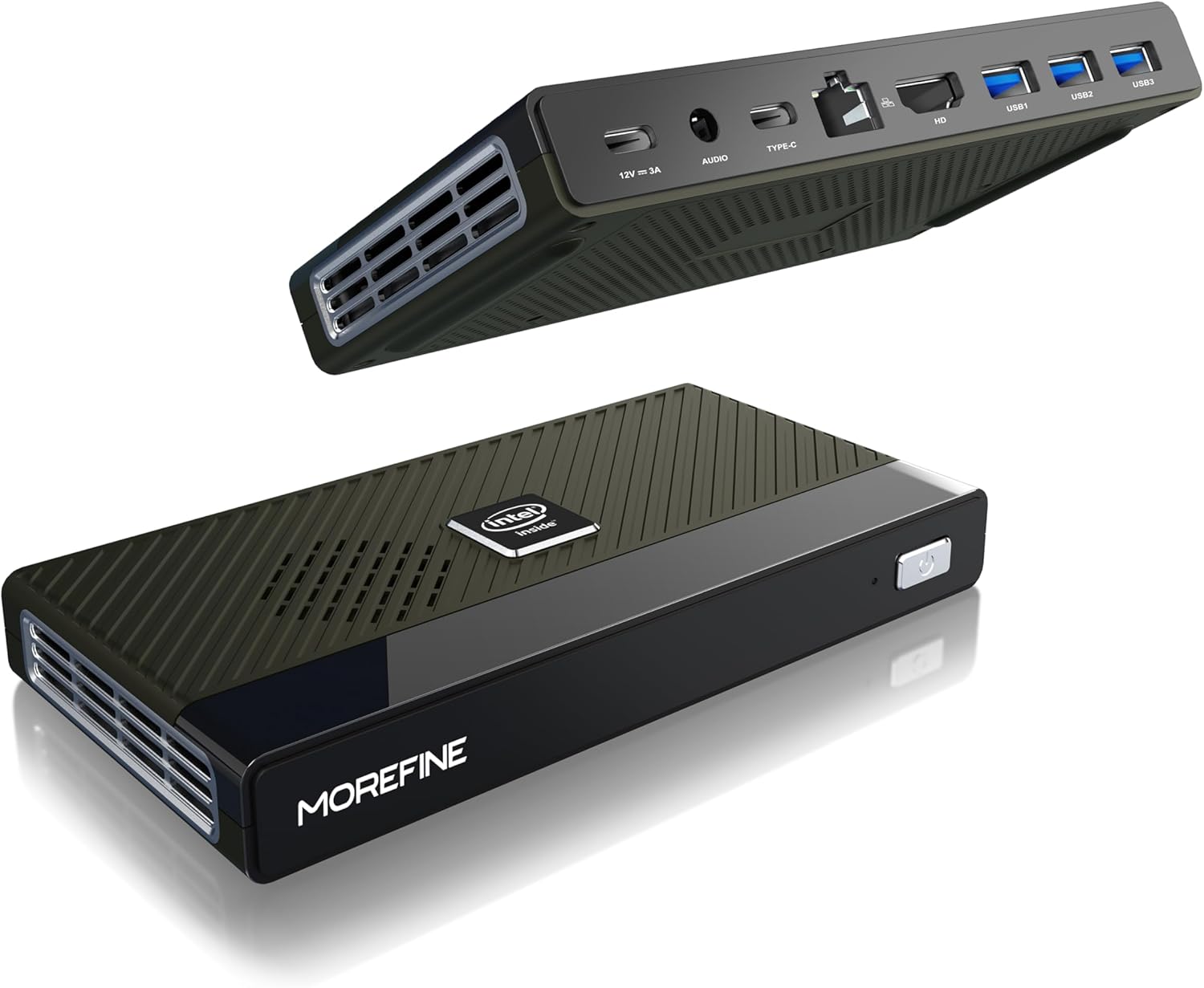
Figure 4.1: MOREFINE M6 Mini PC N200, showcasinג זײַן קאָמפּאַקטן דיזײַן און פּאָרט אויסלייג.
4.1 פּאָרץ און קאַנעקטערז
The M6 Mini PC features a comprehensive set of ports for connectivity:

פיגורע 4.2: דעטאַילעד view of the MOREFINE M6 Mini PC's input/output ports.
- DC-IN (Type-C): Power input (12V/3A).
- אַודיאָ דזשאַק: 3.5mm audio output for headphones or speakers.
- Type-C (Data/Display): Supports 4K@60Hz display output and data transfer.
- 2.5G לאַן: Ethernet port for high-speed wired network connection.
- הדמי: HDMI 2.0 port for 4K@60Hz display output.
- יו-עס-בי 3.2 דור 1 (x3): הויך-גיכקייט USB פּאָרץ פֿאַר פּעריפעריאַלס.
4.2 אינערלעכע קאָמפּאָנענטן
The M6 Mini PC is powered by an Intel Alder Lake N200 processor, offering enhanced performance and energy efficiency. It includes 16GB LPDDR5 RAM and a 1TB PCIe M.2 SSD for fast operation and ample סטאָרידזש.

Figure 4.3: Intel Alder Lake N200 Processor overview.
The device incorporates a silent copper cooling fan to maintain optimal operating temperatures, ensuring stable performance even under load.

פיגור 4.4: אינערלעכע קאמפאנענטן און קיל-סיסטעם.
4.3 Compact Design and Versatility
The M6 Mini PC's compact size (approximately 5.91 x 3.01 x 0.75 inches) and lightweight design make it highly portable and suitable for various applications, including office work, home entertainment, and digital signage.

Figure 4.5: Size comparison of the M6 Mini PC.
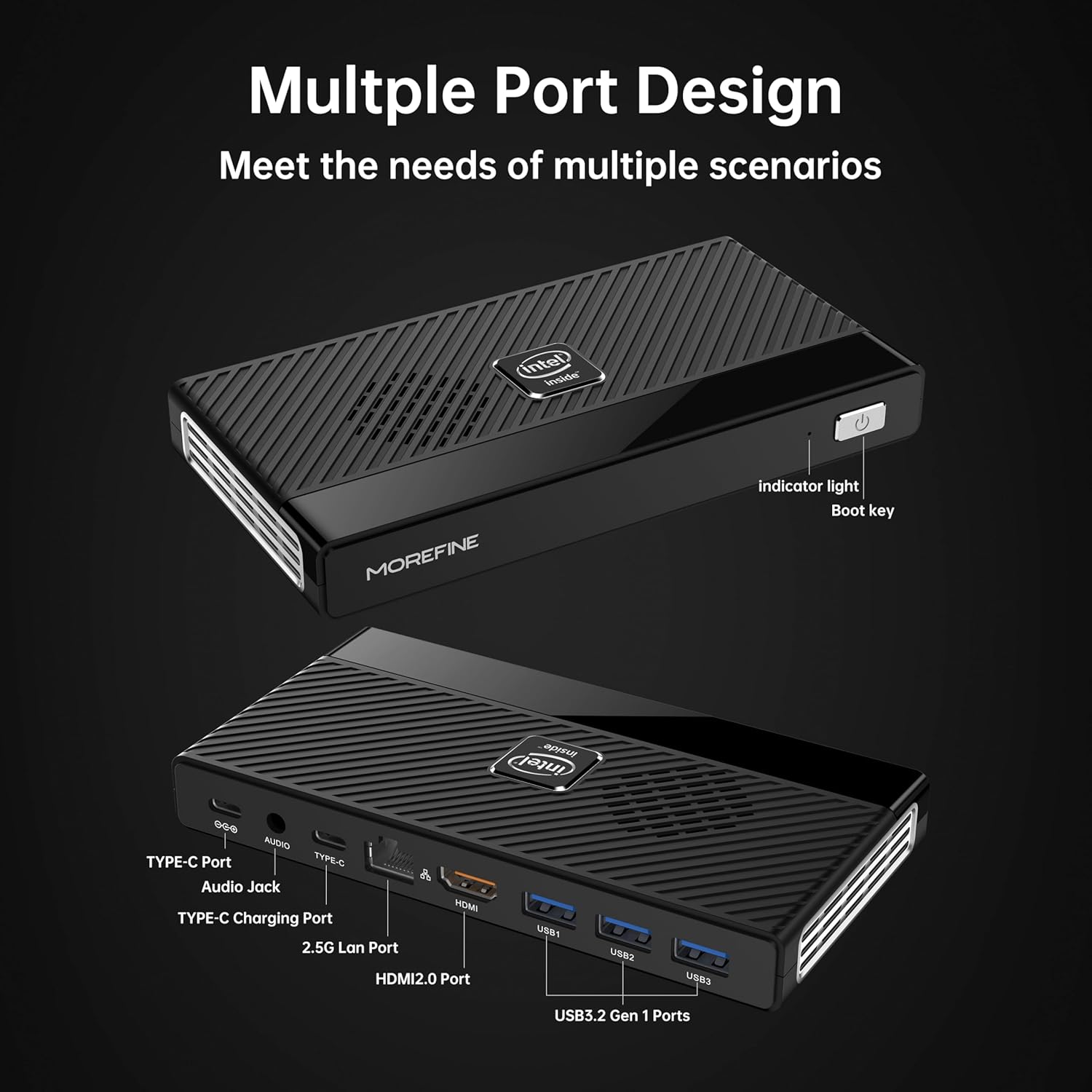
Figure 4.6: Illustrative usage scenarios for the M6 Mini PC.
5. סעטאַפּ
5.1 ערשט קאַנעקשאַן
Follow these steps to set up your MOREFINE M6 Mini PC:
- פֿאַרבינדן דיספּליי: Connect your monitor or TV to the Mini PC using the provided HDMI cable or a compatible Type-C to display cable. The device supports dual 4K@60Hz displays.
- פאַרבינדן פּעריפעראַלס: Plug in your keyboard, mouse, and any other USB devices into the available USB 3.2 ports.
- פֿאַרבינדן נעץ (אָפּציאָנאַל): For a wired internet connection, connect an Ethernet cable to the 2.5G LAN port. Alternatively, the device supports WiFi 6 for wireless connectivity.
- פאַרבינדן מאַכט: Connect the power adapter to the DC-IN Type-C port on the Mini PC, then plug the adapter into a power outlet.
5.2 ערשטער שטיוול
After connecting all necessary components, press the power button on the front of the Mini PC. The device will power on, and the operating system (OS) setup process will begin. Follow the on-screen instructions to complete the OS configuration.

Figure 5.1: Dual 4K display setup example.
ווידעא 5.1: אן איבערview of the MOREFINE M6 Mini PC, demonstrating its features and compact design.
6. אַפּערייטינג ינסטרוקטיאָנס
6.1 מאַכט אויף / אַוועק
- מאַכט אויף: Press the power button once. The indicator light will illuminate.
- מאַכט אַוועק: כדי אויסצושליסן דאס סיסטעם, ניצט די אפערירן סיסטעם'ס אויסשליס פונקציע. פאר א געצוואונגענעם אויסשליס, דריקט און האלט דעם פאוער קנעפל פאר בערך 5 סעקונדעס.
6.2 צווייפאַכיקע אַרויסווייַז קאָנפיגוראַציע
The M6 Mini PC supports connecting two external displays simultaneously via the HDMI and Type-C ports. Once connected, you can configure display settings within your operating system to extend or duplicate your desktop.
6.3 סטאָרידזש יקספּאַנשאַן
The Mini PC has two PCIe 3.0 SSD slots. One slot supports NVMe/SATA SSDs (up to 2TB), and the other supports NVMe SSDs (up to 2TB). To expand storage:
- Ensure the device is powered off and disconnected from the power supply.
- Carefully open the bottom cover of the Mini PC.
- Insert the M.2 SSD into the appropriate slot and secure it with the provided screw.
- פאַרבייַטן די דנאָ דעקן.
- Upon booting, you may need to initialize and format the new SSD through your operating system's disk management tools.
7. וישאַלט
- רייניקונג: Regularly clean the exterior of the Mini PC with a soft, dry cloth. Use compressed air to clear dust from ventilation openings.
- ווענטילאַטיאָן: Ensure the Mini PC is placed in a well-ventilated area. Do not obstruct the air vents.
- ווייכווארג דערהייַנטיקונגען: Keep your operating system and drivers updated to ensure optimal performance and security.
- דאַטאַ באַקקופּ: Regularly back up important data to an external storage device or cloud service.
8. טראָובלעשאָאָטינג
This section addresses common issues you might encounter with your MOREFINE M6 Mini PC.
| אַרויסגעבן | מעגלעך סיבה | לייזונג |
|---|---|---|
| די מיטל טוט נישט מאַכט אויף. | מאַכט אַדאַפּטער נישט פארבונדן אָדער דעפעקט; פּראָבלעם מיט מאַכט אַוטלעט. | זיכער מאַכן אַז דער מאַכט אַדאַפּטער איז זיכער פארבונדן צום מיטל און אַ אַרבעטנדיקן מאַכט אַוטלעט. פּרוּווט אַן אַנדער אַוטלעט. |
| קיין דיספּלעי אויף מאָניטאָר. | Display cable loose or faulty; incorrect input selected on monitor. | Check display cable connections. Ensure the monitor is set to the correct input source (HDMI/Type-C). Try a different cable or monitor. |
| לאַנגזאַמע פאָרשטעלונג. | Too many applications running; insufficient storage space; outdated drivers. | Close unnecessary applications. Free up disk space. Update operating system and drivers. |
| Device feels hot. | Obstructed ventilation; prolonged heavy usage. | Ensure air vents are clear and the device is in a well-ventilated area. Reduce heavy workload if necessary. If overheating persists, contact support. |
| קענען ניט פאַרבינדן צו ווי-פי. | Wi-Fi module disabled; incorrect password; driver issue. | Check Wi-Fi settings in the OS. Verify password. Ensure Wi-Fi drivers are installed and up to date. |
9. טעכניש ספּעסאַפאַקיישאַנז
| שטריך | באַשרייַבונג |
|---|---|
| פּראַסעסער | Intel Alder Lake N200 (up to 3.7 GHz, 4 Cores) |
| באַראַן | 16GB LPDDR5 4800MHz (non-removable) |
| סטאָרידזש | 1TB PCIe M.2 SSD (expandable via 2 M.2 slots, up to 2TB each) |
| גראַפיקס | Intel UHD גראַפיקס |
| ווידעא רעזולטאַט | HDMI (4K@60Hz) x1, Type-C (4K@60Hz) x1 |
| וסב פּאָרץ | USB 3.2 Gen1 x3, Type-C x1 (data/display) |
| נעץ | 2.5G LAN (RJ45), WiFi 6 (802.11ax) |
| בלועטאָאָטה | בלועטאָאָטה 5.2 |
| אַודיאָ | 3.5 מם אַודיאָ דזשאַק |
| אָפּערייטינג סיסטעם | Pre-installed OS (specific version may vary) |
| דימענשאַנז | בעערעך. 5.90 X 3.07 X 0.75 אינטשעס (149.86 X 76.5 X 19.05 מם) |
| וואָג | אומגעפער 0.102 אונסעס (240 ג) |
| ספּעציעלע פֿעיִקייטן | Wake On LAN, PXE Boot, RTC Wake, Auto Power On |
10. וואָראַנטי און שטיצן
MOREFINE products are designed for reliability and performance. For warranty information, please refer to the documentation included with your purchase or visit the official MOREFINE webפּלאַץ.
If you encounter any issues or require technical assistance, please contact MOREFINE customer support. You can typically find contact information on the MOREFINE official store page or through the retailer where you purchased the product. When contacting support, please have your product model (M6-N200) and purchase details ready.