
1. הקדמה
Thank you for choosing the Tesvor S8Pro Robot Vacuum Cleaner. This manual provides essential information for setting up, operating, and maintaining your robot vacuum to ensure optimal performance and longevity. Please read this manual thoroughly before using the product and keep it for future reference.
2. זיכערקייַט אינסטרוקציעס
To reduce the risk of injury or damage, read these safety instructions carefully. This appliance is for indoor household use only.
- Do not use the robot in wet environments or on surfaces with standing water.
- Keep the robot away from open flames or fragile objects.
- Ensure the charging dock is placed against a wall on a level surface, with no obstacles within 1 meter (3 feet) in front and 0.5 meters (1.5 feet) on either side.
- Do not allow children to operate the robot. Supervise children and pets when the robot is operating.
- Before cleaning, remove power cords, small objects, and any items that could entangle the brushes.
- ניצט נישט דעם ראָבאָט צו אויפהייבן גרויסע שמוץ, פליסיקייטן אדער ברענענדיקע אביעקטן.
- Only use the original power adapter and charging dock provided by Tesvor.
- אויב די מאַכט שנור איז דאַמידזשד, עס מוזן זיין ריפּלייסט דורך דער פאַבריקאַנט אָדער אַ קוואַלאַפייד סערוויס אַגענט צו ויסמיידן כאַזערדז.
3. פּעקל אינהאַלט
באַשטעטיקן אַז אַלע קאָמפּאָנענטן זענען פאַראַן אין דער פּאַקעט:
- ראָבאָט וואַקוום קלינער
- מאַכט אַדאַפּטער
- אָפּווישן בלאָק
- טשאַרדזשינג סטאַנציע
- 2-in-1 Water Tank and Dustbin
- זייט ברושעס (2 פּאָר)
- HEPA פילטער (פאר-אינסטאלירט)
- באַניצער מאַנואַל
- רייניקונג מכשירים
- ווייַט קאָנטראָל
- ראָללער באַרשט (פאַר-אינסטאַלירט)

בילד 3.1: פּאַקעט אינהאַלט. The package includes the robot vacuum, power adapter, mop pad, charging station, 2-in-1 water tank and dustbin, side brushes, HEPA filter, user manual, cleaning tools, remote control, and roller brush.
4. פּראָדוקט איבערview
The Tesvor S8Pro is a 2-in-1 robot vacuum cleaner featuring powerful suction and intelligent navigation for efficient home cleaning.
שליסל פֿעיִקייטן:
- שטאַרק סאַקשאַן: Up to 6000 Pa (adjustable up to 8000 Pa) for deep cleaning.
- 2-אין-1 וואַקוום און מאַפּ: Simultaneous vacuuming and mopping with a 350 ml electronic water tank and 250 ml dustbin.
- לידאַר נאַוויגאַציע: Precise mapping and optimal route planning for comprehensive coverage.
- לאנג באַטאַרייע לעבן: 5200 mAh lithium-ion battery, providing up to 180 minutes of runtime at low suction.
- Automatic Charging & Resume: Returns to the charging dock when battery is low and resumes cleaning.
- Sensor-Controlled Obstacle Avoidance: Detects and avoids obstacles to prevent collisions.
- טעפּעך בוסט: Automatically increases suction power on carpets.
- סמאַרט קאָנטראָל: Control via smartphone app, compatible with Amazon Alexa and Google Home.

Image 4.1: 2-in-1 Water Tank and Dustbin. The Tesvor S8Pro features a versatile 2-in-1 design, allowing it to vacuum and mop simultaneously. It includes a 350 ml water tank and a 250 ml dustbin.

Image 4.2: Powerful Suction. The Tesvor S8Pro offers powerful suction, adjustable up to 8000Pa, to effectively clean various types of debris from hard floors and carpets. The image shows different suction levels from quiet to max.
5. סעטאַפּ
5.1 טשאַרדזשינג דאָק פּלאַצירונג
Place the charging dock against a wall on a hard, level surface. Ensure there are no obstacles within 1 meter (3 feet) in front and 0.5 meters (1.5 feet) on either side of the dock to allow the robot to return and charge successfully.
5.2 ערשט טשאַרדזשינג
Connect the power adapter to the charging dock and plug it into a wall outlet. Place the robot on the charging dock. The robot will automatically begin charging. For first-time use, fully charge the robot (approximately 5-6 hours).

Image 5.1: Automatic Charging. The robot vacuum automatically returns to its charging dock when the battery is low (below 20%) and resumes cleaning from where it left off once charged (above 80%).
5.3 אינסטאַלירן זייט ברושעס
Snap the side brushes onto the corresponding posts on the bottom of the robot until they click into place.
5.4 Installing 2-in-1 Water Tank/Dustbin
Fill the water tank with clean water (for mopping) and ensure the dustbin is empty. Slide the 2-in-1 module into the back of the robot until it locks securely.
5.5 קאַנעקטינג צו די אַפּ
Download the Tesvor app from your smartphone's app store. Follow the in-app instructions to connect your robot vacuum to your home Wi-Fi network. This enables advanced features like scheduling, cleaning mode selection, and real-time mapping.
6. אָפּערייטינג
6.1 אָנהייבן/פּויזירן רייניקונג
- אָנהייב: Press the power button on the robot or the 'Clean' button in the app/remote control to start automatic cleaning.
- פּויזע: Press the power button or 'Clean' button again to pause cleaning.
6.2 רייניקונג מאָדעס
Select cleaning modes via the Tesvor app or remote control:
- אַוטאָ רייניקונג: The robot intelligently plans an S-shaped path for comprehensive coverage.
- אָרט רייניקונג: Cleans a specific area intensively.
- ברעג רייניקונג: רייניקט לעבן ווענט און מעבל עדזשאַז.
- Mopping Mode: For wet cleaning, ensure the water tank is filled and the mop pad is attached.

Image 6.1: Smart Cleaning Features. This intelligent robot vacuum supports various cleaning modes including S-shaped path, specific area cleaning, and scheduled cleaning. It generates real-time room maps and can be controlled via Amazon Alexa or Google Home.
6.3 טעפּעך בוסט
The robot automatically detects carpets and increases its suction power for a more thorough clean. It can also navigate over obstacles up to 20mm high.

Image 6.2: Carpet Boost. The robot vacuum automatically detects carpets and increases suction power for a deeper clean. It can climb obstacles up to 20mm.
6.4 קול קאָנטראָל
The Tesvor S8Pro is compatible with Amazon Alexa and Google Home. Follow the instructions in the Tesvor app to link your robot with your voice assistant for convenient control.

Image 6.3: LDS LiDAR Navigation. The robot vacuum uses advanced LDS LiDAR navigation to efficiently map its surroundings, ensuring comprehensive coverage and optimized cleaning paths.
7. וישאַלט
Regular maintenance ensures your Tesvor S8Pro operates efficiently. Always turn off the robot before performing any maintenance.
7.1 Emptying Dustbin & Cleaning Water Tank
- Press the release button to remove the 2-in-1 module.
- Open the dustbin compartment and empty debris.
- Rinse the dustbin and water tank with clean water. Allow them to air dry completely before reinserting.
- Remove and clean the mop pad after each use.
7.2 רייניקונג הויפּט באַרשט
Open the main brush cover on the bottom of the robot. Remove the main brush and use the cleaning tool to cut and remove any hair or debris tangled around it. Reinstall the brush.
7.3 רייניקונג פון זייט-באַרשטן
Periodically check the side brushes for tangled hair or debris. Pull them off their posts, clean them, and reattach. Replace worn brushes as needed.
7.4 רייניקונג פילטערס
Remove the HEPA filter from the dustbin. Tap it gently to remove dust. Do not wash the HEPA filter with water. Replace the HEPA filter every 3-6 months, depending on usage.
7.5 רייניקונג פון סענסאָרן און טשאַרדזשינג קאָנטאַקטן
Wipe the cliff sensors, wall sensors, and charging contacts on both the robot and the charging dock with a clean, dry cloth to ensure proper function.
8. טראָובלעשאָאָטינג
אויב איר טרעפט פּראָבלעמען מיט אייער ראָבאָט וואַקוום, זעט די פאלגענדע געוויינטלעכע פּראָבלעמען און לייזונגען:
| פּראָבלעם | מעגלעך סיבה | לייזונג |
|---|---|---|
| ראָבאָט טוט נישט קער אויף | נידעריגע באַטעריע; מאַכט קנעפּל נישט געדריקט | Charge the robot; Press and hold the power button for 3 seconds |
| ראָבאָט קען נישט לאָדן | Charging contacts dirty; Charging dock unplugged | Clean charging contacts; Ensure charging dock is plugged in |
| ראָבאָט בלייבט אָפט שטעקן | צו פיל שטערונגען; קליף סענסארן שמוציג | Clear the cleaning area; Clean cliff sensors |
| נעבעך רייניקונג פאָרשטעלונג | מיסטקאַסטן פול; באַרשטן פֿאַרפּלאָנטערט; פֿילטער פֿאַרשטאָפּט | Empty dustbin; Clean main/side brushes; Clean/replace filter |
| מאַפּינג פונקציע אַרבעט נישט | Water tank empty; Mop pad not attached | Fill water tank; Attach mop pad correctly |
For further assistance, please contact Tesvor customer support.
9. ספּעסאַפאַקיישאַנז
| שטריך | דעטאַל |
|---|---|
| סאָרט | Tesvor |
| מאָדעל נאָמען | YC-S8 Pro |
| מאָדעל נומער | M2-NLT |
| סאַקשאַן מאַכט | 6000 Pa (adjustable up to 8000 Pa) |
| נאַוויגאַציע טיפּ | LiDAR נאַוויגאַציע |
| באַטערי טיפּ | ליטהיום-יאָן |
| באַטאַרייע קאַפּאַציטעט | 5200 מאַה |
| מאַקס רונטימע | 180 minutes (at lowest suction) |
| וואַסער טאַנק קאַפּאַציטעט | 350 מל |
| דוסטבין קאַפּאַציטעט | 250 מל |
| פילטער טיפּ | העפּאַ |
| קאָנטראָל מעטאָד | Application, Remote Control |
| קאַמפּאַטאַבאַל דעוויסעס | Amazon Echo, Google Home, Smartphone, Tablet |
| פּראָדוקט דימענסיעס (ראָבאָט) | 33 ל רענטגענ 33 וו רענטגענ 10 ה סענטימעטער |
| Charging Dock Dimensions | 17.5 ל רענטגענ 9 וו רענטגענ 11.5 ה סענטימעטער |
| קאָליר | ווייַס |
| רעקאָממענדעד ניצט | Home cleaning, floors, carpets, pet hair removal |
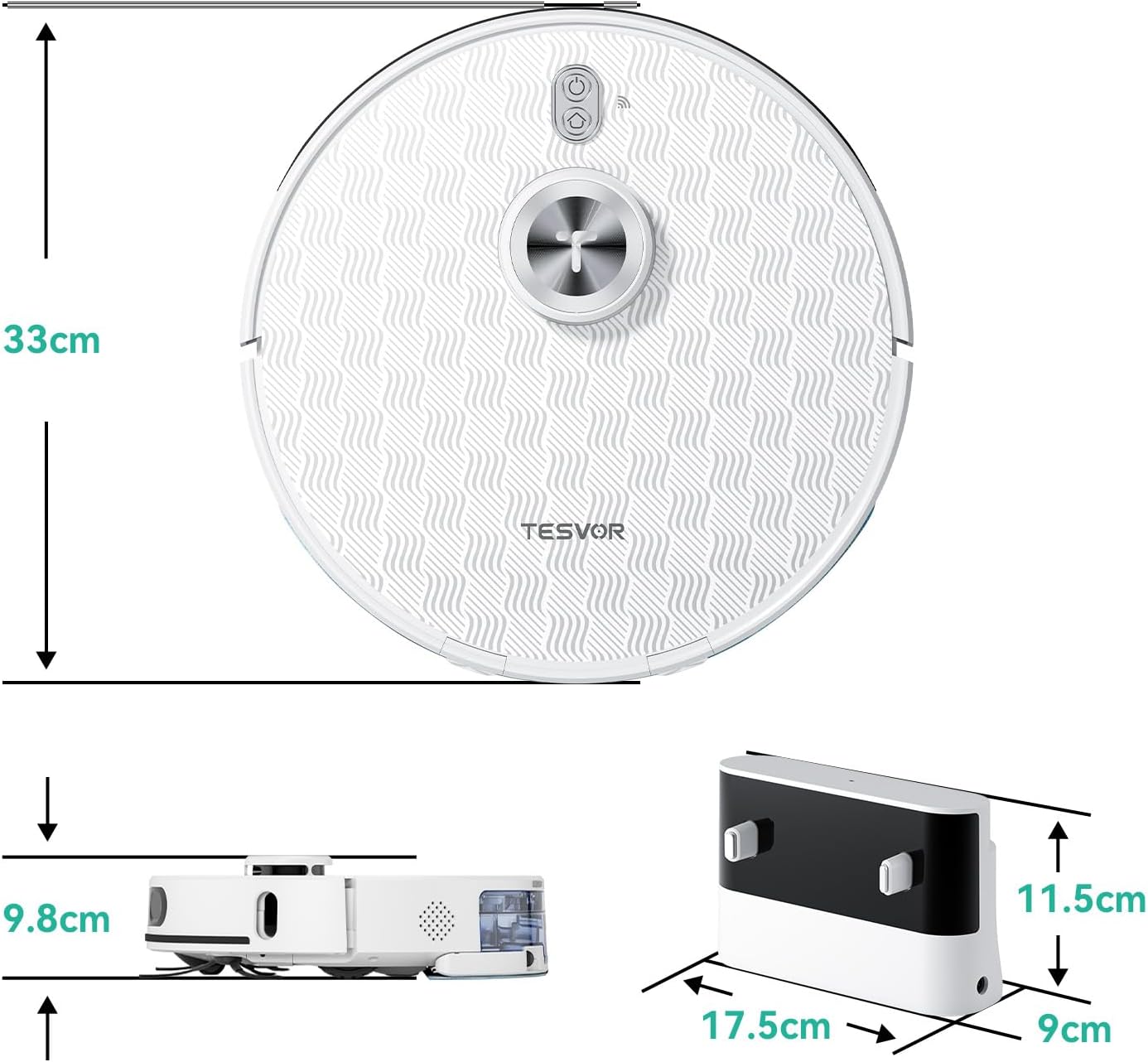
בילד 9.1: פּראָדוקט דימענסיעס. The robot vacuum measures 33cm in diameter and 9.8cm in height. The charging dock measures 17.5cm in width, 9cm in depth, and 11.5cm in height.
10. וואָראַנטי און שטיצן
The Tesvor S8Pro Robot Vacuum Cleaner comes with a 2 יאָר וואָראַנטי. For warranty claims, technical support, or any questions regarding your product, please contact Tesvor customer service through the official website or your purchase platform. Please have your model number (M2-NLT) and proof of purchase ready.