
הקדמה
Thank you for choosing the Vieta Pro Silence 3 Bluetooth 5.4 Active Noise Cancelling Headphones. These headphones are designed to provide a superior audio experience with advanced features for comfort and convenience. Please read this manual carefully before using your headphones to ensure proper operation and to maximize their lifespan.
פּעקל אינהאַלט
- Vieta Pro Silence 3 Headphones
- וסב-C טשאַרדזשינג קאַבלע
- 3.5 מם אַודיאָ קאַבלע
- באַניצער מאַנואַל
פּראָדוקט איבערview
Familiarize yourself with the various parts and controls of your Vieta Pro Silence 3 headphones.
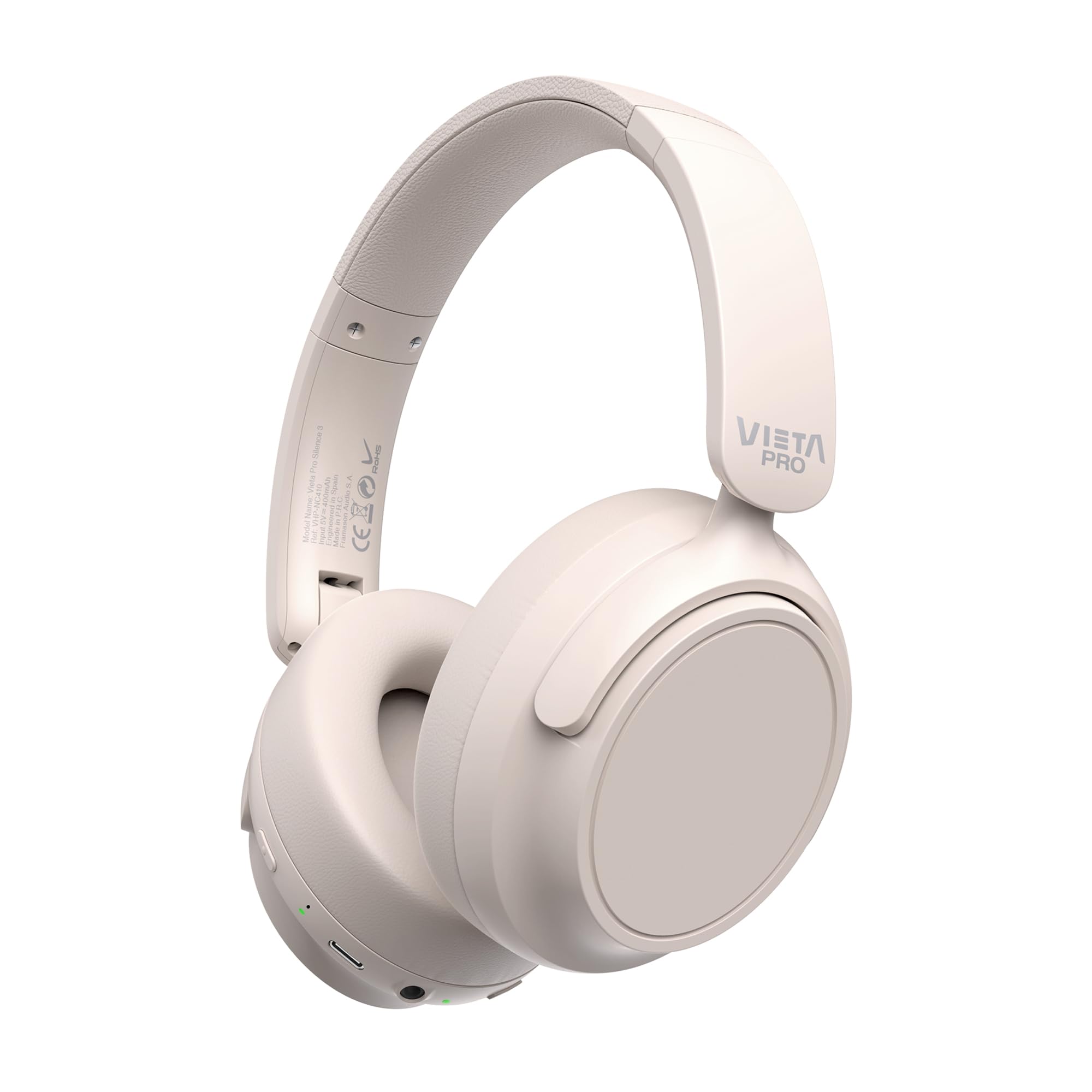
בילד: פראָנט view of the Vieta Pro Silence 3 headphones, showcasing their overall design.

בילד: זייט view of the Vieta Pro Silence 3 headphones, highlighting the earcups and adjustable headband.

Image: Close-up of a Vieta Pro Silence 3 earcup, illustrating the control buttons, charging port, and 3.5mm audio jack.
The headphones feature a foldable design for easy portability.

Image: Vieta Pro Silence 3 headphones in their folded state, demonstrating their compact design for travel and storage.
סעטאַפּ
1. טשאַרדזשינג די כעדפאָונז
Before first use, fully charge your headphones. Connect the supplied USB-C cable to the charging port on the headphones and the other end to a USB power source (e.g., wall adapter, computer USB port).
- די LED אינדיקאַטאָר וועט ווייַזן די טשאַרדזשינג סטאַטוס (למשל, רויט פֿאַר טשאַרדזשינג, בלוי/אויס פֿאַר גאָר טשאַרדזשד).
- א פולע אָפּצאָל גיט ביז 50 שעה פון ווידערשפּיל.
- Fast charging via USB-C allows for quick power-ups.
2. פּאָווערינג אויף / אויסגעלאשן
- צו מאַכט אויף: דריק און האלט דעם פּאַוער קנעפּל פֿאַר אַרום 3 סעקונדעס ביז דער LED אינדיקאַטאָר צינדט זיך אָן און איר הערט אַן אָזערלעכע פּראָמפּט.
- צו מאַכט אַוועק: דריק און האלט דעם פּאַוער קנעפּל פֿאַר אַרום 3 סעקונדעס ביז דער LED אינדיקאַטאָר וועט זיך אויסלעשן און איר הערט אַן אָודאַבאַלן פּראָמפּט.
3. בלועטאָאָטה פּערינג
- מאַכן זיכער אַז די כעדפאָונז זענען פּאַוערד אַוועק.
- דריק און האלט דעם פּאַוער קנעפּל פֿאַר 5-7 סעקונדעס ביז דער LED אינדיקאַטאָר בלינקט בלוי און רויט אָלטערנאַטיוולי, וואָס ווײַזט אויף פּערינג מאָדע.
- אויף אייער דעווייס (סמאַרטפאָן, טאַבלעט, קאָמפּיוטער), אַקטיווירט בלועטוט און זוכט פֿאַר פֿאַראַן דעווייסעס.
- Select "Vieta Pro Silence 3" from the list of found devices.
- Once paired, the LED indicator will flash blue slowly, and you will hear a confirmation tone.
די כעדפאָונז וועלן אויטאָמאַטיש פּרובירן צו זיך ווידער צו פאַרבינדן מיטן לעצטן געפּאָרטן דעווייס ווען זיי ווערן אָנגעצונדן.
4. דראָטיקע פֿאַרבינדונג (הילף־אינפּוט)
You can use the headphones with a wired connection when Bluetooth is not available or preferred. Connect one end of the 3.5mm audio cable to the auxiliary input port on the headphones and the other end to your audio source's 3.5mm jack.
- When using the wired connection, Bluetooth functionality is disabled.
- Active Noise Cancellation (ANC) can still be used in wired mode.
אַפּערייטינג ינסטראַקשאַנז
1. מוזיק פּלייבאַק
- שפּיל / פּויזע: דרוק אַ מאָל אויף די מולטי-פונקציאָנירן.
- ווייַטער שפּור: דריק און האַלט די באַנד אַרויף קנעפּל.
- פֿריִערדיקע שפּור: דריקן און האַלטן די Volume Down קנעפּל.
- באַנד אַרויף: דריק קורץ דעם "Volume Up" קנעפל.
- באַנד אַראָפּ: דריק קורץ דעם באַנד אַראָפּ קנעפּל.
2. רופן מאַנאַגעמענט
- ענטפֿערן / סוף רופן: דרוק אַ מאָל אויף די מולטי-פונקציאָנירן.
- אָפּוואַרפן רופן: דריקן און האַלטן די מולטי-פונקציע קנעפּל פֿאַר 2 סעקונדעס.
- שטימע אַססיסטאַנט: Double-press the Multi-function button to activate your device's voice assistant (Siri, Google Assistant, etc.).
3. אַקטיווע ראַש קאַנסאַליישאַן (ANC)
The ANC feature reduces ambient noise, allowing for a more immersive listening experience.
- Activate/Deactivate ANC: Press the dedicated ANC button once. The LED indicator for ANC will light up (e.g., green) when active.
- ANC can be used independently or with Bluetooth/wired audio.
4. Dual Pairing Function
The Dual Pairing feature allows you to connect your headphones to two Bluetooth devices simultaneously.
- פֿאַרבינדט די קאָפּהערער מיטן ערשטן דעווייס ווי באַשריבן אין דער "בלוטעט פֿאַרבינדונג" סעקציע.
- דיאַקטיווירן בלועטוט אויף דער ערשטער דעווייס.
- שטעלט די כעדפאָונז צוריק אין פּערינג מאָדע און פּערט זיי מיטן צווייטן דעווייס.
- Enable Bluetooth on the first device. The headphones should now be connected to both devices.
- Audio will play from the device that is actively transmitting.
וישאַלט
- רייניקט די כעדפאָונז מיט אַ ווייכן, טרוקענעם שטאָף. ניצט נישט קיין שרײַבנדיקע רייניגערס אדער סאָלווענטן.
- פֿאַרמײַדט אויסשטעלן די כעדפאָונז צו עקסטרעמע טעמפּעראַטורן, פֿײַכטקייט, אָדער דירעקטער זון.
- Store the headphones in a cool, dry place when not in use, preferably in their folded state to protect them.
- פּרוּווט נישט צו צענעמען אָדער מאָדיפֿיצירן די כעדפאָונז, ווײַל דאָס וועט בטל מאַכן די וואָראַנטי.
טראָובלעשאָאָטינג
| פּראָבלעם | מעגלעך לייזונג |
|---|---|
| די קאָפּהערער ווערן נישט אנגעצינדן. | זיכער מאַכן אַז די קאָפּהערער זענען אָנגעלאָדן. פֿאַרבינדט זיי צו אַ שטראָם מקור מיטן USB-C קאַבל. |
| קען נישט פארבינדן דורך בלוטוט. |
|
| קיין קלאַנג אָדער נידעריקע וואָלומען. |
|
| די ANC ארבעט נישט עפעקטיוו. |
|
ספּעסאַפאַקיישאַנז
| שטריך | דעטאַל |
|---|---|
| מאָדעל נאָמען | שטילקײט 3 |
| מאָדעל נומער | RM |
| קאַנעקטיוויטי טעכנאָלאָגיע | Bluetooth 5.4, Wired (3.5mm Jack) |
| ראַש קאַנסאַליישאַן | אַקטיוו ראַש קאַנסאַליישאַן (ANC) |
| באַטערי לעבן | אַרויף צו 50 שעה |
| טשאַרדזשינג פּאָרט | יו-עס-בי-סי (שנעל טשאַרדזשינג) |
| מיקראָפאָן | Integrated for hands-free calls |
| פאָרם פאַקטאָר | Circum-Auricular (Over-Ear) |
| ימפּידאַנס | 32 אָהמס |
| ספּעציעלע פֿעיִקייטן | Dual Pairing, Foldable Design, Low Latency Mode |
זיכערקייַט אינפֿאָרמאַציע
- ניצט נישט די כעדפאָונז אויף הויכן קול פֿאַר לענגערע פּעריאָדן צו פאַרמייַדן געהער שעדיקן.
- ניצט נישט די כעדפאָונז אין סיטואַציעס וואו די אוממעגלעכקייט צו הערן אַמביאַנט קלאַנגען קען זיין געפערלעך (למשל, דרייווינג, וועלאָסיפּעד, גיין אין פאַרקער).
- האַלטן אויס פון דערגרייכן פון קינדער.
- אָפּזאָגן דעם פּראָדוקט ריספּאַנסאַבלי לויט די היגע רעגיאַליישאַנז.
וואָראַנטי און שטיצן
For warranty information and technical support, please refer to the documentation provided with your purchase or visit the official Vieta Pro webזייטל. ביטע באַהאַלטן אייער קויפן באַווייַז פֿאַר וואָראַנטי קליימז.
Note: Information regarding specific warranty duration or direct support contacts was not available in the provided product data.