
1. הקדמה
This manual provides essential information for the safe and efficient operation of your TOPBULL 40A MPPT Solar Charge Controller. This device is designed to optimize power harvesting from your solar panels and efficiently charge various battery types in 12V or 24V systems. It features advanced Maximum Power Point Tracking (MPPT) technology, comprehensive protection functions, and a user-friendly LCD interface.

בילד 1: פראָנט view of the TOPBULL 40A MPPT Solar Charge Controller, showing the LCD display and control buttons.
2. זיכערקייַט אינסטרוקציעס
Please read all safety instructions carefully before installation and operation. Failure to follow these instructions may result in personal injury or damage to the controller or other components.
- זיכער מאַכן אַז אַלע פֿאַרבינדונגען זענען ריכטיק און זיכער איידער איר שטעלט אָן די עלעקטריע.
- נעמט נישט אוועק אדער פרובירט נישט צו פאררעכטן דעם קאנטראלער. ווענדט זיך צו קוואַליפֿיצירטע פּערסאָנעל פֿאַר סערוויס.
- Install the controller in a well-ventilated area, away from flammable materials and moisture.
- שטענדיק פארבינדן די באַטעריע צום קאָנטראָללער ערשט, דערנאָך דעם זונ - פּאַנעל, און צום סוף דעם לאַסט. אָפּשטעקן אין פארקערטן סדר.
- טראָגט פּאַסיקע פּערזענלעכע שוץ-עקוויפּמענט, אַרייַנגערעכנט אויג-שוץ, ווען איר אַרבעט מיט באַטעריעס און עלעקטרישע סיסטעמען.
- The controller includes multiple electronic protections such as reverse polarity, overcharge, over-discharge, overload, short-circuiting, TVS lightning, overpower, reverse current, and overtemperature protection. However, proper installation is crucial for optimal safety.
3. פּעקל אינהאַלט
באַשטעטיקן אַז אַלע זאכן זענען פאַראַן אין פּעקל:
- TOPBULL 40A MPPT Solar Charge Controller
- מאַונטינג סקרוז
- באַניצער מאַנואַל (דעם דאָקומענט)

Image 2: Contents of the product package, showing the controller, user manual, and mounting hardware.
4. פּראָדוקט איבערview
The TOPBULL 40A MPPT Solar Charge Controller features a clear LCD display and intuitive buttons for monitoring and configuration. It is equipped with terminals for solar panel input, battery connection, DC load output, and dual USB ports.
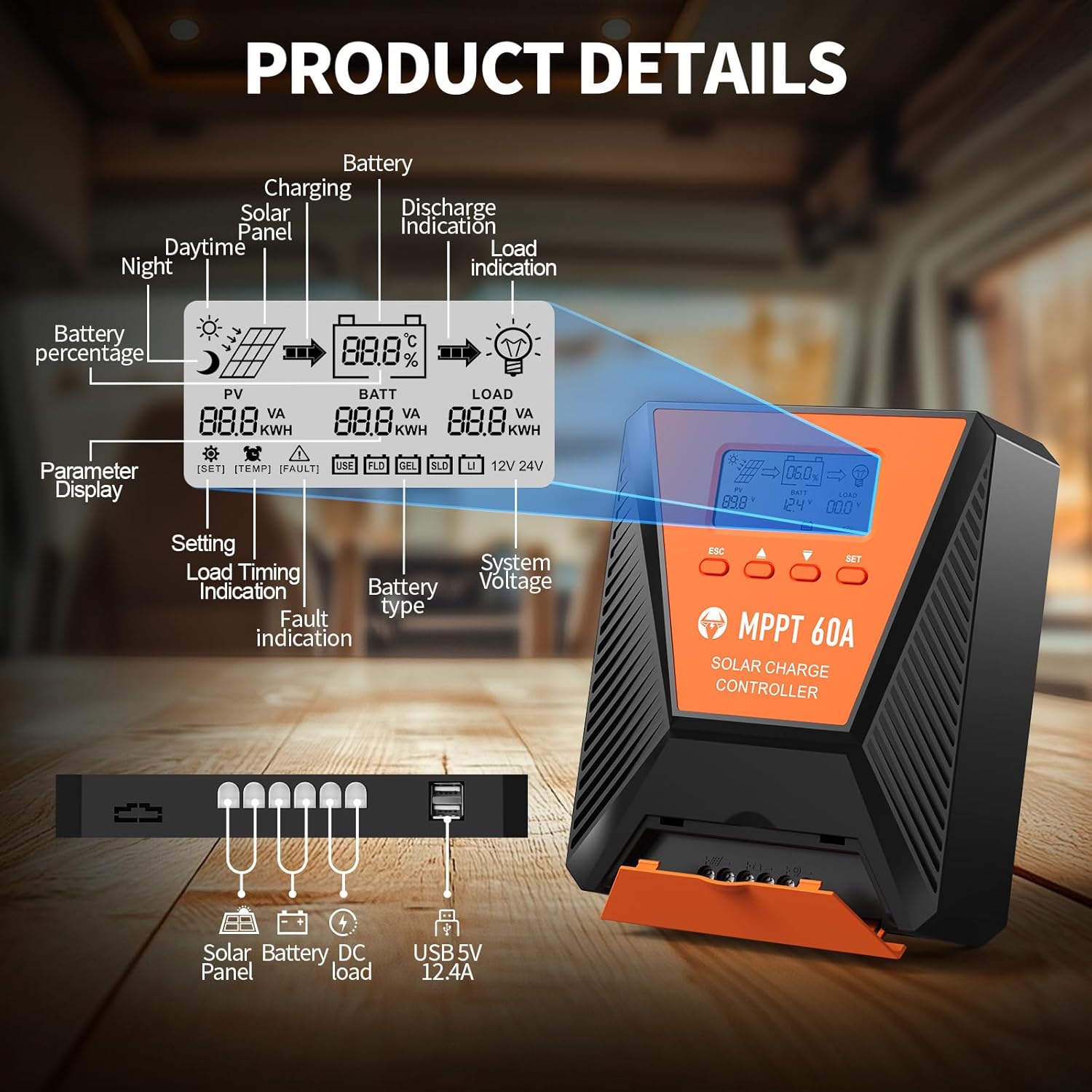
בילד 3: דעטאַלירט view of the controller's LCD display, showing various indicators and parameters, along with the connection ports at the bottom.
LCD Display Indicators:
- פּוו: זונ טאַפליע וואָלtagE און מאַכט.
- BATT: באַטערי וואָלtage, charge status, and type.
- מאַסע: Load status and power.
- באַטערי פּערסיזtage: Current battery charge level.
- Charging/Discharge Indication: Arrows indicating power flow.
- שולד אָנווייַז: Error codes displayed if issues occur.
- סיסטעם וואָלtage: Automatically detected 12V or 24V.
קאָנטראָל קנעפּלעך:
- ESC: Exit menu or cancel setting.
- אַרויף/אַראָפּ פײַלן: Navigate menus or adjust values.
- שטעלן: Enter menu or confirm setting.
5. סעטאַפּ און ייַנמאָנטירונג
גיי די סטעפּס פֿאַר ריכטיק ינסטאַלירונג פון דיין זונ - אָפּצאָל קאָנטראָללער:
- מאָונטינג: Choose a suitable location for the controller, ensuring adequate ventilation and protection from direct sunlight, high temperatures, and moisture. Use the provided mounting screws to secure the controller.
- באַטערי קשר: Connect the battery to the controller's battery terminals first. Ensure correct polarity (positive to positive, negative to negative). The controller will automatically detect the 12V or 24V system voltage.
- סאָלאַר פּאַנעל קאַנעקשאַן: Connect the solar panel to the controller's solar input terminals. Ensure correct polarity. The controller will begin charging the battery.
- גלייכשטראָם לאָוד קאַנעקשאַן (אָפּציאָנאַל): Connect your DC loads to the load terminals. Ensure correct polarity.

Image 4: Connection diagram illustrating how to connect the solar panel, battery bank, inverter (for AC load), and DC load to the MPPT controller.
The controller supports various deep cycle battery types, including FLD, LiFePO4, SLD, GEL, and AGM. It also supports 0V lithium battery charging (lithium battery activation function).

Image 5: The controller is compatible with various 12V/24V battery types, automatically identifying voltage and supporting custom parameters and 0V lithium battery charging.
6. אַפּערייטינג ינסטרוקטיאָנס
LCD Display and Parameter Settings:
The LCD display provides real-time information about your solar charging system. Use the four buttons (ESC, UP, DOWN, SET) to navigate menus and adjust parameters.
- דרוק שטעלן צו אַרייַן די הויפּט מעניו.
- ניצן אַרויף / אַראָפּ to scroll through options such as battery type, load timer settings, and other customizable parameters.
- דרוק שטעלן again to select an option and then use אַרויף / אַראָפּ צו טוישן וואַלועס.
- דרוק שטעלן to confirm changes, or ESC צו אַרויסגאַנג אָן שפּאָרן.
טשאַרדזשינג פּראָצעס:
The controller utilizes a smart 4-stagטשאַרדזשינג פּראָצעס צו אָפּטימיזירן באַטאַרייע געזונט און לאָנדזשעוואַטי:
- פאַרנעם אָפּצאָל: Rapid charging to bring the battery to approximately 80% capacity.
- אַבזאָרפּשאַן אָפּצאָל: Charging at a constant voltage to bring the battery to 100% capacity.
- לאָזנ שווימען אָפּצאָל: Maintaining the battery at full charge with a lower voltage.
- Equalization Charge (for specific battery types): Periodically overcharging to balance cell voltages.
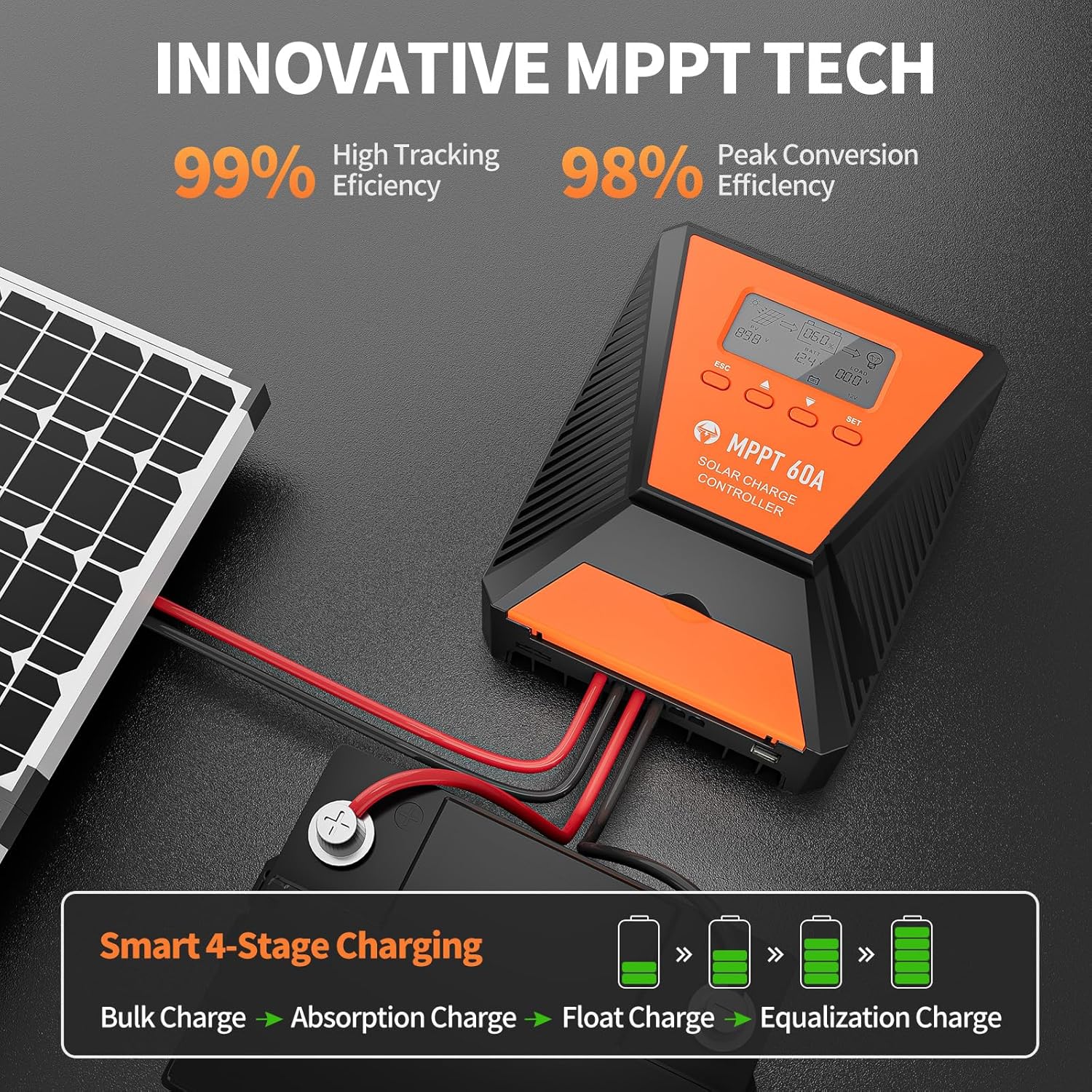
Image 6: The controller features 99% high tracking efficiency and 98% peak conversion efficiency, along with a smart 4-stagE טשאַרדזשינג פּראָצעס.
USB טשאַרדזשינג:
The controller includes dual USB ports for charging electronic devices. These ports provide 5V DC output.
7. וישאַלט
Regular maintenance ensures optimal performance and extends the lifespan of your solar charge controller and battery system.
- טשעק קאַנעקשאַנז: פּעריִאָדיש קאָנטראָלירן אַלע וויירינג קאַנעקשאַנז פֿאַר שטרענגקייט און קעראָוזשאַן.
- ריין קאָנטראָללער: האַלט דעם קאָנטראָללער ריין און פריי פון שטויב און שמוץ. ניצט אַ טרוקענעם שטאָף פֿאַר רייניקונג.
- ווענטילאַטיאָן: Ensure the installation area remains well-ventilated to prevent overheating. The controller is designed with a metal case and dual high-speed intelligent fans for enhanced heat dissipation.
- באַטערי דורכקוק: פֿאָלגט די פאַבריקאַנט'ס וישאַלט גיידליינז פֿאַר דיין ספּעציפֿיש באַטאַרייע טיפּ.
- טעמפּעראַטור פאַרגיטיקונג: The controller features a temperature compensation function that automatically adjusts charging and discharging parameters to prolong battery life.
8. טראָובלעשאָאָטינג
If you encounter issues with your controller, refer to the LCD display for error codes and consult the following common troubleshooting steps:
- קיין ווייַז: Check battery connections and ensure the battery has sufficient voltage.
- קיין טשאַרדזשינג: Verify solar panel connections and ensure adequate sunlight. Check for any fault indications on the LCD.
- לאָדן אַרבעט נישט: Check load connections and ensure the load is within the controller's rated capacity. Verify load timer settings.
- טעות קאָדעס: The LCD display will show specific error codes for various issues (e.g., overvoltage, ונדעראָלtage, overtemperature, short circuit). Refer to the controller's internal error code list (if provided in a separate document) for detailed explanations and solutions.
The controller incorporates 9 intelligent protection features to safeguard your system:
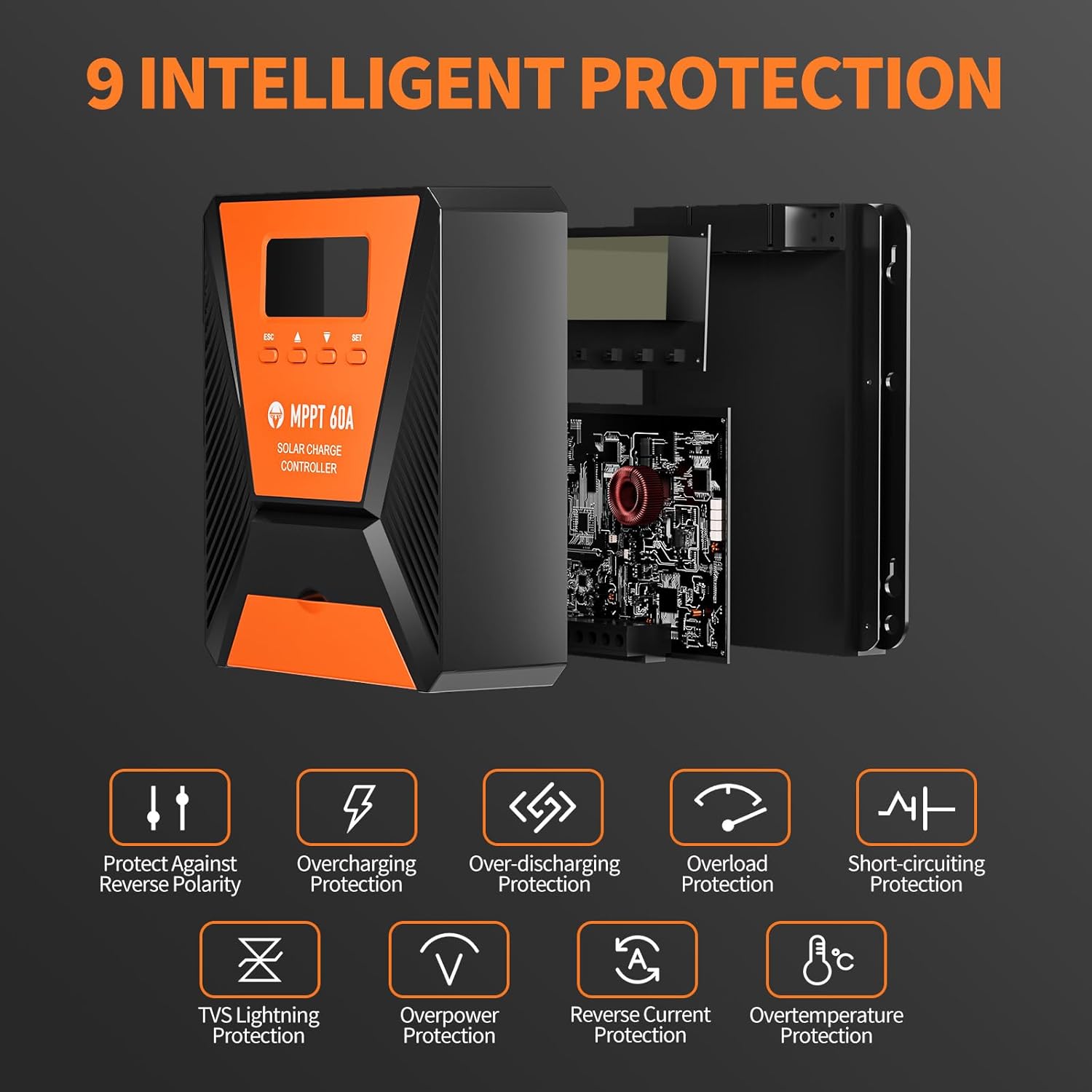
Image 7: The controller provides 9 intelligent protection features, including protection against reverse polarity, overcharging, over-discharging, overload, short-circuiting, TVS lightning, overpower, reverse current, and overtemperature.
9. ספּעסאַפאַקיישאַנז
| שטריך | באַשרייַבונג |
|---|---|
| מאָדעל | 40 א |
| סאָרט | TOPBULL |
| סיסטעם וואָלtage | 12V/24V Automatic Recognition |
| טראַקינג עפעקטיווקייט | >99% |
| שפּיץ קאָנווערסיע עפעקטיווקייט | מאַקסימום 98% |
| קאָמפּאַטיבלע באַטערי טייפּס | FLD, LiFePO4, SLD, GEL, AGM |
| מאַקס פּוו ינפּוט וואָלtage | 100V DC |
| Max Solar Input Power (12V System) | 720 וו |
| Max Solar Input Power (24V System) | 1440 וו |
| וסב רעזולטאַט | Dual USB Ports, 5V DC |
| ווייַז טיפּ | לקד |
| דימענשאַנז (פּאַקאַץ) | 23.6 X 22.1 X 10.59 סענטימעטער |
| וואָג (פּאַקעט) | 1.25 קג |
| אַרייַנגערעכנט אַקסעסעריז | מאַונטינג סקרוז |
10. וואָראַנטי און שטיצן
TOPBULL is committed to providing professional technical support. If you have any questions or require assistance with your MPPT solar charge controller, please contact our customer service. We strive to meet your needs and provide the best possible support.