
1. פּראָדוקט איבערview
The MXT SuperLive Plus 16CH Hybrid DVR is a robust surveillance solution designed for comprehensive video recording and monitoring. This system supports 16 channels of HD-TVI/CVI/AHD analog cameras up to 5MP Lite 1080p resolution, and additionally accommodates up to 8 channels of IP cameras. Equipped with a 4TB HDD, it utilizes H.265 compression for efficient storage and is NDAA compliant. Remote surveillance is facilitated through the SuperLive Plus mobile application for iOS and Android devices.

בילד 1.1: פאָרנט און הינטן view of the MXT 16CH Hybrid DVR, alongside a 4TB hard disk drive, illustrating the device's compact design and extensive connectivity options.
2. וואָס איז אין דער קעסטל
Upon unboxing, verify that all components are present and in good condition:
- 1x MXT 16CH Hybrid DVR (with pre-installed 4TB HDD)
- מאַכט אַדאַפּטער
- וסב מאַוס
- שנעל אָנהייב גייד
- Screws for additional HDD installation (if applicable)
3. פּראָדוקט פֿעיִקייטן
The MXT 16CH Hybrid DVR offers a comprehensive set of features for advanced surveillance:
- Hybrid Video Input: Supports 16 channels of HD Analog (TVI/AHD/CVI) video input up to 5MP Lite 1080p, and up to 8 channels of IP video input.
- סטאָרידזש קאַפּאַציטעט: Equipped with a 4TB HDD, expandable with 2x SATA ports (up to 10TB each) and 1x E-SATA port.
- ווידעא קאַמפּרעשאַן: Utilizes H.265 compression for efficient storage and high-quality video.
- NDAA קאָמפּאַטיבל: Adheres to the National Defense Authorization Act standards.
- ווייטער אויפזיכט: Free remote monitoring via the SuperLive Plus APP for iOS and Android devices.
- ווידעא אַוטפּוץ: Multiple video outputs including 1x HDMI, 1x VGA, and 1x BNC for versatile display options.
- אַודיאָ שטיצן: 8x RCA audio inputs and 1x RCA audio output. Supports Audio-Over-Coax for HD-TVI cameras with built-in mics (requires manual activation).
- פּלייבאַק: Simultaneous 16-channel playback.
- שרעק: 16-קאַנאַל שרעק אַרייַנשרייַב און 4-קאַנאַל שרעק רעזולטאַט.

בילד 3.1: פראָנט view of the MXT 16CH Hybrid DVR, highlighting its sleek design and the NDAA Compliant certification.
4. Physical Components and Connections
Familiarize yourself with the DVR's front and rear panels to ensure proper setup and operation.
4.1 פראָנט פּאַנעל
The front panel typically includes status indicators (REC, NET, PWR) and a USB port for mouse or backup devices.
4.2 דערציען פּאַנעל קאַנעקשאַנז
The rear panel provides all necessary ports for video input, audio, network, and display outputs.

Image 4.1: Detailed diagram of the MXT 16CH Hybrid DVR's rear panel, showing BNC video inputs, audio inputs/outputs, alarm terminals, network port, USB ports, VGA, HDMI, and power input.
- Video Inputs (BNC): 16 channels for analog HD-TVI/CVI/AHD cameras.
- אַודיאָ אינפּוטס (RCA): 8 channels for external microphones.
- אַודיאָ אַרויסגאַנג (RCA): 1 channel for external speakers.
- אַלאַרם אַרייַנגאַנג/אַרויסגאַנג: Terminals for connecting external alarm devices.
- VGA רעזולטאַט: פאַרבינדן צו אַ ווגאַ מאָניטאָר.
- HDMI רעזולטאַט: Connect to an HDMI monitor or TV for high-definition display.
- BNC-CVBS Output: Composite video output (can be used as main or spot output).
- לאַן פּאָרט (RJ45): Connect to your network router for remote access.
- וסב פּאָרץ: For connecting a mouse, USB flash drive for backup, or external HDD.
- מאַכט אַרייַנשרייַב: Connect the provided DC12V power adapter.
5. סעטאַפּ גייד
Follow these steps to set up your MXT 16CH Hybrid DVR:
- פֿאַרבינדן קאַמעראַס: Connect your analog HD-TVI/CVI/AHD cameras to the BNC video input ports on the rear panel. For IP cameras, connect them to your network via a PoE switch (not included) and ensure they are on the same network as the DVR.
- פֿאַרבינדן מאָניטאָר: פֿאַרבינדט אַ מאָניטאָר צום DVR ניצנדיק דעם HDMI אָדער VGA פּאָרט.
- פאַרבינדן מויז: שטעקט אריין די USB מויז אין איינעם פון די USB פּאָרטן אויף דער פראָנט אָדער הינטערשטער פּאַנעל.
- פאַרבינדן נעץ: פֿאַרבינדט אַן עטערנעט קאַבל פֿון די DVR'ס לאַן פּאָרט צו אייער ראַוטער אָדער נעץ סוויטש.
- פאַרבינדן מאַכט: Connect the provided DC12V power adapter to the DVR's power input port, then plug the adapter into a power outlet. The DVR will power on automatically.
- ערשט סעטאַפּ וויזערד: Upon first boot, the DVR will guide you through an initial setup wizard. Follow the on-screen prompts to configure basic settings such as language, date/time, network settings, and password.
- האַרד דיסק איניציאַליזאַציע: If the pre-installed 4TB HDD is not recognized or if you install additional HDDs, you may need to format them through the DVR's menu system (System > Storage > HDD Management).
- Audio-Over-Coax Activation: If using HD-TVI cameras with built-in microphones, navigate to the DVR's menu to manually activate the Audio-Over-Coax feature for the respective channels.
6. Operating Instructions: SuperLive Plus Mobile APP
The SuperLive Plus mobile application allows you to remotely view live feeds, play back recordings, and manage your DVR from your smartphone or tablet.
6.1 Downloading and Installing the APP
- אראפקאפיע: זוכן פֿאַר "SuperLive Plus" in the Apple App Store (for iOS devices) or Google Play Store (for Android devices).
- ינסטאַלירן: Download and install the application on your mobile device.
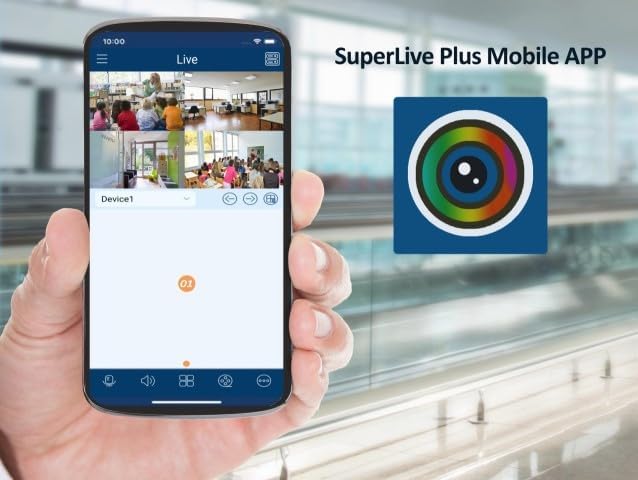
Image 6.1: A smartphone displaying the SuperLive Plus Mobile APP interface, showing multiple camera feeds, alongside the app's distinctive icon.
6.2 Adding Your DVR to the APP
- עפֿענען אַפּ: Launch the SuperLive Plus application.
- לייג דיווייס: Tap on the "Add Device" or "+" icon.
- יבערקוקן QR קאָד: On your DVR, navigate to the network settings or P2P/Cloud menu to find the device's QR code. Use the app's scan function to scan this QR code. Alternatively, you can manually enter the device's serial number or IP address.
- אַרייַן אינפֿאָרמאַציע: Provide a device name, username, and password for your DVR (the same credentials you set during the DVR's initial setup).
- היט: Save the device configuration. Your DVR should now be listed in the app.
Image 6.2: The SuperLive Plus application's splash screen, featuring its logo and the motto "Secure the world with you," indicating the app is ready for use.
6.3 Basic APP Functions
- לעבן View: Tap on the added device to view live feeds from your connected cameras. You can switch between single and multi-channel views.
- פּלייבאַק: אַקסעס רעקאָרדעד פאָאָtage by selecting the playback option and choosing the desired date and time.
- Snapshot/Record: Capture still images or record video clips directly to your mobile device.
- PTZ קאָנטראָל: If you have PTZ (Pan-Tilt-Zoom) cameras, use the app to control their movement and zoom.
- אַודיאָ: Listen to audio from cameras with microphones and use two-way audio if supported.
7. וישאַלט
רעגולערע אויפהאלטונג גאראנטירט אפטימאלע פאָרשטעלונג און לאַנגלעבעדיקייט פון אייער DVR סיסטעם.
- ריין קעסיידער: Dust can accumulate and cause overheating. Gently clean the DVR's exterior and ventilation openings with a soft, dry cloth. Do not use liquid cleaners.
- Firmware דערהייַנטיקונגען: קאָנטראָלירט פּעריִאָדיש דעם פאַבריקאַנט'ס webזייטל פֿאַר פירמווער דערהייַנטיקונגען. דערהייַנטיקן פירמווער קען פֿאַרבעסערן פאָרשטעלונג, צולייגן נייע פֿעיִקייטן און פֿאַרריכטן באַגז.
- האַרד דיסק געזונט קאָנטראָל: Monitor the health of your hard disk drives through the DVR's system menu. Replace failing HDDs promptly to avoid data loss.
- באַקאַפּ וויכטיקע פוtage: Regularly back up critical video footagצו אַן עקסטערנאַלן USB דרייוו אָדער נעץ סטאָרידזש.
- מאַכט ציקל: If the DVR experiences minor issues, a simple power cycle (unplugging and replugging after a minute) can often resolve them.
8. טראָובלעשאָאָטינג
די סעקציע באהאנדלט אלגעמיינע פראבלעמען וואס איר קענט באגעגענען און גיט מעגלעכע לייזונגען.
| פּראָבלעם | מעגלעך סיבה | לייזונג |
|---|---|---|
| קיין ווידעא ארויסגאנג אויף מאָניטאָר. | Loose cable connection, incorrect input source on monitor, DVR not powered on. | Check HDMI/VGA cable connections. Ensure monitor is set to correct input. Verify DVR power indicator is on. |
| קאַמעראַס ווייַזן נישט ווידעא. | Loose BNC connection, camera power issue, incorrect video format, IP camera not configured. | Check BNC connections. Ensure cameras are powered. Verify camera video format matches DVR settings. For IP cameras, ensure they are added and configured correctly in the DVR's IP camera management. |
| Cannot access DVR remotely via SuperLive Plus APP. | DVR not connected to network, network firewall blocking, incorrect APP settings, P2P service disabled. | Verify DVR's network cable is connected and network status is "Online". Check router settings for port forwarding if not using P2P. Ensure P2P/Cloud service is enabled on the DVR. Double-check device credentials in the APP. |
| No recording or HDD error. | HDD not initialized, HDD full, HDD failure, recording schedule not set. | Initialize/format HDD in DVR settings. Check HDD health. Configure recording schedule. Delete old footage or install larger HDD if full. |
9. ספּעסאַפאַקיישאַנז
Detailed technical specifications for the MXT 16CH Hybrid DVR.

Image 9.1: Diagram illustrating key features and physical dimensions of the MXT 16CH Hybrid DVR.
Image 9.2: Comprehensive table detailing the technical specifications of the MXT 16CH Hybrid DVR, including video, audio, record, playback, network, and general parameters.
| קאַטעגאָריע | באַשרייַבונג |
|---|---|
| מאָדעל נומער | SPL5MP16CHDVR4TB |
| ווידעא אַרייַנשרייַב | 16CH HD Analog (TVI/AHD/CVI 5MP/4MP/1080p/720p/WD1) + up to 8CH IP (5MP/4MP/3MP/1080p/960p/720p) |
| רעקאָרד האַכלאָטע | 5MP Lite/4MP Lite/1080p/1080p Lite/720p/WD1/D1 |
| ווידעא קאַמפּרעשאַן | ה.265 |
| אַודיאָ אַרייַנשרייַב / רעזולטאַט | 8x RCA Input, 1x RCA Output |
| הדד קאַפּאַציטעט | 2x SATA (up to 10TB each), 1x E-SATA (4TB HDD pre-installed) |
| ווידעא רעזולטאַט | 1x HDMI (1920x1080), 1x VGA (1920x1080), 1x BNC-CVBS |
| נעץ צובינד | 1x RJ45 1000Mbps |
| וסב צובינד | 2 קס וסב 2.0, 1 קס וסב 3.0 |
| מאַכט צושטעלן | DC12V/4A |
| דימענשאַנז (ב x ד x ה) | 380 X 268 X 45 מם (בעערעך 15 X 10.5 X 1.8 אינטשעס) |
| אַפּערייטינג טעמפּעראַטור | -10°C צו 50°C (14°F צו 122°F) |
10. וואָראַנטי און שטיצן
This product comes with a manufacturer's warranty. For specific warranty terms and duration, please refer to the documentation included with your purchase or contact the seller directly.
טעכניש שטיצן: US-based professional and experienced technical support is provided exclusively by the seller, Beyond Quantum Tech. For assistance with setup, configuration, or troubleshooting, please contact their support team.
For the most up-to-date support information, please visit the seller's page on Amazon or their official webפּלאַץ.