
COOLGEEK CS-01
COOLGEEK Record Player Model CS-01 User Manual
Original Vinyl Turntable with Bluetooth 5.0 and AT-3600L Stylus
1. הקדמה
Thank you for choosing the COOLGEEK Record Player Model CS-01. This manual provides essential information for the safe and optimal use of your new record player. Please read it thoroughly before operation and retain it for future reference.
The COOLGEEK CS-01 combines classic vinyl playback with modern Bluetooth connectivity, offering a rich audio experience through its integrated 4-speaker system and advanced suspension technology.
2. וואָס איז אין דער קעסטל
- וויןtagE וויניל רעקאָרד שפּילער
- ינסטראַקשאַנז מאַנואַל
- מאַכט אַדאַפּטער
3. פּראָדוקט איבערview
The COOLGEEK CS-01 is designed for both aesthetic appeal and superior sound performance. Key features include:
- יינציק פּלאַן: Metal frame and one-piece body construction with anti-vibration silicone base.
- פאַכמאַן-גראַד סאָונד: Equipped with 4 high-quality speakers (2x 15W track-shape speakers for bass, 2x 10W treble units) and circular inverted tubes for enhanced low-frequency volume.
- Cushioning Shock Absorption System: Features a unique 4-spring suspension cushion system and core disk rotating shaft to minimize resonance and optimize shock resistance.
- Dual Rotation Speed: Supports 33 1/3 and 45 RPM vinyl records.
- AT-3600L Stylus Head: Comes with a high-quality Audio-Technica AT-3600L cartridge for accurate tracking and sound reproduction.
- בלועטאָאָטה 5.0 קאַנעקטיוויטי: Seamlessly connect your PC, tablet, or smartphone for wireless audio streaming.
- Adjustable Counterweight & Anti-Skate Control: For precise tonearm balance and optimal tracking.
- Phono-Line Output: Allows connection to external stereo systems.

Figure 1: COOLGEEK Record Player Model CS-01

פיגורע 2: איבערview of key features including Bluetooth 5.0, Vinyl Mode, Line Out, Audio-Technica Cartridge, Carbon Fiber Tonearm, Spring Suspension, High Fidelity, Dual Speed, and Shock-Absorbing Foot Pad.

פיגורע 3: דעטאַילעד view of the internal speaker configuration, showing 2x 15W track-shape speakers, 2x 10W treble units, and circular inverted tubes for enhanced bass.
4. סעטאַפּ אינסטרוקציעס
Follow these steps to set up your COOLGEEK Record Player:
- אויספּאַקן: נעמט פֿאָרזיכטיק אַרויס אַלע קאָמפּאָנענטן פֿון דער פּאַקאַדזשינג. האַלט די פּאַקאַדזשינג פֿאַר צוקונפֿטיקן טראַנספּאָרט אָדער סטאָרידזש.
- אָרט: Place the record player on a stable, level surface away from direct sunlight, heat sources, and excessive vibration.
- מאַכט קשר: Connect the power adapter to the DC 24V/2A port on the back of the record player and then plug it into a wall outlet.
- Platter and Belt Installation:
- Place the platter onto the spindle.
- Locate the drive belt (usually pre-installed or found in packaging). Carefully stretch the belt around the motor pulley and the inner rim of the platter.
- שטויב דעקל אינסטאַלאַציע: Attach the dust cover hinges to the designated slots on the back of the record player.
- Cartridge and Stylus: The AT-3600L cartridge and stylus are typically pre-installed. Ensure the stylus protector is removed before playing a record.
- Tonearm Balance and Tracking Force:
- Unlock the tonearm.
- Slide the counterweight onto the rear of the tonearm. Adjust it until the tonearm floats horizontally and is balanced.
- Once balanced, turn the numbered ring on the counterweight to set the tracking force. Refer to the cartridge specifications (AT-3600L typically requires 3.5g).
- Adjust the anti-skating dial to match the tracking force setting.
Video 1: Official setup and overview of the COOLGEEK Record Player. This video demonstrates the product's features and basic operation.

Figure 4: Illustration of the 4-spring suspension cushion system and anti-vibration silicone base, designed to reduce resonance and optimize shock resistance.

פיגורע 5: נאָענט-אַרויף view of the Audio-Technica AT-3600L stylus head, highlighting its precision for optimal sound quality.
5. אַפּערייטינג ינסטרוקטיאָנס
5.1 Playing Vinyl Records
- מאַכט אויף: Turn the power knob to the 'LP' (Album Mode) position.
- אויסקלייַבן גיכקייַט: Choose the appropriate speed (33 1/3 or 45 RPM) using the speed selector switch.
- אָרט רעקאָרד: Carefully place a vinyl record on the platter.
- פאזיציע טאן-ארעם: Unlock the tonearm. Gently lift the tonearm using the cueing lever and position it over the desired track on the record.
- נידעריקער טאָנאַרם: Slowly lower the cueing lever to allow the stylus to gently descend onto the record. The platter will automatically start rotating.
- סטרויערן באַנד: Use the anodized alloy metal knob to adjust the volume to your preference.
- ענדיגן ווידערשפּיל: At the end of the record, the tonearm will automatically lift and return to its rest position. Alternatively, manually lift the tonearm using the cueing lever and return it to the rest.

Figure 6: Demonstrates how to unlock the tonearm and place it on the record's outermost segment. The disk automatically starts rotating, and the machine lowers the arm for playback.

Figure 7: Close-up of the 33/45 dual rotation speed selector, allowing compatibility with various vinyl record types.
5.2 בלועטאָאָטה מאָדע
- אַקטאַווייט בלועטאָאָטה: Turn the power knob to the 'BT' (Bluetooth Mode) position. The Bluetooth indicator light will begin to flash, indicating it's in pairing mode.
- פּאָר דיווייס: On your smartphone, tablet, or PC, enable Bluetooth and search for 'COOLGEEK CS-01' (or similar name). Select it to pair.
- באַשטעטיקונג: Once successfully paired, the Bluetooth indicator light will stop flashing and remain solid.
- שפּיל אַודיאָ: Start playing audio from your paired device. The sound will be output through the record player's speakers.
- סטרויערן באַנד: Control the volume using the record player's volume knob and/or your paired device's volume controls.

Figure 8: Visual comparison of the record player in vinyl playback mode and Bluetooth streaming mode, illustrating its dual functionality.
5.3 Connecting to External Speakers (Line Out)
For enhanced sound, you can connect your COOLGEEK CS-01 to an external stereo system or powered speakers using the Line Out ports.
- געפינען פּאָרטן: Identify the 'LINE OUT L' and 'LINE OUT R' RCA ports on the back of the record player.
- פאַרבינדן קאַבלעס: Connect RCA cables (not included) from these ports to the corresponding audio input ports on your external ampליפיער אָדער פּאַוערד ספּיקערז.
- אויסקלייַבן אַרייַנשרייַב: On your external audio system, select the input source corresponding to where you connected the record player.
- סטרויערן באַנד: Control the volume primarily through your external audio system.
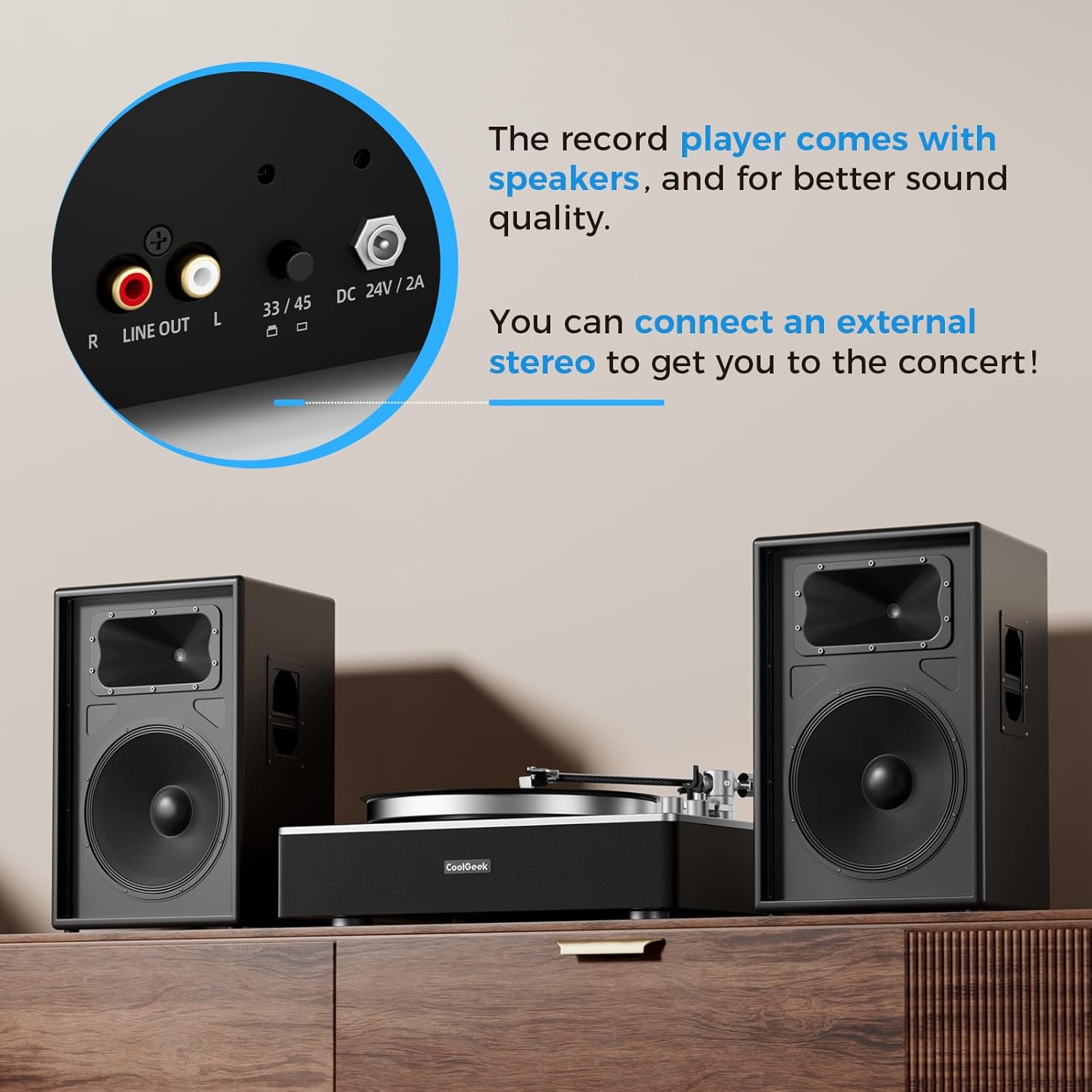
פיגורע 9: נאָענט-אַרויף view of the rear panel, showing the Line Out (RCA) ports and the 33/45 speed selector, allowing connection to external audio systems.
6. וישאַלט
- רייניקונג: Use a soft, dry cloth to clean the record player's surface. For the stylus, use a soft brush designed for stylus cleaning, brushing gently from back to front.
- שטויב דעקל: Keep the dust cover closed when not in use to protect the platter and tonearm from dust and debris.
- סטילוס אויסטויש: The stylus has a limited lifespan. Replace it when you notice a degradation in sound quality or visible wear. Refer to the manufacturer's guidelines for compatible replacement styli (e.g., Audio-Technica AT-3600L replacement stylus).
- Belt Maintenance: Periodically check the drive belt for wear or stretching. Replace if necessary to maintain consistent platter speed.
7. טראָובלעשאָאָטינג
| פּראָבלעם | מעגלעך סיבה | לייזונג |
|---|---|---|
| קיין מאַכט | שטראָם אַדאַפּטער נישט פארבונדן; שטראָם אַוטלעט דעפעקטיוו | Ensure adapter is securely connected; Try a different outlet |
| קיין געזונט פון ספּיקערז | Volume too low; Incorrect mode selected; External speakers not connected/powered | Increase volume; Ensure correct mode (LP/BT); Check external speaker connections and power |
| איבערשפּרינגען אָדער פֿאַרדרייען קלאַנג | Dust/debris on record/stylus; Incorrect tracking force/anti-skate; Record player not level; Damaged stylus | Clean record/stylus; Re-balance tonearm and adjust tracking force/anti-skate; Ensure player is on a level surface; Replace stylus if damaged |
| בלועטאָאָטה איז נישט פּערינג | Player not in BT mode; Device too far; Interference | Ensure player is in BT mode; Move device closer; Restart player and device |
| אומרעכטע ווידערשפּיל גיכקייט | Wrong speed selected; Drive belt issue | Select correct speed (33/45 RPM); Check drive belt for proper placement or wear |
8. ספּעסאַפאַקיישאַנז
| שטריך | דעטאַל |
|---|---|
| סאָרט | COOLGEEK |
| מאָדעל נומער | CS-01 |
| קאָליר | שוואַרץ |
| מאַטעריאַל | Acrylic, Ceramic, Metal |
| פּונקט וואָג | 21 פונט |
| פּעקל דימענשאַנז | 21 X 16 X 9.35 אינטשעס |
| מאַקסימום ראָוטיישאַנאַל גיכקייַט | 45 רפּם |
| אַרייַנגערעכנט קאַמפּאָונאַנץ | Instruction Manual, Power Adapter, VintagE וויניל רעקאָרד שפּילער |
| ספּעציעלע פֿעיִקייטן | Adjustable Anti Skate Control, Shock-Resistant Silicone, 4-Spring Suspension Cushion System, Stereo Speakers, Bluetooth Input, Cartridge AT-3600L Stylus Head, Adjustable Counterweight, Phono-Line Output, Built-in Preamp, Arm auto pause |
| קאַמפּאַטאַבאַל דעוויסעס | רעדנער |
9. וואָראַנטי & שטיצן
For warranty information and customer support, please refer to the documentation included with your product or visit the official COOLGEEK webזייטל. האַלט אייער קויף קוויטל ווי אַ באַווייַז פון קויפן פֿאַר קיין וואָראַנטי קליימז.
Ask a question about this manual
Ask about setup, troubleshooting, compatibility, parts, safety, or missing instructions. Manuals+ will review the question and use this page’s manual context to help answer it.