
1. הקדמה
This manual provides essential instructions for the proper setup, operation, and maintenance of your DWIN 7 Inch Commercial Grade Capacitive Touch Screen, model DMG80480C070_03WTC. Please read this manual thoroughly before using the device to ensure optimal performance and longevity.
2. פּראָדוקט איבערview
The DWIN DMG80480C070_03WTC is a high-quality 7.0-inch capacitive touch screen designed for commercial applications. It features an 800x480 pixel resolution with 16.7 million colors on a TN-TFT-LCD panel. The device is powered by the T5L1 chip and runs on the DGUS II system, offering robust performance and a user-friendly interface.
Key features include TTL/RS232 interface for versatile connectivity and support for easy development using DWIN DGUS V7.6 GUIs, requiring no coding skills. It also supports a dual development system (DGUS II/TA).

בילד 2.1: איבערview of the DWIN DMG80480C070_03WTC Capacitive Touch Screen highlighting its key features such as 800x480 resolution, 7.0-inch size, 24-bit color, G+G structure, T5L1 chip, and TTL/RS232 connectivity.
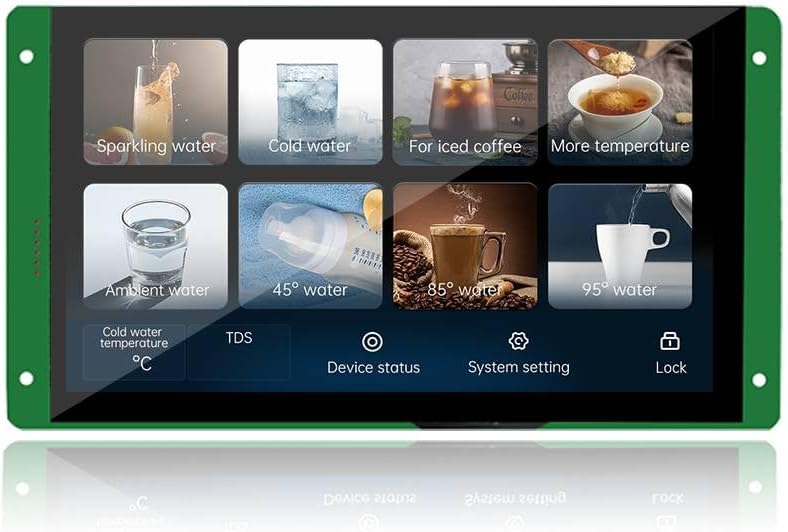
בילד 2.2: אַן עקסample of a user interface displayed on the DWIN DMG80480C070_03WTC touch screen, demonstrating various interactive elements and data displays.
3. סעטאַפּ
3.1 אויספּאַקן און אינהאַלט
Carefully unpack the device and verify that all components are present:
- DWIN DMG80480C070_03WTC Capacitive Touch Screen
- FCC1005 Connection Cable
- HDL662K USB to Serial Adapter
- וסב קאַנעקשאַן קאַבלע
3.2 קאַנעקטינג די מיטל
The touch screen offers TTL and RS232 interfaces for communication. Use the provided 10Pin_1.0mm FCC connection wire to establish communication with your host system.

בילד 3.1: דעטאַילעד view of the back panel of the DWIN DMG80480C070_03WTC, showing various interfaces such as FLASA, TP interface, LCM interface, Buzzer, ON=TTL/OFF=RS232 switch, Reserved module interface, Expand FLASH, T5L ASIC, PGT05 interface, SD Card slot, and User interface.
- מאַכט קשר: Connect the appropriate power supply to the designated power input on the back panel.
- דאַטאַ קשר: Utilize the FCC1005 connection cable to link the screen's TTL/RS232 interface to your control system. Refer to Image 3.1 for port identification.
- Serial Mode Selection: Ensure the ON/OFF switch for TTL/RS232 is set to the desired communication mode (ON for TTL, OFF for RS232).
- SD קאָרט: If using an SD card for data or firmware updates, insert it into the SD card slot.
4. אַפּערייטינג ינסטרוקטיאָנס
4.1 DGUS II System Operation
The screen operates on the DGUS II system, which manages the display and touch functionalities. Once powered on, the screen will load its pre-programmed interface.
4.2 GUIs Development and Data Download
The DWIN DMG80480C070_03WTC supports easy-to-use DWIN DGUS V7.6 GUIs Development, which does not require extensive coding skills. This platform allows for the creation and customization of user interfaces.

בילד 4.1: אַן איבערview of the DWIN DGUS Development Platform, illustrating its interface and capabilities for designing and managing screen displays and touch interactions.
Firmware and user interface data can be downloaded to the device via an SD card or through the on-line serial port connection. Refer to the DWIN DGUS V7.6 software documentation for detailed instructions on development and download procedures.
4.3 Dual Development System
The device supports a dual development system: DGUS II and TA (Instruction Set). This provides flexibility for advanced users to implement custom functionalities and control logic.
5. וישאַלט
5.1 רייניקן דעם עקראַן
To clean the touch screen, gently wipe the surface with a soft, lint-free cloth. For stubborn smudges, slightly dampen the cloth with water or a mild, non-abrasive screen cleaner. Avoid using harsh chemicals, abrasive materials, or excessive moisture, as these can damage the screen or internal components.
5.2 ענוויראָנמענטאַל קאַנסידעריישאַנז
Ensure the device is operated within its specified temperature and humidity ranges. Avoid exposing the screen to direct sunlight for prolonged periods or to environments with high dust concentration to prevent damage and maintain optimal performance.
6. טראָובלעשאָאָטינג
If you encounter issues with your DWIN touch screen, consider the following basic troubleshooting steps:
- קיין ווייַז: Verify that the power supply is correctly connected and providing adequate power. Check all cable connections.
- קיין ריר-רעספּאָנס: Ensure the screen is clean and free from obstructions. If the issue persists, a recalibration might be necessary (refer to DGUS software documentation).
- קאָמוניקאַציע ערראָרס: Confirm that the TTL/RS232 switch is set to the correct mode and that the communication cables are securely connected. Check the serial port settings on your host system.
- ווייכווארג ישוז: If problems arise after a firmware update or GUI change, try reloading a known working configuration via SD card or serial port.
For more complex issues or technical support, please contact DWIN customer service or refer to the official DWIN documentation available on their webפּלאַץ.
7. ספּעסאַפאַקיישאַנז
The following table details the technical specifications for the DWIN DMG80480C070_03WTC Capacitive Touch Screen:
| שטריך | באַשרייַבונג |
|---|---|
| סאָרט | DWIN |
| מאָדעל נאָמען | DMG80480C070_03WTC |
| באַראַן | LPDDR3 (8 MB Installed) |
| זכּרון סטאָרידזש קאַפּאַסיטי | 16 מב |
| אָפּערייטינג סיסטעם | דזשי-עס-דזשי-וס צווייטער |
| פּראָדוקט דימענשאַנז (LxWxH) | 0.53 X 7.5 X 4.15 אינטשעס |
| קאַנעקטיוויטי טעכנאָלאָגיע | TTL, RS232, FCC |
| פּראַסעסער סאָרט | MediaTek |
| נומער פון פּראַסעסערז | 1 |
| באַטעריז | 1 CR2 באַטאַרייע (אַרייַנגערעכנט) |
| פאַבריקאַנט | DWIN Technology Co., Ltd |
| ערשטער דאַטע בנימצא | 6 סעפטעמבער 2024 |
8. וואָראַנטי און שטיצן
For information regarding product warranty, please refer to the documentation provided at the time of purchase or contact your vendor. DWIN Technology Co., Ltd provides support for their products. You can visit the official DWIN Store on Amazon פֿאַר נאָך רעסורסן און קאָנטאַקט אינפֿאָרמאַציע.