
הקדמה
The PHYSEN Keyless Entry Fingerprint Door Lock offers advanced security and convenience for your home or office. This smart deadbolt set provides multiple unlocking methods, including fingerprint recognition, keypad codes, and traditional mechanical keys. Designed for easy installation and durable performance, it ensures reliable access control and peace of mind.
קאַמפּאָונאַנץ איבערview
Your PHYSEN Keyless Entry Fingerprint Door Lock package includes all necessary components for installation and operation:
- Keyless entry door lock unit
- 2 לעבער כאַנדאַלז
- Adjustable latch (x2)
- Setup assembly kits (screws, plates, etc.)
- 2 Backup keys

Image: All components included in the PHYSEN Keyless Entry Fingerprint Door Lock package.

Image: Visual representation of the multiple unlocking methods: fingerprint, password, spare keys, one-time password, auto-lock, and low battery alert.
סעטאַפּ און ינסטאַלירונג
The PHYSEN Keyless Entry Fingerprint Door Lock is designed for easy self-installation, typically requiring only a screwdriver. It is compatible with all American standard left and right-handed doors.
Door Compatibility Check
איידער די אינסטאַלאַציע, זיכער מאַכן אַז אייער טיר טרעפט די פאלגענדע ספּעסיפיקאַציעס:
- Door Hole: 2-1/8 אינטשעס (54 מם)
- Minimalist Distance: ≥ 4 inches (101.6mm)
- באַקקסעט: 2-3/8 inches or 2-3/4 inches (60mm or 70mm)
- Latch Hole: 1 אינטש (25 מם)
- טיר גרעב: 1-3/8 inches to 2 inches (35-55mm)
The lock is suitable for single cylinder doors and is not compatible with mortise or integrated lock systems.
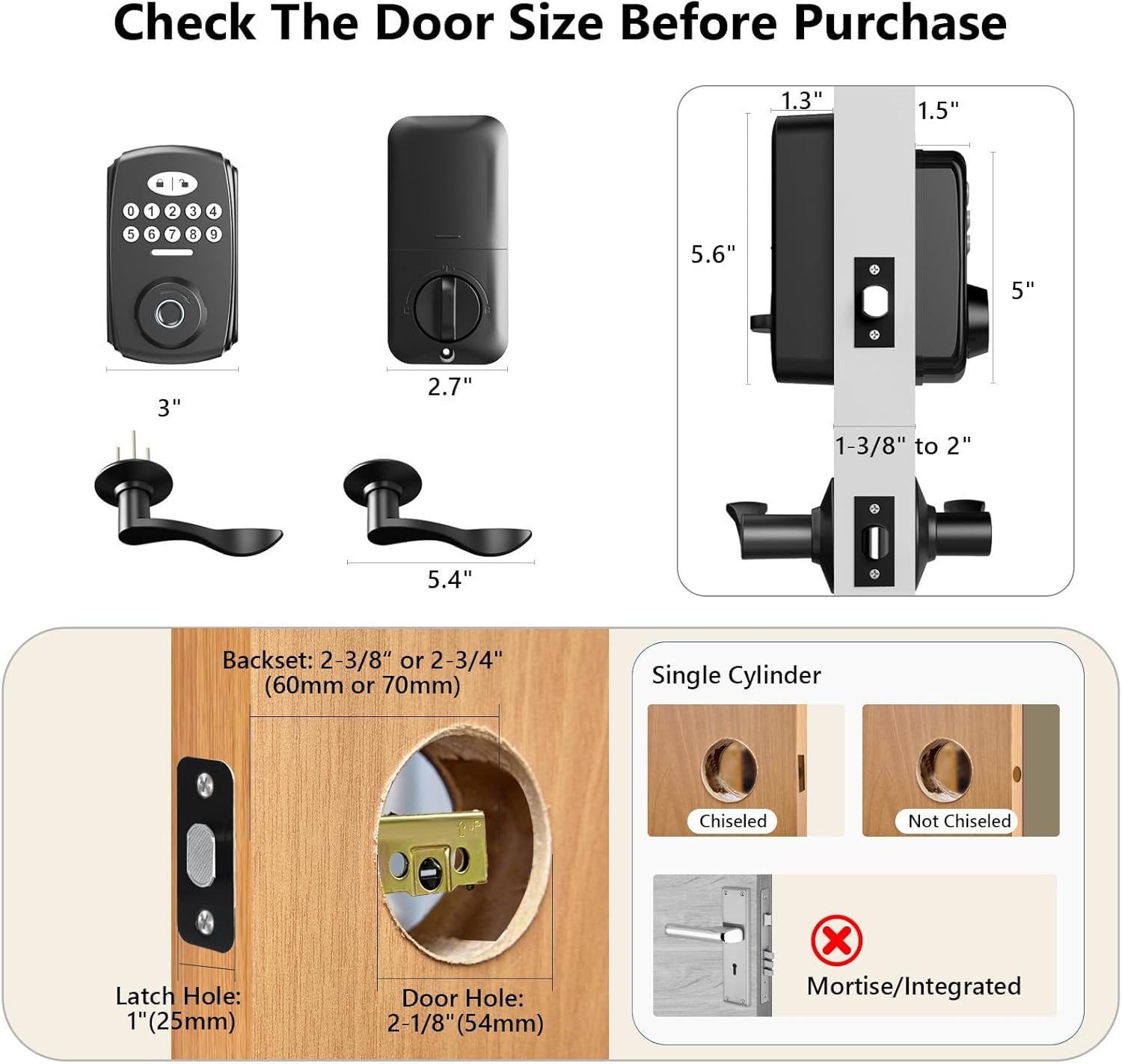
Image: Diagram illustrating required door dimensions and compatibility for installation.
ינסטאַללאַטיאָן סטעפּס
- צוגרייטן די טיר: Remove any existing deadbolt hardware. Ensure the latch is in the unlocked position before proceeding.
- ינסטאַלירן די לאַטש: Insert the adjustable latch into the door edge.
- ינסטאַלירן עקסטעריאָר אַסעמבלי: Place the exterior keypad assembly through the door hole, aligning it with the latch.
- ינסטאַלירן ינלענדיש אַסעמבלי: Connect the interior assembly to the exterior assembly, ensuring proper cable routing and alignment. Secure with screws.
- Install Lever Handles: Attach the lever handles to both sides of the door. The design allows for easy adjustment for both left and right door opening directions.
- אַרייַנלייגן באַטעריז: Open the battery cover on the interior assembly and insert 4 AA alkaline batteries (not included).
- טעסט אָפּעראַציע: Follow the user manual to program and test the lock's functions.

Image: A person demonstrating the easy installation process using a screwdriver.
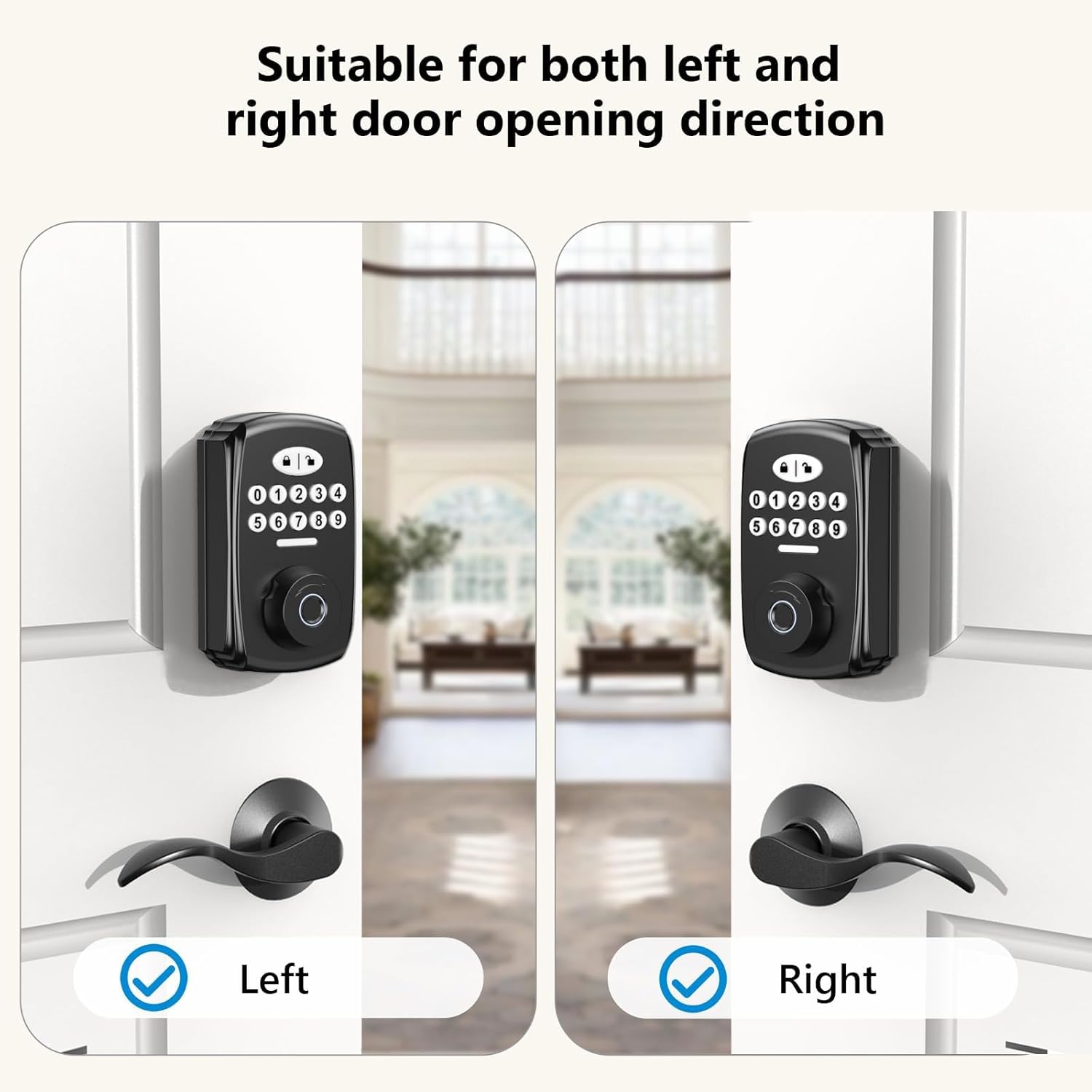
Image: The lock's design accommodates both left and right door opening directions.
אַפּערייטינג ינסטראַקשאַנז
The PHYSEN Smart Deadbolt offers multiple convenient ways to secure and access your property.
ופשליסן פינגערפּרינט
The advanced fingerprint sensor identifies your fingerprint within 0.3 seconds and unlocks the door within 1 second, boasting a 99.99% recognition rate. Up to 100 unique fingerprints can be registered.

Image: Details on the advanced fingerprint unlock, highlighting 0.3s identification and 99.99% recognition rate.
Keypad Code Unlock
You can add up to 100 user codes for family members and create temporary codes for guests. The keypad features an anti-peeping password function, allowing you to enter random digits before or after your actual code to protect your privacy. The keypad is backlit for convenient use at night.

Image: Demonstrates the anti-peeping password feature and backlit keypad for enhanced security and convenience.
One-Time Passwords
Generate one-time passwords for single-use access, ideal for deliveries or short-term visitors.

Image: Illustrates the use of one-time passwords for convenient access for guests or deliveries.
אַוטאָ-לאַק שטריך
Configure the electronic door lock to automatically lock after 5-99 seconds. You can also use the one-touch auto-lock feature by pressing the lock key on the keypad, ensuring your door is always secured.
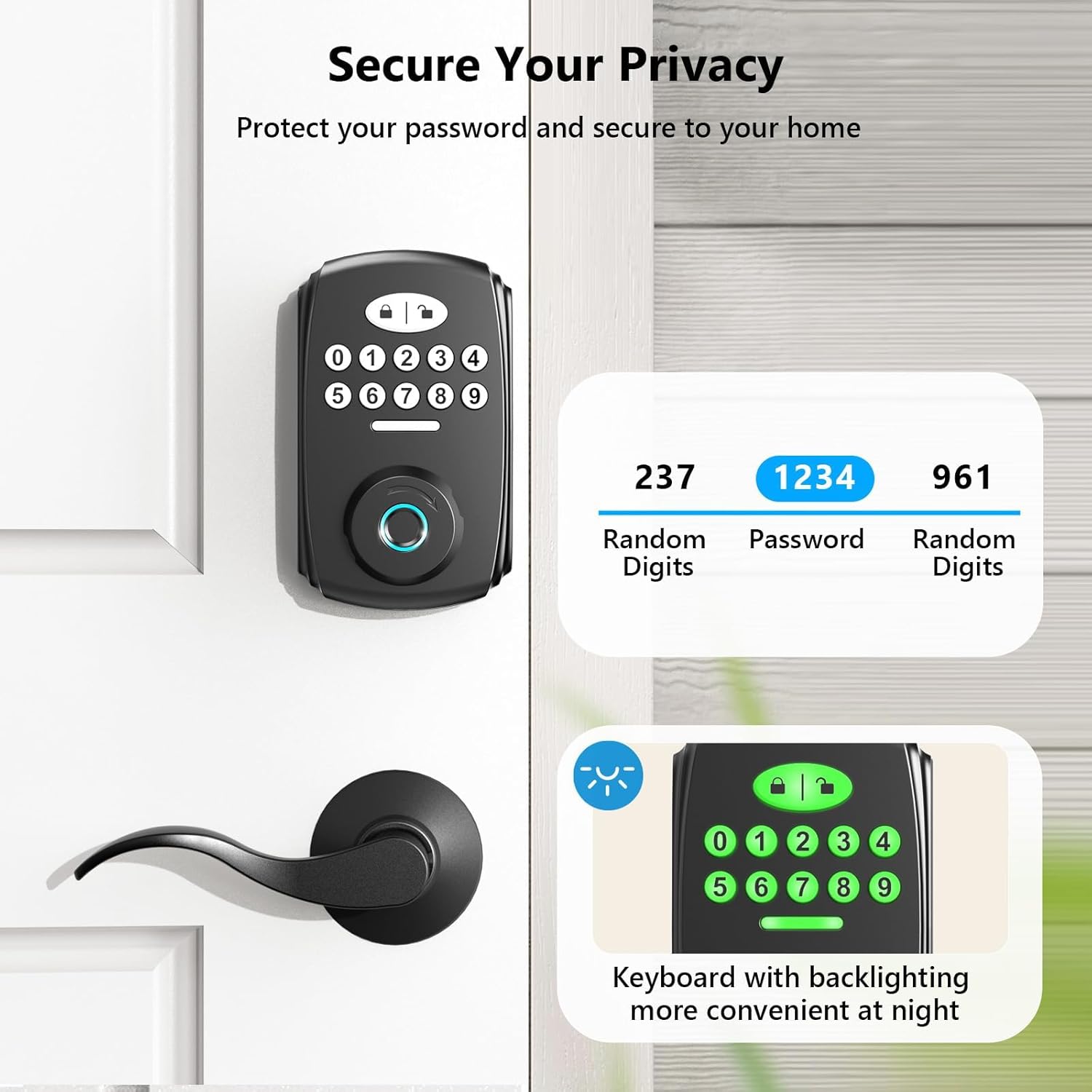
Image: Highlights the smart auto-lock feature, which can be set to lock automatically after a set time, and the one-touch locking option.
שטיל מאָדע
Activate silent mode to eliminate beeping sounds when pressing keys, providing a quiet operation experience.

Image: Depicts the silent mode feature, which mutes keypress sounds.
מעטשאַניקאַל שליסל ופשליסן
For traditional access or in case of battery depletion, the lock includes two backup mechanical keys.
וישאַלט
Proper maintenance ensures the longevity and optimal performance of your PHYSEN door lock.
באַטערי פאַרבייַט
The lock operates on 4 AA batteries. A low battery indicator will alert you when it's time for replacement. Replace all batteries simultaneously with new alkaline batteries for best performance.

Image: Shows the low battery alert on the keypad, indicating when batteries need replacement.
רייניקונג
ווישט אָפּ די אויסערלעכע זייט פֿון שלאָס מיט אַ ווייכן, טרוקענעם שטאָףamp שטאָף. פֿאַרמײַדט אַברייסיוו רייניגער אָדער סאָלווענטן וואָס קענען שאַטן די ענדיקונג אָדער עלעקטראָנישע קאָמפּאָנענטן.
וועטער קעגנשטעל
The lock has an IP65 rating, making it weather-resistant and suitable for outdoor use, protecting your front door in various weather conditions.

Image: The lock is shown to be durable and functional in various weather conditions, including rain.
טראָובלעשאָאָטינג
For detailed troubleshooting steps, please refer to the comprehensive user manual included with your product. Below are common issues and general advice:
- Incorrect Code Attempts: If too many incorrect codes are entered, the system will lock out for 3 minutes and sound an alarm. Wait for the lockout period to expire before trying again.
- פינגער-אפדרוק נישט דערקענט: זיכער מאַכן אַז אייער פינגער איז ריין און טרוקן. פּרוּווט ווידער רעגיסטרירן אייער פינגער-אָפּדרוק אויב די פּראָבלעם בלייבט.
- קיין מאַכט: Check battery installation and replace batteries if the low battery indicator is on or if the lock is unresponsive.
- Mechanical Key Not Working: Ensure the key is fully inserted and turned correctly. Check for any obstructions in the keyhole.
ספּעסאַפאַקיישאַנז
| שטריך | דעטאַל |
|---|---|
| סאָרט | PHYSEN |
| מאָדעל נאָמען | Fingerprint Door Lock (MMS-1-US-B) |
| לאַק טיפּ | ביאָמעטריק |
| ספּעציעלע שטריך | פינגערפּרינט |
| מאַטעריאַל | אַלומינום |
| קאָליר | שוואַרץ |
| ענדיקן טיפּ | מאַט שווארצע |
| נומער דימענשאַנז ל x וו x ה | 4.9 X 3.9 X 3.1 אינטשעס |
| פּונקט וואָג | 3.21 פונט |
| מאַכט מקור | 4 אַאַ באַטעריז (ניט אַרייַנגערעכנט) |
| וועטער קעגנשטעל | IP65 רייטאַד |
וואָראַנטי און שטיצן
PHYSEN is committed to providing high-quality products and customer satisfaction.
שוץ פּלאַנז
Extended protection plans are available for purchase to cover your device beyond the standard warranty:
- 3-יאָר שוץ פּלאַן: $6.99
- 4-יאָר שוץ פּלאַן: $8.99
- גאַנץ באַשיצן: $16.99/חודש (דעקט אַלע בארעכטיגטע פאַרגאַנגענע און צוקונפֿטיקע קויפֿן)
קונה שטיצן
For further assistance, technical support, or warranty claims, please visit the official PHYSEN store or contact customer service through the platform where you purchased the product.
באַזוכן די PHYSEN Store on Amazon.


