
הקדמה
Thank you for choosing the Cuifati Mini Body Camera. This manual provides detailed instructions for the proper use, setup, and maintenance of your device. Please read this manual thoroughly before operating the camera to ensure optimal performance and longevity.
פּעקל אינהאַלט
- 1 x Wearable Camera
- 1 רענטגענ קעריינג באַג
- 1 x באַניצער מאַנואַל
- 1 X Lanyard
- 1 x Back Shell Bracket
- 1 X Tripod
- קסנומקס רענטגענ וסב קאַבלע
- 1 רענטגענ רייניקונג שטאָף

Figure 1: Cuifati Mini Body Camera and included accessories.

Figure 2: Multi-scenario application examples for the body camera.
פּראָדוקט איבערview
Familiarize yourself with the components and controls of your Cuifati Mini Body Camera.
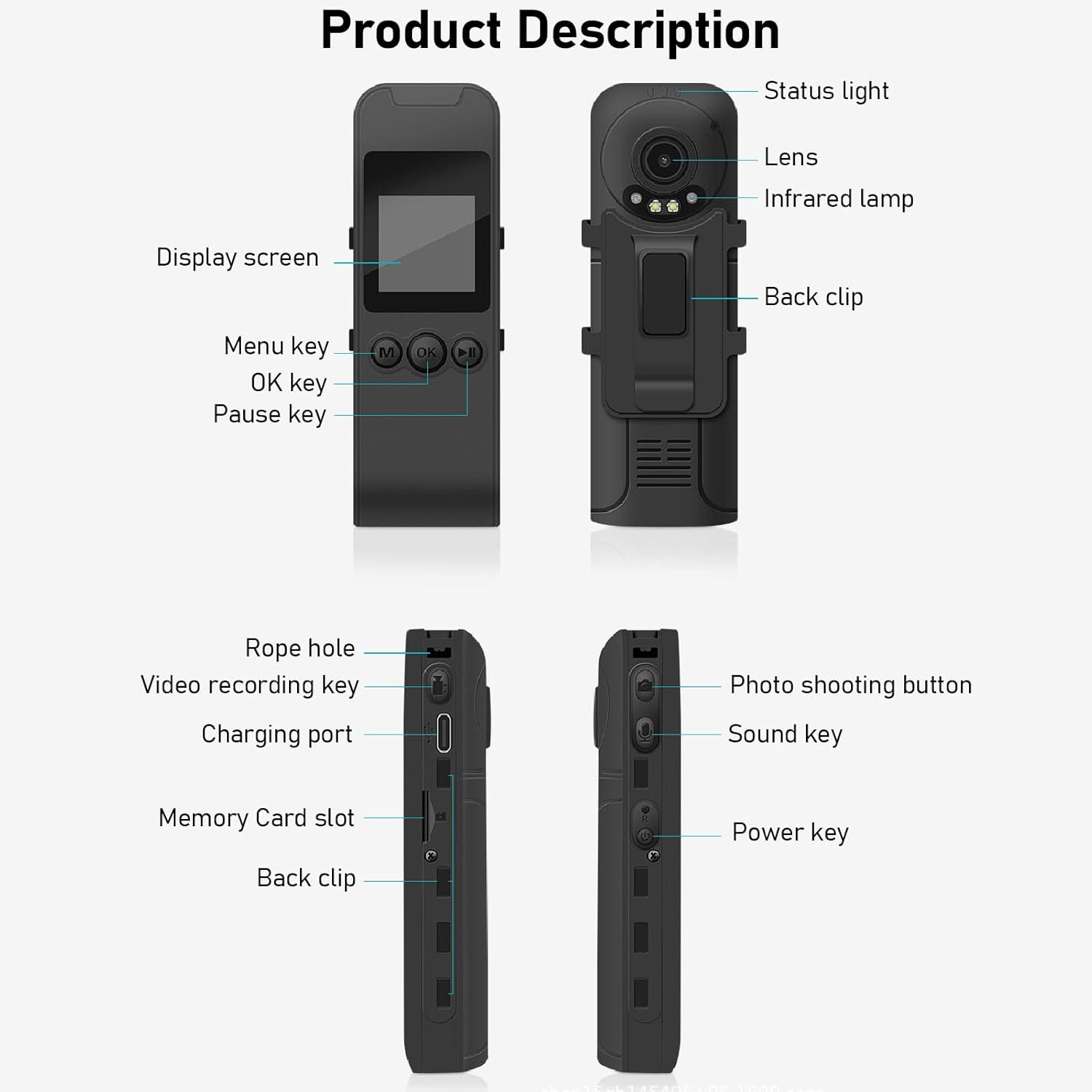
Figure 3: Labeled components of the Cuifati Mini Body Camera.
- סטאַטוס ליכט: Indicates device status (e.g., recording, charging).
- לענס: Main camera lens for video and photo capture.
- ינפראַרעד לamp: Provides illumination for night vision.
- צוריק קליפ: For attaching the camera to clothing or other surfaces.
- ווייַז פאַרשטעלן: 1.3-inch LCD for live view, פּלייבאַק, און מעניו נאַוויגאַציע.
- Menu Key (M): אַקסעס די סעטטינגס פון די מיטל.
- OK שליסל: Confirms selections or starts/stops functions.
- פּאַוז שליסל: Pauses playback or recording.
- שטריק לאָך: Attachment point for the lanyard.
- Video Recording Key: הייבט אן און שטעלט אפ ווידעא רעקארדירונג.
- טשאַרדזשינג פּאָרט (טיפּ-C): פֿאַר אָפּלאָדן דעם מיטל און פֿאַרבינדן עס צו אַ קאָמפּיוטער.
- זכּרון קאָרט שפּעלטל: אַרײַנשטעלן די מיקראָSD קאַרטל פֿאַר סטאָרידזש.
- Photo Shooting Button: כאַפּט נאָך בילדער.
- Sound Key: Controls audio recording.
- מאַכט שליסל: טורנס די מיטל אויף אָדער אַוועק.
סעטאַפּ
1. טשאַרדזשינג די באַטערי
Before first use, fully charge the camera's built-in lithium-ion battery. Connect the camera to a power source using the provided Type-C USB cable. The status light will indicate charging status. A full charge provides approximately 20 hours of work time and 10 hours of video recording.
Figure 4: Built-in 1200mAh battery for extended use.
2. אַרייַנלייגן אַ זכּרון קאָרט
The camera supports up to a 256GB memory card (not included). Locate the memory card slot on the side of the camera. Gently insert the microSD card with the gold contacts facing down until it clicks into place. To remove, push the card in slightly until it springs out.

Figure 5: Memory card slot for storage expansion.
אַפּערייטינג ינסטראַקשאַנז
1. פּאָווערינג אויף / אויסגעלאשן
- צו מאַכט אויף: Press and hold the Power Key until the display screen illuminates.
- צו מאַכט אַוועק: Press and hold the Power Key until the device shuts down.
2. ווידעא רעקאָרדינג
The camera records in 1440P HD at 30 frames per second with a 120° wide-angle lens and infrared night vision.
- צו אָנהייבן רעקאָרדינג: Press the Video Recording Key. The status light will change, and a recording indicator will appear on the screen.
- צו האַלטן רעקאָרדינג: Press the Video Recording Key again.
- שלייף רעקאָרדינג: The camera supports loop recording, automatically overwriting the oldest files ווען די זכּרון קאָרט איז פול.
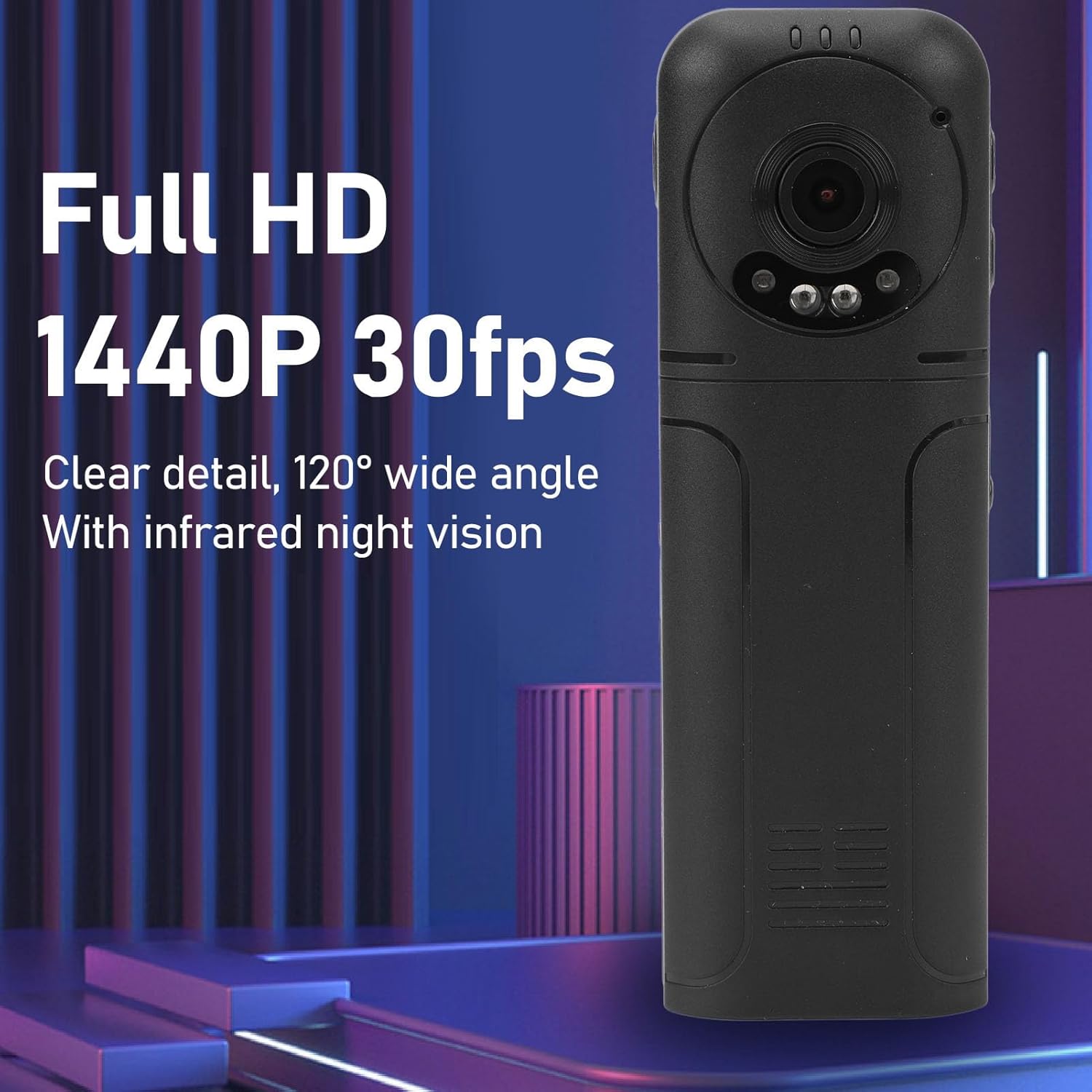
Figure 6: 1440P HD video recording with night vision.
3. פאָטאָ נעמען
- צו נעמען אַ פאָטאָ: In standby mode, press the Photo Shooting Button.
4. אַודיאָ רעקאָרדינג
- To Start Audio Recording: Press the Sound Key.
- To Stop Audio Recording: Press the Sound Key again.

Figure 7: Audio recording functionality.
5. פּלייבאַק און File פאַרוואַלטונג
The 1.3-inch LCD screen supports live playback, browsing, and pausing of videos, photos, and recordings directly on the device.

Figure 8: 1.3-inch color screen for on-device playback.
- On-Device Playback: Use the Menu, OK, and Pause keys to navigate and play files אויף דעם עקראַן.
- קאַנעקטינג צו קאָמפּיוטער: Connect the camera to a computer via the Type-C USB cable to transfer, view, אדער אויסמעקן files.
- OTG פונקציע: If your mobile phone supports OTG, you can connect the camera directly to your phone for playback and file פאַרוואַלטונג.
וישאַלט
1. רייניקונג
- Use the provided cleaning cloth or a soft, dry cloth to wipe the camera body and lens.
- ניצט נישט קיין פליסיקע רייניגער אדער סאָלווענטן, ווייל זיי קענען שאַטן דעם אַפּאַראַט.
2. סטאָרידזש
- האַלט די קאַמעראַ אין אַ קיל, טרוקן אָרט אַוועק פון דירעקט זונשייַן און עקסטרעמע טעמפּעראַטורן.
- Remove the memory card if storing for extended periods.
טראָובלעשאָאָטינג
אויב איר טרעפט פּראָבלעמען מיט אייער קאַמעראַ, זעט די פאלגענדע געוויינטלעכע פּראָבלעמען און לייזונגען:
| פּראָבלעם | לייזונג |
|---|---|
| די קאַמעראַ גייט נישט אָן. | זיכער מאַכן אַז די באַטאַרייע איז אויפגעלאָדן. פֿאַרבינדט עס צו אַ מאַכט מקור און פּרוּווט ווידער. |
| Cannot record video/photo. | Check if a memory card is inserted correctly and has sufficient free space. Format the memory card if necessary (this will erase all data). |
| זכּרון קאַרטל נישט דערקענט. | Ensure the memory card is inserted correctly. Try a different compatible memory card. Format the card using the camera's menu or a computer. |
| Poor video/audio quality. | Ensure the lens is clean. Check lighting conditions. For audio, ensure the microphone is not obstructed. |
| די דעווייס פרירט זיך אדער ווערט נישט-רעאגירנדיק. | Press and hold the Power Key for 10-15 seconds to force a restart. |
ספּעסאַפאַקיישאַנז
Below are the technical specifications for the Cuifati Mini Body Camera (Model CUIFATI2vg0ri8moa):
- נומער טיפּ: Wearable Camera
- מאַטעריאַל: ABS
- נאַכט זעאונג: 2pcs Night Vision Light Beads
- ווידעא האַכלאָטע: 1440P (Maximum)
- ראַם קורס: 30FPS
- באַטערי טיפּ: ליטהיום יאָן באַטערי
- באַטאַרייע קאַפּאַציטעט: 1200mAh (איינגעבויט)
- Storage Support: Maximum 256GB Memory Card (Not Included)
- טשאַרדזשינג פּאָרט: טיפּ-C
- APP נאָמען: For RoadCam (if applicable for advanced features)
- מאָדעל נאָמען: CUIFATI2vg0ri8moa
- פאַבריקאַנט: CUIFATI
וואָראַנטי און שטיצן
For warranty information or technical support, please refer to the documentation provided at the time of purchase or contact Cuifati customer service directly. Keep your purchase receipt as proof of purchase.