
1. הקדמה
The ZOYI VC17B+ is a high-performance, True-RMS digital multimeter designed for accurate measurement of various electrical parameters. It features a large, backlit display for clear readings in diverse environments and a robust design suitable for electricians, students, and maintenance professionals. This manual provides essential information for the safe and effective operation of your device.
די הויפּט פֿעיִקייטן אַרייַננעמען:
- אַק/דק חלקtagE און קראַנט מעזשערמאַנט
- Resistance, Capacitance, and Frequency measurement
- Continuity and Diode testing
- טעמפּעראַטור מעזשערמאַנט
- פליכט ציקל
- Additional functions: True-RMS, Data Hold, Backlight, Low Battery Alert, Auto Power Off, MAX/MIN, Relative Measurement (REL)
2. זיכערקייַט אינפֿאָרמאַציע
Always adhere to safety precautions when using any electrical testing equipment. Failure to do so may result in electric shock, injury, or damage to the meter or equipment under test.
- לייענען דעם מאַנואַל ונ דורך איידער אָפּעראַציע.
- The ZOYI VC17B+ is rated for קאַץ יוו 600 וו און קאַץ III 600 וו. Do not exceed these voltagE לימאַץ.
- קאָנטראָלירט די טעסט דראָטן פֿאַר שאָדן איידער יעדן באַנוץ. פאַרבייטן אויב די איזאָלאַציע איז צעבראָכן.
- Do not use the meter if it appears damaged or is not operating correctly.
- Ensure the function dial is set to the correct range before making measurements.
- ויסמיידן ארבעטן אַליין.
- ניצן וואָרענען ווען ארבעטן מיט וואָלtagהעכער 30V AC RMS, 42V שפּיץ, אדער 60V DC, ווייל די שטעלן פאר א שאָק געפאַר.
- טוישט באַלד די באַטעריעס ווען דער אינדיקאַטאָר פֿאַר נידעריקע באַטעריע דערשיינט.
3. פּעקל אינהאַלט
באַשטעטיקן אַז אַלע זאכן זענען פאַראַן אין דיין פּעקל:
- ZOYI VC17B+ Digital Multimeter
- טעסט לידז (2)
- אַאַ באַטעריז (2)
- Thermocouple Probe (1)
- באַניצער מאַנואַל (דעם דאָקומענט)
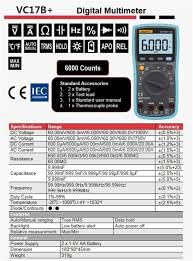
Figure 3.1: Standard Accessories included with the ZOYI VC17B+ Multimeter.
4. פּראָדוקט איבערview
Familiarize yourself with the components of the ZOYI VC17B+ multimeter:
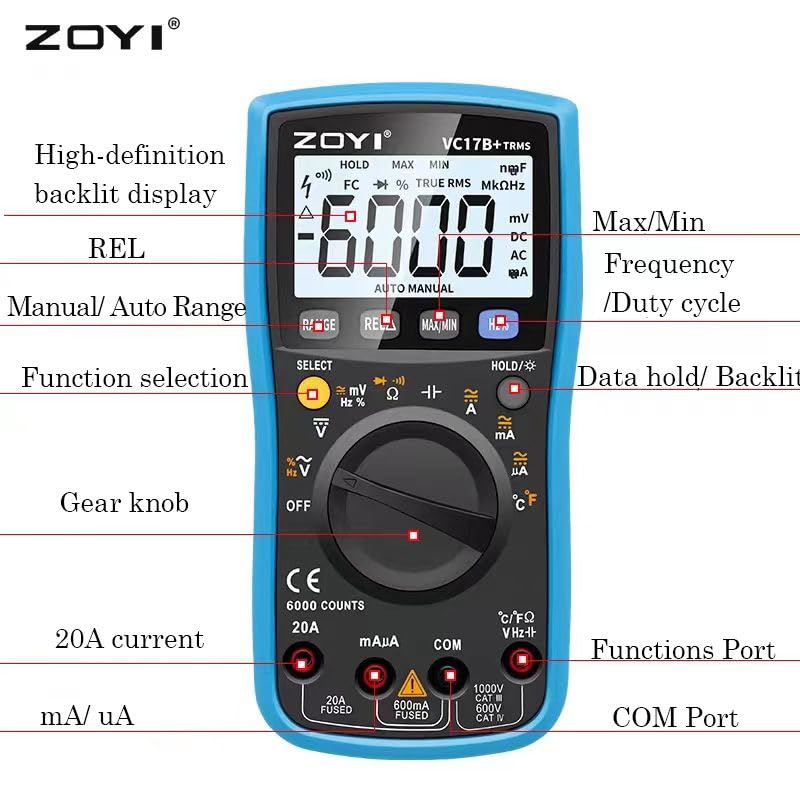
Figure 4.1: ZOYI VC17B+ Multimeter Components.
- ווייַז: Large, high-definition backlit LCD for reading measurements.
- Function Dial (Gear Knob): Used to select the desired measurement function.
- אַרייַנשרייַב דזשאַקס:
- COM: געמיינזאמע (נעגאַטיווע) אַרייַנשרייַב פֿאַר אַלע מעסטונגען.
- VHzΩ: פּאָזיטיווער אַרייַנגאַנג פֿאַר וואָלtage, Frequency, Resistance, Capacitance, Diode, Continuity, and Temperature measurements.
- mA/uA: פּאָזיטיווער אינפוט פֿאַר מיליampערע און מיקראָampere current measurements (fused).
- 20א: Positive input for 20 Ampere current measurements (fused).
- קנעפּלעך:
- קייט: Manual/Auto Range selection.
- REL: רעלאַטיווע מעסטונג פונקציע.
- מאַקס/מין: רעקאָרדירט מאַקסימום און מינימום ווערטן.
- Hz%: Selects Frequency or Duty Cycle.
- HOLD/☀: Data Hold function and Backlight activation.
- אויסקלייַבן: Toggles between functions on a single dial position (e.g., AC/DC, Diode/Continuity).
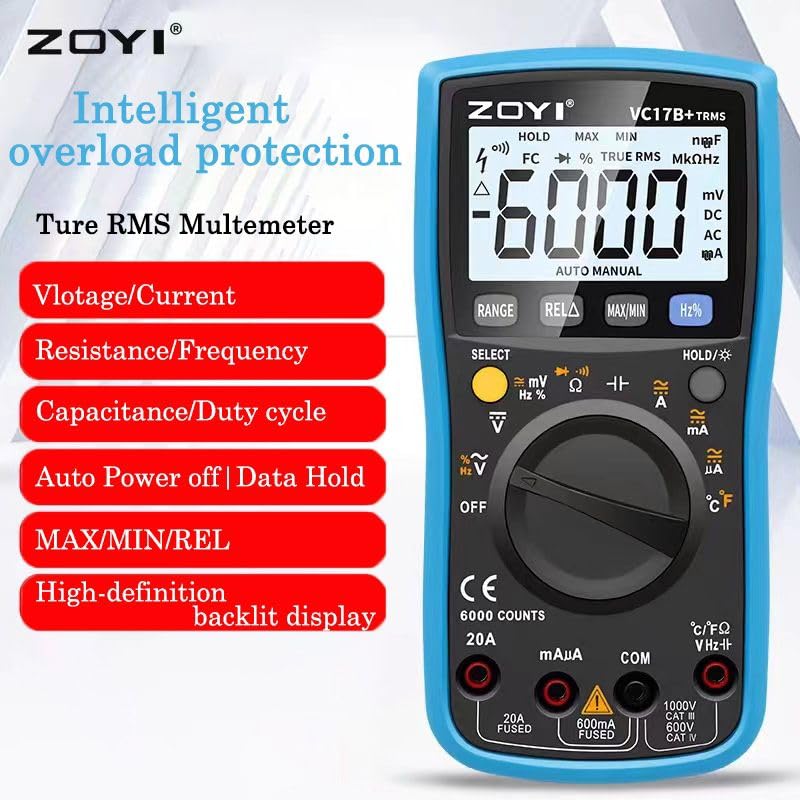
Figure 4.2: ZOYI VC17B+ Multimeter Front View.
5. סעטאַפּ
5.1 באַטאַרייע ייַנמאָנטירונג
- זיכער מאַכן אַז דער מולטימעטער איז אויסגעלאָשן.
- געפינט די באַטעריע אָפּטייל אויף דער צוריקזייט פון דעם מעטער.
- ניצן אַ שרויפנ - ציער צו עפענען די באַטאַרייע דעקן.
- Insert two AA batteries, observing correct polarity (+/-).
- פאַרבייַטן די באַטאַרייע דעקן און באַוואָרענען עס מיט די שרויף.
5.2 פֿאַרבינדן טעסט דראָטן
Always connect the black test lead to the COM jack. Connect the red test lead to the appropriate input jack based on the measurement type:
- VHzΩ: פֿאַר וואָלtage, Resistance, Capacitance, Frequency, Diode, Continuity, and Temperature.
- mA/uA: For small current measurements.
- 20א: For large current measurements (up to 20A).
5.3 ניצן די קיקסטאַנד
The multimeter includes a built-in kickstand for convenient hands-free operation. Gently pull out the kickstand from the back of the unit to prop it up at an angle. Push it back in when not needed.


Figure 5.1: Multimeter back view (left) and with kickstand deployed (right).
6. אַפּערייטינג ינסטרוקטיאָנס
6.1 אַלגעמיינע אָפּעראַציע
- מאַכט אויף / אַוועק: Rotate the function dial from 'OFF' to any measurement function to turn the meter ON. Rotate back to 'OFF' to power OFF.
- Auto Power Off (APO): The meter will automatically power off after approximately 15 minutes of inactivity to conserve battery life. Press any button or rotate the function dial to wake it up.
- באַקלייט: Press and hold the 'HOLD/☀' button to turn the backlight ON or OFF.
- דאַטן האַלטן: Press the 'HOLD/☀' button briefly to freeze the current reading on the display. Press again to release.
- אויטאָמאַטיש/מאַנועל ריינדזשינג: The meter defaults to auto-ranging. Press the 'RANGE' button to switch to manual ranging. In manual ranging, press 'RANGE' repeatedly to cycle through available ranges. Press and hold 'RANGE' to return to auto-ranging.
- SELECT קנעפּל: In certain dial positions (e.g., Voltage, Diode/Continuity), press 'SELECT' to toggle between AC/DC, Diode Test, or Continuity Test.
6.2 ספּעציפֿישע מעסטונג פֿונקציעס
6.2.1 חלקtagמעסטונג (AC/DC)
- Insert the black test lead into the COM jack and the red test lead into the VHzΩ jack.
- Rotate the function dial to the 'V~' (AC Voltagה) אדער 'V=' (DC באַנדtage) position. If both are on one position, use 'SELECT' to choose.
- פֿאַרבינדט די טעסט פּראָובז פּאַראַלעל צום קרייַז אָדער קאָמפּאָנענט וואָס מען דאַרף מעסטן.
- לייענען דעם חלקtagE ווערט אויף די אַרויסווייַזן.
6.2.2 קראַנט מעסטונג (AC/DC)
וואָרענען: Never connect the meter in parallel to a voltagדי מקור ביים מעסט שטראָם. דאָס קען אויפרייסן די פיוז אָדער באַשעדיגן דעם מעטער.
- Insert the black test lead into the COM jack.
- For mA/uA measurements, insert the red test lead into the mA/uA jack. For 20A measurements, insert the red test lead into the 20A jack.
- Rotate the function dial to the appropriate 'A~' (AC Current) or 'A=' (DC Current) position (mA, uA, or 20A). Use 'SELECT' if needed.
- Open the circuit and connect the test probes in series with the load.
- לייענט דעם איצטיקן ווערט אויפן דיספלעי.
6.2.3 קעגנשטעל מעסטונג (Ω)
וואָרענען: זיכער מאַכן אַז די קרייַז איז דעענערדזשייזד און אַלע קאַפּאַסיטאָרן זענען דיסטשאַרדזשד איידער איר מעסט די קעגנשטעל.
- Insert the black test lead into the COM jack and the red test lead into the VHzΩ jack.
- Rotate the function dial to the 'Ω' position.
- פֿאַרבינדט די טעסט פּראָובז אַריבער דעם קאָמפּאָנענט וואָס מען וויל מעסטן.
- לייענען די קעגנשטעל ווערט אויף די אַרויסווייַזן.
6.2.4 קאָנטינויטי טעסט
- Insert the black test lead into the COM jack and the red test lead into the VHzΩ jack.
- Rotate the function dial to the 'Ω' position and press 'SELECT' until the continuity symbol (buzzer icon) is displayed.
- פֿאַרבינדט די טעסט פּראָובז אַריבער דעם קרייַז אָדער קאָמפּאָנענט.
- If continuity exists (resistance below approx. 50Ω), the buzzer will sound.
6.2.5 דייאָוד טעסט
- Insert the black test lead into the COM jack and the red test lead into the VHzΩ jack.
- Rotate the function dial to the 'Ω' position and press 'SELECT' until the diode symbol (->|) is displayed.
- פֿאַרבינדט די רויטע פּראָבע צו דער אַנאָדע און די שוואַרצע פּראָבע צו דער קאַטאָדע פֿון דער דיאָד. דער עקראַן וועט ווײַזן דעם פֿאָרווערטס וואָלומען.tagאון קאַפּ.
- Reverse the probes. The display should show 'OL' (Open Loop) for a good diode.
6.2.6 Capacitance Measurement (F)
וואָרענען: Discharge capacitors completely before testing to prevent damage to the meter.
- Insert the black test lead into the COM jack and the red test lead into the VHzΩ jack.
- Rotate the function dial to the 'F' (Capacitance) position.
- פאַרבינדן די פּראָבע פּראָבעס אַריבער די קאַפּאַסאַטער.
- לייענען די קאַפּאַסאַטאַנס ווערט אויף די אַרויסווייַזן.
6.2.7 Frequency Measurement (Hz) and Duty Cycle (%)
- Insert the black test lead into the COM jack and the red test lead into the VHzΩ jack.
- Rotate the function dial to the 'Hz%' position.
- Press the 'Hz%' button to toggle between Frequency (Hz) and Duty Cycle (%).
- Connect the test probes in parallel to the signal source.
- לייענט די אָפטקייט אָדער דוטי ציקל ווערט אויף דעם דיספּליי.
6.2.8 Temperature Measurement (°C/°F)
- Insert the thermocouple probe into the VHzΩ (positive) and COM (negative) jacks, observing polarity.
- Rotate the function dial to the '°C/°F' position.
- The display will show the ambient temperature. Place the thermocouple tip on or near the object whose temperature is to be measured.
- Read the temperature value. The unit can be toggled between Celsius and Fahrenheit using the 'SELECT' button if available in this mode.
6.2.9 מאַקס/מין פונקציע
In any measurement mode, press the 'MAX/MIN' button to activate this function. The meter will display the maximum or minimum reading recorded since the function was activated. Press again to cycle between MAX, MIN, and current reading. Press and hold to exit.
6.2.10 REL (Relative Measurement) Function
Press the 'REL' button to store the current reading as a reference value. Subsequent measurements will be displayed as the difference from this reference value. Press 'REL' again to exit this mode.
7. וישאַלט
7.1 רייניקונג
ווישט אויס דעם מעטער מיט אדווערטייזמענטamp שטאָף און מילדן וואַשפּולווער. ניצט נישט קיין שוואַרצע מאַטעריאַלן אָדער סאָלווענטן. מאַכט זיכער אַז דער מעטער איז גאָר טרוקן איידער נוצן.
7.2 באַטערי פאַרבייַט
When the low battery indicator appears on the display, replace the batteries as described in Section 5.1. Use two new AA batteries.
7.3 קאָריק פאַרבייַט
אויב די קראַנט מעסטונג פונקציע פיילז, קען די פיוז דאַרפֿן צו זיין ריפּלייסט. זעט די ספּעסיפיקאַציעס פֿאַר די ריכטיקע פיוז טיפּ און שאַץ. פיוז ריפּלייסמאַנט זאָל נאָר דורכגעפירט ווערן דורך קוואַליפֿיצירטע פּערסאָנעל.
7.4 סטאָרידזש
אויב דער מעטער ווערט נישט גענוצט פאר א לענגערע צייט, נעמט ארויס די באַטעריעס כדי צו פארמיידן ליקאַדזש. האַלט דעם מעטער אין א קיל, טרוקן אָרט, אַוועק פון דירעקט זונשייַן און עקסטרעמע טעמפּעראַטורן.
8. טראָובלעשאָאָטינג
| פּראָבלעם | מעגלעך סיבה | לייזונג |
|---|---|---|
| קיין דיספּלעי אָדער טונקעל דיספּלעי | Dead or low batteries; Incorrect battery installation. | טוישן באַטעריעס; קאָנטראָלירן די פּאָלאַריטעט פון די באַטעריעס. |
| קיין קראַנט מעסטונג | Blown fuse; Incorrect input jack used. | Replace fuse (if qualified); Ensure red lead is in mA/uA or 20A jack. |
| 'OL' (Overload) displayed | די מעסטונג איז גרעסער ווי די אויסגעקליבענע קייט אדער מעטער'ס מאקסימום קאפאציטעט. | Switch to a higher range (if in manual mode); Ensure measurement is within meter's limits. |
| ומפּינקטלעך רידינגז | Poor test lead connection; External interference; Damaged meter. | Check connections; Move away from strong electromagnetic fields; Contact support if meter is damaged. |
9. ספּעסאַפאַקיישאַנז
Detailed technical specifications for the ZOYI VC17B+ Digital Multimeter:
9.1 אַלגעמיינע ספּעסאַפאַקיישאַנז
- סאָרט: ZOYI
- מאָדעל נומער: VC17B+
- ווייַז: 6000 Counts, Large Backlit LCD
- אמת-RMS: יא
- מאַכט מקור: 2 רענטגענ אַאַ באַטעריז
- זיכערהייט רייטינג: CAT IV 600V, CAT III 600V
- דימענשאַנז (L x W x H): 180 X 90 X 45 מם (בעערעך)
- וואָג: בעערעך 310 ג (אָן באַטעריז)
- אַוטאָ מאַכט אַוועק: יא
- דאַטן האַלטן: יא
- נידעריק באַטערי אַלערט: יא

Figure 9.1: Physical Dimensions of the Multimeter.
9.2 עלעקטריקאַל ספּעסאַפאַקיישאַנז
Figure 9.2: Detailed Electrical Specifications.
| פֿונקציע | קייט | אַקיעראַסי |
|---|---|---|
| DC Voltage | 60.00mV/600.0mV/6.000V/60.00V/600.0V/1000V | ±(0.5%+3) |
| AC Voltage | 60.00mV/600.0mV/6.000V/60.00V/600.0V/750V | ±(1.0%+3) |
| DC Current | 600.0uA/6000uA/60.00mA/600.0mA/6.000A/20.00A | ±(1.2%+3) |
| AC קראַנט | 600.0uA/6000uA/60.00mA/600.0mA/6.000A/20.00A | ±(1.5%+3) |
| קעגנשטעל | 600.0Ω/6.000kΩ/60.00kΩ/600.0kΩ/6.000MΩ/60.00MΩ | ±(1.0%+3) |
| קאַפּאַסיטאַנס | 9.999nF/99.99nF/999.9nF/9.999uF/99.99uF/999.9uF/9.999mF | ±(5.0%+20) |
| אָפטקייַט | 9.999Hz/99.99Hz/999.9Hz/9.999kHz/99.99kHz/999.9kHz/9.999MHz | ±(0.1%+2) |
| טעמפּעראַטור | -20°C ~ 1000°C / -4°F ~ 1832°F | ±(2.5%+5) |
| דיאָד/קאָנטינויִטעט | יא | יא |
10. וואָראַנטי און שטיצן
For warranty information, please refer to the warranty card included with your product or visit the official ZOYI website. For technical support or service inquiries, please contact your retailer or the manufacturer directly.
- פאַבריקאַנט: ZOYI & ZOTEK Instruments
- Packer Contact Information: Skyking Instruments, Mumbai, INDIA