
1. הקדמה
א דאנק פארן קויפןasing the STN-28 Colorful Cat Ear Luminous Bluetooth Headset. This headset combines wireless audio technology with a unique luminous cat ear design, offering a comfortable and immersive listening experience. This manual provides essential information on how to set up, operate, and maintain your new headset.
2. זיכערקייַט אינפֿאָרמאַציע
- שטעלט נישט אויס דעם כעדסעט צו עקסטרעמע טעמפּעראַטורן, הומידיטי, אדער קאָראָזיווע סאַבסטאַנצן.
- פֿאַרמײַדט צו לאָזן פאַלן אָדער אויסשטעלן דעם כעדסעט צו שטאַרקע קלאַפּן.
- נעמט נישט אויס דעם כעדסעט אליין אדער פרובירט עס נישט צו פאררעכטן. דאס וועט בטל מאכן די גאראנטיע.
- רייניקט דעם כעדסעט מיט אַ ווייכן, טרוקענעם שטאָף. ניצט נישט קיין שאַרפע כעמיקאַלן אדער שרײַבנדיקע מאַטעריאַלן.
- פארלענגערט הערן ביי הויכע וואליום לעוועלס קען שאפן געהער שאדן. שטעלט אפ דעם וואליום צו א זיכערן לעוועל.
3. פּעקל אינהאַלט
- STN-28 Wireless Headset Body
- וסב טשאַרדזשינג קאַבלע
- באַניצער מאַנואַל (דעם דאָקומענט)
4. פּראָדוקט איבערview און קאָנטראָלס
Familiarize yourself with the headset's components and control buttons.
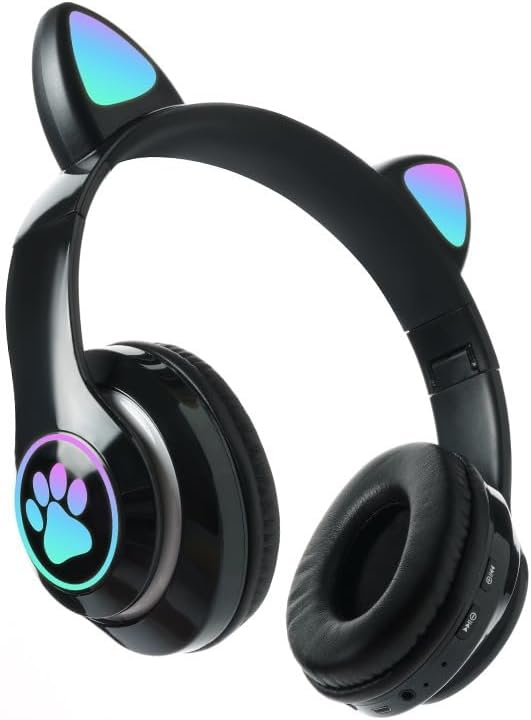
בילד: פראָנט view of the STN-28 headset in black, showcasing the luminous cat ears and paw print design on the earcups.

Image: Two STN-28 headsets, one in purple and one in pink, displayed on a wooden stand, highlighting their colorful design and cat ear feature.
Control Buttons (Typical Layout - Refer to your specific model for exact placement):
- מאַכט קנעפּל: אן/אויס, שפילן/פאוזן, ענטפערן/ענדיגן רוף.
- באַנד אַרויף (+): פֿאַרגרעסערן די קול, נעקסטע ליד (לאַנג דריקן).
- באַנד אַראָפּ (-): פֿאַרקלענערן די באַנד, פֿריִערדיקע ליד (לאַנג דריקן).
- מאָדע קנעפּל (M): Switch between Bluetooth and TF Card mode.
- וסב טשאַרדזשינג פּאָרט: פֿאַר טשאַרדזשינג די כעדסעט.
- טף קאַרד שפּעלטל: Insert external TF card for music playback.
- LED ינדיקאַטאָר ליכט: Shows power, connection, and charging status.
5. סעטאַפּ
5.1 אויפלאָדן דעם כעדסעט
- Connect the USB charging cable to the headset's USB charging port.
- פֿאַרבינדט דעם אַנדערן עק פֿונעם קאַבל צו אַ USB מאַכט מקור (למשל, קאָמפּיוטער USB פּאָרט, USB וואַנט אַדאַפּטער).
- The LED indicator light will show a red light during charging.
- A full charge takes approximately 2 hours. The red light will turn off when fully charged.
Note: Ensure the headset is fully charged before first use for optimal battery life.
5.2 פּאַוערינג אויף / אַוועק
- צו מאַכט אויף: Press and hold the Power button for a few seconds until the LED indicator lights flash red and blue.
- צו מאַכט אַוועק: Press and hold the Power button for a few seconds until the LED indicator light turns off.
5.3 בלועטאָאָטה פּערינג
- Ensure the headset is fully charged and powered off.
- Press and hold the Power button until the LED indicator lights flash red and blue alternately. This indicates the headset is in pairing mode.
- אויף אייער דעווייס (סמאַרטפאָן, טאַבלעט, לאַפּטאָפּ), אַקטיווירט בלועטוט און זוכט פֿאַר פֿאַראַן דעווייסעס.
- Select "STN-28" or "LX-B39C" from the list of found devices.
- Once successfully paired, the LED indicator light on the headset will flash blue slowly.
Note: The headset supports Bluetooth 5.0+EDR for stable and efficient connection.
6. אַפּערייטינג ינסטרוקטיאָנס
6.1 Music Playback (Bluetooth Mode)
- שפּיל / פּויזע: קורץ דריקן די מאַכט קנעפּל.
- באַנד אַרויף: דריק קורץ דעם "+" קנעפל.
- באַנד אַראָפּ: דריק קורץ דעם "-" קנעפל.
- ווייַטער שפּור: לאַנג דריקן די "+" קנעפּל.
- פֿריִערדיקע שפּור: לאַנג דריקן די "-" קנעפּל.
6.2 טעלעפאָן רופן
- ענטפער רופן: דריקט קורץ דעם פּאַוער קנעפּל ווען אַן אינקאַמינג רוף קלינגט.
- סוף רופן: דריק קורץ דעם פּאַוער קנעפּל בעת אַ רוף.
- אָפּוואַרפן רופן: לאנג דריק דעם פּאַוער קנעפּל ווען אַן אינקאַמינג רוף קלינגט.
6.3 TF קאַרטל פּלייבאַק
- אַרײַנשטעלן אַ TF (MicroSD) קאַרטל מיט MP3 אַודיאָ fileס אין די TF קאָרט שפּעלטל.
- The headset will automatically switch to TF card playback mode, or you may need to short press the "M" (Mode) button to switch.
- Use the Play/Pause, Volume Up/Down, and Next/Previous Track buttons as described in section 6.1.
6.4 Luminous Cat Ear Feature
The cat ears and paw print on the earcups feature luminous accents. This feature is typically activated automatically when the headset is powered on. There is no specific control mentioned for this feature, implying it's always on when the headset is active.
7. וישאַלט און קער
- רייניקונג: Wipe the headset regularly with a soft, dry, lint-free cloth. Do not use liquid cleaners or sprays.
- סטאָרידזש: When not in use, store the headset in a cool, dry place away from direct sunlight and extreme temperatures.
- באַטערי זאָרגן: כדי צו פארלענגערן די לעבן פון די באַטעריע, זאָלט איר נישט אָפט אויסלאָדן די באַטעריע. לאָדן די כעדסעט רעגולער, אפילו אויב איר ניצט עס נישט פאר לענגערע צייטן.
- וואַסער קעגנשטעל: The headset is listed as "Waterproof". While it offers protection against water, avoid submerging it in water or exposing it to heavy rain for prolonged periods to prevent damage.
8. טראָובלעשאָאָטינג
| פּראָבלעם | מעגלעך סיבה | לייזונג |
|---|---|---|
| כעדסעט גייט נישט אן. | נידעריק באַטאַרייע. | לאָדט אויף דעם כעדסעט גאָר (אומגעפער 2 שעה). |
| קען נישט צופּאַסן מיטן דעווייס. | כעדסעט נישט אין פּערינג מאָדע; בלועטוט אויסגעלאָשן אויף דעם מיטל; מיטל צו ווייט. | Ensure headset is flashing red/blue; enable Bluetooth on device; keep devices within 10 meters. Try forgetting the device on your phone and re-pairing. |
| קיין קלאַנג אָדער נידעריקע וואָלומען. | Volume too low on headset or device; headset not connected. | Increase volume on both headset and connected device. Ensure headset is properly paired. |
| די TF קארטל שפילט נישט. | קאַרטל נישט ריכטיק אַרײַנגעשטעלט; נישט געשטיצט file format; headset not in TF card mode. | Reinsert TF card; ensure files are MP3; press 'M' button to switch to TF card mode. |
9. ספּעסאַפאַקיישאַנז
| מאָדעל | STN-28 / LX-B39C |
| ווערינג מעטאָד | Head-mounted folding |
| בלועטאָאָטה ווערסיע | בלועטאָאָטה 5.0 + EDR |
| Supported Bluetooth Modes | A2DP 1.2, AVRCP 1.0, HSP, HSF 1.5 |
| באַטאַרייע קאַפּאַציטעט | 400mAh Polymer A-grade Lithium Battery |
| Speaker Size / Impedance | 40מם / 32Ω |
| טראַנסמיסיע ראַנגע | ≤10 meters (33 feet) |
| טשאַרדזשינג צייט | בעערעך. 2 שעה |
| מוזיק פּלייַבאַקק צייט | ≤6 שעה |
| רעדן צייט | ≤6 שעה |
| סטאַנדביי צייט | 200 שעה |
| אָפטקייַט ראַנגע | 20 הערץ - 20,000 הערץ |
| וואַסער קעגנשטעל מדרגה | וואָטערפּרוף |
| קאָנטראָל טיפּ | Media Control, Touch (via buttons) |
| ספּעציעלע פֿעיִקייטן | Luminous Cat Ears, TF Card Playback |
10. וואָראַנטי און שטיצן
This product comes with a standard manufacturer's warranty. For specific warranty terms, conditions, and duration, please refer to the warranty card included with your purchase or contact the retailer where you purchased the product.
For technical support or inquiries, please contact your retailer or the manufacturer directly. Keep your purchase receipt as proof of purchase for warranty claims.