
STN28
STN-28 Colorful Cat Ear Luminous Wireless Bluetooth Headset User Manual
Model: LX-B39C | Brand: Generic
הקדמה
This manual provides detailed instructions for the operation, maintenance, and troubleshooting of your new STN-28 Colorful Cat Ear Luminous Wireless Bluetooth Headset. Please read this manual thoroughly before using the product to ensure proper function and longevity.
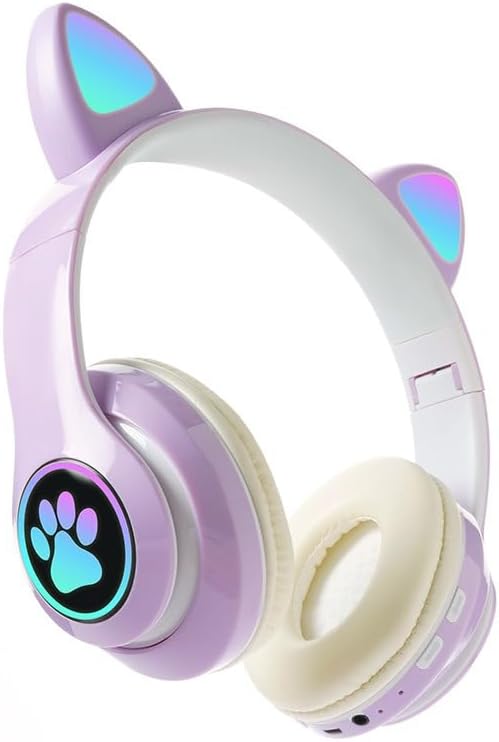
Image: The STN-28 Colorful Cat Ear Luminous Wireless Bluetooth Headset in light purple, featuring glowing cat ears and a paw print design on the ear cup.
פּראָדוקט פֿעיִקייטן
- מאָדערן פּלאַן: Features unique cat ear design with luminous accents.
- ווירעלעסס קאַנעקטיוויטי: Bluetooth 5.0+EDR for seamless pairing.
- באַקוועם פּאַסיק: Padded ear cups and adjustable headband.
- אַודיאָ קאָנטראָלס: Integrated buttons for music, volume, and calls.
- פּאָרטאַטיוו: Lightweight and foldable head-mounted design.
- TF Card Playback: Supports playing songs from an external TF card.
פּעקל אינהאַלט
ביטע טשעק די פּאַקעט פֿאַר די פאלגענדע זאכן:
- STN-28 Wireless Headset Body
- וסב טשאַרדזשינג קאַבלע
- באַניצער מאַנואַל (דעם דאָקומענט)
סעטאַפּ
טשאַרדזשינג די העאַדסעט
Before first use, fully charge the headset. Connect the provided USB charging cable to the headset's USB charging port and to a compatible USB power source (e.g., computer USB port, USB wall adapter).
- The indicator light will show red during charging.
- די טשאַרדזשינג צייט איז בעערעך 2 שעה.
- The red light will turn off once the headset is fully charged.
The headset is equipped with a rechargeable 3.7V/400MAH polymer A-grade lithium battery with overcharge and over-discharge protection.
מאַכט אויף / אַוועק
- צו מאַכט אויף: Press and hold the power button until the indicator lights flash red and blue.
- צו מאַכט אַוועק: דריק און האלט דעם מאַכט קנעפּל ביז די אינדיקאַטאָר ליכטער גייען אויס.
אַפּערייטינג ינסטראַקשאַנז
בלועטאָאָטה פּערינג
- Ensure the headset is fully charged and powered off.
- Press and hold the power button for approximately 3-5 seconds until the indicator lights flash red and blue alternately. This indicates the headset is in pairing mode.
- אויף אייער דעווייס (סמאַרטפאָן, טאַבלעט, קאָמפּיוטער), אַקטיווירט בלועטוט און זוכט פֿאַר פֿאַראַן דעווייסעס.
- Select "STN-28" or "LX-B39C" from the list of found devices.
- Once successfully paired, the indicator light on the headset will flash blue slowly.
- The headset supports Bluetooth 5.0+EDR and modes A2DP 1.2, AVRCP 1.0, HSP, HSF 1.5.
The transmission range is up to 10 meters (33 feet) in an open environment.
Music Playback and Call Control
The headset features integrated controls for media and calls. Specific button functions may vary slightly, but generally include:
- שפּיל / פּויזע: דריק איין מאל דעם מולטי-פונקציע קנעפל.
- ווייַטער שפּור: לאַנג דריקן די "+" קנעפּל.
- פֿריִערדיקע שפּור: לאַנג דריקן די "-" קנעפּל.
- באַנד אַרויף: דריק קורץ דעם "+" קנעפל.
- באַנד אַראָפּ: דריק קורץ דעם "-" קנעפל.
- ענטפֿערן / סוף רופן: דריק איין מאל דעם מולטי-פונקציע קנעפל בעת אן אנקומענדיקן רוף.
- אָפּוואַרפן רופן: לאַנג דריקן דעם מולטי-פונקציע קנעפּל בעת אַן אינקאַמינג רוף.

בילד: א דעטאַלירטע view of the headset's right ear cup, highlighting the control buttons for media playback and calls, as well as the charging port and TF card slot.
טף קאַרד פּלייַבאַקק
The headset supports playing audio files directly from an external TF (microSD) card. Insert a TF card with your desired music into the designated slot on the headset. The headset will automatically switch to TF card playback mode.
וישאַלט
- רייניקט דעם כעדסעט רעגולער מיט אַ ווייכן, טרוקענעם שטאָף. ניצט נישט קיין שרײַבנדיקע רייניגערס אדער סאָלווענטן.
- פֿאַרמײַדט אויסשטעלן דעם כעדסעט צו עקסטרעמע טעמפּעראַטורן, פֿײַכטקייט, אָדער דירעקטער זון.
- סטאָר די כעדסעט אין אַ קיל, טרוקן אָרט ווען ניט אין נוצן.
- פּרוּווט נישט צו צענעמען אָדער פאַרריכטן דעם כעדסעט אַליין, ווײַל דאָס וועט בטל מאַכן די וואָראַנטי.
- האַלט דעם טשאַרדזשינג פּאָרט פריי פון שטויב און דעבריס.
טראָובלעשאָאָטינג
| פּראָבלעם | מעגלעך סיבה | לייזונג |
|---|---|---|
| כעדסעט גייט נישט אן. | נידעריק באַטאַרייע. | לאָדט אויף דעם כעדסעט פֿאַר מינדעסטנס 2 שעה. |
| קען נישט צופּאַסן מיטן דעווייס. | כעדסעט נישט אין פּערינג מאָדע; בלועטוט אויסגעלאָשן אויף דעם מיטל; מיטל צו ווייט. | Ensure headset is flashing red/blue; enable Bluetooth on device; move device closer (within 10M). |
| קיין געזונט בעשאַס פּלייבאַק. | קול צו נידעריג; כעדסעט נישט פארבונדן; אומרעכטע אודיאָ אויסגאבע אויסגעקליבן אויף דעווייס. | Increase headset/device volume; re-pair headset; check device's audio settings. |
| שלעכטע געזונט קוואַליטעט אָדער דיסקאַנעקשאַנז. | Interference; device too far; low headset battery. | Move away from sources of interference; move closer to device; charge headset. |
ספּעסאַפאַקיישאַנז
| שטריך | דעטאַל |
|---|---|
| מאָדעל | LX-B39C (STN-28) |
| ווערינג מעטאָד | Head-mounted, Folding |
| בלועטאָאָטה ווערסיע | 5.0+עדר |
| Supported Bluetooth Modes | A2DP 1.2, AVRCP 1.0, HSP, HSF 1.5 |
| באַטאַרייע קאַפּאַציטעט | 400 מאַה פּאָלימער ליטהיום באַטערי |
| רעדנער גרייס / ימפּידאַנס | 40מם / 32Ω |
| ריסיווינג סענסיטיוויטי | -84דבם |
| מאַקס טראַנסמיטינג מאַכט | קסנומקסדבם |
| טראַנסמיסיע ראַנגע | ≤10 מעטער |
| טשאַרדזשינג פּאָרט | וסב |
| טשאַרדזשינג צייט | בעערעך. 2 שעה |
| מוזיק פּלייַבאַקק צייט | אַרויף צו 6 שעה |
| רעדן צייט | אַרויף צו 6 שעה |
| סטאַנדביי צייט | 200 שעה |
| ראַש קאָנטראָל | אַקטיוו ראַש קאַנסאַליישאַן |
| קאָנטראָל מעטאָד | Touch / Media Control Buttons |
| קאָליר | ליכט לילאַ |
| אויער פּלייסמאַנט | איבער אויער |
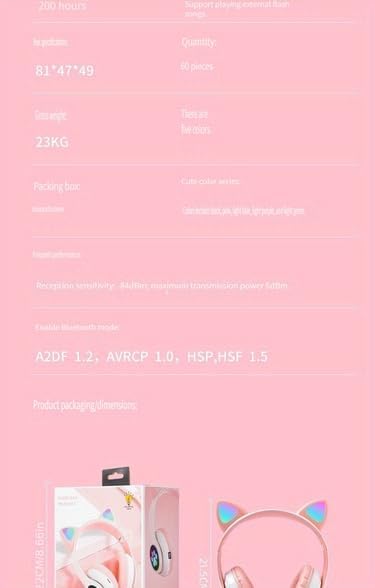
Image: A visual representation of the headset's dimensions and some technical specifications, including model number and battery capacity.
וואָראַנטי און שטיצן
For warranty information or technical support, please refer to the retailer where you purchased this product. Keep your proof of purchase for any warranty claims.
Manufacturer: Shantou Chaoyang District Gurao Lanxin Electronics Factory
Ask a question about this manual
Ask about setup, troubleshooting, compatibility, parts, safety, or missing instructions. Manuals+ will review the question and use this page’s manual context to help answer it.