
1. פּראָדוקט איבערview
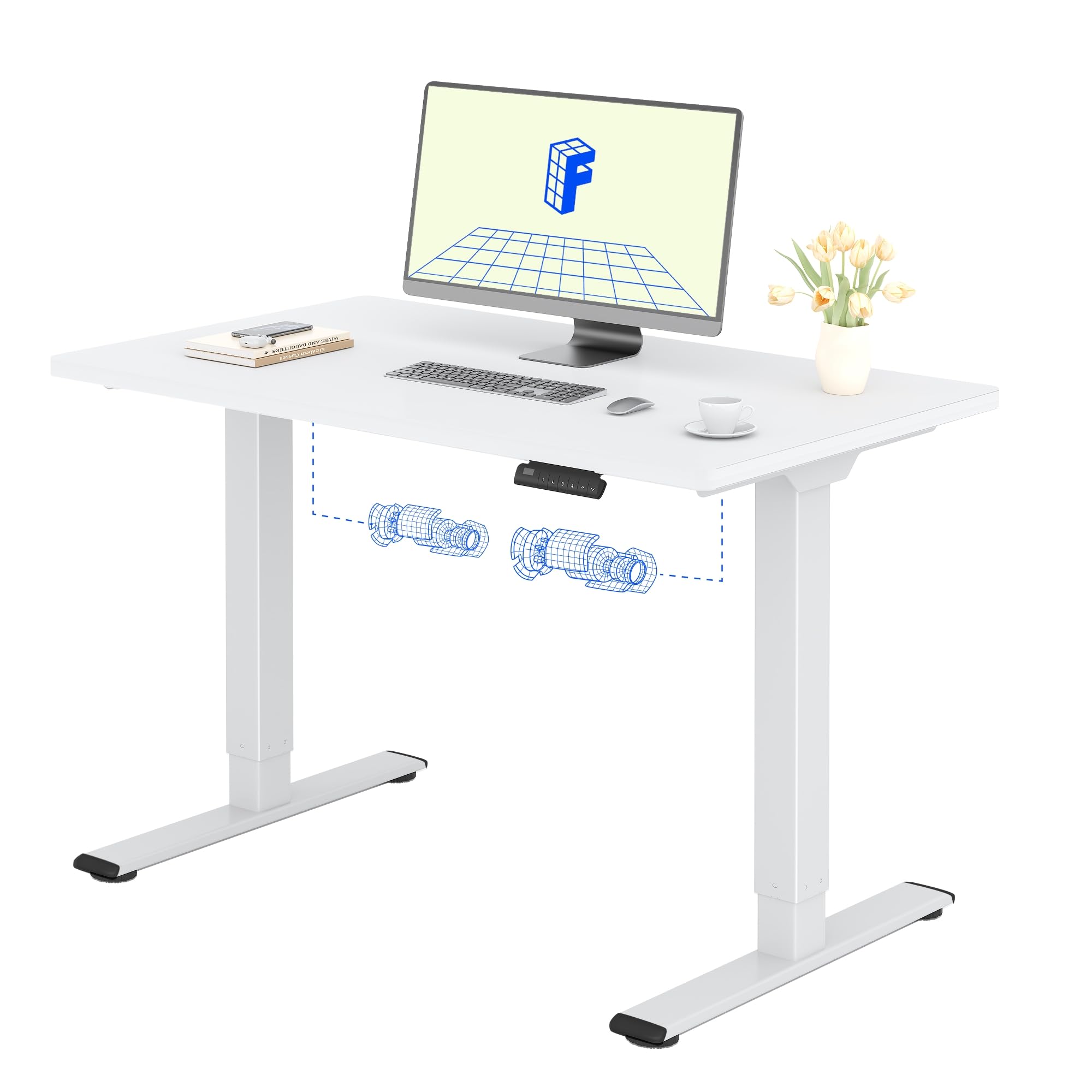
The FLEXISPOT Electric Standing Desk QB2 SET is designed to provide a stable and efficient workspace with adjustable height capabilities. This desk features a robust dual-motor system and an intelligent control panel for ease of use.
שליסל פֿעיִקייטן:
- שטאַרקע צווייענדיקע מאָטאָרן: Ensures greater stability and efficiency, with a maximum speed of up to 25 mm/s.
- סטאַביל שטיצן: Static load capacity of 120 kg and dynamic load capacity of 100 kg, providing secure support for various office equipment.
- קלוגע קאָנטראָל פּאַנעל: Features four memory functions for easy height adjustment and an anti-collision system for safety.
- אַדזשאַסטאַבאַל הייך: The desk height can be adjusted from 70 cm to 119 cm to suit different user requirements and work preferences.
- איין-שטיק טישפּלאַט: A seamless 120x60cm tabletop for a clean and modern aesthetic.

2. זיכערקייַט אינפֿאָרמאַציע
ביטע ליינט און פארשטייט אלע זיכערהייט אינסטרוקציעס איידער איר שטעלט עס צונויף און ניצט עס כדי צו פארמיידן שאדן אדער שאדן צום פראדוקט.
- Do not exceed the maximum allowed weight of 70 kg (moving) or 100 קג (סטאַטיק)איבערלאדונג קען פאראורזאכן אומסטאביליטעט און שאדן.
- Pay close attention to stability when adjusting the height. Ensure the desk is level and all items are securely placed.
- Be cautious of obstacles in the vicinity that could cause a collision during height adjustment. The desk is equipped with an anti-collision system, but manual vigilance is always recommended.
- האַלט קינדער און חיות אַוועק פון די טיש בעת אָפּעראַציע צו פאַרמייַדן אַקסאַדאַנץ.
- Ensure all cables are properly managed and secured to avoid entanglement or damage during movement.

3. סעטאַפּ און אַסעמבלי
The FLEXISPOT Electric Standing Desk is designed for straightforward assembly. An instruction manual is included with your purchase. It is recommended that צוויי מענטשן assemble the desk to ensure safety and ease.
פֿאַרזאַמלונג עצות:
- לייענען דעם מאַנואַל: קערפאַלי שייַעךview the included assembly instructions before starting.
- מכשירים: All necessary tools are typically included. A small electric screwdriver can speed up the process, but is not essential. You may need a pencil and a wood drill bit for minor pilot holes.
- אויספּאַקן: The desk is shipped in two separate packages for maximum protection: one for the desktop and one for the frame. Ensure both packages have arrived before beginning assembly.
- צייט: Assembly typically takes around 1 hour for one person, taking their time.


4. אַפּערייטינג ינסטרוקטיאָנס
The FLEXISPOT Electric Standing Desk offers intuitive controls for adjusting its height and saving preferred positions.
קאָנטראָל פּאַנעל פאַנגקשאַנז:
- אַרויף/אַראָפּ קנעפּלעך: Use the up (▲) and down (▼) arrows to manually adjust the desk height.
- זכּרון פּרעסעטס (1, 2, 3, 4): The control panel allows you to save up to four preferred height settings. To save a height: adjust the desk to your desired height, then press and hold one of the memory buttons (1-4) until you hear a beep or see the display flash, indicating the height is saved.
- געפֿירט ווייַז: ווײַזט די איצטיקע הייך פֿון טיש אין סענטימעטער.
- אַנטי-קאליזיע סיסטעם: This safety feature automatically stops and slightly reverses the desk's movement if it encounters an obstacle during height adjustment.
הייך אַדזשאַסטמאַנט קייט:
The desk can be adjusted from a minimum height of 70 סענטימעטער to a maximum height of 119 סענטימעטער.


5. וישאַלט
Proper maintenance ensures the longevity and optimal performance of your FLEXISPOT Electric Standing Desk.
רייניקונג:
- The desk surface and frame are easy to clean. Use a טרוקן אדער דamp שטאָף to wipe away dust and spills.
- פֿאַרמײַדן די נוצן פֿון שאַרפֿע כעמיקאַלן אָדער אַברייסיוו רייניקונגסמיטלען, ווײַל די קענען שאַטן די ענדיקונג.
אַלגעמיינע זאָרגן:
- Regularly check all screws and fasteners to ensure they are tight. Retighten if necessary.
- Keep the area around the desk clear to allow for smooth height adjustments and to prevent the anti-collision system from being triggered unnecessarily.
- Do not place excessively heavy objects on the desk, especially when moving, to avoid straining the motors.
6. טראָובלעשאָאָטינג
If you encounter any issues with your FLEXISPOT Electric Standing Desk, refer to the following common troubleshooting steps.
פּראָסט ישוז און סאַלושאַנז:
- Desk Not Moving / No Power:
- קאָנטראָלירט צי דער מאַכט קאַבל איז זיכער אַרייַנגעשטעקט אין ביידע דעם טיש און די וואַנט אַוטלעט.
- זיכער מאַכן אַז די וואַנט אַוטלעט אַרבעט דורך אַרײַנשטעקן אַן אַנדער דעוויס.
- Desk Wobbles at High Height:
- זיכער מאַכן אַז אַלע פֿאַרזאַמלונג שרויפן זענען צוגעצויגן.
- איבערצייגט אז דער טיש שטייט אויף א גלייכער ייבערפלאך. שטעלט צו די גלייכשטעלנדיקע פיס אויב נויטיג.
- פארטיילן די וואָג גלייך אויף די טיש.
- טעות קאָד אויף ווייַז:
- Refer to the detailed troubleshooting section in the included physical manual for specific error codes and their solutions.
- Often, a simple reset can resolve minor errors. To perform a reset, unplug the desk for 10-15 seconds, then plug it back in.
- אַנטי-קאליזיע סיסטעם טריגערט אָפט:
- Ensure there are no obstructions under or above the desk during movement.
- Check if any cables are interfering with the desk's movement.
אויב די טריט לייזן נישט דעם פראבלעם, ביטע קאנטאקטירט FLEXISPOT קאסטומער סופארט פאר ווייטערדיגע הילף.
7. פּראָדוקט ספּעסאַפאַקיישאַנז
| שטריך | דעטאַל |
|---|---|
| סאָרט | FLEXISPOT |
| מאָדעל נומער | QB2 SET |
| GTIN/UPC | 840460406635 |
| דעסק פּלאַן | שטייענדיק דעסק |
| פאָרעם | רעקטאַנגגיאַלער |
| פּראָדוקט דימענשאַנז (ד רענטגענ וו רענטגענ ה) | 60P x 120l x 73H cm (60D x 120W x 73H cm) |
| טאַבלעטאָפּ גרייס | 120 X 60 סענטימעטער |
| טאַבלעטאָפּ גרעב | 1.5 סענטימעטער |
| קאָליר | ווייסע ראַם + ווייסע שפּיץ |
| סטייל | מאָדערן |
| באַזע מאַטעריאַל | אַללוי סטיל |
| שפּיץ מאַטעריאַל טיפּ | האלץ |
| ענדיקן טיפּ | Laser, Powder Coated |
| ספּעציעלע פֿעיִקייטן | Ergonomic, Height Adjustable, Memory Presets, Anti-collision |
| פּונקט וואָג | 30 קילאָגראַמס |
| מינימום הייך | 70 סענטימעטער |
| מאַקסימום הייך | 119 סענטימעטער |
| ליפטינג מעקאַניזאַם | Electric (Dual Motor) |
| Recommended Load Capacity | 100 קילאָגראַמס |
| רעקאָמענדירטע פֿאַרזאַמלונג פּערזאָנען | 2 |
| אַסעמבלי אינסטרוקציעס | אַרייַנגערעכנט |
| אַרייַנגערעכנט קאַמפּאָונאַנץ | Height adjustment mechanism, keyboard drawer (if applicable) |
| אָרט טיפּ | אָפיס |
| רעקאָממענדעד ניצט | Work, Home, Office, Gaming |

8. וואָראַנטי אינפֿאָרמאַציע
FLEXISPOT provides a limited warranty for the Electric Standing Desk QB2 SET.
- 5 יאָר וואָראַנטי: Covers the frame, motors, and other mechanical components.
- 2 יאָר וואָראַנטי: דעקט דעם קאָנטראָללער, סוויטש, און עלעקטראָנישע קאָמפּאָנענטן.
For detailed warranty terms and conditions, please refer to the warranty card included with your product or visit the official FLEXISPOT webפּלאַץ.
9. קונה שטיצן
Should you require assistance with your FLEXISPOT Electric Standing Desk, please utilize the following resources:
- אָנליין קראָם: Visit the official FLEXISPOT store on Amazon for product information and FAQs: FLEXISPOT Amazon Store
- קאָנטאַקט קונה סערוויס: For technical support, warranty claims, or any other inquiries, please contact FLEXISPOT customer service directly. Contact details can typically be found on the official FLEXISPOT webוועבזייטל אדער אין אייער פּראָדוקט דאָקומענטאַציע.
- קערט: If you are not satisfied with your purchase, you may be eligible for a return within 30 days. Please refer to the return policy of your retailer or contact customer service for details.