
נווועוו 47251
Nuwave OxyPure ZERO Air Purifier User Manual
מאָדעל: 47251
בראַנד: נווועוו
פּראָדוקט איבערview
The Nuwave OxyPure ZERO Air Purifier is designed to provide comprehensive air purification for large rooms, covering up to 2,002 square feet. It features a revolutionary dual 4-stage filtration system capable of capturing 100% of airborne pollutants as small as 0.1 microns. With washable and reusable filters, smart controls, and quiet operation, it offers an efficient and convenient solution for maintaining clean indoor air quality.

Image: The Nuwave OxyPure ZERO Air Purifier, showcasing its sleek design and the accompanying smartphone application for remote control and monitoring.
שליסל פֿעיִקייטן:
- True No Replacement Filters: Revolutionary Bio-Guard filters are washable and reusable, eliminating replacements and reducing waste.
- Large Area Coverage: Purifies spaces up to 2,002 sq ft. Cleans a 1,000 sq ft room twice per hour and a 2,002 sq ft room once per hour with adjustable vents at 30°, 60°, or 90°.
- Advanced Dual 4-Stage פילטריישאַן: Features a stainless-steel prefilter, ozone emission removal filter, two Hi-Tech Bio-Guard filters, and one Bio-Guard 360 filter to capture particles and odors.
- Certified Air Purification: Intertek lab certified to capture 100% of airborne pollutants as small as 0.1 microns, including smoke, dust, irritants, and other airborne particles, ensuring clean air.
- California Air Resource Board Certified: Meets California's strict ozone emissions limits, reducing ozone levels to less than 1 part per billion — 70 times lower than the EPA's safe level.
- ענערגיע עפעקטיוו: Energy Star certified with a minimal annual electricity cost means that it is cost-effective for continuous use.
- Smart & WiFi Capable: Monitor and control air quality remotely via the app. Compatible with Android and iOS devices for convenient home air management and real-time updates.
- Night-Time Sleep Mode: Operates quietly at just 21.41 dB with all indicator lights turned off, creating an ideal environment for undisturbed sleep and relaxation.
- Proven Effectiveness: Removes common pollutants including airborne irritants, pet hair, smoke, dust, and harmful chemicals, improving air quality and giving you peace of mind.
- אַרייַנגערעכנט אַקסעסעריז: Comes with 2 stainless-steel pre-filters, 2 ozone emission removal filters, 2 Bio-Guard filters, 1 Bio-Guard 360 filter, and an owner’s manual. All filters, except ozone removal filters, are washable.
סעטאַפּ גייד
1. אַנפּאַקקינג און ערשט דורכקוק
Carefully remove the air purifier from its packaging. Inspect the unit and all included accessories for any signs of damage. Ensure all components listed in the "Included Accessories" section are present.
- Nuwave OxyPure ZERO Air Purifier unit
- 2 Stainless-steel Pre-filters (pre-installed)
- 2 Bio-Guard Filters (pre-installed)
- 2 Ozone Emission Removal Filters (pre-installed)
- 1 Cylindrical Bio-Guard Filter (pre-installed)
- באַזיצער ס מאַנואַל (דאָס דאָקומענט)
קסנומקס. פּלאַסעמענט
Place the air purifier on a flat, stable surface in the room where air purification is desired. For optimal performance, ensure there is adequate space around the unit for air intake and exhaust. The unit is equipped with caster wheels for easy movement.

Image: The air purifier positioned in a spacious living area, demonstrating its suitability for large rooms up to 2,002 sq ft.
The adjustable vents allow you to customize airflow at 30°, 60°, or 90° angles to direct purified air effectively.
3. מאַכט קאַנעקשאַן
Plug the power cord into a standard electrical outlet. The unit is Energy Star certified for efficient operation.
4. אַפּ סעטאַפּ (אפציאָנעל אָבער רעקאָמענדירט)
For smart control and remote monitoring, download the OxyPure Smart App from your device's app store (compatible with Android and iOS). Follow the in-app instructions to connect your air purifier to your home Wi-Fi network.

Image: A close-up of the air purifier's control panel and a smartphone displaying the OxyPure app, highlighting the dual control options.
אַפּערייטינג ינסטראַקשאַנז
קאָנטראָל פּאַנעל איבערview
The control panel on top of the unit allows for easy operation. You can also use the OxyPure Smart App for remote control.
1. מאַכט אויף / אויסגעלאשן
דרוק די מאַכט קנעפּל צו קער די אַפּאַראַט אויף אָדער אַוועק.
2. אַפּערייטינג מאָדעס
- אַוטאָ מאָדע: The purifier automatically adjusts fan speed based on real-time air quality detected by its dual sensors. This mode ensures efficient purification without constant manual adjustment.
- Ultimate Clean Mode: Activates maximum purification power for rapid air cleaning.
- עקאָ מאָדע: Optimizes energy consumption while maintaining effective air purification.
- שלאָפן מאָדע: Reduces fan speed to its lowest setting (21.41 dB) and turns off all indicator lights for undisturbed sleep.
3. פאַן ספּיד אַדזשאַסטמאַנט
Cycle through the 6 available fan speeds using the פאַן ספּיד button to select your desired airflow intensity.
4. טייַמער פֿונקציע
Set the operational timer for 1, 2, 4, 8, or 12 hours using the טיימער button. The unit will automatically turn off after the set duration.

Image: A child sleeping peacefully next to the air purifier, illustrating its quiet operation in sleep mode (21.4 dB) and the indicator lights turned off.
5. לופט קוואַליטי ינדיקאַטאָר
The unit features dual sensors that detect particles and odors, providing real-time air quality feedback through color-coded LED indicators on the unit. The color changes to reflect the current air quality level (e.g., green for good, red for poor).

Image: The air purifier operating in a room with a cat, showing a color-coded bar indicating air quality from Perfect to Bad, demonstrating the real-time monitoring feature.
וישאַלט
Regular maintenance of your Nuwave OxyPure ZERO Air Purifier ensures optimal performance and extends the lifespan of the unit. The unique washable and reusable filters significantly reduce the need for costly replacements.
1. Filter Cleaning (Washable Filters)
The Stainless-steel Pre-filters, Bio-Guard Filters, and Bio-Guard 360 Filter are designed to be washable and reusable. It is recommended to clean these filters regularly, depending on usage and air quality conditions.
- Turn off and unplug the air purifier before attempting any maintenance.
- Carefully remove the washable filters from the unit. Refer to the diagram in the "Product Overview" section for filter locations.
- Rinse the filters under cool running water until the water runs clear. For stubborn dirt, a mild detergent can be used, followed by thorough rinsing.
- Allow the filters to air dry completely before reinserting them into the unit. Ensure they are fully dry to prevent mold or mildew growth.

Image: A visual breakdown of the air purifier's filtration system, detailing the Stainless-steel Pre-filters, Side Bio-Guard Filters, Cylindrical Bio-Guard Filters, and Ozone Removal Filter.
וויכטיק באַמערקונג: The Ozone Emission Removal Filter is נישט washable. Do not get this filter wet. It should be replaced when its effectiveness diminishes, though its lifespan is generally long.
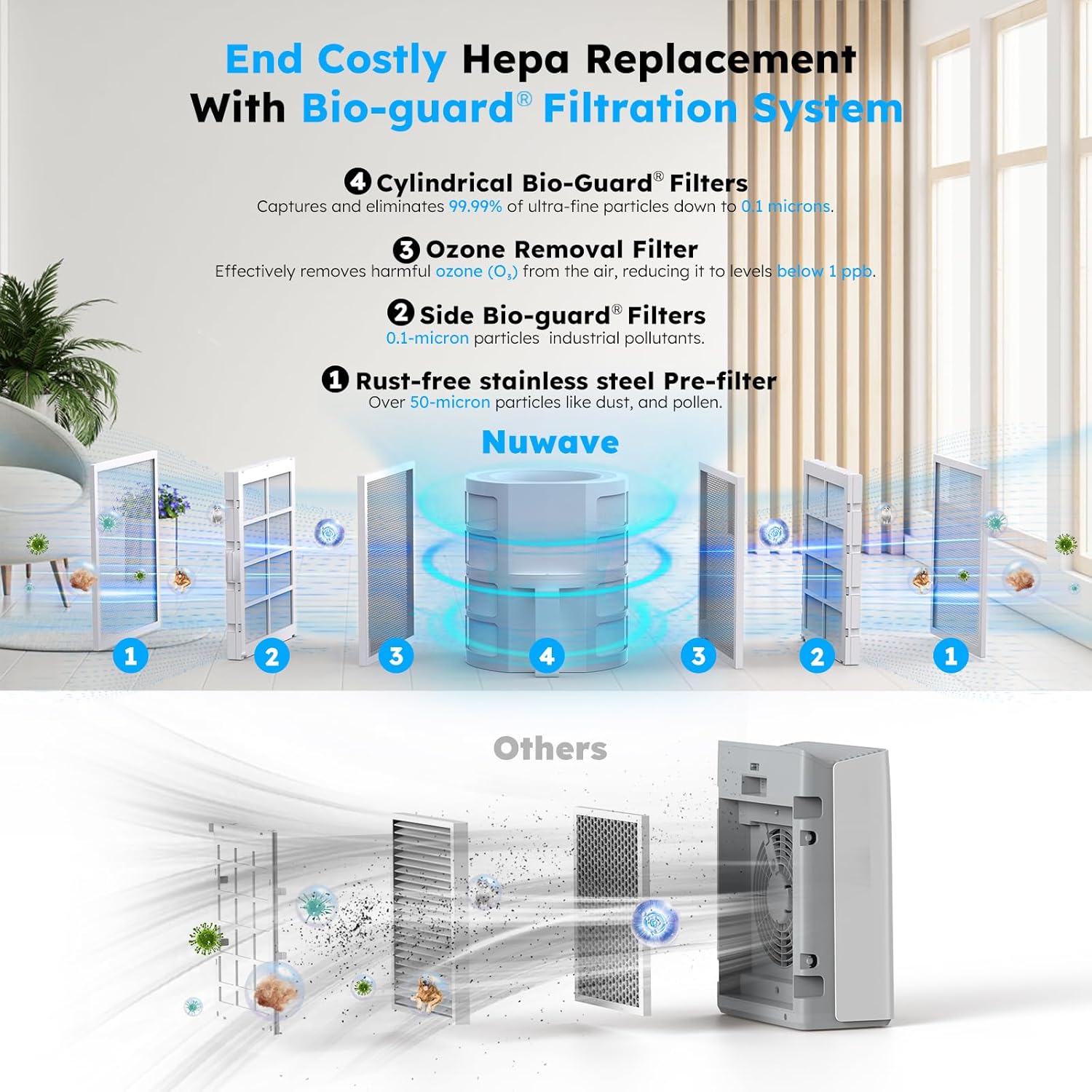
Image: An illustration comparing the Nuwave Bio-Guard filtration system, highlighting its washable and reusable filters, against traditional HEPA filters that require replacement.
2. עקסטעריאָר רייניקונג
ווישן די יקסטיריער פון די אַפּאַראַט מיט אַ ווייך, דamp cloth. Do not use abrasive cleaners or solvents, as these may damage the surface.
טראָובלעשאָאָטינג
If you encounter issues with your Nuwave OxyPure ZERO Air Purifier, refer to the following common problems and solutions:
| פּראָבלעם | מעגלעך סיבה | לייזונג |
|---|---|---|
| אַפּאַראַט טוט נישט קער אויף. | נישט איינגעשטאכן; פראבלעם מיטן עלעקטרישן אויסגאבע; די פאוער קנעפל נישט געדריקט. | זיכער מאַכן אַז די מאַכט שנור איז זיכער אַרייַנגעשטעקט אין אַ אַרבעטנדיקן ווענטיל. דריק פעסט דעם מאַכט קנעפּל. |
| Air quality not improving. | Filters are dirty; unit is too small for the room; vents are obstructed. | Clean the washable filters. Ensure the unit is appropriately sized for the room (up to 2,002 sq ft). Check that air intake and exhaust vents are clear. |
| ומגעוויינטלעך ראַש בעשאַס אָפּעראַציע. | Filters not properly installed; foreign object inside unit; unit on uneven surface. | Ensure all filters are correctly seated. Turn off and unplug the unit, then check for any obstructions. Place the unit on a flat, stable surface. |
| אַפּ קאַנעקטיוויטי פּראָבלעמען. | Wi-Fi signal weak; incorrect Wi-Fi password; app outdated. | Ensure your Wi-Fi network is stable and the unit is within range. Double-check your Wi-Fi password. Update the OxyPure Smart App to the latest version. |
| אינדיקאַטאָר לייץ אַרבעטן נישט. | Sleep Mode is active. | If in Sleep Mode, indicator lights are intentionally turned off. Exit Sleep Mode to restore lights. |
If the problem persists after trying these solutions, please contact Nuwave customer support for further assistance.
ספּעסאַפאַקיישאַנז
| באַשרייַבונג | דעטאַל |
|---|---|
| קאָליר | ווייַס |
| סאָרט | Nuwave |
| פּראָדוקט דימענשאַנז | 12"ד רענטגענ 14"וו רענטגענ 23"ה |
| שטאָק שטח קאַווערידזש | 2002 קוואַדראַט פֿיס |
| סערטיפיקאַטיאָנס | CARB Certified, EPA Certified, Energy Star Certified |
| ראַש לעוועל (שלאָף מאָדע) | 21.4 דב |
| פּאַרטאַקאַל ריטענשאַן גרייס | 0.1 מיקראָמעטער |
| קאָנטראָללער טיפּ | Button Control, Remote Control with Oxypure Smart App |
| UPC | 652185472518 |
| פאַבריקאַנט | Nuwave |
| פּונקט וואָג | 22 פונט |
| נומער מאָדעל נומער | 47251 |
| אַרייַנגערעכנט קאַמפּאָונאַנץ | 2 Stainless-steel Pre-filters, 2 Bio-Guard Filters, 2 Ozone Emission Removal Filters, 1 Cylindrical Bio-Guard Filter |

Image: Certification documents from Intertek and UL, verifying the air purifier's performance in capturing pollutants and its zero ozone emission.
וואָראַנטי און שטיצן
וואָראַנטי אינפֿאָרמאַציע
For detailed warranty information, please refer to the official Nuwave website or the warranty card included with your product. Nuwave is committed to delivering high-quality products and ensuring customer satisfaction.
קונה שטיצן
If you have any questions, require technical assistance, or need to report an issue, please contact Nuwave customer support. You can find contact information on the official Nuwave website or in the original packaging.
For additional information and a downloadable PDF version of the user manual, please visit the official Nuwave support page or refer to the document provided at: Nuwave OxyPure ZERO User Manual (PDF).
Ask a question about this manual
Ask about setup, troubleshooting, compatibility, parts, safety, or missing instructions. Manuals+ will review the question and use this page’s manual context to help answer it.