
Mesqool e5a70cca-01be-4e29-bb91-9cfc7e32344
Mesqool Emergency Radio Instruction Manual
Model: e5a70cca-01be-4e29-bb91-9cfc7e32344
בראַנד: מעסקול
1. הקדמה
This manual provides detailed instructions for the Mesqool Emergency Radio, a versatile device designed for emergency preparedness and outdoor activities. It features multiple power sources, including a large-capacity rechargeable battery, hand crank, and solar panel, along with AM/FM/SW radio reception, NOAA weather alerts, a powerful flashlight, a reading lamp, and a cell phone charging function.

Figure 1: Mesqool Emergency Radio in Gray Camo, demonstrating phone charging capability.
2. פּעקל אינהאַלט
ביטע אָפּהאַקן דאָס קעסטל פֿאַר די פֿאָלגנדיקע זאַכן:
- נויטפאַל ראַדיאָ
- 5V 2A Adapter and Type C Cord
- מעטאַל קרוק
- Portable Belt
- באַזיצער ס מאַנואַל
3. שליסל פֿעיִקייטן
- NOAA Weather Alert Radio: Receives 7 pre-programmed NOAA weather channels with automatic alert function for severe weather events.
- מולטי-באַנד ראַדיאָ: Supports AM, FM, and Shortwave (SW) frequencies for broad reception.
- הויך-קאַפּאַציטעט באַטערי: Equipped with a 12000mAh rechargeable Li-ion battery for extended operation and device charging.
- Five Power Sources: Rechargeable battery, USB-C input, hand crank, solar panel, and 3 AAA batteries (not included).
- נויטפאַל לייטינג: Features a bright flashlight (150-300 Lumens) and a 2-level brightness reading lamp (120-250 Lumens).
- SOS שרעק: Activates a loud 116dB alarm with flashing red light for emergency signaling.
- Cell Phone Charger: Functions as a power bank to charge mobile devices via USB output.
- LCD פאַרשטעלן: Large, backlit LCD displays radio station, time, and weather channels.
- געווער: IPX-3 waterproof and dust-proof rating.
4. קאָנטראָלס און קאַמפּאָונאַנץ
Familiarize yourself with the radio's controls and ports:

פיגורע 2: פראָנט view of the radio highlighting the large LCD display and control buttons.
- מאַכט קנעפּל: Press to turn the radio on or off.
- באַנד קנעפּל: Cycles through AM, FM, SW, and Weather Band (WB) modes.
- WX Alert Button: Activates or deactivates the NOAA weather alert function.
- באַנד +/- קנעפּלעך: אַדזשאַסטירט די אַודיאָ אַרויסגאַנג באַנד.
- Tune +/- Buttons: Adjusts the radio frequency.
- שלאָס קנעפּל: פאַרהיט אַקסאַדענטאַל קנעפּל דריקונגען.
- שטעלן צייט קנעפּל: Used to set the current time displayed on the LCD.
- באַקלייט קנעפּל: Toggles the LCD screen backlight.
- פלאַשליגהט: Located on the left side of the radio. Activated via a dedicated button.
- SOS Control Button: Activates the emergency SOS alarm.
- USB Output Charging Port: פֿאַר טשאַרדזשינג עקסטערנע דעוויסעס.
- טיפ-C אינפוט טשאַרדזשינג פּאָרט: For charging the radio's internal battery.
- 3.5 מם כעדפאָון דזשאַק: פֿאַר פּריוואַט צוגעהערט.
- טעלאַסקאָפּיק אַנטענע: Extend for better radio reception.
- זונ פּאַנעל: Located on the top, used for trickle charging.
- האַנט קראַנק: Foldable crank on the back for manual power generation.
- לייענען לamp: Located under the solar panel, flips up for illumination.
- AAA Battery Compartment: Located on the bottom, for optional AAA battery power.
- קאָמפּאַס: Integrated into the portable strap for navigation.

פיגורע 3: זייַט view illustrating the SOS alarm and headphone jack.
5. Power Sources and Charging
The Mesqool Emergency Radio offers five flexible ways to ensure you always have power:
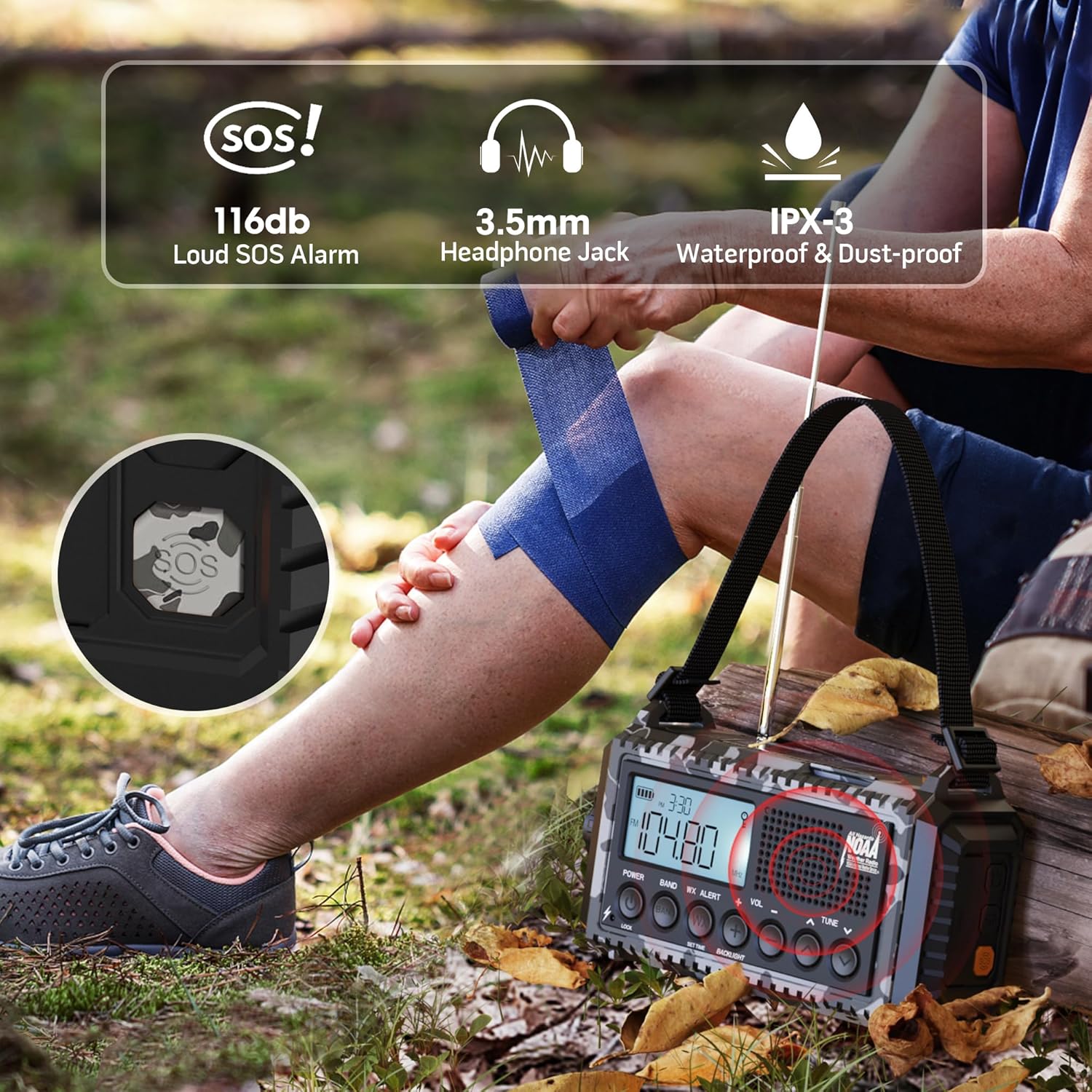
Figure 4: Visual representation of the five power options for the radio.
- 12000mAh Built-in Li-ion Battery: The primary power source. Ensure it is fully charged before extended use.
- Type-C Input (5V/2A): Connect the provided Type-C cable to a compatible USB adapter (not included) for the most efficient charging. The charging indicator lights will show progress.
- האַנט קראַנק: Rotate the hand crank clockwise or counter-clockwise at a steady pace (approx. 130-150 RPM) for 3-5 minutes to generate enough power for short-term use or to initiate charging.
- זונ פּאַנעל: Place the radio in direct sunlight. The solar panel provides trickle charging to maintain the battery level or extend playtime. It is not intended for full charging from a depleted state.
- 3 AAA Batteries (Not Included): Open the battery compartment on the bottom and insert 3 AAA batteries. This serves as a backup power source when the internal Li-ion battery is low or depleted.
The battery indicator on the LCD screen will show the current charge level. A flashing indicator typically means the battery is low and requires charging.
6. ראַדיאָ אָפּעראַציע
The radio supports AM, FM, SW, and NOAA Weather Bands.

Figure 5: The radio displaying NOAA Weather Alert functionality.
- קערן אויף / אַוועק: דרוק די מאַכט קנעפּל צו דרייען דעם ראַדיאָ אָן אָדער אויס.
- אויסקלייבן באַנד: דרוק די BAND button repeatedly to cycle through AM, FM, SW, and WB (Weather Band).
- טונינג סטיישאַנז: ניצן די טונע +/- buttons to manually adjust the frequency. For automatic scanning, press and hold the טונע +/- button for 2 seconds. The radio will stop on the next available station.
- באַנד קאָנטראָל: ניצן די וואָל +/- קנעפּלעך צו סטרויערן די הערן-וואָלומען.
- NOAA וועטער ווארענונג:
- צו געבן, דריקן די WX ALERT button. The 'WX' icon will appear on the LCD.
- The radio will automatically scan 7 NOAA weather channels. When an alert is received, an audible alarm will sound, and the red alert light will flash.
- To disable, press the WX ALERT קנעפּל ווידער.
7. Flashlight and Reading Lamp אָפּעראַציע
The radio includes integrated lighting features for various situations.

Figure 6: The radio's reading lamp and flashlight in use.
- פלאַשליגהט: Press the dedicated flashlight button on the side of the radio to turn it on. Press again to cycle through brightness levels (if applicable) or turn off.
- לייענען לamp: Flip up the solar panel to reveal the reading lamp. Press the reading lamp button (often located near the flashlight button) to turn it on. Press again to adjust brightness levels or turn off.
8. SOS Alarm Function
In an emergency, the SOS alarm can be activated to attract attention.
- To activate the SOS alarm, press the סאָס button (often a distinct yellow or red button, or integrated with a light button). A loud siren will sound, and a red flashing light will activate.
- To deactivate, press the סאָס קנעפּל ווידער.
9. Cell Phone Charging
The radio can serve as an emergency power bank for your mobile devices.
- Connect your mobile device to the USB output charging port on the side of the radio using your device's charging cable.
- The radio's internal 12000mAh battery will provide power to your device.
- If the radio's battery is low, you may need to use the hand crank to generate initial power for charging.

Figure 7: The radio connected to a smartphone for charging.
10. ספּעסאַפאַקיישאַנז
| שטריך | דעטאַל |
|---|---|
| פּראָדוקט דימענשאַנז | 3.7 X 2.48 X 6.8 אינטשעס |
| פּונקט וואָג | 1.46 פונט |
| באַטערי טיפּ | 1 ליטהיום יאָן באַטאַרייע (אַרייַנגערעכנט) |
| מאַכט מקור | Rechargeable Battery | Solar Panel | Hand Crank | Type-C Input 5V/2A |
| ראַדיאָ באַנדס געשטיצט | AM/FM/7 Pre-Configured NOAA Stations |
| קאַנעקטיוויטי טעכנאָלאָגיע | NOAA RADIO |
| ספּעציעלע פֿעיִקייטן | Cellphone USB Charger, Flashlight, Reading Lamp, Strap, Lightweight, SOS Alarm, NOAA Weather Alert |
11. טראָובלעשאָאָטינג
- קיין מאַכט: Ensure the internal battery is charged. Try hand cranking for a few minutes or connecting to a USB power source. Check if AAA batteries are inserted correctly and have charge.
- שלעכטע ראַדיאָ אָפּנאַם: Extend the telescopic antenna fully. Try repositioning the radio. For AM/SW, rotate the radio for optimal signal.
- NOAA Alert Not Working: Ensure the WX Alert function is enabled. Check if you are within range of a NOAA broadcast.
- טעלעפאָן לאָדט זיך נישט אויף: Ensure the radio has sufficient power. Check the USB cable connection. Some devices may require more power than the radio can provide for rapid charging.
- קנעפּלעך ניט ריספּאַנדאַבאַל: Check if the Lock function is activated. Deactivate it if necessary.
12. וישאַלט
- רייניקונג: ווישן די ראַדיאָ מיט אַ ווייך, דamp שטאָף. דו זאלסט נישט נוצן האַרב קעמיקאַלז אָדער אַברייסיוו קלינערז.
- סטאָרידזש: האַלט דעם ראַדיאָ אין אַ קיל, טרוקן אָרט אַוועק פון דירעקט זונשייַן און עקסטרעמע טעמפּעראַטורן.
- באַטערי זאָרגן: For optimal battery life, fully charge the internal Li-ion battery at least once every three months, even if not in use.
- וואַסער קעגנשטעל: While IPX-3 rated (splash-proof), avoid submerging the radio in water. Ensure all port covers are securely closed when exposed to moisture.
13. וואָראַנטי און שטיצן
For warranty information, technical support, or service inquiries, please refer to the contact details provided on the product packaging or the official Mesqool webזייטל. האַלט אייער קויף קוויטל ווי אַ באַווייַז פון קויפן.
Ask a question about this manual
Ask about setup, troubleshooting, compatibility, parts, safety, or missing instructions. Manuals+ will review the question and use this page’s manual context to help answer it.