
1. הקדמה
This manual provides detailed instructions for the proper use, setup, operation, and maintenance of your EBTOOLS Bluetooth Headset. Please read this manual thoroughly before using the product to ensure optimal performance and longevity.
2. פּראָדוקט איבערview
2.1 שליסל פֿעיִקייטן
- ראָטירבאַר מיקראָפאָן: Easily adjust the microphone to the optimal angle for clear voice capture.
- בלועטאָאָטה 5.0 טעכנאָלאָגיע: Ensures faster, more efficient, and stable wireless connectivity with compatible devices.
- באַקוועם פּלאַן: Single-ear design with padded ear cushion and flexible headband for extended wear without discomfort.
- לאנג באַטאַרייע לעבן: Up to 17 hours of talk time and 200 hours of standby time on a 2-hour charge.
- וניווערסאַל קאַמפּאַטאַבילאַטי: Works with laptops, cell phones, PCs, tablets, and other Bluetooth-enabled devices. Ideal for office, home, remote work, call centers, VoIP, and Skype.
2.2 פּעקל אינהאַלט
באַשטעטיקן אַז אַלע זאכן זענען פאַראַן אין דיין פּעקל:
- EBTOOLS Bluetooth Headset
- טשאַרדזשינג באַזע
- מיקראָ וסב טשאַרדזשינג קאַבלע
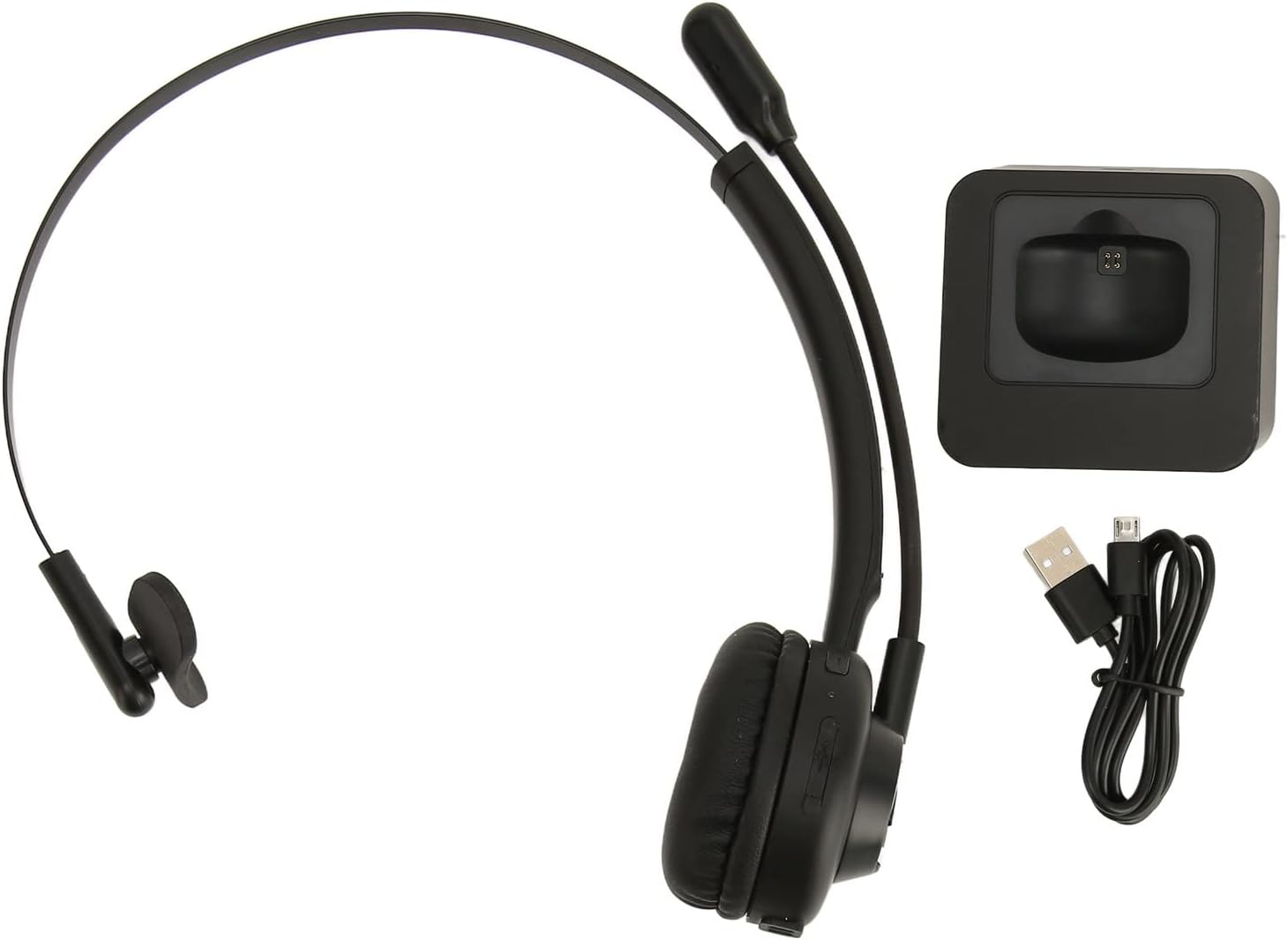
Image: The EBTOOLS Bluetooth Headset, its dedicated charging base, and a Micro USB charging cable, illustrating the complete package contents.
2.3 Headset Controls and Indicators

Image: A detailed diagram highlighting the Micro USB port, LED indicator, Volume Down button, Multifunctional button, and Volume Up button on the EBTOOLS Bluetooth Headset.
- מיקראָ וסב פּאָרט: For direct charging of the headset.
- LED ינדיקאַטאָר: ווײַזט מאַכט, טשאַרדזשינג און פּערינג סטאַטוס.
- באַנד - קנעפּל: דיקריסאַז אַודיאָ באַנד.
- Multifunctional Button: Controls power, pairing, call answer/end, and music playback.
- באנד + קנעפּל: ינקריסאַז אַודיאָ באַנד.
3. סעטאַפּ
3.1 אויפלאָדן דעם כעדסעט
Before first use, fully charge the headset. You can charge it using the included charging base or directly via the Micro USB port.
- Connect the Micro USB cable to the charging base and a power source (e.g., computer USB port, USB wall adapter).
- Place the headset onto the charging base, ensuring the charging contacts align. The LED indicator on the headset will show charging status.
- Alternatively, connect the Micro USB cable directly to the headset's Micro USB port and a power source.
- A full charge typically takes approximately 2 hours. The LED indicator will change color or turn off once fully charged.

בילד: א נאָענטע בילד view of the headset's earcup, showing the charging contacts designed to connect with the charging base.
3.2 פּאָרן מיט אַ בלועטוט מיטל
To connect your headset to a device:
- מאַכן זיכער אַז די כעדסעט איז אויסגעדרייט אַוועק.
- דריקן און האַלטן די מולטיפונקטיאָנאַל קנעפּל for approximately 5-7 seconds until the LED indicator flashes red and blue alternately, indicating pairing mode.
- אויף אייער דעווייס (טעלעפאן, קאמפיוטער, טאבלעט), אקטיוויזירט בלועטוט און זוכט פאר נייע דעווייסעס.
- Select "EBTOOLS Headset" (or similar name) from the list of available devices.
- Once connected, the LED indicator on the headset will typically flash blue slowly or turn solid blue.
- אויב געבעטן פֿאַר אַ פּאַראָל, אַרייַן "0000".
3.3 טראָגן די כעדסעט
The headset is designed for comfort and flexibility.
- Adjust the flexible headband to fit comfortably over your head.
- The single ear design allows you to remain aware of your surroundings.
- Rotate the microphone boom to position it close to your mouth for optimal voice clarity. The microphone can be rotated 180 degrees to be worn on either the left or right ear.

Image: A person wearing the EBTOOLS Bluetooth Headset, demonstrating the comfortable fit and the adjustable, rotatable microphone positioned for clear communication.
4. אַפּערייטינג ינסטרוקטיאָנס
4.1 מאַכט אויף / אַוועק
- מאַכט אויף: דריקן און האַלטן די מולטיפונקטיאָנאַל קנעפּל for approximately 3 seconds until the LED indicator flashes blue.
- מאַכט אַוועק: דריקן און האַלטן די מולטיפונקטיאָנאַל קנעפּל for approximately 3-5 seconds until the LED indicator flashes red and then turns off.
4.2 אַדזשאַסטירן באַנד
- דרוק די באנד + קנעפּל to increase the listening volume.
- דרוק די באַנד - קנעפּל צו פאַרמינערן די צוגעהערט באַנד.
4.3 רוף פאַרוואַלטונג
- ענטפער רופן: קורץ דריקן די מולטיפונקטיאָנאַל קנעפּל ווען אַן אנקומענדיקער רוף קלינגט.
- סוף רופן: קורץ דריקן די מולטיפונקטיאָנאַל קנעפּל בעשאַס אַ רופן.
- אָפּוואַרפן רופן: דריקן און האַלטן די מולטיפונקטיאָנאַל קנעפּל for approximately 2 seconds when an incoming call rings.
- ריאַל די לעצטע נומער: טאָפּל-דריקן די מולטיפונקטיאָנאַל קנעפּל ווען נישט אויף א רוף.
4.4 Music Playback (if supported by device)
- שפּיל / פּויזע: קורץ דריקן די מולטיפונקטיאָנאַל קנעפּל.
- ווייַטער שפּור: דריקן און האַלטן די באנד + קנעפּל.
- פֿריִערדיקע שפּור: דריקן און האַלטן די באַנד - קנעפּל.
4.5 מיקראָפאָן באַניץ
The rotatable microphone ensures your voice is captured clearly.
- Adjust the microphone boom to be approximately 1-2 inches from your mouth.
- The microphone can be rotated 180 degrees to allow wearing the headset on either the left or right ear.

בילד: א נאָענטע בילד view of the EBTOOLS headset's flexible microphone boom, highlighting its design for optimal voice pickup.
5. וישאַלט
5.1 רייניקונג
- Wipe the headset with a soft, dry, or slightly damp שטאָף.
- דו זאלסט נישט נוצן האַרב קעמיקאַלז, רייניקונג סאָלוואַנץ אָדער שטאַרק דיטערדזשאַנץ.
- פֿאַרמײַדט אַרײַנצוקומען פֿײַכטקײַט אין קיין עפענונגען.
5.2 באַטערי קער
- לאָדט אויף דעם כעדסעט רעגולער, אפילו אויב עס ווערט נישט אָפט גענוצט, כּדי צו האַלטן די באַטאַרייע געזונט.
- פֿאַרמײַדט אָפֿט פֿולשטענדיק אויסצולאָדן די באַטעריע.
- האַלט די כעדסעט אין אַ קיל, טרוקן אָרט אַוועק פון עקסטרעמע טעמפּעראַטורן.
6. טראָובלעשאָאָטינג
אויב איר טרעפט פּראָבלעמען מיט אייער כעדסעט, באַזירט זיך אויף די פאלגענדע געוויינטלעכע לייזונגען:
| פּראָבלעם | מעגלעך לייזונג |
|---|---|
| כעדסעט גייט נישט אן. | Ensure the headset is charged. Connect it to the charging base or directly via USB. |
| קען נישט צופּאַסן מיטן דעווייס. | Ensure the headset is in pairing mode (LED flashing red/blue). Turn off and on your device's Bluetooth. Delete previous pairings on your device and try again. Ensure the headset is within range (typically 10 meters). |
| קיין קלאַנג אָדער נידעריקע וואָלומען. | Increase volume on both the headset and your connected device. Ensure the headset is selected as the audio output device on your computer or phone. Re-pair the headset. |
| מיקראָפאָן טוט נישט אַרבעטן. | Ensure the microphone is positioned correctly. Check microphone settings on your connected device to ensure the headset is selected as the input device. |
| אומגעריכטע פֿאַרבינדונג. | Move closer to your connected device. Avoid obstacles between the headset and device. Reduce interference from other wireless devices. |
7. ספּעסאַפאַקיישאַנז
| שטריך | דעטאַל |
|---|---|
| סאָרט נאָמען | EBTOOLS |
| מאָדעל נומער | EBTOOLSrsgvuyg5fc |
| קאַנעקטיוויטי טעכנאָלאָגיע | בלועטאָאָטה 5.0 |
| פּונקט וואָג | 11.6 אונסעס |
| פּעקל דימענשאַנז | 7.09 X 6.69 X 2.36 אינטשעס |
| רעדן צייט | אַרויף צו 17 שעה |
| סטאַנדביי צייט | אַרויף צו 200 שעה |
| טשאַרדזשינג צייט | בעערעך 2 שעה |
8. וואָראַנטי און שטיצן
For warranty information or technical support, please refer to the documentation included with your purchase or contact EBTOOLS customer service through the retailer where the product was purchased. Keep your proof of purchase for warranty claims.