
1. הקדמה
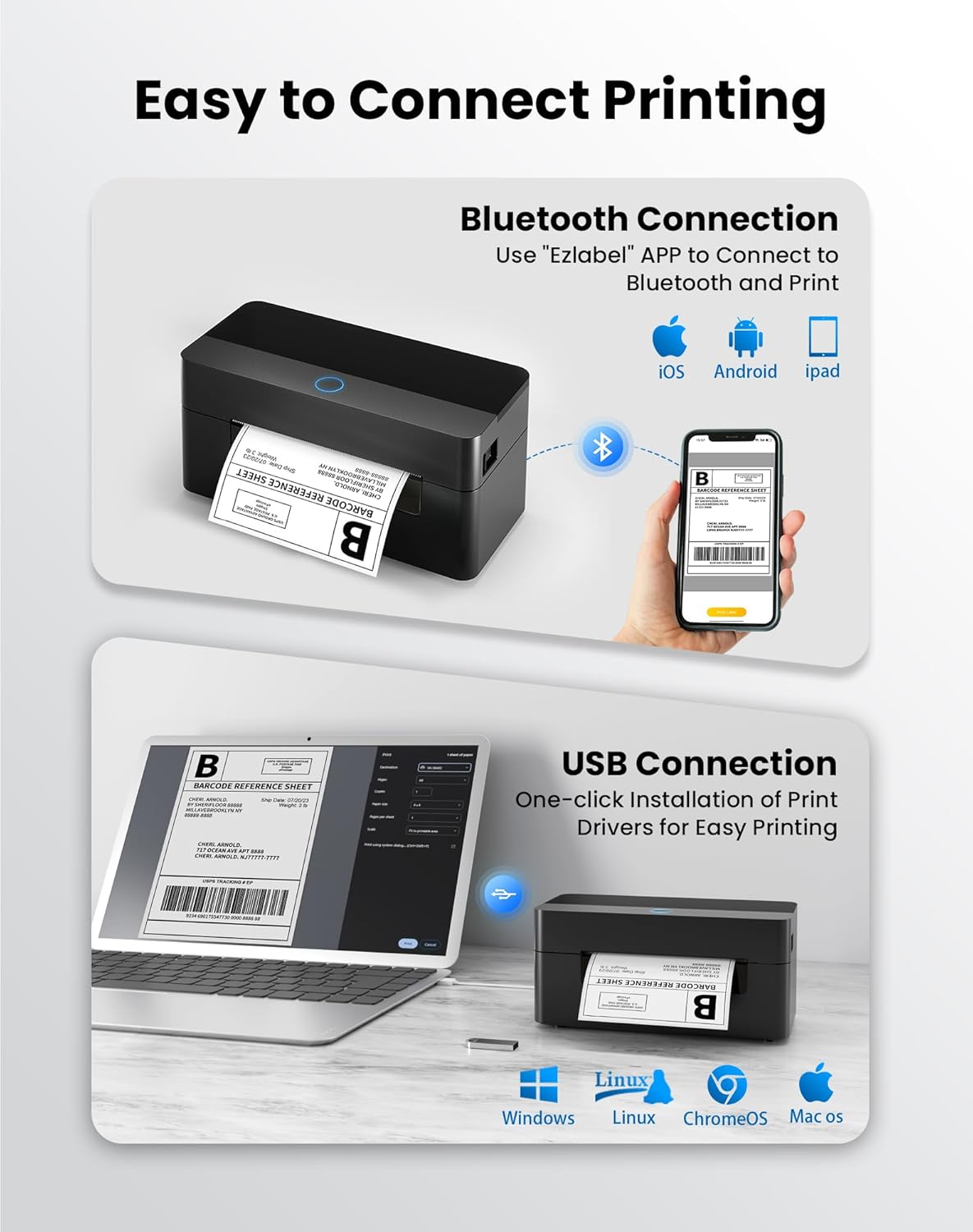
This manual provides detailed instructions for the setup, operation, and maintenance of your BPXX Bluetooth Thermal Shipping Label Printer, Model D463B. This printer is designed for efficient and clear printing of various thermal labels, including 4x6 inch shipping labels, with a resolution of 203 DPI. It supports both Bluetooth connectivity via the 'Ezlabel' mobile application and USB connection to computers.
2. פּאַקינג רשימה
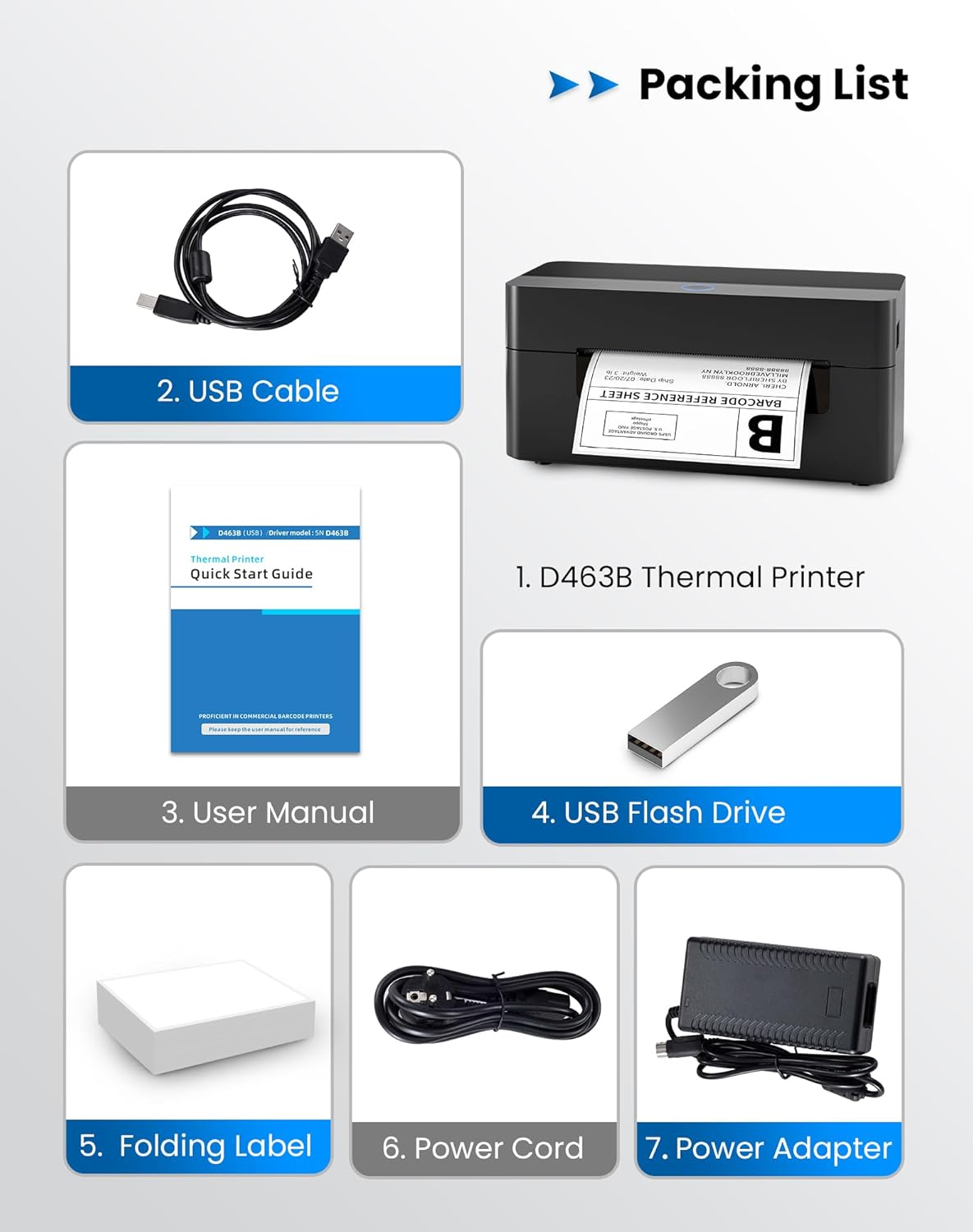
ביטע באַשטעטיקן אַז אַלע זאכן וואָס זענען ליסטעד אונטן זענען אַרייַנגערעכנט אין דיין פּעקל:
- 1 x BPXX D463B Thermal Printer
- קסנומקס רענטגענ וסב קאַבלע
- 1 x באַניצער מאַנואַל
- 1 x USB פלאַש דרייוו (מיט דרייווערס)
- 1 x Folding Label (sampדי ראָלל)
- קסנומקס X מאַכט קאָרד
- 1 x מאַכט אַדאַפּטער
3. סעטאַפּ גייד
3.1 האַרדוואַרע קאַנעקשאַן
- Connect the power adapter to the printer's power port and plug the power cord into an electrical outlet.
- Open the printer cover and load the thermal labels. Ensure the labels are facing the correct direction for printing and are properly aligned within the guide rails.
- פאַרמאַכן די דרוקער דעקן סיקיורלי.

3.2 ווייכווארג און דרייווער אינסטאַלאַציע
3.2.1 Mobile App (Bluetooth Connection)
For mobile printing, download the 'Ezlabel' application from your device's app store (available for iOS and Android).
- זוכן פֿאַר 'Ezlabel' in the App Store (iOS) or Google Play Store (Android).
- אראפקאפיע און ינסטאַלירן די אַפּלאַקיישאַן.
- געבן בלועטאָאָטה אויף דיין רירעוודיק מיטל.
- Open the 'Ezlabel' app and follow the in-app instructions to connect to your BPXX D463B printer via Bluetooth.
3.2.2 Computer Driver (USB Connection)
For computer printing, install the appropriate drivers for your operating system (Windows, Mac OS, Linux, ChromeOS). Drivers are provided on the included USB flash drive or can be downloaded from the official webפּלאַץ.
- Insert the provided USB flash drive into your computer.
- Locate and run the installer for your operating system.
- גיי די פּראַמפּס אויף דעם עקראַן צו פאַרענדיקן די ינסטאַלירונג פון די שאָפער.
- Alternatively, download drivers from: BPXX Driver Download
4. אַפּערייטינג ינסטרוקטיאָנס
4.1 לאָדן עטיקעטן
Ensure the thermal labels are loaded correctly for optimal printing. The printer supports thermal labels with widths ranging from 1 to 4.5 inches, including standard 4x6 inch shipping labels.
- עפענען די שפּיץ דעקל פון די דרוקער.
- Place the roll of thermal labels into the label compartment, ensuring the printable side faces upwards.
- Feed the first label through the printer's output slot until it is slightly extended.
- Adjust the label guides to fit the width of your labels snugly, without being too tight.
- Close the top cover. The printer will automatically detect the label size and calibrate.

4.2 Printing via Bluetooth (Mobile App)
- Ensure the printer is powered on and connected to the 'Ezlabel' app via Bluetooth.
- Open the 'Ezlabel' app on your mobile device.
- Select or create your desired label design. The app includes preset templates for various label sizes.
- Confirm print settings such as label size and quantity.
- אָנהייבן דעם דרוק באַפֿעל פֿון דער אַפּ.
4.3 Printing via USB (Computer)
- פאַרבינדן די דרוקער צו דיין קאָמפּיוטער מיט די צוגעשטעלט וסב קאַבלע.
- זיכער מאַכן אַז די דרוקער דרייווערס זענען ריכטיק אינסטאַלירט.
- Open the document or application from which you wish to print (e.g., a PDF viewער, שיפּינג ווייכווארג).
- Select the BPXX D463B printer from your printer options.
- Adjust print settings as needed (e.g., paper size to 4x6 inches for shipping labels).
- Send the print command.
4.4 Supported Platforms and Print Quality
The BPXX D463B printer is compatible with major shipping carriers and e-commerce platforms, facilitating the printing of shipping labels, return labels, and postagע עטיקעטן.
- Shipping Carriers: FedEx, UPS, USPS, DHL, EasyPost, etc.
- E-commerce Platforms: Amazon, Shopify, Etsy, eBay, Walmart, etc.
The printer utilizes a high-quality thermal print head and advanced algorithms to deliver clear and sharp barcodes and text at 203 DPI resolution. It achieves a high-speed output of 152mm/s, capable of printing approximately 72 4x6 inch shipping labels per minute.


5. וישאַלט
רעגולערע אויפהאלטונג גאראנטירט אפטימאלע פאָרשטעלונג און פארלענגערט די לעבנסדויער פון אייער דרוקער.
- רייניקונג די פּרינט קאָפּ: Use an alcohol swab or a specialized thermal printer cleaning pen to gently wipe the print head. Ensure the printer is off and cooled down before cleaning.
- רייניקונג די יקסטיריער: ווישט אָפּ די אויסערלעכע זייט פון דעם דרוקער מיט אַ ווייכן, טרוקענעם שטאָף.amp שטאָף. ויסמיידן ניצן האַרב קעמיקאַלז אָדער אַברייסיוו מאַטעריאַלס.
- באַזייַטיקונג פון שטויב: Periodically use compressed air to clear any dust or paper debris from inside the label compartment.
6. טראָובלעשאָאָטינג
If you encounter issues with your BPXX D463B printer, refer to the following common problems and solutions:
- דרוקער רעאגירט נישט:
- Ensure the power cord is securely connected and the printer is turned on.
- For Bluetooth connection, verify that Bluetooth is enabled on your device and the printer is paired within the 'Ezlabel' app.
- For USB connection, check the USB cable connection and ensure drivers are correctly installed. Try a different USB port or cable.
- Poor Print Quality (Faint/Streaky Prints):
- רייניקט דעם דרוק קאָפּ ווי באַשריבן אין דער וישאַלט סעקציע.
- זייט זיכער אַז איר ניצט הויך-קוואַליטעט טערמישע לאַבעלס.
- Check print density settings in the 'Ezlabel' app or printer preferences on your computer.
- עטיקעטן ווערן נישט ריכטיק צוגעפֿיטערט:
- Verify that labels are loaded correctly and aligned with the guide rails.
- Ensure there are no obstructions in the label path.
- Perform a label calibration from the printer settings or app if available.
- Printer Offline Error:
- Restart both the printer and your computer/mobile device.
- Re-establish the Bluetooth or USB connection.
- Check printer status in your operating system's printer settings.
7. פּראָדוקט ספּעסאַפאַקיישאַנז
| מאָדעל נאָמען | D463B |
| סאָרט | BPXX |
| דרוק טעכנאָלאָגיע | טערמאַל |
| קאַנעקטיוויטי טעכנאָלאָגיע | בלועטאָאָטה, וסב |
| מאַקסימום פּרינט האַכלאָטע | 203 x 203 Dots Per Inch (DPI) |
| מאַקסימום פּרינט ספּיד | 152 mm/s (72 labels per minute) |
| מאַקסימום מעדיע גרייס | 4 X 6 אינטש |
| שטיצט לאַבעל ברייט | 1 - 4.5 אינטשעס |
| קאַמפּאַטאַבאַל דעוויסעס | PC (Windows, Mac OS, Linux, ChromeOS), Smartphones (iOS, Android) |
| קאָנטראָל מעטאָד | App ('Ezlabel'), USB |
| פּראָדוקט דימענשאַנז | 7.3"ד רענטגענ 3.3"וו רענטגענ 3.3"ה |
| פּונקט וואָג | 1.6 פונט |
| אַרייַנגערעכנט קאַמפּאָונאַנץ | Printer, USB Cable, User Manual, USB Flash Drive, Sample Labels, Power Cord, Power Adapter |
8. וואָראַנטי און שטיצן
The BPXX D463B Thermal Shipping Label Printer comes with a limited warranty. For specific warranty terms and conditions, please refer to the documentation included with your product or contact BPXX customer support.
For technical assistance, troubleshooting, or any inquiries regarding your product, please contact BPXX customer support through the official webזייטל אדער די קאָנטאַקט אינפֿאָרמאַציע וואָס איז צוגעשטעלט אין אייער פּראָדוקט פּאַקאַדזשינג.