
1. הקדמה
א דאנק פארן קויפןasing the Salange HY300Pro Mini Projector. This manual provides essential information for setting up, operating, and maintaining your projector. Please read it thoroughly before use to ensure optimal performance and longevity of your device.
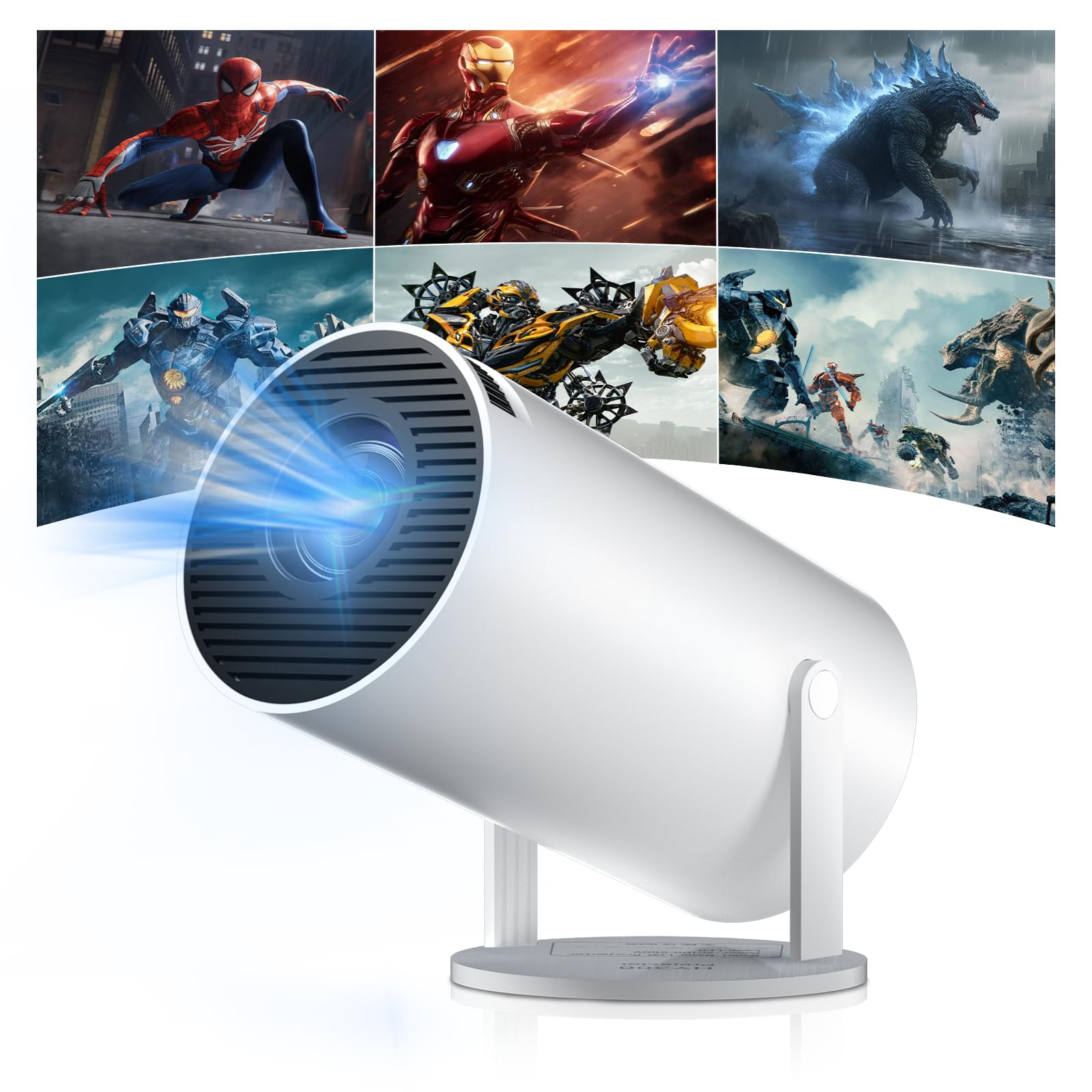
Figure 1: Salange HY300Pro Mini Projector
2. פּראָדוקט איבערview
שליסל פֿעיִקייטן
- דואַל-באַנד WiFi 6 און בלועטוט 5.4: Ensures fast and stable network connectivity and seamless audio pairing with external speakers or headphones.
- אַנדרויד 11.0 אָפּערייטינג סיסטעם: Supports installation of various applications directly on the projector for versatile entertainment and productivity.
- 4K Support & Native 720P Resolution: Delivers clear and vibrant images, supporting 1080P and 4K video playback.
- 180° ראָוטיישאַן: Flexible projection angles for various setups, including ceiling, wall, or angled surfaces.
- Automatic Keystone Correction & Manual Focus: Intelligently corrects image distortion and allows for fine-tuning clarity.
- סאָליד און פּאָרטאַטיוו פּלאַן: Weighs only 700g, making it easy to transport for outdoor activities or different rooms.

פיגורע 2: איבערview of Salange HY300Pro features including 8K support, WiFi 6, Bluetooth 5.4, 180° rotation, and auto keystone correction.
וואָס איז אין די קעסטל
- 1 x Salange HY300Pro Projector
- 1 x באַניצער מאַנואַל
- 1 x מאַכט קאַבלע
- 1 x רימאָוט קאָנטראָל

Figure 3: Contents of the Salange HY300Pro package.
3. סעטאַפּ
3.1 אַנפּאַקינג און פּלייסמאַנט
- קערפאַלי באַזייַטיקן אַלע קאַמפּאָונאַנץ פון די פּאַקקאַגינג.
- שטעלט דעם פּראָיעקטאָר אויף אַ שטאַרקער, גלאַטער ייבערפלאַך. זאָרגט פֿאַר גענוג ווענטילאַציע אַרום דעם אַפּאַראַט.
- The projector's 180° rotation feature allows flexible placement. Adjust the projector's angle to project onto a wall, ceiling, or screen as desired.

Figure 4: Projector demonstrating 180-degree rotation for various projection surfaces.
3.2 מאַכט קאַנעקשאַן
Connect the provided power cable to the projector's power input and then to a power outlet.
3.3 ערשטע איינשטראָם און פאָקוס אַדזשאַסטמענט
- דרוק די מאַכט קנעפּל אויף די פּראַדזשעקטער אָדער די ווייַט קאָנטראָל צו קער אויף די מיטל.
- The projector features automatic keystone correction. It will intelligently detect and correct image distortion to ensure a square image.
- For fine-tuning the image clarity, use the manual focus adjustment ring on the projector.

Figure 5: Illustration of automatic keystone correction and manual focus adjustment.
3.4 נעץ פֿאַרבינדונג (WiFi)
- Navigate to the 'Settings' menu on the projector's home screen.
- Select 'Network & Internet' and enable Wi-Fi.
- Choose your desired Wi-Fi network from the list and enter the password if prompted. The projector supports dual-band 2.4G + 5G WiFi 6 for fast and stable connections.

Figure 6: Visual representation of the projector's WiFi 6 capabilities for ultra-fast streaming.
3.5 בלועטאָאָטה פּערינג
- From the 'Settings' menu, select 'Connected Devices' or 'Bluetooth'.
- געבן בלועטאָאָטה און זוכן פֿאַר בנימצא דעוויסעס.
- אויסקלייבן אייער בלועטוט רעדנער אדער כעדפאָונז פון דער ליסטע צו פּאָרן.

Figure 7: Projector connected to various Bluetooth audio devices.
3.6 קאַנעקטינג פונדרויסנדיק דעוויסעס
The projector supports HDMI and USB connections.
- הדמי: Connect your laptop, game console, Blu-ray player, or TV stick using an HDMI cable. Select the corresponding HDMI input source from the projector's input menu.
- וסב: אַרײַנשטעלן אַ USB דרייוו צו שפּילן מעדיע files directly. Access the files through the media player application on the Android OS.
4. אַפּערייטינג ינסטרוקטיאָנס
4.1 נאַוויגירן די אַנדרויד אָפּערירן סיסטעם
The Salange HY300Pro runs on Android 11.0, providing a smart TV experience.
- ניצט די ווײַטקאָנטראָל צו נאַוויגירן דורך דעם היים־עקראַן, אַפּליקאַציעס און סעטטינגס.
- The interface is intuitive, similar to an Android smartphone or tablet.

Figure 8: Projector displaying the Android OS home screen with various streaming apps.
4.2 אַפּ פאַרוואַלטונג
You can install and manage applications directly on the projector.
- Access the app store (e.g., Google Play Store) to download streaming services, games, and productivity tools.
- To uninstall an app, go to 'Settings' > 'Apps' and select the desired app.
4.3 סקרין מירערינג
Mirror your smartphone or tablet screen to the projector wirelessly.
- זיכער מאַכן אַז ביידע אייער דעווייס און דער פּראָיעקטאָר זענען פארבונדן צו דער זעלבער Wi-Fi נעץ.
- On the projector, select the screen mirroring function (e.g., 'Miracast', 'AirPlay', or 'Screen Share').
- On your smartphone/tablet, enable screen mirroring and select the projector from the list of available devices.
4.4 בילד און קלאַנג סעטטינגס
Adjust various settings to optimize your viewינג דערפאַרונג.
- בילד סעטטינגס: Access 'Settings' > 'Display' to adjust brightness, contrast, color, and aspect ratio.
- געזונט סעטטינגס: Access 'Settings' > 'Sound' to adjust volume, sound mode, and output device.

Figure 9: Projector displaying a large image, illustrating its ability to create a home cinema experience.
5. וישאַלט
5.1 רייניקן די לינז
ניצט אַ ווייכע, לינט-פֿרייע שטאָף ספּעציעל דיזיינד פֿאַר אָפּטישע לענסעס צו פֿאָרזיכטיק ווישן די פּראָיעקטאָר לענס. ניצט נישט קיין שרײַבנדיקע רייניגערס אָדער איבערגעטריבענע קראַפֿט.
5.2 ווענטאַליישאַן
Ensure the projector's ventilation vents are clear of dust and obstructions. Blocked vents can lead to overheating and reduced performance. Periodically clean the vents with a soft brush or compressed air.
5.3 סטאָרידזש
ווען נישט אין באַנוץ פֿאַר לענגערע פּעריאָדן, האַלט דעם פּראָיעקטאָר אין אַ קיל, טרוקן אָרט, אַוועק פון דירעקט זונשייַן און עקסטרעמע טעמפּעראַטורן. ניצט די אָריגינעלע פּאַקאַדזשינג אָדער אַ פּראַטעקטיוו קעסטל צו פאַרמייַדן שטויב אָנזאַמלונג און שעדיקן.
6. טראָובלעשאָאָטינג
| פּראָבלעם | מעגלעך סיבה | לייזונג |
|---|---|---|
| קיין בילד געוויזן | Power cable disconnected; Incorrect input source; Projector in standby mode. | Check power connection; Select correct HDMI/USB input; Press power button to wake up. |
| די בילד איז בלערי | פאָקוס נישט אַדזשאַסטיד; פּראָיעקטאָר צו ווייט/נאָענט צום עקראַן. | Adjust manual focus ring; Ensure projector is within optimal projection distance. |
| קיין געזונט | Volume too low; Muted; Incorrect audio output selected; Bluetooth device not paired. | Increase volume; Unmute; Check audio settings; Re-pair Bluetooth device. |
| Wi-Fi/Bluetooth פֿאַרבינדונג פּראָבלעמען | Incorrect password; Out of range; Interference. | Verify password; Move closer to router/device; Reduce interference from other electronics. |
| ווייַט קאָנטראָל נישט ארבעטן | Dead batteries; Obstruction; Not paired. | פאַרבייטן באַטעריעס; אַראָפּנעמען שטערונגען; פאַרבינדן די ווייַטקאָנטראָל אויב נייטיק. |
7. ספּעסאַפאַקיישאַנז
| שטריך | דעטאַל |
|---|---|
| סאָרט | סאַלאַנגע |
| מאָדעל נומער | X-HY300PRO |
| סעריע | Salange Mini Beamer |
| קאָליר | ווייַס |
| ווייַז טיפּ | לקד |
| געבוירן האַכלאָטע | 1280 רענטגענ 720 פּ |
| מאַקסימום דיספּליי רעזאָלוציע | 3840 x 2160 (4K געשטיצט) |
| קאַנעקטיוויטי טעכנאָלאָגיע | Bluetooth, Wi-Fi (WiFi 6) |
| ייַזנוואַרג צובינד | בלועטוט, הדמי, יו-עס-בי |
| קאַמפּאַטאַבאַל דעוויסעס | Smartphones, Laptops, Game Consoles, Blu-ray Players, Media Players |
| נומער דימענשאַנז (L X W X H) | 9.5 X 9.5 X 15.7 סענטימעטער |
| ספּעציעלע פֿעיִקייטן | Wi-Fi Compatible, Digital Keystone Correction, Lightweight, Portable, 180° Rotation |
| רעקאָממענדעד ניצט | Business, Home Cinema, Gaming, Education |
| פאָרם פאַקטאָר | פּאָרטאַטיוו |
| מאַונטינג טיפּ | טיש בארג |
8. וואָראַנטי און שטיצן
For warranty information and technical support, please refer to the documentation included with your purchase or visit the official Salange webזייטל. האַלט דיין קויפן באַווייַז פֿאַר וואָראַנטי קליימז.