
1. פּראָדוקט איבערview
The QRD Wireless Controller (Model: US-T5-JB02) is a high-performance replacement controller designed for Nintendo Switch, Switch Pro, Lite, and OLED models. It features advanced technologies such as Hall Effect joysticks for precise, drift-free control, dual vibration motors for immersive feedback, and a 6-axis gyroscope for accurate motion sensing. This controller also includes programmable back buttons and customizable LED backlighting, enhancing your gaming experience.
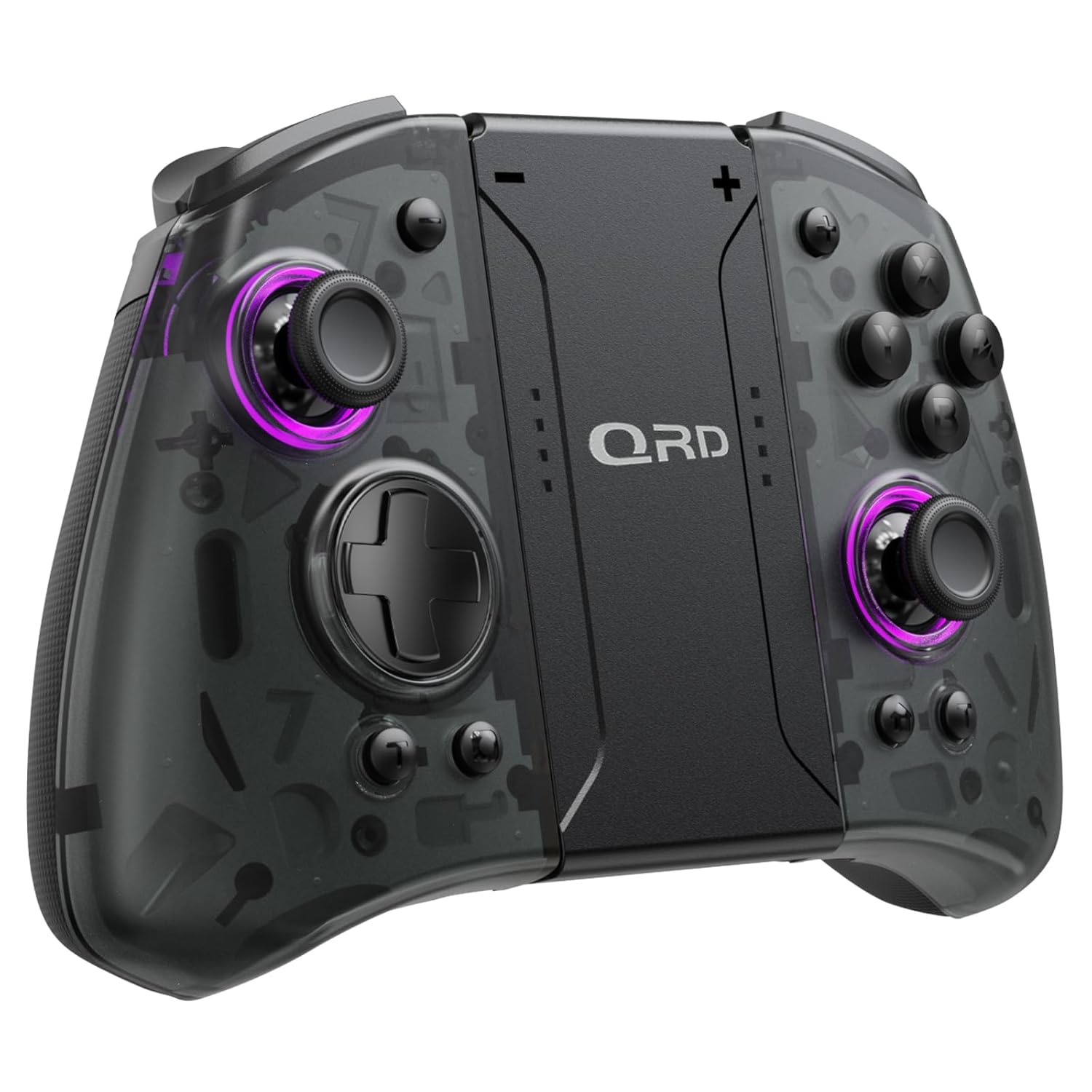
בילד 1.1: פראָנט view of the QRD Wireless Controller, showcasinג זײַן ערגאָנאָמישן פּלאַן און קנעפּל אויסלייג.
2. שליסל פֿעיִקייטן
- וויירלעס בלועטוט 5.3 קאָנעקטיוויטי: Ensures stable, lag-free connection for seamless gameplay.
- האַל עפֿעקט דזשויסטיקס: Provides 360° precise, drift-free control and extended lifespan.
- דואַל ווייבריישאַן מאָטאָרן: Offers 3 levels of adjustable vibration for enhanced tactile feedback.
- 6-אַקס גיראָסקאָפּ באַוועגונג סענסינג: Enables accurate tilt detection for precise aiming and movement in compatible games.
- פּראָגראַמירבאַרע צוריק קנעפּלעך: Customize controls with single or multiple mappings for efficient combo execution.
- טורבאָ פונקציע: Allows for rapid firing of buttons.
- LED באַקלייט: Features 8 different colors with static, breathing, and flashing modes for personalized aesthetics.
- לאנג באַטאַרייע לעבן: Up to 10 hours of uninterrupted gameplay on a single charge (2 hours charging time).
- ערגאָנאָמיק פּלאַן: Comfortable grip for extended gaming sessions, includes a screenshot function.

Image 2.1: Diagram highlighting key features such as Bluetooth 5.3, Dual Vibration, 6-Axis Gyro, Turbo, Macro Back Paddles, and Colorful Options.

Image 2.2: Illustration demonstrating the Hall Effect Joysticks, emphasizing drift-free and accurate control.
3. סעטאַפּ און קאַנעקשאַן
3.1 Initial Pairing with Nintendo Switch
- Ensure your Nintendo Switch console is powered on and updated to the latest system version.
- פֿון די היים מעניו, אויסקלײַבן "קאָנטראָלערס" > "ענדערן גריפּ/אָרדער".
- On the QRD Wireless Controller, press and hold the HOME קנעפּל (usually located in the center) for 3-5 seconds until the LED indicators start flashing rapidly.
- אזוי שנעל ווי דער קאנטראלער איז ערפאלגרייך פארבינדן, וועלן די קארעספאנדירנדע שפילער LED(ס) אויפן קאנטראלער זיך אנצינדן.
- The controller can also be connected by sliding it into the Nintendo Switch Dock while the console is attached.
3.2 Reconnecting the Controller
To reconnect a previously paired controller, simply press the HOME קנעפּל once. The controller will automatically attempt to connect to the last paired console.
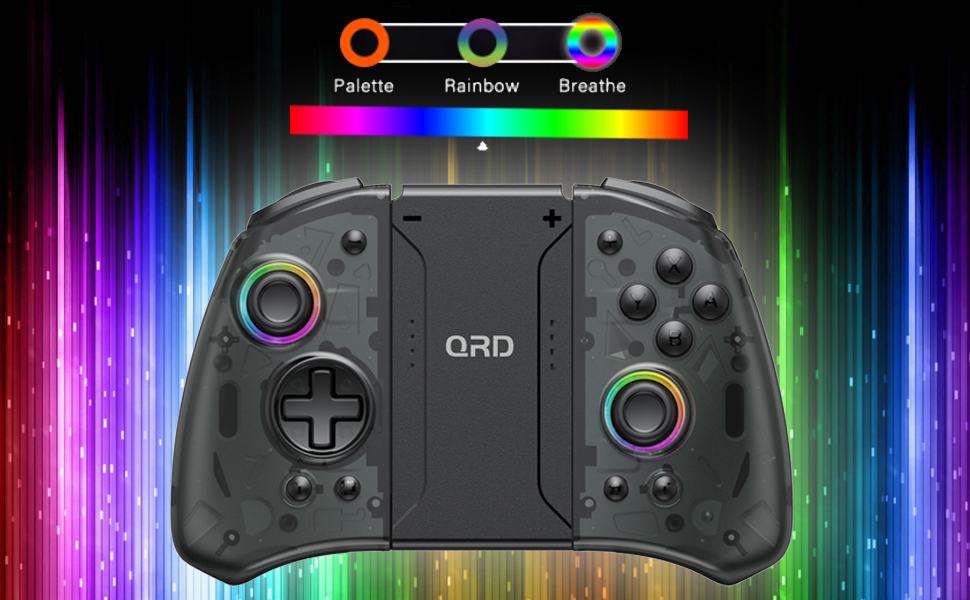
Image 3.1: Visual representation of controller compatibility with Nintendo Switch and Switch OLED models. Note: Not compatible with Switch Lite.
4. אַפּערייטינג ינסטרוקטיאָנס
4.1 קנעפּל אויסלייג
מאַכט זיך באַקאַנט מיטן קאָנטראָללער'ס קנעפּל אויסלייג:
- לינקס דזשויסטיק: Movement control.
- רעכט דזשויסטיק: Camera or aiming control.
- ד-פּאַד: ריכטונגס-איינגאב.
- A/B/X/Y קנעפּלעך: אַקציע קנעפּלעך.
- לינקס/רעכטס קנעפּלעך: אַקסל קנעפּלעך.
- ZL/ZR קנעפּלעך: טריגער קנעפּלעך.
- HOME קנעפּל: Returns to the HOME Menu, powers on/off the controller.
- סקרינשאט קנעפל: Captures screenshots.
- +/- קנעפּלעך: Plus and Minus buttons for in-game functions.
- M1/M2 (Back Buttons): Programmable macro buttons.
4.2 אַדזשאַסטירן ווייבריישאַן אינטענסיטעט
The controller supports 3 levels of vibration intensity. To adjust, press and hold the טורבאָ קנעפּל און דעמאָלט דריקן די די-פּאַד אַרויף or ד-פּאַד אַראָפּ to cycle through intensity levels (Low, Medium, High, Off).
4.3 Turbo Function Setup
To set a button to Turbo mode:
- דריקן און האַלטן די טורבאָ קנעפּל.
- While holding Turbo, press the desired action button (e.g., A, B, X, Y, L, R, ZL, ZR). The button will now continuously register input when held down.
- To clear Turbo for a specific button, repeat the process. To clear all Turbo settings, press and hold the טורבאָ קנעפּל פֿאַר 5 סעקונדעס.
4.4 Programming Back Buttons (Macro)
The M1 and M2 back buttons can be programmed to execute a sequence of button presses (macro). Each macro can store up to 16 button presses.
- דריקן און האַלטן די M1 or M2 button you wish to program.
- While holding the M button, press the SET קנעפּל (refer to manual diagram for location, typically a small button on the back). The indicator light will flash slowly.
- Enter the desired sequence of button presses (e.g., A, B, X, Y, D-Pad directions).
- דרוק די SET קנעפּל again to save the macro. The indicator light will stop flashing.
- To clear a macro, press and hold the programmed M button and then press the SET קנעפּל צוויי מאָל.
4.5 LED Backlight Adjustment
The controller features customizable RGB lighting. To cycle through modes and colors:
- דרוק די געפירט קנעפּל (refer to manual diagram for location) to change between static color, breathing, and flashing modes.
- In static mode, press the געפירט קנעפּל repeatedly to cycle through the 8 available colors.

Image 4.1: Display of the controller's LED backlight options, including Palette (static colors), Rainbow, and Breathe modes.
5. אויפלאָדן און באַטעריע לעבן
The QRD Wireless Controller is equipped with a built-in rechargeable Lithium Polymer battery. A 2.5m USB-C cable is included for charging.
- Connect the USB-C end of the cable to the controller's charging port and the USB-A end to a power source (e.g., Nintendo Switch Dock, USB wall adapter, computer USB port).
- טשאַרדזשינג נעמט בעערעך 2 שעה פֿאַר אַ פול אָפּצאָל.
- A full charge provides up to 10 hours of continuous gameplay.
- The LED indicators on the controller will show charging status and battery level.
6. וישאַלט
To ensure the longevity and optimal performance of your QRD Wireless Controller, follow these maintenance guidelines:
- רייניקונג: ניצט אַ ווייכע, טרוקענע שטאָף צו ווישן דעם קאָנטראָללער. פֿאַר שווערע שמוץ, אַ ביסל ווייכער מאַכןampווייקט דעם שטאָף מיט וואַסער. פֿאַרמייַדט ניצן שטרענגע כעמיקאַלן, סאָלווענטן, אָדער אַברייסיוו רייניגער.
- סטאָרידזש: האַלט דעם קאָנטראָללער אין אַ קיל, טרוקן אָרט אַוועק פון דירעקט זונשייַן, עקסטרעמע טעמפּעראַטורן און הויכער הומידיטי.
- האַנדלינג: Avoid dropping the controller or subjecting it to strong impacts. Do not disassemble the controller, as this may void the warranty and cause damage.
- טשאַרדזשינג: Do not leave the controller charging for excessively long periods after it is fully charged.
7. טראָובלעשאָאָטינג
| פּראָבלעם | מעגלעך סיבה | לייזונג |
|---|---|---|
| Controller does not connect. | Low battery; Not paired; Interference. | Charge the controller; Re-pair the controller following Section 3.1; Move closer to the console or away from other wireless devices. |
| אינפוט לעג אדער דיסקאנעקציע בעת גאַמעפּלייַ. | Wireless interference; Distance from console; Low battery. | Ensure no strong wireless signals are nearby; Reduce distance to console; Charge the controller. |
| Joysticks drift or are unresponsive. | Calibration issue; Physical debris. | Go to Switch System Settings > Controllers and Sensors > Calibrate Control Sticks. Clean around the joystick base. |
| די קנעפּלעך זענען נישט ריספּאַנדינג. | Stuck button; Software glitch. | Ensure buttons are not physically stuck. Try resetting the controller (if a reset button is present, otherwise power cycle). |
| ווייבריישאַן אַרבעט נישט. | Vibration setting off; Game does not support vibration. | Adjust vibration intensity (Section 4.2). Verify game compatibility. |
8. ספּעסאַפאַקיישאַנז
| שטריך | דעטאַל |
|---|---|
| מאָדעל נומער | US-T5-JB02 |
| קאַנעקטיוויטי | בלועטאָאָטה 5.3 |
| קאַמפּאַטאַבילאַטי | Nintendo Switch, Switch Pro, Switch OLED |
| דזשויסטיק טיפּ | האַלל אַפעקט |
| ווייבריישאַן | Dual Motors, 3 adjustable levels |
| באַוועגונג קאָנטראָל | 6-אַקס גיראָסקאָפּע |
| פּראָגראַממאַבלע קנעפּלעך | Yes (Back Buttons) |
| באַטערי טיפּ | ליטהיום פּאָלימער |
| טשאַרדזשינג צייט | בעערעך. 2 שעה |
| שפּיל צייט | אַרויף צו 10 שעה |
| טשאַרדזשינג פּאָרט | וסב-C |
| דימענשאַנז | 7.95 X 5.51 X 2.36 אינטשעס (בעערעך) |
| וואָג | 12.35 אונסעס (בעערעך) |
9. וואָראַנטי און שטיצן
9.1 וואָראַנטי אינפֿאָרמאַציע
QRD products are manufactured with high-quality materials and undergo rigorous testing. This product comes with a standard manufacturer's warranty against defects in materials and workmanship. Please refer to the product packaging or the official QRD webזייטל פֿאַר ספּעציפֿישע וואָראַנטי טערמינען און געדויער.
9.2 קונה שטיצן
For technical assistance, troubleshooting, or warranty claims, please contact QRD Customer Support. Have your product model number (US-T5-JB02) and purchase information ready when contacting support.
- אָנליין שטיצן: Visit the official QRD website for FAQs, updated manuals, and support contact forms.
- E- בריוו שטיצן: [Insert QRD Support Email Address Here - if available, otherwise omit]
- טעלעפאָן שטיצן: [Insert QRD Support Phone Number Here - if available, otherwise omit]
We are committed to providing excellent customer service and ensuring your satisfaction with QRD products.