
leapwell CD201W
Leapwell Portable CD Player User Manual
Model: CD201W
הקדמה
Thank you for choosing the Leapwell Portable CD Player. This device is designed to provide a versatile and high-quality audio experience, supporting multiple playback modes and featuring a classic design. Please read this manual thoroughly to understand the product's functions and ensure proper operation and maintenance.
וואָס איז אין די קעסטל
ביטע קאָנטראָלירט דעם אינהאַלט פֿון אייער פּעקל. אויב עס פֿעלן אָדער זענען געשעדיגט עפּעס, קאָנטאַקטירט קונה שטיצע.
- Leapwell Portable CD Player
- ווייַט קאָנטראָל
- ירפאָונז
- 3.5 מם AUX קאַבלע
- וסב-C טשאַרדזשינג קאַבלע
- באַניצער מאַנואַל

Image: The Leapwell Portable CD Player shown with its remote control, earphones, AUX cable, USB-C charging cable, and user manual, all neatly arranged next to its packaging box.
פּראָדוקט איבערview
The Leapwell Portable CD Player combines classic design with modern functionality. It features a top-loading CD mechanism with a translucent dust cover, integrated speakers, and a control panel with a rotary knob for volume and various buttons for mode selection and playback control.

Image: A white Leapwell Portable CD Player with its top lid open, revealing a CD. The front speakers are illuminated with a blue glow, and control buttons are visible on the right side.
שליסל פֿעיִקייטן:
- Multi-Functional Playback: Supports CD Play, Bluetooth, FM Radio, USB, AUX, AB Repeat, and Optical Mode.
- HiFi Speaker System: Features independent sound cavity design and inner magnetic speaker unit for enhanced sound detail and bass.
- קריקאָנלאָדלעך באַטערי: Built-in USB-C fast rechargeable battery provides 4-5 hours of playback.
- קלאַסיש פּלאַן: Retro square design with an elegant volume knob and translucent CD dust cover.
- ווערסאַטאַל קאַנעקטיוויטי: Includes 3.5mm audio, USB, and optical interfaces for external connections.
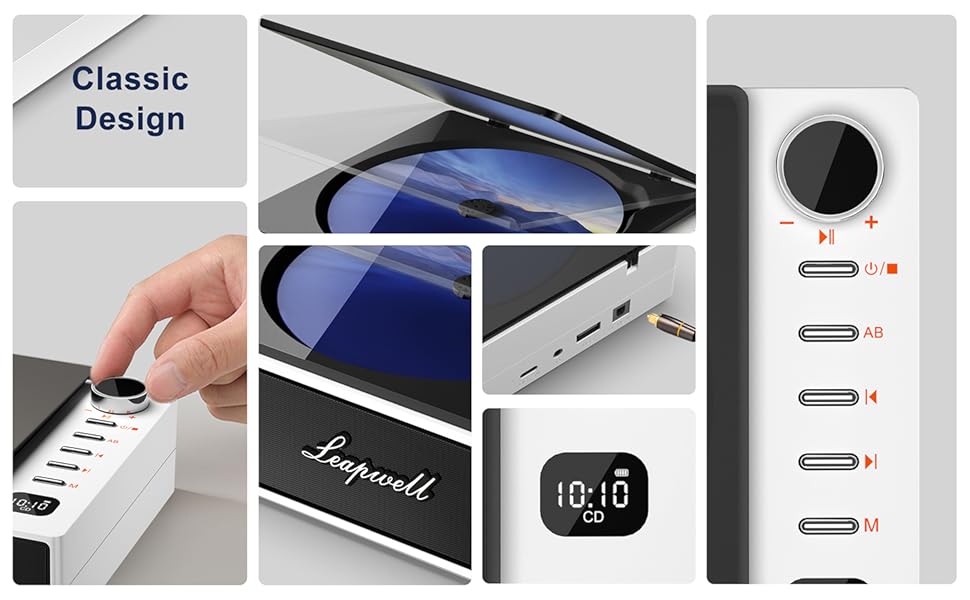
בילד: א קאלאזש אויסשטעלונגasing various design elements and features of the CD player, including the volume knob, the open CD lid, the USB-C and optical ports, and the digital display.
סעטאַפּ
1. טשאַרדזשינג די מיטל
Before first use, fully charge the CD player. Connect the provided USB-C charging cable to the USB-C port on the device and the other end to a 5V-2A power adapter (not included) or a computer's USB port. A blinking white light indicates charging. The light will become solid when fully charged. Charging typically takes 3.5 hours for 4-5 hours of playback.

Image: The portable CD player is shown outdoors, emphasizing its built-in rechargeable battery and portability, with icons indicating 4.5 hours playback and 3.5 hours charging time.
2. פּאָווערינג אויף / אויסגעלאשן
Press and hold the power button (usually indicated by a power symbol) to turn the device on or off.
אַפּערייטינג מאָדעס
The Leapwell CD Player supports multiple audio sources. Use the 'M' (Mode) button on the device or remote control to switch between modes.

Image: A circular diagram illustrating the six different operating modes of the CD player: CD Mode, BT Mode (Bluetooth), FM Mode, USB Mode, AB Repeat, and Optical Mode.
1. CD Play Mode
- Open the translucent dust cover on top of the player.
- Carefully place a CD onto the spindle, ensuring it is seated correctly.
- נאָענט די שטויב דעקן.
- Select "CD" mode using the 'M' button. The CD will begin playing automatically.
- Use the play/pause, skip forward/backward buttons, and volume knob to control playback.

Image: The Leapwell Portable CD Player with its top lid open, ready for a CD to be inserted. The internal mechanism is visible.
2. בלועטאָאָטה מאָדע
The CD player can connect to Bluetooth headphones or a mobile phone to play music.
- Switch the player to "BT" (Bluetooth) mode. The display will show "BT" and an indicator will blink, signifying pairing mode.
- On your Bluetooth device (e.g., smartphone, headphones), enable Bluetooth and search for "Leapwell CD Player".
- Select the device to pair. Once connected, the Bluetooth indicator on the CD player will stop blinking.
- You can now play audio from your connected device through the CD player's speakers or connected Bluetooth headphones.

Image: A person's hands are shown interacting with a smartphone and the CD player, illustrating the Bluetooth connection process. Bluetooth icons float between the devices.
3. עפעם ראַדיאָ מאָדע
- Switch the player to "FM" mode.
- Use the skip forward/backward buttons to scan for radio stations.
- Adjust the volume using the rotary knob.
4. וסב מאָדע
- אַרייַנלייגן אַ וסב בליץ פאָר מיט אַודיאָ fileס אין די וסב פּאָרט.
- Switch the player to "USB" mode.
- The player will automatically detect and begin playing audio fileס פון די USB דרייוו.
5. AUX מאָדע
Connect external audio devices (e.g., smartphone, MP3 player) using the provided 3.5mm AUX cable.
- Connect one end of the 3.5mm AUX cable to the AUX-in port on the CD player.
- פֿאַרבינדט דעם אַנדערן עק צום כעדפאָון דזשעק אָדער אַודיאָ אַרויסגאַנג פֿון אייער עקסטערנעם מיטל.
- Switch the player to "AUX" mode.
- Play audio from your external device. The sound will be output through the CD player's speakers.
6. אָפּטיש מאָדע
For high-fidelity audio output, connect the CD player to an external decoder or speaker system via an optical cable (not included).
- Connect an optical cable to the optical output port on the CD player.
- Connect the other end to the optical input of your compatible audio system.
- Switch the player to "Optical" mode.
- Audio from the CD player will now be transmitted digitally to your external system.
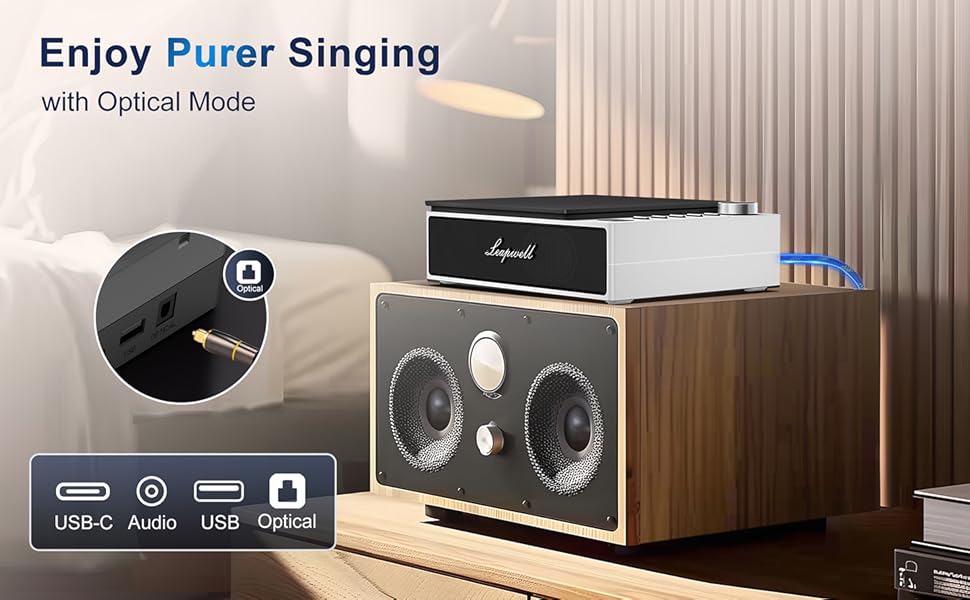
Image: The CD player is shown connected to a larger external speaker system using an optical cable, highlighting its capability for high-quality audio output.
7. AB Repeat Mode
This mode allows you to repeat a specific section of an audio track (CD or USB).
- During playback, press the "AB" button once to set the starting point (A).
- Press the "AB" button again to set the ending point (B). The section between A and B will now repeat.
- Press the "AB" button a third time to cancel the repeat function.
וישאַלט
- רייניקונג: Use a soft, dry cloth to clean the exterior of the player. For the CD lens, use a specialized CD lens cleaner. Do not use abrasive cleaners or solvents.
- שטויב דעקל: Keep the translucent dust cover closed when not in use to protect the optical drive from dust and debris.
- סטאָרידזש: האַלט דעם שפּילער אין אַ קיל, טרוקן אָרט אַוועק פון דירעקט זונשייַן און עקסטרעמע טעמפּעראַטורן.
- באַטערי זאָרגן: כדי צו פארלענגערן די לעבן פון די באַטעריע, זאָלט איר נישט אָפט אויסלאָדן די באַטעריע. לאָדט דאָס אַפּאַראַט רעגולער אויף, אפילו אויב איר ניצט עס נישט קעסיידער.
טראָובלעשאָאָטינג
| פּראָבלעם | מעגלעך סיבה / לייזונג |
|---|---|
| די מיטל טוט נישט מאַכט אויף. | Battery might be depleted. Connect to power adapter and charge. Ensure the power button is pressed and held sufficiently. |
| די סי-די שפּילט נישט אדער הערט זיך איבער. | CD might be dirty or scratched. Clean the CD. Ensure the CD is properly seated. The player has anti-shake protection, but excessive movement can still cause skips. |
| קיין געזונט פון ספּיקערז. | Volume might be too low. Increase volume using the knob. Ensure correct mode is selected. Check if external headphones or speakers are connected and functioning. |
| בלועטאָאָטה קשר ישוז. | Ensure the player is in Bluetooth pairing mode. Make sure the external Bluetooth device is discoverable and within range. Try unpairing and re-pairing the devices. |
| ווייַט קאָנטראָל נישט ארבעטן. | Check if the remote control's battery needs replacement. Ensure there are no obstructions between the remote and the player's IR receiver. |
| Slow charging via computer USB. | Charging via a computer's USB port will be slower. It is recommended to use a 5V-2A adapter for faster charging. |
ספּעסאַפאַקיישאַנז
| שטריך | דעטאַל |
|---|---|
| פּראָדוקט דימענשאַנז | 7.3 X 5.8 X 2.2 אינטשעס (18.5 X 14.7 X 5.6 סענטימעטער) |
| פּונקט וואָג | 1.4 פונט (0.63 קג) |
| מאָדעל נומער | CD201W |
| באַטערי טיפּ | 1 ליטהיום יאָן באַטאַרייע (אַרייַנגערעכנט) |
| פּלייַבאַקק מאָדעס | CD, Bluetooth, FM Radio, USB, AUX, AB Repeat, Optical |
| קאַנעקטיוויטי טעכנאָלאָגיע | Auxiliary, Bluetooth, Optical, USB, USB-C |
| ספּעציעלע פֿעיִקייטן | Anti-Skip Protection, Built-In Speaker, Portable, Rechargeable |
| טונער טעכנאָלאָגיע | FM |
| מאַכט מקור | באַטאַרייע פּאַוערד |
וואָראַנטי & שטיצן
Leapwell CD Players come with lifelong technical support and 24/7 professional customer service. For any inquiries, issues, or warranty claims, please contact Leapwell customer support through the retailer's platform or the contact information provided in your product packaging.
Ask a question about this manual
Ask about setup, troubleshooting, compatibility, parts, safety, or missing instructions. Manuals+ will review the question and use this page’s manual context to help answer it.