
1. הקדמה
The Auronic Electric Air Dehumidifier AU3270 is designed to effectively remove excess moisture from indoor environments, helping to prevent mold growth and maintain a healthy humidity level. This appliance is suitable for spaces up to 15 square meters and can extract up to 10 liters of moisture per day. This manual provides essential information for the safe and efficient use of your dehumidifier.

Image: The Auronic Electric Air Dehumidifier AU3270 positioned in a living room, illustrating its compact design and 10-liter daily capacity for optimal dehumidification.
2. זיכערקייַט אינסטרוקציעס
ביטע ליינט אַלע זיכערהייט אינסטרוקציעס קערפֿול איידער איר ניצט דעם אַפּאַראַט צו פֿאַרמייַדן שאָדן אָדער שאָדן.
- פאַרזיכערן די מאַכט צושטעלן וואָלtage שטימט מיט דער ראַנג־עטיקעט אויפן לופט־טרוקענער.
- ארבעט נישט דעם לופט-טרוקענער מיט א צעבראכענעם עלעקטרישע שנור אדער שטעקער.
- האַלט דעם אַפּאַראַט אַוועק פון היץ קוועלער, דירעקט זונשייַן און ברענענדיקע מאַטעריאַלן.
- בלאָקירט נישט דעם לופט אריינגאנג אדער ארויסגאנג. האַלט בייַ מינדסטער 20 סענטימעטער פּלאַץ אַרום דעם אַפּאַראַט.
- Always place the dehumidifier on a stable, level surface to prevent water spillage.
- Unplug the appliance before cleaning, maintenance, or when not in use for extended periods.
- טונקט נישט איין דעם אַפּאַראַט, עלעקטרישע שנור, אדער פּלאָג אין וואַסער אדער אַנדערע פליסיקייטן.
- דער אַפּפּליאַנסע איז נישט בדעה פֿאַר נוצן דורך מענטשן (אַרייַנגערעכנט קינדער) מיט רידוסט גשמיות, סענסערי אָדער גייַסטיק קייפּאַבילאַטיז, אָדער פעלן פון דערפאַרונג און וויסן, סייַדן זיי האָבן באקומען השגחה אָדער לימעד וועגן די נוצן פון דעם אַפּפּליאַנסע דורך אַ מענטש פאַראַנטוואָרטלעך פֿאַר זייער זיכערקייַט.
- קינדער זאָל זיין סופּערווייזד צו ענשור אַז זיי טאָן ניט שפּילן מיט די אַפּפּליאַנסע.
3. סעטאַפּ
3.1 אויספּאַקן און פּאַקעט אינהאַלט
Carefully remove the dehumidifier from its packaging. Check that all components are present and undamaged. The package typically includes the dehumidifier unit, a drainage hose, and this user manual.

Image: Contents of the Auronic Dehumidifier package, displaying the main unit, continuous drainage hose, and user manual, along with key product dimensions.
3.2 פּלייסמאַנט
Place the dehumidifier on a firm, level surface in the desired location. Ensure there is at least 20 cm of free space around the air inlet and outlet for optimal airflow. The unit is effective for rooms up to 15 square meters. Avoid placing it in direct sunlight or near heat-emitting appliances.
3.3 מאַכט קאַנעקשאַן
Plug the power cord into a grounded electrical outlet. Ensure the outlet meets the power requirements specified on the appliance's rating label.
3.4 דריינאַדזש אָפּציעס
דער לופט-טרוקענער אָפפערט צוויי דריינאַדזש מעטאָדן:
- וואַסער טאַנק: The unit collects condensed water in its internal 2-liter water tank. The appliance will automatically stop operating when the tank is full, and an indicator will illuminate.
- קעסיידערדיק דריינאַדזש: For uninterrupted operation, attach the included drainage hose to the continuous drainage port on the back of the unit. Route the hose to a suitable drain or larger container, ensuring it is sloped downwards to allow water to flow freely by gravity.
4. אַפּערייטינג ינסטרוקטיאָנס
4.1 קאָנטראָל פּאַנעל איבערview
The dehumidifier features an intuitive digital LED display and control buttons for easy operation.
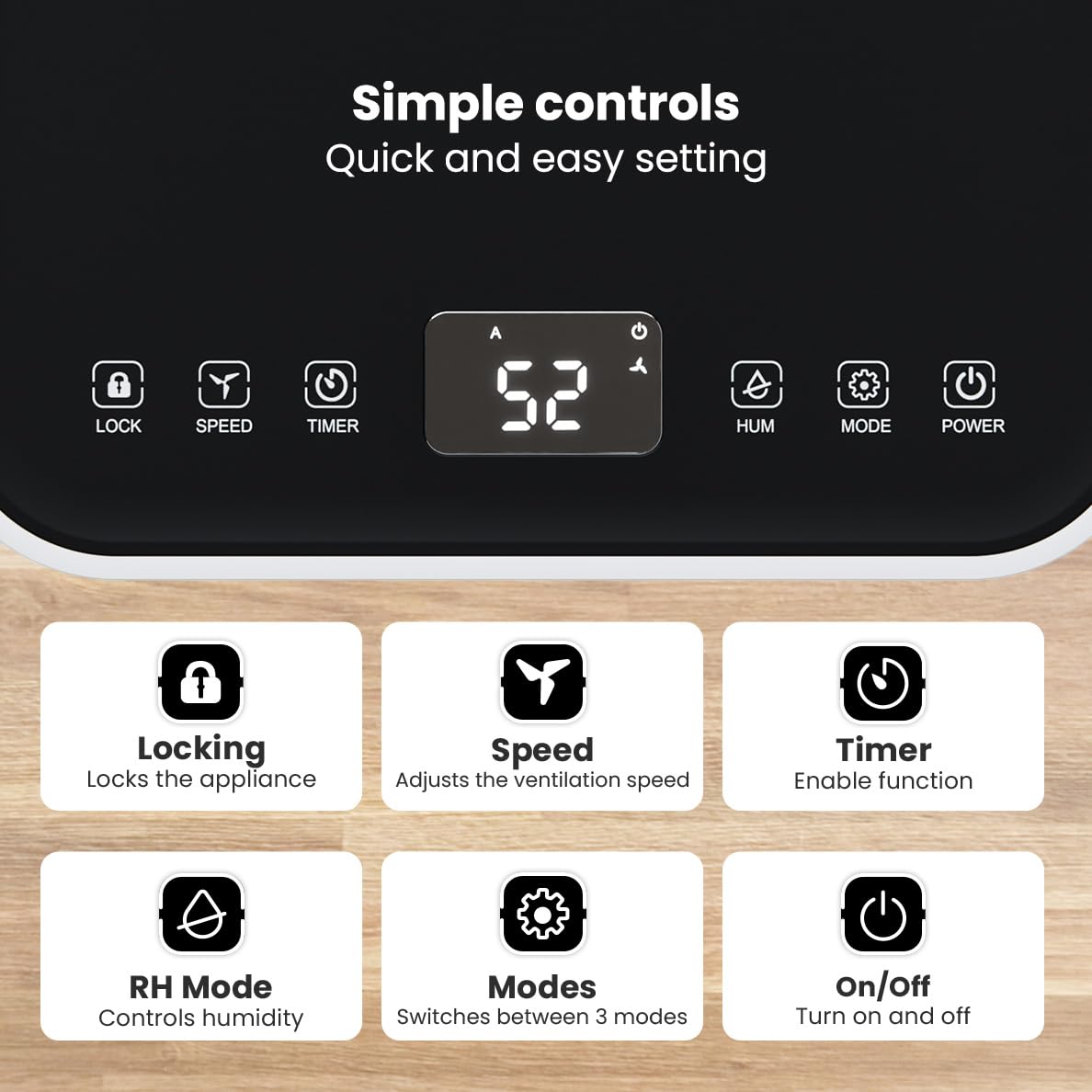
בילד: דעטאַלירט view of the dehumidifier's control panel, highlighting each button's function for easy setting adjustments.
- מאַכט קנעפּל (⏻): קער די אַפּפּליאַנסע אויף אָדער אַוועק.
- מאָדע קנעפּל (⚙): Switches between the three operating modes: Automatic, Continuous, and Quiet.
- RH Mode Button (💧): Controls the desired relative humidity level. Press to set the target humidity.
- טייַמער קנעפּל (⏱): Enables the timer function for scheduled operation.
- גיכקייט קנעפּל (⇋): Adjusts the ventilation speed (fan speed).
- לאַק קנעפּל (🔒): פארשפארט דעם קאנטראל פאנעל צו פארמיידן אקצידענטעלע ענדערונגען.
4.2 אַפּערייטינג מאָדעס
דריק דעם מאָדע קנעפּל צו דורכגיין די פאַראַן אָפּעראַציע מאָדעס:
- אָטאַמאַטיק מאָדע: The device automatically adjusts its operation based on the current room humidity to maintain a comfortable level.
- קעסיידערדיק מאָדע: Ideal for very damp environments like wet basements. The dehumidifier operates continuously regardless of the humidity level until the water tank is full or continuous drainage is active.
- שטיל מאָדע: Designed for night-time use or in areas where low noise is preferred. The dehumidifier operates at a reduced fan speed, ensuring a peaceful environment with a noise level below 36dB.

Image: A chart comparing the noise level of the Auronic Dehumidifier (42dB) to common sounds like breathing, whispering, and loud conversation, highlighting its quiet operation.
4.3 Humidity Sensor and Display
The integrated humidity sensor monitors the room's humidity level, which is displayed on the digital screen. The color of the display indicates the current humidity status:
- בלוי: Humidity level is below 45%.
- גרין: Humidity level is between 45% and 64%.
- רויט: Humidity level is above 65%.
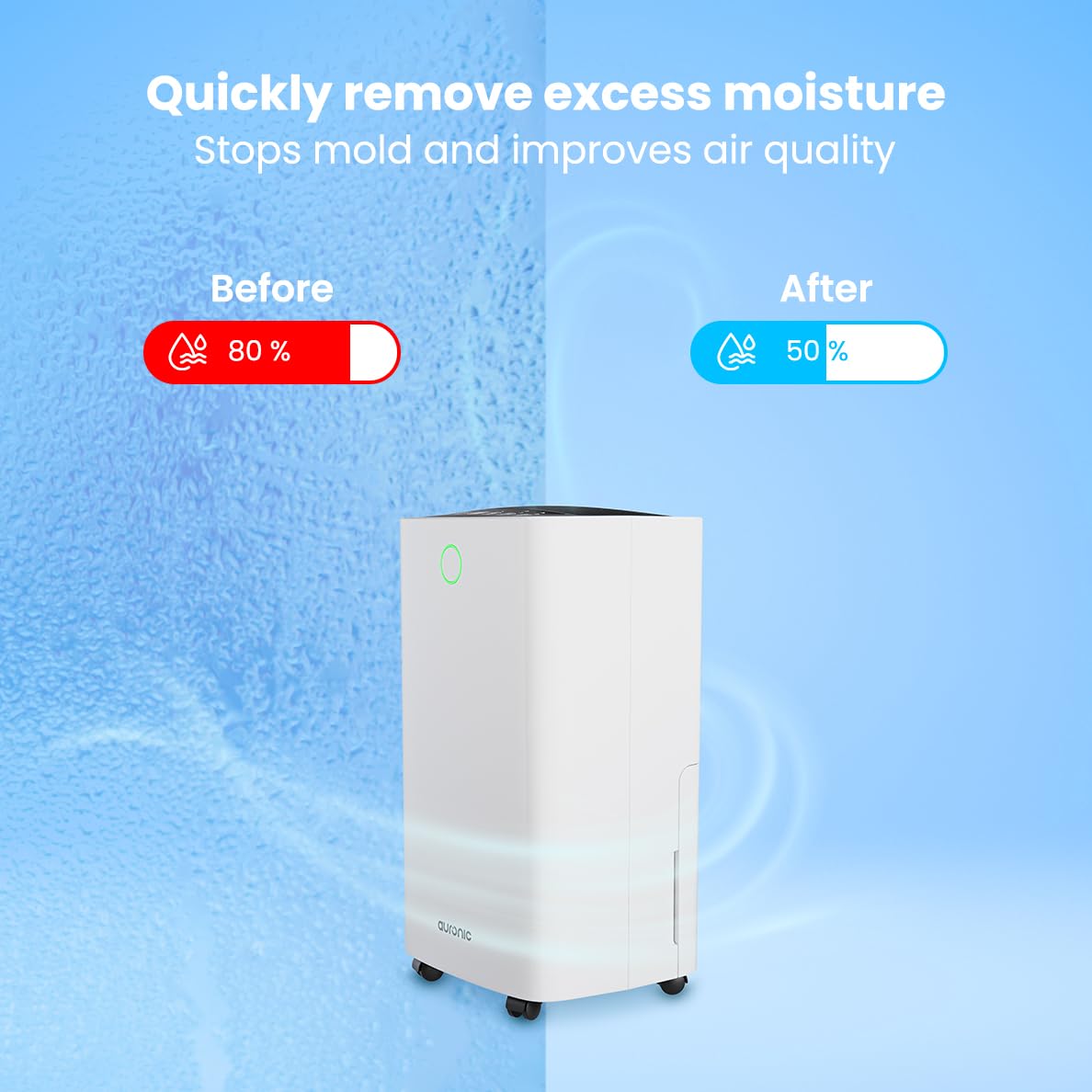
Image: A visual representation demonstrating the dehumidifier's effectiveness, showing a reduction in humidity from 80% to 50% in a room.
4.4 Laundry Drying Function
The Auronic dehumidifier includes a laundry drying function to assist in reducing the drying time of clothes, sheets, and towels. Place the appliance in your laundry room or near drying clothes to utilize this feature, which helps to remove moisture from the air and accelerate the drying process.

Image: The dehumidifier in a bathroom setting, demonstrating its ability to extract up to 10 liters of moisture and its suitability for rooms up to 15 square meters, alongside its intelligent humidity meter, wash-dry function, and silent operation.
5. וישאַלט
רעגולערע אויפהאלטונג גאראנטירט די לאנגעוויטי און עפעקטיווע אפעראציע פון אייער לופט-טרוקענער.
5.1 עמפּטיינג די וואַסער טאַנק
When the water tank is full, the dehumidifier will stop operating, and an indicator light will turn on. Carefully pull out the water tank from the unit, empty the collected water, and then reinsert the tank firmly until it clicks into place. Ensure the tank is properly seated to resume operation.
5.2 רייניקונג די לופט פילטער
The air filter should be cleaned regularly (e.g., every two weeks or as needed) to maintain optimal performance. A dirty filter can reduce efficiency and increase energy consumption.
- נעמט ארויס דעם לופט-טרוקענער פון דער עלעקטרישער ווענטיל.
- געפינט און אַראָפּנעמט דעם לופט פילטער (געווענליך אויף דער הינטערשטער זייט אדער הינטערשטער זייט פונעם אַפּאַראַט).
- Clean the filter using a vacuum cleaner to remove dust and debris. For heavily soiled filters, wash gently with lukewarm water and a mild detergent.
- Allow the filter to air dry completely before reinserting it into the dehumidifier.
5.3 אַלגעמיינע רייניקונג און סטאָרידזש
ווישן די יקסטיריער פון די דעהומידיפיער מיט אַ ווייך, דamp cloth. Do not use abrasive cleaners or solvents. For long-term storage, ensure the water tank is empty and clean, the filter is clean and dry, and the unit is unplugged. Store the dehumidifier in a cool, dry place, preferably in its original packaging.
6. טראָובלעשאָאָטינג
אויב איר טרעפט פּראָבלעמען מיט אייער לופט-טרוקענער, זעט די פאלגענדע געוויינטלעכע פּראָבלעמען און לייזונגען:
| פּראָבלעם | מעגלעך סיבה | לייזונג |
|---|---|---|
| דער לופט-טרוקענער צינדט זיך נישט אן. | קיין שטראָם צושטעל; שטראָם שנור נישט איינגעשטעקט; שטראָם קנעפּל נישט געדריקט. | Check power connection; Ensure outlet is functional; Press the Power button. |
| קיין וואַסער געזאַמלט אָדער נידעריק דעהומידיפיקאַציע. | Room temperature too low; Humidity level already low; Air filter clogged; Air inlet/outlet blocked; Water tank not properly inserted. | Ensure room temperature is above 5°C; Check current humidity; Clean the air filter; Clear any obstructions; Reinsert water tank correctly. |
| אַפּאַראַט איז טומלדיק. | איינהייט נישט אויף א גלייכער ייבערפלאך; לופט פילטער פארשטאפט; אינערליכע קאמפאנענטן וויברירן. | Place on a stable, level surface; Clean the air filter; If noise persists, contact customer support. |
| דער וואַסער טאַנק פול אינדיקאַטאָר איז אָן, אָבער דער טאַנק איז נישט פול. | Float switch malfunction; Water tank not properly seated. | Remove and reinsert the water tank; Check float switch for obstructions. |
| דער עקראַן ווײַזט אַ טעות קאָד. | Internal sensor error or malfunction. | נעמט ארויס דעם איינהייט פון שטעקער פאר 5 מינוט, און שטעקט אים צוריק אריין. אויב דער טעות בלייבט, קאנטאקטירט קאסטומער סופארט. |
7. ספּעסאַפאַקיישאַנז
Technical specifications for the Auronic Electric Air Dehumidifier AU3270:
| שטריך | דעטאַל |
|---|---|
| סאָרט | אַוראָניק |
| מאָדעל נאָמען | AU3270 |
| קאַפּאַציטעט | 10 ליטער / טאָג |
| וואַסער טאַנק קאַפּאַציטעט | 2 ליטער |
| שטאָק שטח קאַווערידזש | Up to 15 m² (150000 Square Centimeters) |
| וואָסtage | 185 וואטס |
| פּראָדוקט דימענשאַנז (ד רענטגענ וו רענטגענ ה) | 50D x 30.5W x 26.5H סענטימעטער |
| פּונקט וואָג | 10 קילאָגראַמס |
| קאָליר | ווייַס |
| ראַש מדרגה | Below 36dB (in Quiet Mode) |
8. וואָראַנטי & שטיצן
8.1 וואָראַנטי אינפֿאָרמאַציע
Your Auronic Electric Air Dehumidifier AU3270 comes with a standard manufacturer's warranty. Please refer to the warranty card included in your package for specific terms, conditions, and duration. Keep your proof of purchase for warranty claims.
8.2 קונה שטיצן
For any questions, technical assistance, or warranty claims, please contact Auronic customer support. Contact details can typically be found on the product packaging, the official Auronic webזייטל, אדער די וואָראַנטי קאַרטל.