
הקדמה
This manual provides essential instructions for the setup, operation, and maintenance of your BLOW Portable Internet Radio RI 1. Please read this manual thoroughly before using the device to ensure proper functionality and to prevent damage.
וויכטיק סאַפעטי אינפֿאָרמאַציע
- דו זאלסט נישט ויסשטעלן די מיטל צו רעגן אָדער נעץ.
- צענעמט נישט דעם אפאראט. לאָזט איבער אלע סערוויסעס צו קוואַליפֿיצירטע פּערסאָנאַל.
- ניצן בלויז די צוגעשטעלט מאַכט אַדאַפּטער.
- ויסמיידן עקסטרעם טעמפּעראַטורעס און דירעקט זונשייַן.
- האַלטן די מיטל אַוועק פון שטאַרק מאַגנעטיק פעלדער.
פּעקל אינהאַלט
זיכער מאַכן אַז אַלע זאכן זענען פאַראַן אין פּעקל:
- BLOW Internet Radio RI 1
- מאַכט אַדאַפּטער
- User Manual (in Polish and English)

Image: The BLOW Internet Radio RI 1 packaging, showing the radio unit, power adapter, and user manual.
פּראָדוקט איבערview
The BLOW Portable Internet Radio RI 1 offers a wide range of features for an enhanced audio experience. It includes internet radio access, FM tuner, Bluetooth connectivity, and a clear LCD display.

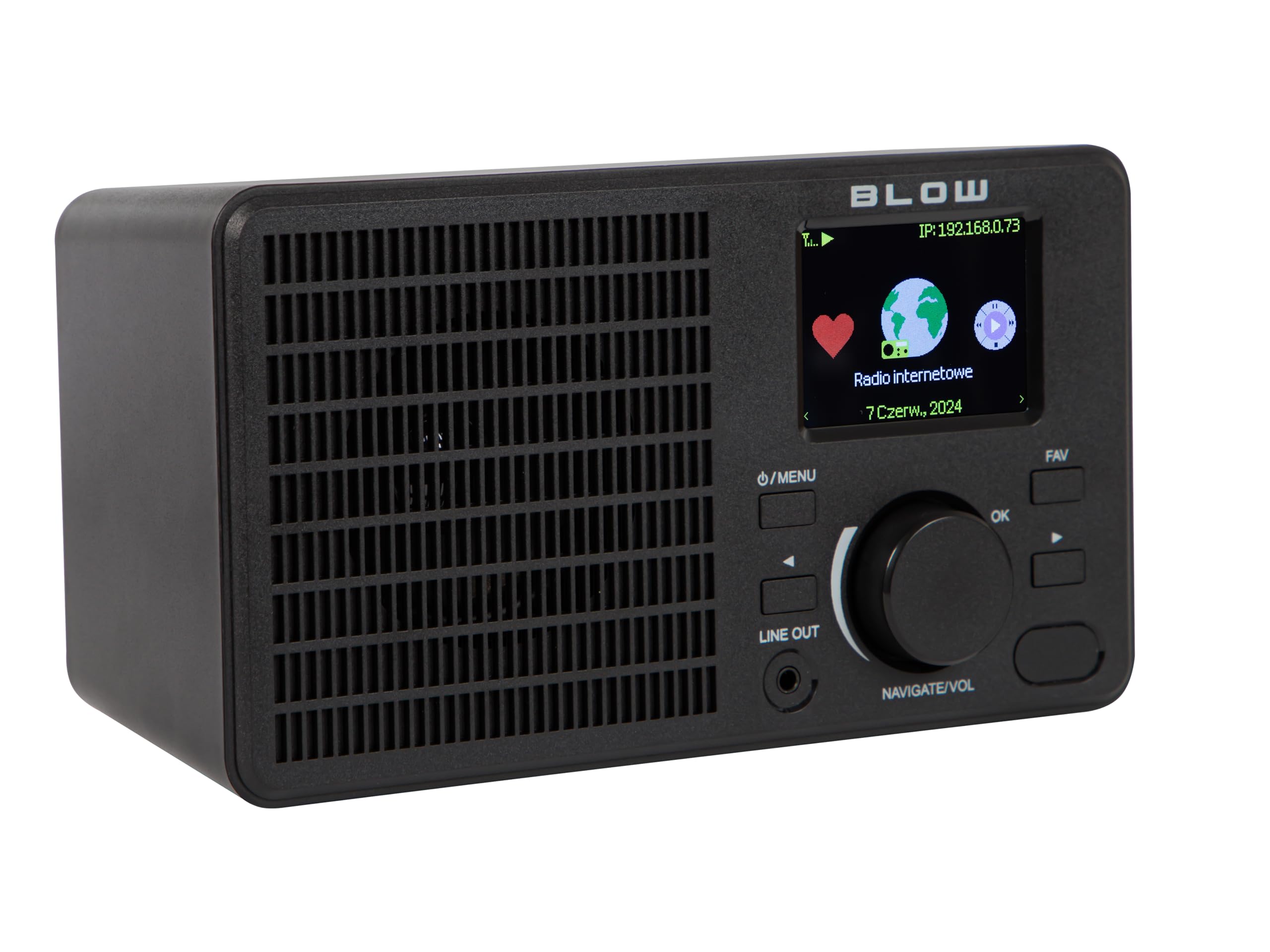
בילד: פראָנט view of the BLOW Internet Radio RI 1, showcasing the display, speaker grille, and control buttons.
שליסל פֿעיִקייטן:
- אינטערנעט ראַדיאָ: Access thousands of stations worldwide via Wi-Fi.
- Wi-Fi קאַנעקטיוויטי: Wireless access to internet radio and network features.
- בלועטאָאָטה: Stream music from mobile devices.
- 2.4-inch TFT Color Display: Shows station information and track details.
- Dual Alarm with Snooze: Wake up to music or news.
- שורה אָוט: פאַרבינדן צו אַן amplifier or external audio system.
- סאָליד פּלאַן: Elegant black design suitable for various interiors.
- FM טונער: For local radio broadcasts.
בילד: הינטערשטע view of the BLOW Internet Radio RI 1, showing the DC 5V power input and product information label.
סעטאַפּ
1. מאַכט קאַנעקשאַן
- Connect the provided power adapter to the DC 5V input port on the back of the radio.
- צאַפּן די מאַכט אַדאַפּטער אין אַ נאָרמאַל עלעקטריקאַל ווענטיל.
- דער ראַדיאָ וועט זיך אויטאָמאַטיש אָנצינדן אָדער אַרייַן אין סטענדביי מאָדע.

Image: The power adapter included with the BLOW Internet Radio RI 1, showing the plug and DC connector.
2. Initial Wi-Fi Setup
- Upon first power-on, the radio will guide you through the initial setup process.
- Use the navigation dial and OK button to select your preferred language.
- די ראַדיאָ וועט סקענען פֿאַר פֿאַראַן Wi-Fi נעטוואָרקס. אויסקלײַבן אײַער נעטוואָרק פֿון דער רשימה.
- Enter your Wi-Fi password using the navigation controls. Confirm with the OK button.
- Once connected, the radio will display a confirmation message.

Image: The BLOW Internet Radio RI 1 display showing the internet radio interface with network status.
אַפּערייטינג ינסטראַקשאַנז
יקערדיק קאָנטראָלס
- מאַכט/מעניו קנעפּל: Press to turn on/off or access the main menu.
- Navigate/Volume Dial: Rotate to navigate menus or adjust volume. Press to confirm selection.
- OK קנעפּל: קאַנפערמז סאַלעקשאַנז.
- FAV קנעפּל: Accesses favorite stations.
- שורה אָוט: 3.5mm jack for connecting to external audio systems.

בילד: א נאָענטע בילד view of the BLOW Internet Radio RI 1's control panel, highlighting the display and buttons.
אינטערנעץ ראַדיאָ מאָדע
- From the main menu, select "Internet Radio".
- בלעטערט סטאנציעס לויט לאקאציע, זשאנער, אדער זוכט לויט נאמען.
- Select a station and press OK to start playback.
- To save a station as a favorite, navigate to the station and press the FAV button.
עפעם ראַדיאָ מאָדע
- פֿון הויפּט מעניו, אויסקלײַבן "FM ראַדיאָ".
- Use the navigation dial to tune to a frequency or perform an auto-scan for stations.
- Press OK to select a station.
בלועטאָאָטה מאָדע
- From the main menu, select "Bluetooth". The radio will enter pairing mode.
- On your mobile device (smartphone, laptop), enable Bluetooth and search for "BLOW RI 1".
- Select the radio to pair. Once connected, you can stream audio from your device to the radio.

Image: The BLOW Internet Radio RI 1 shown alongside a smartphone, illustrating Bluetooth connectivity for music streaming.
שרעק זייגער פונקציע
- Access the "Alarm" settings from the main menu.
- Set up to two independent alarms.
- Configure alarm time, source (buzzer, internet radio, FM), and snooze duration.
- Ensure the radio is connected to power for the alarm to function reliably.
וישאַלט
- רייניקונג: Use a soft, dry cloth to clean the radio's surface. Do not use liquid cleaners or abrasive materials.
- סטאָרידזש: When not in use for extended periods, store the radio in a cool, dry place.
- ווייכווארג דערהייַנטיקונגען: Periodically check for firmware updates through the radio's system settings to ensure optimal performance and access to new features.
טראָובלעשאָאָטינג
| פּראָבלעם | מעגלעך לייזונג |
|---|---|
| קיין מאַכט | Check if the power adapter is securely connected to the radio and the electrical outlet. Try a different outlet. |
| קענען ניט פאַרבינדן צו ווי-פי | Ensure your Wi-Fi password is correct. Check if your router is working. Try restarting the radio and your router. Ensure the radio is within range of your Wi-Fi signal. |
| Internet radio stations not playing | Verify your internet connection is active. Some stations may be temporarily offline. Try other stations. |
| בלועטאָאָטה פּערינג פיילז | Ensure the radio is in Bluetooth pairing mode. Make sure Bluetooth is enabled on your mobile device and it's within range. Try unpairing and re-pairing. |
| נעבעך עפעם אָפּטראָג | Adjust the radio's position. Ensure there are no strong interference sources nearby. |
ספּעסאַפאַקיישאַנז
| שטריך | דעטאַל |
|---|---|
| סאָרט | קלאַפּ |
| מאָדעל | 5900804137467 |
| קאַנעקטיוויטי טעכנאָלאָגיע | Wi-Fi, Bluetooth, Aux, Line Out |
| טונער טעכנאָלאָגיע | FM |
| ווייַז טיפּ | LCD (2.4-inch TFT Color Display) |
| מאַכט מקור | Corded Electric (AC: 100-240V, 50/60Hz; DC: 5V/1A) |
| קאַמפּאַטאַבאַל דעוויסעס | Smartphone, Laptop, Headphones |
| ספּעציעלע פֿעיִקייטן | Lightweight, Portable, Dustproof, Built-in Clock, Dual Alarm with Snooze |
| פּראָדוקט דימענשאַנז | 19.4 סענטימעטער (ל) רענטגענ 8.8 סענטימעטער (וו) רענטגענ 11 סענטימעטער (ה) |
| קאָליר | שוואַרץ |
וואָראַנטי און שטיצן
For warranty information and technical support, please refer to the contact details provided in the separate warranty card included with your product or visit the official BLOW webפּלאַץ.
פאַבריקאַנט: קלאַפּ
Webפּלאַץ: www.blow.pl