
1. הקדמה
This manual provides detailed instructions for the installation, operation, and maintenance of your suptek PC Monitor Arm MD01A. Please read this manual thoroughly before installation and keep it for future reference. This gas spring display arm is designed to support a single LCD monitor, enhancing your workspace ergonomics and efficiency.

Figure 1: suptek PC Monitor Arm MD01A Overview with dimensions and specifications.
2. פּראָדוקט פֿעיִקייטן
- קאַמפּאַטאַבאַל מאָניטאָרס: This gas spring display arm supports a single LCD monitor. It has a load capacity of 2-9kg and is compatible with monitor sizes ranging from 13 to 32 inches.
- VESA Standards: Supports VESA mounting patterns of 75x75mm and 100x100mm.
- מולטי ווינקל אַדזשאַסטמאַנט: The gas spring mechanism allows for smooth vertical and horizontal screen adjustments with minimal effort. The multi-axis design enables tilt up 90°, down 90°, swivel left/right 180°, and 360° rotation. This wide range of motion helps reduce eye strain and improve work efficiency.
- פּלאַץ שפּאָרן: Replaces traditional monitor stands, freeing up significant desk space.
- קאַבלע פאַרוואַלטונג: Integrated cable clips help organize and protect cables, maintaining a tidy workspace.

Figure 2: Optimized workspace with the monitor arm.
3. סעטאַפּ אינסטרוקציעס
3.1 פאַר-ינסטאַלירונג טשעק
Before proceeding with installation, ensure your desk and monitor meet the following requirements:
- מאָניטאָר גרייס: 13-32 אינטשעס
- מאָניטאָר וואָג: 2-9 קג
- VESA קאַמפּאַטאַבילאַטי: 75x75 מם אָדער 100x100 מם
- Desk Thickness (for Clamp Mount): 10-70מם
- Desk Hole Diameter (for Grommet Mount): מינימום 10 מם

Figure 3: Pre-installation compatibility checks.
3.2 Choosing a Mounting Method
The monitor arm offers two installation methods:
- דעסק קלamp: For desks with an edge, the robust C-clamp securely fastens the monitor, providing maximum stability. Suitable for desks 10-70mm thick.
- גראָמעט מאַונט: For desks with a pre-drilled hole, this method provides a flush and stable installation. Suitable for desks with a bolt-through hole (minimum hole diameter 10mm).
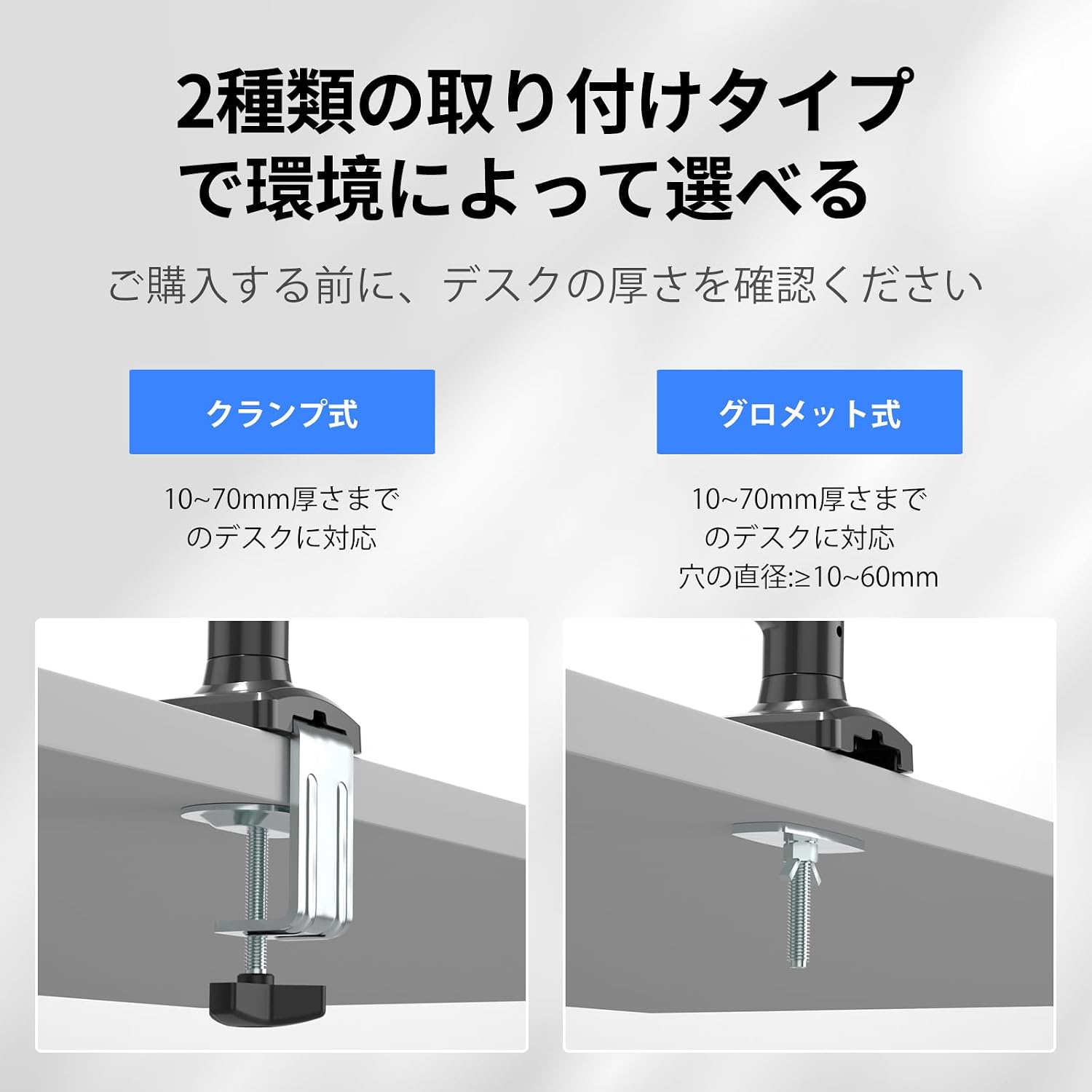
פיגורע 4: קלamp and Grommet mounting options.
3.3 ינסטאַללאַטיאָן סטעפּס
Follow these steps to install your monitor arm:
- צוטשעפּען די Clamp/Grommet to the Desk: Securely fasten the chosen mounting base (C-clamp or grommet) to your desk according to the selected method. Ensure it is tightened firmly.
- צוטשעפּען די אָרעם: Slide the monitor arm onto the pole of the mounting base.
- Attach the Monitor: Align your VESA-compatible monitor with the VESA plate on the arm. Secure the monitor using the provided screws.

Figure 5: Monitor arm installation steps.
4. אַפּערייטינג ינסטרוקטיאָנס
4.1 Multi-Angle Adjustment
The monitor arm allows for flexible positioning to achieve optimal viewאַנגלעס:
- טילט: Adjust the screen vertically up to 90° and down to 90°.
- סוויוול: Rotate the screen horizontally left or right up to 180°.
- ראָוטיישאַן: Rotate the screen 360° for portrait or landscape orientation.

Figure 6: Multi-angle adjustment options.
4.2 גאז פֿעדער שפּאַנונג אַדזשאַסטמענט
The gas spring tension must be adjusted to match your monitor's weight for smooth movement and stable positioning. וויכטיק: To prevent damage to the monitor or mount, always keep the arm in a horizontal position during adjustment. The gas pressure cannot be adjusted without a monitor attached.
- If the arm drops: Turn the internal bolt counter-clockwise (towards '+') to increase the gas spring tension until the arm stays in the desired position.
- If the arm rises or cannot be pushed down: Turn the internal bolt clockwise (towards '-') to decrease the gas spring tension until the arm stays in the desired position.

פיגור 7: גאז פעדער שפּאַנונג אַדזשאַסטמענט.
4.3 Height and Length Adjustment
The arm allows for flexible height adjustment from 140mm to 450mm and a maximum extension length of 534mm to suit your ergonomic needs.

Figure 8: Adjusting arm height and length.
5. וישאַלט
To ensure the longevity and proper functioning of your suptek PC Monitor Arm, follow these maintenance guidelines:
- רעגולער רייניקונג: Wipe the arm and base with a soft, damp שטאָף צו באַזייַטיקן שטויב און שמוץ. פֿאַרמייַדן אַברייסיוו רייניגער אָדער סאָלווענטן וואָס קענען שעדיקן די ענדיקונג.
- טשעק קאַנעקשאַנז: קאָנטראָלירט פּעריִאָדיש אַלע שרויפן און באָלטן צו זיכער מאַכן אַז זיי זענען פעסט. פֿעסטשטעלט ווידער אויב נייטיק צו האַלטן די פעסטקייט.
- גאז פרילינג אַדזשאַסטמענט: If you change monitors or notice the arm is not holding its position correctly, re-adjust the gas spring tension as described in Section 4.2.
- קאַבלע פאַרוואַלטונג: Ensure cables are routed properly through the cable clips and are not pinched or under excessive tension.

Figure 9: Cable management routing.
6. טראָובלעשאָאָטינג
| פּראָבלעם | מעגלעך סיבה | לייזונג |
|---|---|---|
| Monitor arm drops or cannot hold position. | די גאז-פעדער שפּאַנונג איז צו נידעריק פֿאַר דעם מאָניטאָר'ס וואָג. | Increase gas spring tension by turning the internal bolt counter-clockwise (towards '+'). Refer to Section 4.2. |
| Monitor arm rises or cannot be pushed down. | די גאז-פעדער שפּאַנונג איז צו הויך פֿאַר דעם מאָניטאָר'ס וואָג. | Decrease gas spring tension by turning the internal bolt clockwise (towards '-'). Refer to Section 4.2. |
| Monitor is wobbly or unstable. | Mounting screws or clamp/grommet are not tight enough. | Check and tighten all mounting screws and the desk clamp/grommet. Ensure the monitor is securely attached to the VESA plate. |
| לימיטעד קייט פון באַוועגונג. | Obstructions or incorrect assembly. | Ensure there are no physical obstructions. Review assembly steps in Section 3.3 to confirm correct installation. |
7. ספּעסאַפאַקיישאַנז
- מאָדעל: MD01A
- סאָרט: סופּטעק
- מאַונטינג טיפּ: Tabletop Mount (C-clamp אדער גראָמעט)
- באַוועגונג טיפּ: Tilt, Swivel, Rotation, Height Adjustment
- מאַטעריאַל: אַללוי סטיל
- קאָליר: שוואַרץ
- קאַמפּאַטאַבאַל מאָניטאָר גרייס: 13-32 אינטשעס
- מאַסע קאַפּאַציטעט: 2-9 קג (4.4-19.8 לבס)
- VESA קאַמפּאַטאַבילאַטי: 75 קס 75 מם, 100 קס 100 מם
- טיש גרעב (Clamp): 10-70 מם (0.39-2.76 אינטשעס)
- Desk Hole Diameter (Grommet): מינימום 10 מם (0.39 אינטשעס)
- טילט ראַנגע: +90° צו -90°
- סוויוואַל קייט: ±180°
- ראָוטיישאַן: 360°
- הייך אַדזשאַסטמאַנט קייט: 140-450 מם (5.5-17.7 אינטשעס)
- Maximum Arm Extension: 534 מם (21 אינטשעס)
8. וואָראַנטי און שטיצן
suptek provides a one-year warranty from the date of purchase for this product. In case of any malfunction or defect, please contact us through your Amazon account. To expedite the support process, please include your order number when contacting us.
קאָנטאַקט מעטאָד:
- קלאָץ אין צו דיין אַמאַזאָן חשבון.
- Navigate to 'Account Service'.
- Go to 'Order History'.
- Find your order for the suptek PC Monitor Arm MD01A.
- Click on 'Seller' and then 'Ask a Question'.
We are committed to resolving your issues promptly and sincerely.