
1. הקדמה
א דאנק פארן קויפןasing the RCA SP550BT Portable Speaker. This manual provides important information regarding the setup, operation, and maintenance of your new speaker. Please read it thoroughly before use and keep it for future reference.
The RCA SP550BT is a versatile portable speaker featuring 50W output, Bluetooth connectivity, USB playback, FM radio, AUX input, True Wireless Stereo (TWS) function, LED lights, and a microphone input for an enhanced audio experience.
2. פּעקל אינהאַלט
ביטע טשעק די פּאַקעט פֿאַר די פאלגענדע זאכן:
- RCA SP550BT Portable Speaker
- ווייַט קאָנטראָל
- מאַכט קאַבלע
- באַניצער מאַנואַל (דעם דאָקומענט)
3. פּראָדוקט איבערview
Familiarize yourself with the main components and features of your RCA SP550BT speaker.

פיגורע 3.1: פראָנט view of the RCA SP550BT portable speaker. This image displays the speaker in an upright position, highlighting the top control panel and the three prominent speaker cones with red illumination.

פיגורע 3.2: זייַט view of the RCA SP550BT portable speaker. This perspective shows the depth of the speaker and the integrated handle for portability.

פיגורע 3.3: האָריזאָנטאַל view of the RCA SP550BT portable speaker. This image illustrates the speaker's design when placed on its side, emphasizing the speaker grille and LED lighting.
3.1 רימאָוט קאָנטראָל
The included remote control allows for convenient operation of the speaker from a distance.
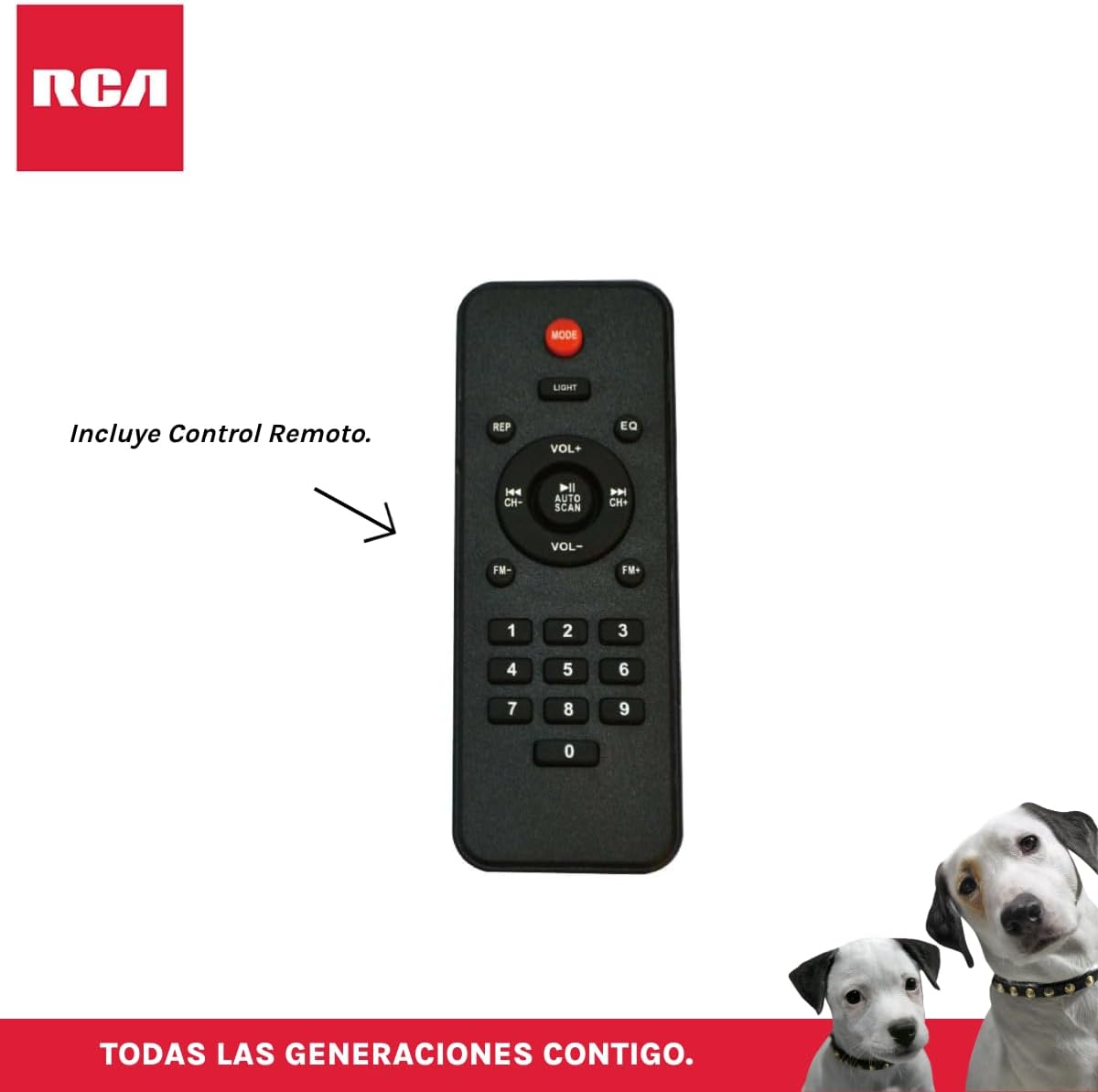
פיגורע 3.4: RCA SP550BT Remote Control. This image displays the full layout of the remote control, including buttons for power, mode selection, volume adjustment, track navigation, equalizer settings, and a numeric keypad.
4. סעטאַפּ
4.1 מאַכט קאַנעקשאַן
- Ensure the speaker is placed on a stable, flat surface.
- Connect the power cable to the speaker's power input port.
- Plug the other end of the power cable into a standard electrical outlet (AC 100-240V, 50/60Hz).
- Press the power button on the speaker or remote control to turn it on.
5. אַפּערייטינג ינסטרוקטיאָנס
5.1 מאַכט אויף / אַוועק
- צו אנצינדן דעם רעדנער, דריק די מאַכט קנעפּל אויף דער קאָנטראָל פּאַנעל אָדער אויף דער ווײַטקאָנטראָל.
- To turn off the speaker, press the מאַכט קנעפּל ווידער.
5.2 מאָדע סעלעקציע
דרוק די מאָדע button on the control panel or remote control to switch between Bluetooth, USB, FM, and AUX input modes.
5.3 בלועטאָאָטה פּערינג
- צינדט אן דעם רעדנער און סעלעקטירט בלועטוט מאָדע ניצנדיק די מאָדע button. The display will show "BLUE" and a pairing indicator will flash.
- אַקטיווירן בלועטוט אויף אייער מאָביל מיטל (סמאַרטפאָן, טאַבלעט, אאז"וו).
- זוכן פֿאַר "RCA SP550BT" in your device's Bluetooth list and select it to pair.
- Once paired, the speaker will emit a confirmation sound, and the Bluetooth indicator will stop flashing.
- איר קענט איצט שפּילן אַודיאָ פֿון אייער דעווייס דורך דעם רעדנער.
5.4 יו-עס-בי פּלייבּעק
- Insert a USB flash drive (FAT32 format, max 32GB) containing MP3 audio fileס אין די וסב פּאָרט.
- דער רעדנער וועט זיך אויטאָמאַטיש איבערקערן צו USB מאָדע און אָנהייבן שפּילן דעם ערשטן ליד. אויב נישט, דריק די מאָדע קנעפּל צו אויסקלייַבן וסב מאָדע.
- ניצן די שפּיל / פּויזע, פרייַערדיק, און NEXT buttons on the control panel or remote to control playback.
5.5 עפעם ראַדיאָ
- Turn on the speaker and select FM mode using the מאָדע קנעפּל.
- דריקן און האַלטן די שפּיל / פּויזע קנעפּל (אָדער AUTO SCAN אויף ווײַטקאָנטראָל) צו אויטאָמאַטיש סקענען און ראַטעווען פֿאַראַן FM סטאַנציעס.
- ניצן די פרייַערדיק און NEXT קנעפּלעך צו נאַוויגירן דורך די געראַטעוועטע סטאַנציעס.
5.6 AUX אַרייַנשרייַב
- Connect an external audio device (e.g., MP3 player, laptop) to the speaker's AUX input port using a 3.5mm audio cable (not included).
- אויסקלייבן AUX מאָדע ניצנדיק די מאָדע קנעפּל.
- קאָנטראָליר ווידערשפּיל און באַנד פֿון דיין פֿאַרבונדענעם מיטל.
5.7 TWS (אמת'ע ווירעלעס סטערעאָ) פונקציע
The TWS function allows you to connect two RCA SP550BT speakers wirelessly for a stereo sound experience.
- Ensure both SP550BT speakers are powered on and in Bluetooth mode, but not yet paired with any device.
- אויף איינעם פון די רעדנער, דריק און האלט די TWS button (if available, or a dedicated TWS pairing button) until you hear a confirmation tone. The speakers will attempt to pair with each other.
- Once successfully paired, one speaker will act as the master (left channel) and the other as the slave (right channel).
- Now, pair your mobile device with the master speaker via Bluetooth as described in section 5.3.
5.8 געפירט לייץ
דרוק די ליכט button on the control panel or remote control to cycle through different LED light modes or to turn them off.
5.9 מיקראָפאָן באַניץ
Connect a wired microphone (not included) to the microphone input port on the speaker. Adjust the microphone volume using the dedicated knob (if available) or the main volume control.
6. וישאַלט
- רייניקונג: ניצט אַ ווייכע, טרוקענע שטאָף צו רייניקן די אויסערלעכע זייט פון דעם רעדנער. ניצט נישט קיין שרײַבנדיקע רייניגערס אדער סאָלווענטן.
- סטאָרידזש: ווען נישט אין באַנוץ פֿאַר לענגערע פּעריאָדן, זאָל מען דעם רעדנער האַלטן אין אַ קיל, טרוקן אָרט, אַוועק פֿון דירעקטער זון און עקסטרעמע טעמפּעראַטורן.
- וואַסער ויסשטעלן: די רעדנער איז נישט וואַסערפּרוף. פֿאַרמייַדט עס אויסצושטעלן צו וואַסער אָדער צו פֿיל פֿײַכטקייט.
7. טראָובלעשאָאָטינג
אויב איר טרעפט פּראָבלעמען מיט אייער רעדנער, זעט די פאלגענדע געוויינטלעכע פּראָבלעמען און לייזונגען:
| פּראָבלעם | מעגלעך סיבה | לייזונג |
|---|---|---|
| קיין מאַכט | Power cable not connected; Power outlet not working; Speaker off. | Check power cable connection; Try a different outlet; Press the POWER button. |
| קיין געזונט | קול צו נידעריג; אומרעכטע מאָדע אויסגעקליבן; מיטל נישט ריכטיק פארבונדן. | Increase volume; Select correct input mode (Bluetooth, USB, AUX); Reconnect device. |
| בלועטאָאָטה פּערינג פיילז | Speaker not in pairing mode; Device Bluetooth off; Speaker already paired. | Ensure speaker is in Bluetooth pairing mode; Turn on device Bluetooth; Disconnect from other devices. |
| וסב פּלייבאַק טוט נישט אַרבעטן | USB drive format incompatible; Corrupt files; USB drive not inserted correctly. | Ensure USB is FAT32 format; Check file integrity; Reinsert USB drive. |
| שלעכטע FM ראַדיאָ אָפּנאַם | שוואַך סיגנאַל; שטערונג. | Relocate speaker; Extend antenna (if applicable). |
8. ספּעסאַפאַקיישאַנז
| שטריך | באַשרייַבונג |
|---|---|
| מאָדעל | SP550BT |
| סאָרט | RCA |
| רעדנער רעזולטאַט מאַכט | 50 וואטס (מאקסימום) |
| קאַנעקטיוויטי טעכנאָלאָגיע | בלועטאָאָטה, וסב, AUX |
| ווירעלעסס טעכנאָלאָגיע | בלועטאָאָטה |
| אַודיאָ רעזולטאַט מאָדע | סטערעאָ |
| רעדנער טיפּ | פּאָרטאַטיוו, דרויסנדיק |
| מאַונטינג טיפּ | טאַבלעטאָפּ בארג |
| קאָנטראָל מעטאָד | ווייַט קאָנטראָל |
| רעדנער גרייס | 6.5 אינטשעס |
| וואָאָפער דיאַמעטער | 6.5 אינטשעס |
| באַטאַרייע קאַפּאַציטעט | 4400 מיליamp שעהן |
| מאַכט מקור | עלעקטריק קאַבלע |
| קאַמפּאַטאַבאַל דעוויסעס | לאַפּטאָפּ, MP3 שפּילער, סמאַרטפאָון, טאַבלעט |
| GTIN / UPC | 044476152061 |
9. וואָראַנטי און שטיצן
This product comes with a limited warranty. Please refer to the warranty card included in your package for specific terms and conditions. For technical support or service inquiries, please contact RCA customer service through their official webפּלאַץ אָדער די קאָנטאַקט אינפֿאָרמאַציע צוגעשטעלט מיט דיין קויפן.
Note: Warranty terms may vary by region. Keep your proof of purchase for warranty claims.