
הקדמה
This manual provides essential information for the proper setup, operation, and maintenance of your ONN 24-inch FHD Gaming Monitor, model 100027813. Please read this manual thoroughly before using the product to ensure optimal performance and safety. This monitor is designed to deliver a high-quality gaming experience with its 1080p resolution, 165Hz refresh rate, 1ms response time, and FreeSync technology.
זיכערקייַט אינפֿאָרמאַציע
שטענדיק האַלטן די פאלגענדע זיכערהייט מיטלען צו פאַרמייַדן שעדיקן צו די מאָניטאָר און ענשור באַניצער זיכערהייט:
- שטעלט נישט אויס דעם מאָניטאָר צו רעגן אָדער פייכטקייט כּדי צו פֿאַרמייַדן פֿײַער אָדער שאָק געפֿאַרן.
- עפֿנט נישט דעם מאָניטאָר casinז. עס זענען נישטאָ קיין טיילן וואָס דער באַניצער קען סערוויסן אינעווייניק. לאָזט איבער אַלע סערוויסינג צו קוואַליפֿיצירטע סערוויס פּערסאָנעל.
- שטעלט דעם מאָניטאָר אויף אַ סטאַבילער, גלאַטער ייבערפלאַך כּדי צו פאַרהיטן אַז ער זאָל נישט פאַלן.
- זיכער מאַכן אַז די ווענטילאַציע אַרום דעם מאָניטאָר איז ריכטיק. בלאָקירט נישט די ווענטילאַציע עפענונגען.
- ניצט נאָר דעם מאַכט אַדאַפּטער וואָס ווערט צוגעשטעלט מיטן מאָניטאָר.
- נעמט ארויס דעם מאָניטאָר פֿון דער עלעקטרישער אַוטלעט בעת בליץ-שטורעמס אָדער ווען ער ווערט נישט גענוצט פֿאַר לאַנגע פּעריאָדן.
פּעקל אינהאַלט
באַשטעטיקן אַז אַלע זאכן זענען פאַראַן אין פּעקל:
- ONN 24-inch FHD Gaming Monitor
- מאָניטאָר שטאַנד (באַזע און האַלדז)
- מאַכט אַדאַפּטער
- DisplayPort Cable (6 ft)
- HDMI Cable (6 ft)
- באַניצער מאַנואַל (דעם דאָקומענט)

Image: Retail box of the ONN 24-inch Gaming Monitor, highlighting key features like 165Hz, 1ms response time, DisplayPort, HDMI, and Adaptive-Sync.
סעטאַפּ
1. אַסעמבאַל די שטיין
- נעמט פֿאָרזיכטיק אַרויס דעם מאָניטאָר און שטאַנד קאָמפּאָנענטן פֿון דער פּאַקאַדזשינג.
- Attach the stand neck to the stand base. Secure it with the provided screw, if applicable.
- Align the assembled stand with the mounting slot on the back of the monitor. Gently push until it clicks into place or secure with screws as per the design.
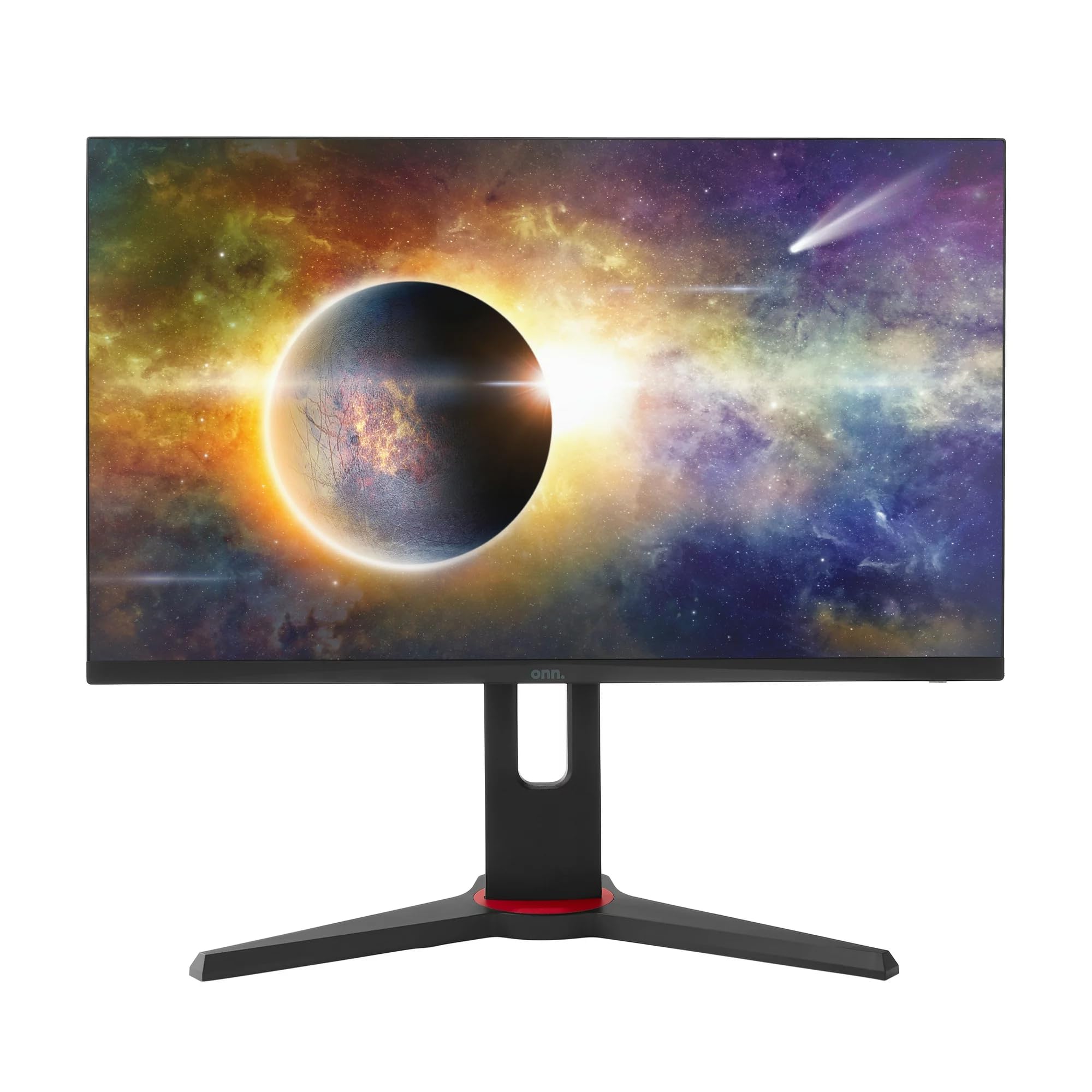
בילד: פראָנט view of the ONN 24-inch Gaming Monitor, fully assembled with its stand.

בילד: הינטערשטע view of the ONN 24-inch Gaming Monitor, illustrating the stand attachment and cable management area.
2. קאַנעקטינג קאַבלעס
Locate the input ports on the back of your monitor:
- מאַכט: Connect the power adapter to the monitor's power input and then to a power outlet.
- ווידעא ינפּוט: Connect one end of the provided DisplayPort or HDMI cable to the corresponding port on your computer's graphics card and the other end to the monitor. The monitor supports 2 HDMI inputs and 1 DisplayPort input.
- Audio Output (Optional): If your monitor has a 3.5mm audio jack, you can connect external speakers or headphones.

בילד: נאָענט-אַרויף view of the monitor's rear ports, including HDMI 1, HDMI 2, DisplayPort (DP), and power input.
3. ערשטע אויפשטעל
- מאַכן זיכער אַז אַלע קייבאַלז זענען סיקיורלי פארבונדן.
- Press the power button on the monitor (usually located on the back or bottom right).
- The monitor should display the ONN logo and then search for an input signal.
- If no image appears, ensure your computer is powered on and the correct input source is selected on the monitor (see Operating section).
אַפּערייטינג
1. מאַכט אויף / אויסגעלאשן
Press the power button to turn the monitor on or off. The power indicator light will show the monitor's status (e.g., blue for on, amber for standby).
2. אויף-סקרין דיספּליי (OSD) מעניו נאַוויגאַציע
Your monitor features an OSD menu for adjusting various settings. Typically, buttons on the back or bottom of the monitor control the OSD:
- מעניו קנעפּל: אָפּענס די OSD מעניו.
- נאַוויגאַציע קנעפּלעך (אַרויף/אַראָפּ/לינקס/רעכטס): געניצט צו נאַוויגירן דורך מעניו אָפּציעס.
- אויסקלייבן/אריינטרייכן קנעפל: באַשטעטיקט אַן אויסוואַל אָדער גייט אַרײַן אין אַ סובמעניו.
- אַרויסגאַנג קנעפּל: פֿאַרלאָזט דעם איצטיקן מעניו אָדער OSD.
3. אַדזשאַסטינג סעטטינגס
Key settings you can adjust via the OSD menu include:
- ברייטנאַס / קאַנטראַסט: אַדזשאַסטירן די אַלגעמיינע לומינאַנס און דעם חילוק צווישן ליכטיקע און טונקעלע געביטן.
- קאָליר סעטטינגס: מאָדיפֿיצירן קאָליר טעמפּעראַטור, גאַמאַ, און יחידישע RGB לעוועלס.
- אַרייַנשרייַב מקור: Manually select between HDMI 1, HDMI 2, or DisplayPort inputs.
- דערפרישן קורס: Ensure your graphics card and monitor are set to 165Hz for the smoothest experience. This is usually configured in your operating system's display settings.
- ענטפער צייט: Adjust the monitor's response time setting (e.g., 1ms) for reduced motion blur in fast-paced games.
- FreeSync טעכנאָלאָגיע: Enable FreeSync in the OSD menu and in your AMD graphics card settings to synchronize the monitor's refresh rate with your GPU's frame rate, eliminating screen tearing and stuttering.
- בילד מאָדעס: Select from preset modes optimized for different content (e.g., Standard, Game, Movie, Text).

Image: The ONN 24-inch Gaming Monitor displayed in a typical desk setup, connected to a laptop with gaming peripherals.
וישאַלט
רייניקונג די מאָניטאָר
- שטענדיק אָפּשטויסן די מאָניטאָר איידער רייניקונג.
- ניצן אַ ווייך, לינט-פֿרייַ שטאָף לייטלי דampאָפּגעווישט מיט וואַסער אָדער אַ מילד, נישט-אַברייסיוו פאַרשטעלן רייניגער.
- שפריצט נישט רייניגער גלייך אויפן עקראַן. טראָגט עס ערשט אויף דעם שטאָף.
- ויסמיידן ניצן שטרענגע כעמיקאַלן, אַברייסיוו פּאַדס, אָדער סאָלוואַנץ.
סטאָרידזש
אויב איר לייגט אפ דעם מאָניטאָר פאר א לענגערע צייט, זאָלט איר אָפּשטעקן אַלע קאַבלען, אייַנפּאַקן עס אין זײַן אָריגינעלער פּאַקעט (אויב פֿאַראַן), און עס אַוועקלייגן אין אַ קיל, טרוקן אָרט, ווײַט פֿון דירעקטער זון און עקסטרעמע טעמפּעראַטורן.
טראָובלעשאָאָטינג
אויב איר טרעפט פּראָבלעמען מיט אייער מאָניטאָר, זעט די פאלגענדע געוויינטלעכע פּראָבלעמען און לייזונגען:
| פּראָבלעם | מעגלעך לייזונג |
|---|---|
| קיין בילד אויף פאַרשטעלן |
|
| Image is flickering or distorted |
|
| No sound (if using monitor speakers/audio out) |
|
| מאָניטאָר דערגרייכט נישט 165 הערץ |
|
ספּעסאַפאַקיישאַנז
Detailed technical specifications for the ONN 24-inch FHD Gaming Monitor (Model 100027813):
| שטריך | באַשרייַבונג |
|---|---|
| מאָדעל נומער | 100027813 |
| פאַרשטעלן גרייס | 24 אינטשעס |
| האַכלאָטע | FHD 1080p (1920x1080) |
| דערפרישן קורס | 165 הז |
| ענטפער צייט | 1 מיליסעקאַנדז |
| ווייַז טעכנאָלאָגיע | IPS |
| אַדאַפּטיוו סינק | FreeSync |
| אַספּעקט פאַרהעלטעניש | 16:9 |
| קאַנטראַסט פאַרהעלטעניש | 2000:1 |
| פאַרשטעלן ייבערפלאַך | Matte, Anti-glare with low blue light setting |
| קאַנעקטיוויטי | 2 x HDMI, 1 x DisplayPort |
| פּראָדוקט דימענשאַנז (ד רענטגענ וו רענטגענ ה) | 61.3 X 11.3 X 37.3 סענטימעטער |
| פּונקט וואָג | 6.1 קג |
| קאָליר | שוואַרץ |
| מאַונטינג טיפּ | דעסק בארג |
| ספּעציפיש ניצט | Entertainment, Gaming |
וואָראַנטי
This ONN 24-inch FHD Gaming Monitor is a renewed product. Warranty terms and conditions for renewed products may vary. Please refer to the specific warranty information provided by the seller or retailer at the time of purchase. It is recommended to retain your proof of purchase for any warranty claims.
שטיצן
For technical assistance, troubleshooting beyond this manual, or warranty inquiries, please contact the retailer or the Amazon Renewed support channel where the product was purchased. Have your model number (100027813) and proof of purchase ready when contacting support.