
הקדמה
This manual provides comprehensive instructions for the setup, operation, maintenance, and troubleshooting of your BPXX D463B Bluetooth Thermal Label Printer. Please read this manual thoroughly before using the printer to ensure proper function and longevity of the device.
זיכערקייַט אינפֿאָרמאַציע
- Use only the original power adapter provided with the printer.
- שטעלט נישט אויס דעם דרוקער צו וואַסער אָדער צו פיל הומידיטי.
- פֿאַרמײַדט צו שטעלן דעם דרוקער אין דירעקטער זון אָדער לעבן היץ־קוואַלן.
- Keep the printer away from dust and debris to prevent internal damage.
- פרובירט נישט צו צענעמען אדער פאררעכטן דעם דרוקער אליין. קאנטאקטירט קאסטומער סופארט פאר הילף.
- זיכער מאַכן אַז די ווענטילאַציע אַרום דעם דרוקער איז ריכטיק בעתן באַנוץ.
פּעקל אינהאַלט
באַשטעטיקט אַז אַלע זאכן וואָס זענען אויסגערעכנט אונטן זענען אַרייַנגערעכנט אין אייער פּעקל:
- BPXX D463B USB & Bluetooth Printer
- וסב קאַבלע
- מאַכט אַדאַפּטער
- מאַכט שנור
- U Disk (USB flash drive with drivers and guide)
- אָטג אַדאַפּטער
- Labels (sampדי ראָלל)
- שנעל אָנהייב גייד

Image: Contents of the BPXX D463B Thermal Label Printer package.
פּראָדוקט איבערview
The BPXX D463B is a compact and efficient thermal label printer designed for various labeling needs, including shipping labels, product labels, and more. It features both Bluetooth and USB connectivity for versatile use across different operating systems.

בילד: פראָנט view of the BPXX D463B Thermal Label Printer in operation.
שליסל פֿעיִקייטן:
- הויך-קוואַליטעט דרוקן: 203dpi resolution for clear images, text, and barcodes.
- צווייענדיק קאַנעקטיוויטי: Supports Bluetooth for iOS, Android, and Windows, and USB for Windows, Mac OS, Linux, and ChromeOS.
- ברייט קאַמפּאַטאַבילאַטי: Works with major e-commerce and shipping platforms like Amazon, Shopify, eBay, UPS, USPS, FedEx, and more.
- שנעל פּרינטינג גיכקייַט: Up to 152mm/s (72 sheets of 4x6 labels per minute).
- אָטאַמאַטיק לאַבעל דיטעקשאַן: Automatically identifies label size for ease of use.
- דוראַבאַל פּרינט קאָפּ: Features an aluminum alloy print head with smart temperature control for prolonged service life.
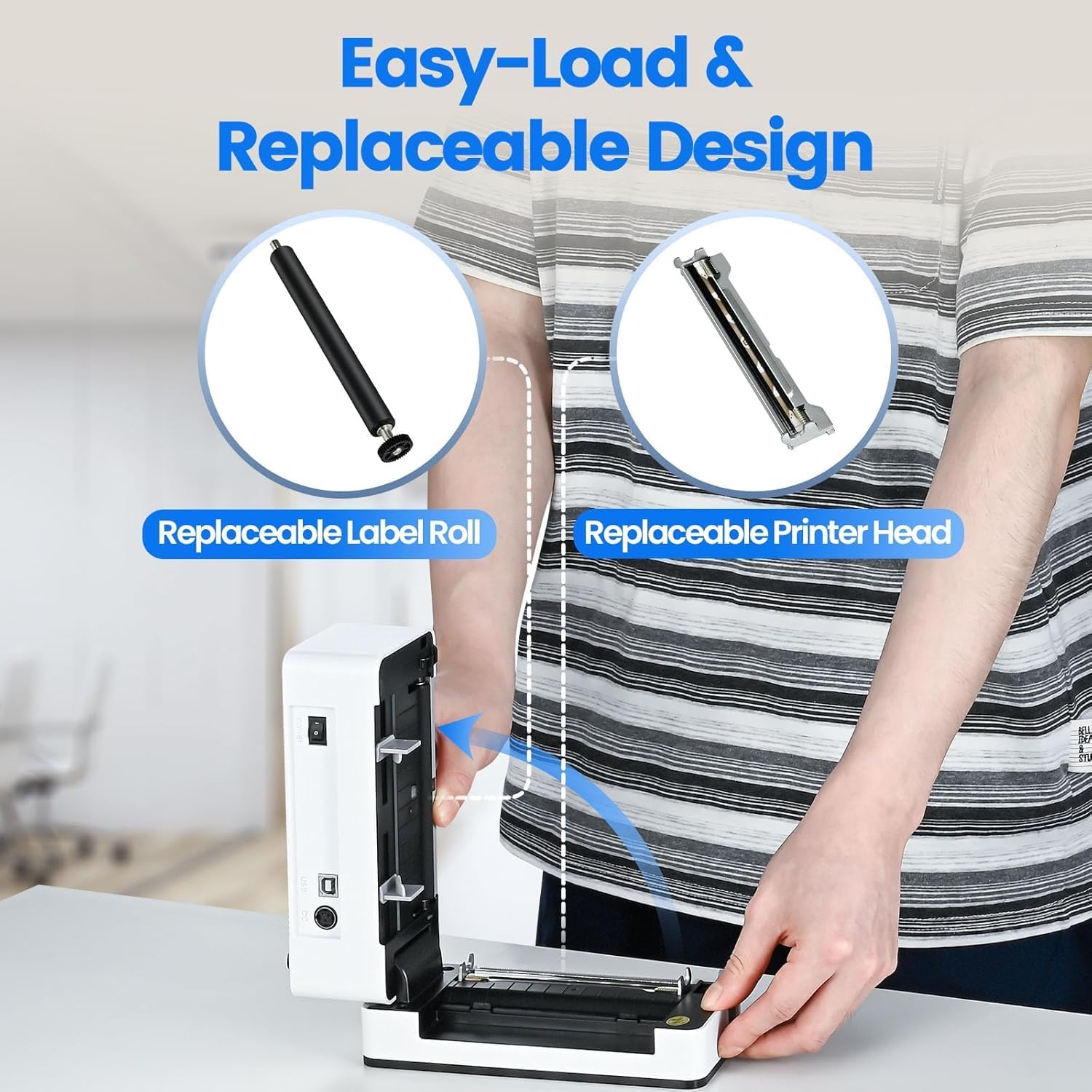
Image: The printer's aluminum alloy print head, designed for durability and extended service life.
סעטאַפּ
1. לאָודינג לאַבעלס
- עפענען די שפּיץ דעקל פון די דרוקער.
- Insert the thermal labels into the label compartment, ensuring the printable side is facing up.
- Adjust the label guides to fit the width of your labels snugly.
- Close the top cover. The printer will automatically detect the label size and feed a few labels to calibrate.

Image: Illustration of the easy-load label mechanism.
2. קאַנעקטינג צו דיין מיטל
The D463B printer offers both Bluetooth and USB connectivity.

Image: Connectivity options for the BPXX D463B printer.
Bluetooth Connection (iOS, Android, Windows):
- Ensure the printer is powered on. The indicator light should be blue.
- Download the "4Barcode" APP from your device's app store (iOS/Android) or install the driver for Windows from the provided U Disk.
- געבן בלועטאָאָטה אויף דיין רירעוודיק מיטל אָדער קאָמפּיוטער.
- Open the "4Barcode" APP or the printer driver software.
- זוכן פֿאַר available Bluetooth devices and select "D463B" or a similar name.
- Pair the device. Once paired, you can begin printing wirelessly.
USB Connection (Windows, Mac OS, Linux, ChromeOS):
- Connect one end of the USB cable to the printer and the other end to your computer.
- אַרײַנשטעלן די צוגעשטעלטע U דיסק אין אײַער קאָמפּיוטער.
- Follow the instructions on the U Disk to install the appropriate printer drivers for your operating system. A detailed installation guide video is included on the U Disk.
- Once drivers are installed, the printer will be recognized by your computer and ready for use.
אַפּערייטינג די פּרינטער
פּרינטינג פּראָצעס
After successful setup and connection, you can print labels from various applications and platforms.

Image: Demonstrating the printer's high-speed and high-definition printing capabilities.
- Open the document or label file you wish to print (e.g., a shipping label PDF).
- Select the print option within your application.
- Choose the "BPXX D463B" printer from the list of available printers.
- Ensure the correct label size is selected in the print settings (e.g., 4x6 inches). The printer supports various label sizes up to 4.1 inches in width.
- באַשטעטיקן די דרוק סעטטינגס און אָנהייבן דרוקן.

Image: The printer's maximum 4.1-inch label width capability and auto-detection feature.
פּלאַטפאָרמע קאַמפּאַטאַבילאַטי
The BPXX D463B is compatible with a wide range of e-commerce and shipping platforms, streamlining your workflow:
- אַמאַזאָן
- Shopify
- עבייַ
- שאָפּעע
- אַפּס
- USPS
- שיפּאָ
- פעדעקס
- Etsy
- שיפּסטאַטיאָן
- PayPal
- און פילע מער.

Image: The printer's compatibility with major e-commerce and shipping platforms.
וישאַלט
רייניקונג די פּרינטער
Regular cleaning ensures optimal print quality and extends the life of your printer.
- Turn off the printer and unplug it from the power source before cleaning.
- ניצן אַ ווייך, לינט-פֿרייַ שטאָף לייטלי דampened with isopropyl alcohol to clean the print head. Allow it to dry completely before use.
- Wipe down the exterior of the printer with a dry, soft cloth.
- Remove any dust or label debris from the label compartment.
ריפּלייסינג קאַמפּאָונאַנץ
The BPXX D463B is designed for easy replacement of key components to maximize its lifespan.
Image: Easy-load and replaceable design for label roll and printer head.
Replacing the Label Roll:
Follow the "Loading Labels" instructions in the Setup section to replace an empty label roll.
Replacing the Printer Head:
While the aluminum alloy print head is designed for durability, it is replaceable if needed. Refer to the detailed instructions provided on the U Disk or contact customer support for guidance on replacing the print head.
טראָובלעשאָאָטינג
| פּראָבלעם | מעגלעך סיבה | לייזונג |
|---|---|---|
| Printer not powering on. | שטראָם קאַבל נישט פארבונדן; פּראָבלעם מיט שטראָם אַוטלעט. | זיכער מאַכן אַז דער עלעקטרישער קאַבל איז זיכער פֿאַרבונדן. פּרוּווט אַן אַנדער עלעקטרישער אַוטלעט. |
| קען נישט פאַרבינדן דורך בלוטוט. | Bluetooth not enabled; incorrect app/driver; printer not discoverable. | Ensure Bluetooth is on. Use the "4Barcode" APP. Restart printer and device. |
| Poor print quality (faded, unclear). | Print head dirty; incorrect label type; low-quality labels. | Clean the print head. Ensure you are using thermal labels. Try new labels. |
| עטיקעטן ווערן נישט ריכטיק צוגעפֿירט. | Labels improperly loaded; label guides not adjusted. | Reload labels, ensuring they are straight and guides are snug. |
| Printer not recognized by computer (USB). | Drivers not installed; faulty USB cable/port. | Install drivers from the U Disk. Try a different USB cable or port. |
ספּעסאַפאַקיישאַנז
| שטריך | דעטאַל |
|---|---|
| מאָדעל נאָמען | D463B |
| דרוק טעכנאָלאָגיע | טערמאַל |
| קאַנעקטיוויטי טעכנאָלאָגיע | בלועטאָאָטה, וסב |
| דרוק האַכלאָטע | 203 דפּי (דאַץ פּער אינטש) |
| מאַקסימום דרוק גיכקייט (מאָנאָכראָם) | 152mm/s (72 sheets 4x6 labels/min) |
| Max Label Width | 4.1 אינטשעס |
| Compatible Label Sizes | 4"x6", 3"x2", 3"x1", 2"x1", 2-5/16" x 4" inches |
| קאַמפּאַטאַבאַל דעוויסעס | Laptops, PCs, Tablets, Smartphones |
| שטיצט אַס | iOS, Android, Windows, Mac OS, Linux, ChromeOS |
| פּראָדוקט דימענשאַנז | 3.35"ד רענטגענ 3.35"וו רענטגענ 7.28"ה |
| פּונקט וואָג | 3.12 פונט |
| מאַכט מקור | AC אַדאַפּטער (אַרייַנגערעכנט) |

Image: The compact size of the BPXX D463B printer.
וואָראַנטי
The BPXX D463B Thermal Label Printer comes with a איין יאָר וואָראַנטי from the date of purchase. This warranty covers manufacturing defects and malfunctions under normal use. It does not cover damage caused by misuse, accidents, unauthorized repairs, or natural disasters.
ביטע האַלטן דיין דערווייַז פון קויפן פֿאַר וואָראַנטי קליימז.
קונה שטיצן
For any questions, technical assistance, or warranty claims, please contact BPXX customer support through the following channels:
- בליצפּאָסט: Refer to the contact information provided in your product packaging or on the official BPXX webפּלאַץ.
- אָנליין שטיצן: Visit the BPXX official webזייטל פֿאַר אָפֿט געשטעלטע פֿראַגעס, דרייווערס און שטיצע רעסורסן.
When contacting support, please have your printer model (D463B) and purchase information ready.