
פּראָדוקט איבערview
The TP-Link Archer MR505 is a 4G+ Cat6 AC1200 Wireless Dual Band Gigabit Router designed to provide reliable internet connectivity. This router supports dual-band Wi-Fi (2.4 GHz and 5 GHz) and features Gigabit Ethernet ports for high-speed wired connections. It is compatible with 4G+ Cat6 networks, offering mobile broadband access.

פיגורע 1: פראָנט view of the Archer MR505 router.
פיגורע 2: זייַט view of the Archer MR505 router.
פּעקל אינהאַלט
באַשטעטיקן אַז אַלע זאכן זענען פאַראַן אין דיין פּעקל:
- TP-Link Archer MR505 Router
- מאַכט אַדאַפּטער
- שנעל ינסטאַללאַטיאָן גייד
- רדזש 45 עטהערנעט קאַבלע

Figure 3: Key features and components of the Archer MR505.
סעטאַפּ אינסטרוקציעס
Follow these steps to set up your Archer MR505 router:
- אַרייַנלייגן סים קאָרט: Locate the SIM card slot on the router. Insert your 4G/LTE SIM card into the slot until it clicks into place. Ensure the SIM card is a normal data SIM for optimal compatibility. Some data-only SIM cards may require specific configurations or may not be fully compatible.
- פאַרבינדן מאַכט: Connect the provided power adapter to the router's power port and then plug it into a power outlet. The router will power on automatically.
- וואַרטן אויף איניציאַליזאַציע: Allow a few minutes for the router to boot up and establish a connection to the 4G/LTE network. The LED indicators on the front panel will show the connection status.
- ערשטע Wi-Fi פֿאַרבינדונג:
- Find the default Wi-Fi network name (SSID) and password printed on the label at the bottom of the router.
- פֿאַרבינדט אײַער קאָמפּיוטער אָדער מאָבילן מיטל צו דעם Wi-Fi נעץ.
- Access Router Management:
- עפענען א web בלעטערער און אַרייַן די פעליקייַט פאַרוואַלטונג אַדרעס (למשל, http://tplinkwifi.net or http://192.168.1.1).
- לאָגין זיך אַרײַן מיטן נאָרמאַלן באַניצער נאָמען און פּאַראָל (געוויינטלעך אַדמין / אַדמין or specified on the label).
- קאַנפיגיער נעץ סעטטינגס: Follow the on-screen Quick Setup wizard to configure your internet connection, change the Wi-Fi network name (SSID), and set a strong, unique password for both your Wi-Fi and router management interface.
- Tether App Setup (Optional): Download the TP-Link Tether app from your device's app store. The app provides an intuitive way to manage your router settings from your smartphone or tablet.
- עקסטערנע אַנטענע (אָפּציאָנעל): If using external antennas (not included), connect them to the designated ports on the back of the router. You may need to manually enable external antenna usage through the router's web צובינד אדער טעטהער אַפּ.
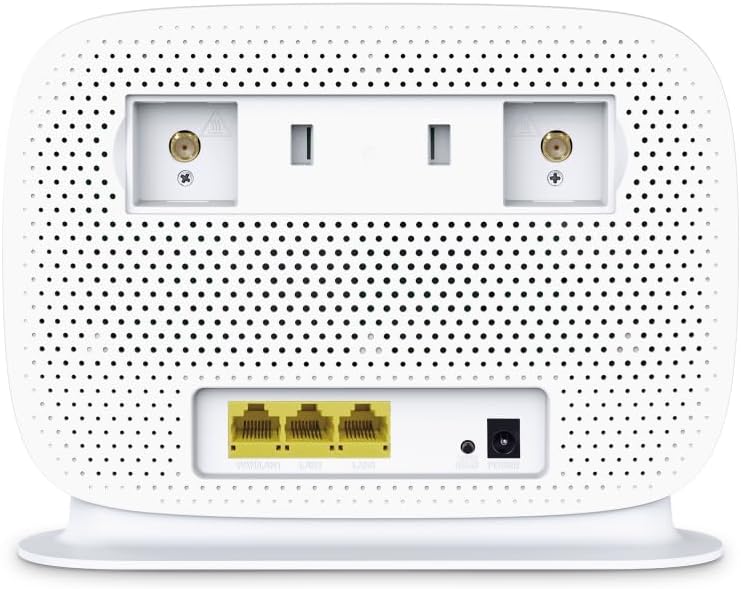
Figure 4: Rear panel of the Archer MR505 with ports and SIM slot.

Figure 5: Archer MR505 in various usage scenarios.
אַפּערייטינג ינסטראַקשאַנז
The Archer MR505 provides robust wireless and wired connectivity:
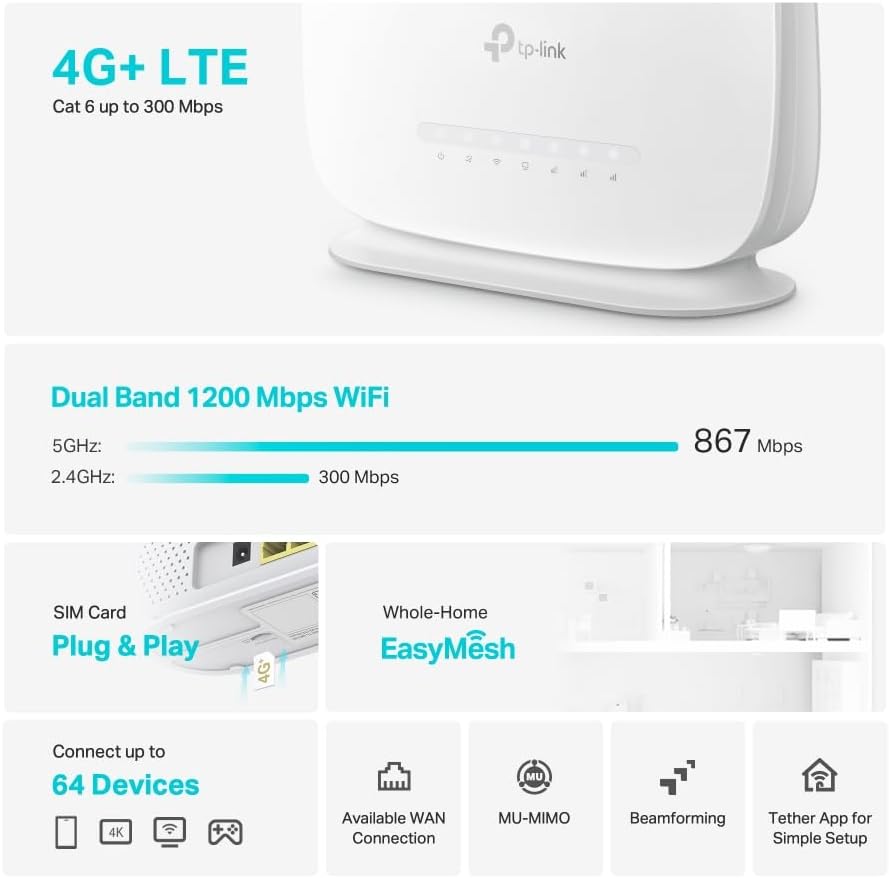
- צוויי-באַנד ווי-פי: The router operates on both 2.4 GHz and 5 GHz bands, offering speeds up to 300 Mbps and 867 Mbps respectively, for a total of AC1200 Wi-Fi.
- 4G+ Cat6 Connectivity: Enjoy mobile broadband speeds up to 300 Mbps download and 300 Mbps upload (maximum upstream data transfer rate).
- גיגאַביט עטהערנעט פּאָרץ: Four Gigabit LAN ports (1000 Mbps) are available for high-speed wired connections to devices like computers, gaming consoles, or smart TVs. One port can also function as a WAN port for traditional broadband connections.
- מיטל קאַפּאַציטעט: The router can support connectivity for up to 64 devices simultaneously.
- סמאַרט קאָננעקט: This feature automatically assigns devices to the best available Wi-Fi band (2.4 GHz or 5 GHz) for optimized performance.
- EasyMesh קאָמפּאַטאַביליטי: The Archer MR505 is compatible with TP-Link EasyMesh, allowing you to create a seamless whole-home mesh Wi-Fi network by adding compatible range extenders.
- אַוואַנסירטע טעכנאָלאָגיע: Features like MU-MIMO and Beamforming enhance Wi-Fi efficiency and range, especially for multiple connected devices.
- זיכערהייט: The router supports WPA3 encryption for enhanced network security.

Figure 6: Versatile connectivity and speed capabilities.

Figure 7: Whole-Home EasyMesh integration.
וישאַלט
To ensure optimal performance and security of your router:
- Firmware דערהייַנטיקונגען: קאָנטראָלירט און אינסטאַלירט רעגולער די לעצטע פירמווער דערהייַנטיקונגען פֿון דער TP-Link באַאַמטער. website or via the Tether app. Firmware updates often include security patches and performance improvements.
- זיכערע שפּריכוואָרט: Use strong, unique passwords for your Wi-Fi network and router management interface. Change them periodically.
- פיזישע פּלאַצירונג: שטעלט דעם ראַוטער אין אַ צענטראַלן אָרט, אַוועק פון שטערונגען און קוועלער פון שטערונג (למשל, מייקראַווייווז, שנורלאָזע טעלעפאָנען) צו מאַקסאַמיזירן Wi-Fi קאַווערידזש.
- רייניקונג: Keep the router clean and free from dust. Ensure ventilation holes are not blocked.
- ריסטאַרט פּעריִאָדיש: Restarting the router occasionally can help resolve minor network issues and improve performance.
טראָובלעשאָאָטינג
If you encounter issues with your Archer MR505 router, consider the following:
- No Internet Connection via 4G/LTE:
- זייט זיכער אַז אייער סים קאַרטל איז ריכטיק אַרײַנגעשטעלט און אַקטיוויזירט.
- Verify that your SIM card is a normal data SIM. Some data-only SIM cards may require specific APN settings or might not be fully compatible. Contact your mobile service provider for details.
- Check the 4G/LTE signal strength indicated by the router's LEDs. If the signal is weak, try repositioning the router or consider using external antennas (if supported and configured).
- ריסטאַרט דעם ראַוטער און אייערע פֿאַרבונדענע דעוויסעס.
- Wi-Fi קאַנעקשאַן ישוז:
- Ensure your device is within the router's Wi-Fi range.
- Verify you are using the correct Wi-Fi password.
- If a device frequently connects and disconnects, try restarting that specific device.
- קוק פֿאַר ינטערפיראַנס פון אנדערע עלעקטראָניש דעוויסעס.
- לאַנגזאַמע אינטערנעט גיכקייט:
- Check your 4G/LTE signal strength. Weak signal can significantly reduce speed.
- Ensure no other applications or devices are consuming excessive bandwidth.
- If using Wi-Fi, try connecting to the 5 GHz band for faster speeds, if your device supports it.
- פירט אויס א גיכקייט טעסט צו באשטעטיגן די פאקטישע גיכקייט וואס איר באקומט.
- קען נישט צוקומען צו די ראוטער מענעדזשמענט בלאט:
- זיכער מאַכן אַז אייער דעווייס איז פארבונדן צום ראַוטער'ס נעץ (אָדער דורך Wi-Fi אָדער עטהערנעט קאַבל).
- Verify you are entering the correct management address (e.g., http://tplinkwifi.net).
- פרובירט אויסצורייניגן אייער בלעטערער'ס קעש אדער ניצן אן אנדערן בלעטערער.
ספּעסאַפאַקיישאַנז
| סאָרט | טפּ-לינק |
| מאָדעל נאָמען | Archer MR505 |
| ווירעלעסס סטאַנדאַרד | 802.11ac (Wi-Fi 5) |
| אָפטקייַט באַנד קלאַס | צוויי-באַנד (2.4 GHz און 5 GHz) |
| Wi-Fi דאַטאַ טעמפּאָ | Up to 300 Mbps (2.4 GHz), Up to 867 Mbps (5 GHz) - AC1200 Total |
| 4G+ Cat6 Speed | Up to 300 Mbps Download, Up to 300 Mbps Upload |
| עטהערנעט פּאָרץ | 4 x Gigabit LAN Ports (1000 Mbps), 1 x WAN/LAN Port |
| אַנטענע טיפּ | Internal (External antenna support available) |
| זיכערהייט פּראָטאָקאָל | WPA3 |
| קאָנטראָל מעטאָד | App (TP-Link Tether) |
| קאַמפּאַטאַבאַל דעוויסעס | Laptop, Personal Computer, Smart Television, Smartphone, Tablet |
| מאַכט אַרייַנשרייַב | 12 וואלטס |
| פּונקט וואָג | 0.93 קילאָגראַמס |
| אַרייַנגערעכנט קאַמפּאָונאַנץ | Archer MR505, Power Adapter, Quick Installation Guide, RJ45 Ethernet Cable |
וואָראַנטי און שטיצן
פֿאַר וואָראַנטי אינפֿאָרמאַציע, ביטע זען די וואָראַנטי קאַרטל וואָס איז אַרייַנגערעכנט מיט דיין פּראָדוקט אָדער באַזוכן די באַאַמטער TP-Link וועבזייטל. website for your region. Support resources, including FAQs, firmware downloads, and contact information, are available on the TP-Link support website and through the TP-Link Tether app.
Official TP-Link Webפּלאַץ: https://www.tp-link.com
TP-Link Tether אַפּ: Available on iOS App Store and Google Play Store.