
1. הקדמה
The Atomos Shinobi II is a versatile 5-inch HDMI 4K monitor designed for filmmakers and content creators. It features an HDR touchscreen, extended battery life, and a lightweight design, focusing on common settings that require on-the-fly adjustments. This manual provides detailed instructions for setting up, operating, and maintaining your Shinobi II monitor.

Image: Atomos Shinobi II highlighting its slimmer, brighter design and camera control capabilities.
2. פּראָדוקט איבערview
The Shinobi II monitor is engineered for optimal performance and ease of use. Its compact and robust construction ensures reliability in various shooting environments.
2.1 שליסל פֿעיִקייטן
- 5-inch HDR Display: High-brightness 1500 nits screen for clear outdoor viewing.
- 4K HDMI Monitoring: Supports HDMI signals up to 4Kp30.
- טאָוטשסקרעען צובינד: Intuitive control for settings and monitoring tools.
- USB-C קאַנעקטיוויטי: Versatile power and camera control options.
- לאנג באַטאַרייע לעבן: Designed for all-day operation on a single battery.
- לייטווייט פּלאַן: Enhanced portability for on-the-go productions.
2.2 פיזישע קאָמפּאָנענטן
Familiarize yourself with the physical layout and connections of your Shinobi II monitor:
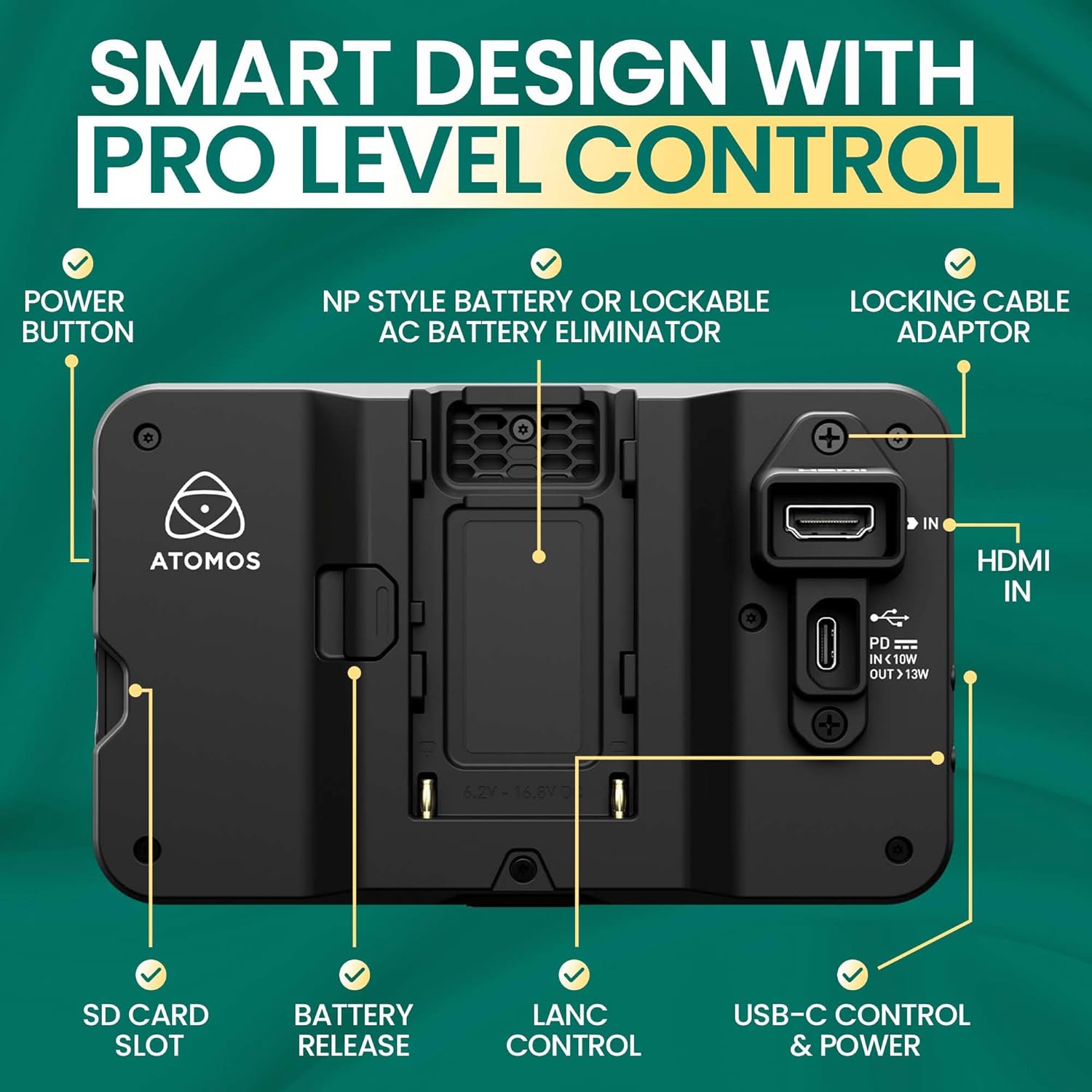
בילד: הינטערשטע view of the Shinobi II monitor, detailing the power button, NP-style battery slot, locking cable adapter, HDMI IN, USB-C control & power, LANC control, battery release, and SD card slot.
- מאַכט קנעפּל: Located on the side for turning the device on/off.
- NP-Style Battery Slot: Accommodates standard NP-F type batteries for portable power.
- HDMI ין: Connects to your camera for video input.
- USB-C Control & Power: Provides power delivery and camera control capabilities.
- LANC Control: For remote camera control (future firmware releases may support more vendors).
- SD Card Slot: For loading LUTs and firmware updates.
- כעדפאָון דזשאַק: For audio monitoring.
- ווייַט פּאָרט: For additional remote control options.
3. סעטאַפּ
3.1 מאַכט די מאָניטאָר
The Shinobi II can be powered using NP-F style batteries or via USB-C Power Delivery.
- ייַנמאָנטירונג פון באַטאַרייע: Slide a compatible NP-F battery into the battery slot on the rear of the monitor until it clicks securely into place.
- USB-C מאַכט: Connect a USB-C PD compatible power source to the USB-C port. This port can also power/charge your camera.
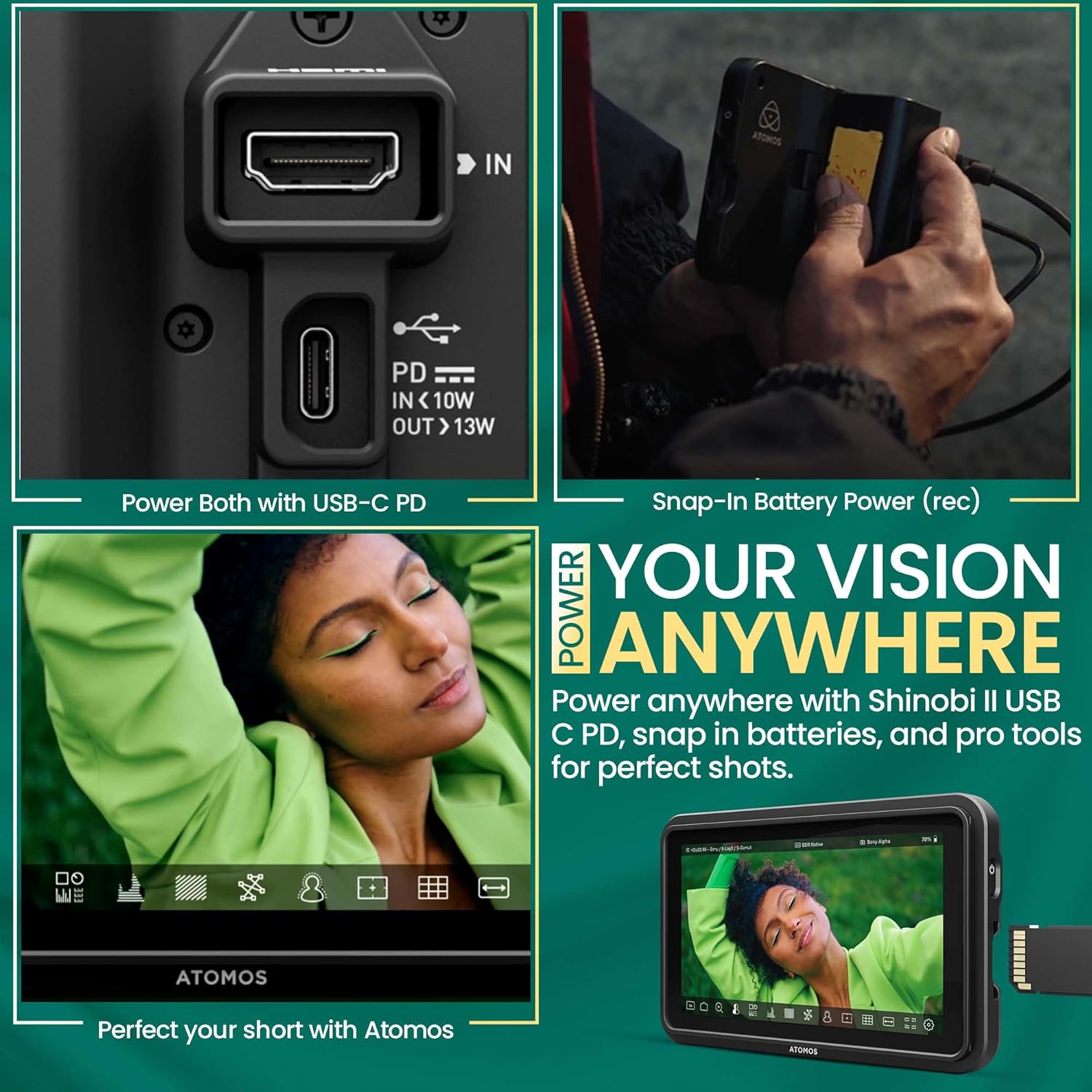
Image: A hand connecting a USB-C cable to the Shinobi II, demonstrating power options and battery use.
3.2 Connecting to Your Camera
Use an HDMI cable to connect your camera to the Shinobi II monitor.
- Connect one end of an HDMI cable to your camera's HDMI output port.
- פאַרבינדן די אנדערע סוף פון די HDMI קאַבלע צו די HDMI ין port on the Shinobi II monitor.
- Ensure both devices are powered on. The monitor should automatically detect the input signal.
4. אַפּערייטינג די מאָניטאָר
The Shinobi II features an intuitive touchscreen interface for easy navigation and control.
4.1 יקערדיק קאָנטראָלס
- מאַכט אויף / אַוועק: Press and hold the power button on the side of the monitor.
- טאָוטשסקרעען נאַוויגאַציע: Tap, swipe, and pinch to navigate menus and adjust settings.
4.2 מאָניטאָרינג מכשירים
The Shinobi II offers a suite of professional monitoring tools to ensure accurate exposure and focus.
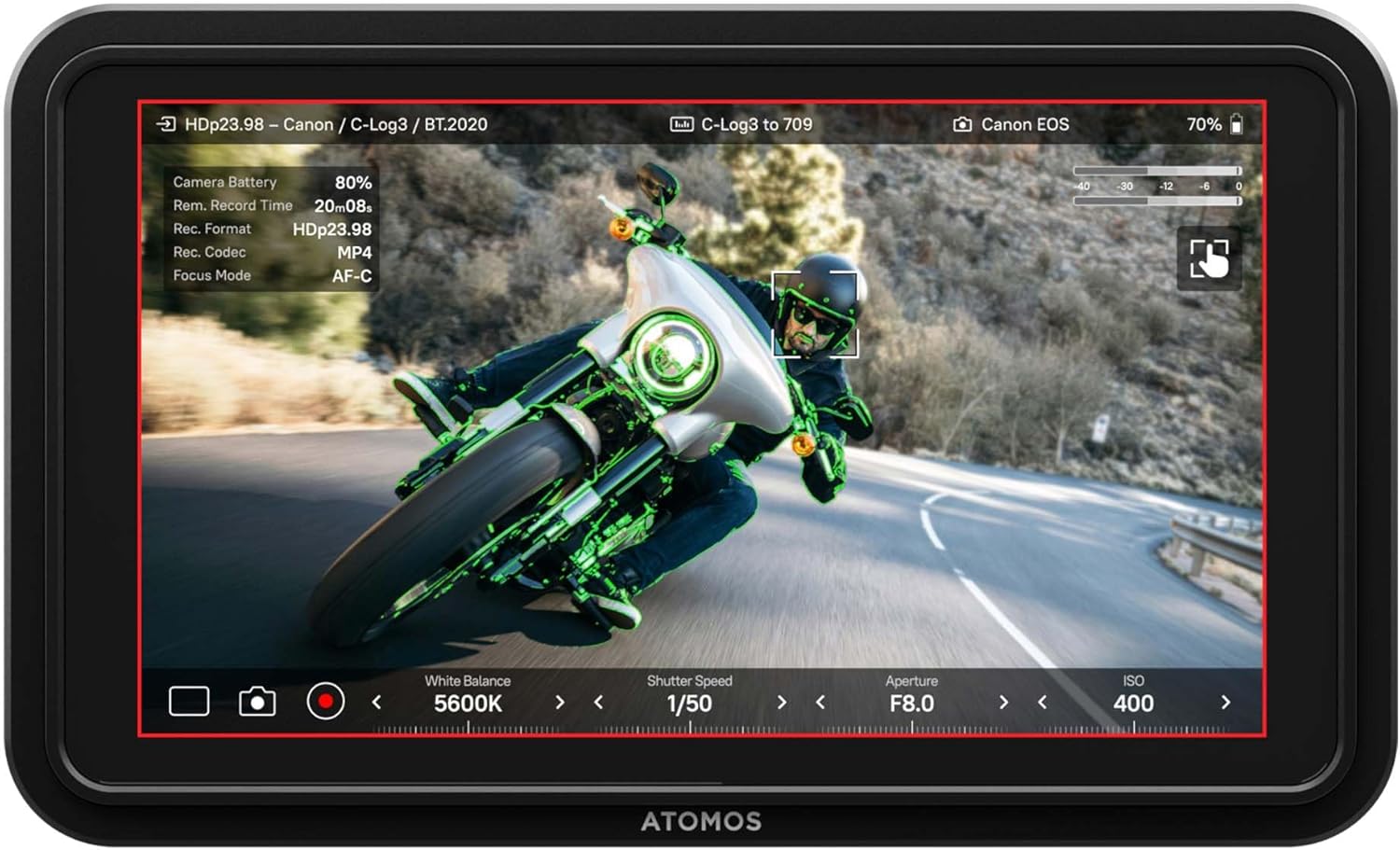
Image: The Shinobi II display showing various camera parameters like White Balance, Shutter Speed, Aperture, and ISO, along with monitoring overlays.
- Analysis Mode: Access waveform, histogram, and vectorscope tools for detailed image analysis.
- Built-in LUTs: Preview your look with up to 8 customizable LUTs. Load additional LUTs via the SD card slot.
- Frame Guides: Utilize various frame guides for precise composition for social media or cinematic productions.
- On-Screen Sliders: Adjust white balance, lens aperture, shutter speed, and ISO directly from the touchscreen.
4.3 קאַמעראַ קאָנטראָל
The Shinobi II supports camera control for various mirrorless and DSLR cameras via USB-C and LANC, allowing for immediate and responsive access to camera settings.

Image: The Shinobi II monitor mounted on a camera, illustrating quick white balance adjustments, precise aperture, shutter, and ISO control for real-time shooting.
Video: An official product guide for the Atomos Shinobi II, demonstrating its features and functionality.
Video: A demonstration of the Atomos Shinobi II's touch focus capability.
5. וישאַלט
Proper care and maintenance will extend the life of your Shinobi II monitor.
- רייניקונג: Use a soft, lint-free cloth to clean the screen and body. For stubborn smudges, a screen-safe cleaning solution can be applied to the cloth (not directly to the screen).
- סטאָרידזש: Store the monitor in a dry, cool place away from direct sunlight and extreme temperatures. Use a protective case during transport.
- Firmware דערהייַנטיקונגען: Regularly check the Atomos website for the latest firmware updates to ensure optimal performance and access new features. Updates can typically be loaded via the SD card slot.
6. טראָובלעשאָאָטינג
If you encounter issues with your Shinobi II, refer to the following common solutions:
- קיין סיגנאַל: Ensure the HDMI cable is securely connected to both the camera and the monitor. Verify that the camera's HDMI output is active and configured correctly.
- Monitor Not Powering On: Check battery charge or USB-C power connection. Ensure the power button is pressed and held for a few seconds.
- טאָוטשסקרין רעאַגירט נישט: Restart the monitor. If the issue persists, check for available firmware updates.
- איבערהייצונג: Ensure proper ventilation around the monitor. Avoid prolonged use in direct sunlight or hot environments.
- Image Ghosting/Artifacts: Verify HDMI cable quality and connection. Check camera output settings and monitor input settings for compatibility.
For persistent issues, contact Atomos customer support.
7. ספּעסאַפאַקיישאַנז
| שטריך | באַשרייַבונג |
|---|---|
| מאָדעל נומער | SHINOBI2 |
| פאַרשטעלן גרייס | 5 אינטשעס |
| האַכלאָטע | 1920 x 1080 (FHD 1080p) |
| בילד ברייטנאַס | 1500 ניץ |
| בילד קאַנטראַסט פאַרהעלטעניש | 1000:1 |
| אַספּעקט פאַרהעלטעניש | 16:9 |
| אַרייַנשרייַב פּאָרץ | HDMI, USB-C (Power/Control), LANC |
| רעזולטאַט פּאָרץ | כעדפאָון דזשאַק |
| מאַכט מקור | NP-F Batteries, USB-C PD (12V batteries required) |
| פּראָדוקט דימענשאַנז | 5.12 X 7.87 X 3.15 אינטשעס |
| פּונקט וואָג | 7.4 אונסעס |
8. וואָראַנטי און שטיצן
Atomos products are designed for reliability and performance. For warranty information, product registration, and technical support, please visit the official Atomos website or contact their customer service department. Keeping your product registered ensures you receive the latest news and information about Atomos updates.
פֿאַר ווייַטער הילף, ביטע באַזוכן: www.atomos.com/support