
הקדמה
Thank you for choosing the Doubc Q13 Wireless Bluetooth 5.3 Earbuds. These earbuds are designed to provide a high-quality audio experience with advanced features such as HiFi stereo sound, ENC noise-cancelling microphones, and IPX7 waterproofing. This manual will guide you through the setup, operation, and maintenance of your new earbuds.

Image: The Doubc Q13 Wireless Bluetooth 5.3 Earbuds in their open charging case, displaying the digital battery indicator.
פּעקל אינהאַלט
ביטע טשעק די פּאַקעט פֿאַר די פאלגענדע זאכן:
- Doubc Q13 Wireless Earbuds (Left and Right)
- טשאַרדזשינג קאַסע
- וסב טיפּע- C טשאַרדזשינג קאַבלע
- באַניצער מאַנואַל
- Eartips (various sizes, typically S/M/L)
סעטאַפּ
1. ערשטע אויפלאָדונג
פארן ערשטן באַנוץ, זאָלט איר גאָר אויפלאָדן די אויערקנעפּלעך און דעם אויפלאָדן-קעסטל. פֿאַרבינדט דעם צוגעשטעלטן USB טיפּ-C קאַבל צום אויפלאָדן-פּאָרט אויפן קעיס און אַ שטראָם-מקור. די LED אַרויסווייַזונג אויפן אויפלאָדן-קעסטל וועט ווײַזן דעם באַטאַריע פּראָצענט.tage. A full charge takes approximately 1.5 hours.
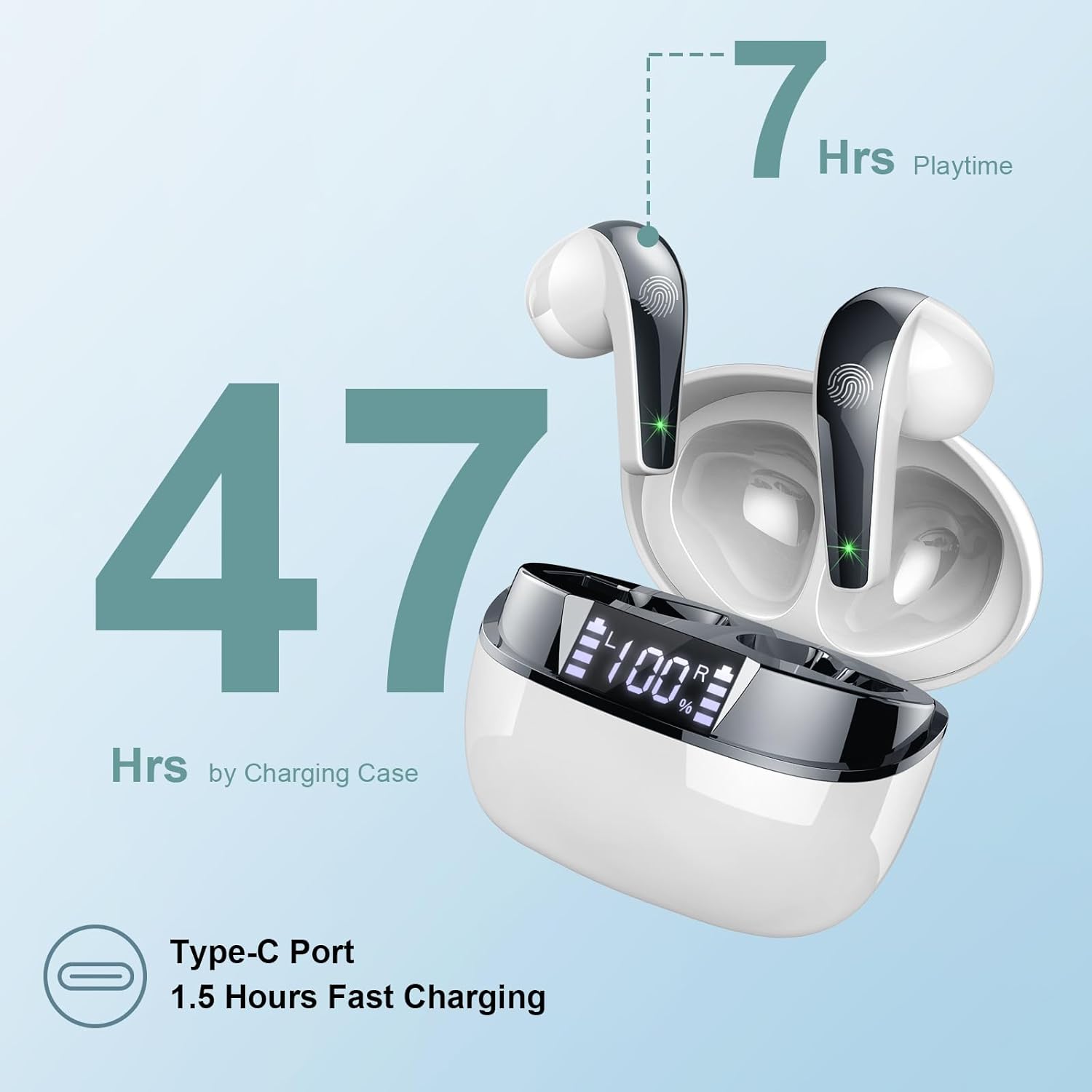
Image: The charging case highlighting 47 hours of total playtime and the Type-C charging port.

Image: A visual representation of the earbuds and charging case, emphasizing 7 hours of music time per charge and 47 hours total with the charging case, along with the dual LED digital display.
2. פּערינג מיט אַ מיטל
- מאַכן זיכער אַז די עאַרבודז זענען באפוילן.
- עפֿנט דעם טשאַרדזשינג קעסטל. די אויערקנעפּלעך וועלן אויטאָמאַטיש אַרײַן אין פּערינג מאָדע.
- אויף אייער דעווייס (סמאַרטפאָן, טאַבלעט, קאָמפּיוטער), גייט צו די בלועטוט סעטטינגס.
- זוכן פֿאַר available devices and select "Q13" from the list.
- אַמאָל פארבונדן, וועט איר הערן אַ באַשטעטיקונג טאָן, און די אויערקנעפּלעך וועלן זיין גרייט פֿאַר נוצן.
The Doubc Q13 earbuds feature one-step pairing and wide compatibility with iOS, Android, and Windows devices.

Image: The earbuds in their charging case next to a smartphone displaying Bluetooth settings, showing "Q13" as a discoverable device, illustrating the one-step pairing process.
אַפּערייטינג ינסטראַקשאַנז
ריר קאָנטראָלס
The Doubc Q13 earbuds feature smart touch controls for easy management of music and calls. The touch sensitive area is located on the outer surface of each earbud.

Image: A user wearing an earbud, with icons indicating various touch control functions such as volume adjustment, call management, music playback, and voice assistant activation.
| קאַמף | פֿונקציע |
|---|---|
| איין צאַפּ (לינקס/רעכטס) | שפּילן/פּויזירן מוזיק, ענטפֿערן/ענדיגן רוף |
| טאָפּל טאַפּ (רעכטס) | ווייַטער שפּור |
| טאָפּל טאַפּ (לינקס) | פֿריִערדיקע שפּירט |
| דרייַיק צאַפּן (רעכט) | באַנד אַרויף |
| דרייַיק צאַפּן (לינקס) | באַנד אַראָפּ |
| לאַנג דריקן (2 סעקונדעס) (לינקס/רעכטס) | אָפּוואַרפן רוף, אַקטיווירן שטימע אַסיסטאַנט |
מאַכט אויף / אַוועק
- מאַכט אויף: עפֿנט דעם טשאַרדזשינג קעסטל, און די אויערקנעפּלעך וועלן זיך אויטאָמאַטיש אנצינדן. אַלטערנאַטיוו, דריק לאַנג דעם ריר-געגנט אויף ביידע אויערקנעפּלעך פֿאַר 3 סעקונדעס.
- מאַכט אַוועק: לייגט די אויערקנעפּלעך צוריק אין די טשאַרדזשינג קעסטל און מאַכט צו דעם דעקל. זיי וועלן זיך אויטאָמאַטיש אויסלעשן און אָנהייבן טשאַרדזשינג. אַלטערנאַטיוו, דריקט לאַנג-דריקט די ריר געגנט אויף ביידע אויערקנעפּלעך פֿאַר 5 סעקונדעס.
וישאַלט
רייניקונג
To ensure optimal performance and charging, regularly clean the charging contacts on both the earbuds and the charging case. Use a cotton swab lightly dampened with alcohol to gently wipe the contacts.

Image: A diagram illustrating the location of charging contacts on the earbuds and inside the charging case, with instructions to clean them if charging issues occur.
וואַסער קעגנשטעל
The earbuds are IPX7 waterproof, meaning they can withstand immersion in water up to 1 meter for 30 minutes. This makes them suitable for workouts and light rain. However, the charging case is not waterproof. Do not expose the charging case to water.

Image: Two earbuds covered in water droplets, visually representing their IPX7 waterproof capability.
סטאָרידזש
Store the earbuds in their charging case when not in use to protect them and keep them charged. Avoid extreme temperatures and direct sunlight.
טראָובלעשאָאָטינג
עאַרבודס ניט טשאַרדזשינג
- זיכער מאַכן אַז דער טשאַרדזשינג קאַבל איז זיכער פארבונדן צו ביידע דעם קעסטל און די מאַכט מקור.
- Verify that the charging contacts on both the earbuds and the case are clean and free of debris. Use alcohol to clean them if necessary.
- Check if the charging case itself has sufficient battery charge.
Only One Earbud Has Sound
- לייגט ביידע אויערקנעפּלעך צוריק אין די טשאַרדזשינג קעסטל און מאַכט צו דעם דעקל.
- On your phone's Bluetooth settings, manually "forget" or "unpair" the "Q13" device.
- After approximately 10 seconds, open the charging case. The earbuds should automatically re-enter pairing mode.
- Reconnect the earbuds with your phone via Bluetooth.
Image: A diagram illustrating solutions for common issues: cleaning charging contacts for charging problems and re-pairing steps for when only one earbud produces sound.
עאַרבודז ניט קאַנעקטינג
- מאַכן זיכער אַז בלועטאָאָטה איז ענייבאַלד אויף דיין מיטל.
- Make sure the earbuds are within the effective range (typically 10 meters) of your device.
- אויסלעשן און דערנאך אן די בלועטוט פון אייער דעווייס.
- איבערחזרן דעם פּערינג פּראָצעס ווי באַשריבן אין דער "סעטאַפּ" סעקציע.
ספּעסאַפאַקיישאַנז
| שטריך | דעטאַל |
|---|---|
| מאָדעל נומער | ק13 |
| בלועטאָאָטה ווערסיע | 5.3 |
| אַודיאָ דרייווער | 13mm Graphene Audio Driver |
| אָפטקייַט ראַנגע | 20 הז - 20,000 הז |
| שפּיל צייט (עאַרבודז) | ביז 7 שעה (איין אָפּצאָל) |
| גאַנץ שפּילצייט (מיט קעסטל) | אַרויף צו 47 שעה |
| טשאַרדזשינג פּאָרט | וסב טיפּ-C |
| טשאַרדזשינג צייט | אומגעפער 1.5 שעה (קעסטל) |
| וואָטערפּרוף רייטינג | IPX7 (בלויז עאַרבודז) |
| מיקראָפאָנעס | 4 ENC ראַש קאַנסאַלינג מיקראָפאָנען |
| עאַרבוד ווייט | אומגעפער 3 גראַם (יעדער) |
| טשאַרדזשינג קאַסע וואָג | בעערעך. 29 ג |
| פּראָדוקט דימענשאַנז | 2.13 x 1.81 x 1.34 אינטשעס (אויפלאָדן קעסטל) |

בילד: א דעטאַלירטע view of the 13mm Graphene Audio Driver, emphasizing HiFi Stereo Sound and built-in microphones with noise reduction for HD calling.

Image: A diagram illustrating the benefits of Advanced Bluetooth 5.3 technology, including faster transfer, lower power consumption, more stable connection, and lower latency.

Image: A visual showing the comfortable and lightweight design of the earbuds and charging case, including their dimensions and individual weights (3g per earbud, 29g for the case).
וואָראַנטי און שטיצן
The Doubc Q13 Wireless Bluetooth 5.3 Earbuds come with a 3 יאָר וואָראַנטי, זיכער מאַכן רואיגקייט וועגן פּראָדוקט קוואַליטעט און פאָרשטעלונג.
For technical support, warranty claims, or any inquiries, please refer to the contact information provided on the product packaging or the official Doubc website. Specific support contact details are not available in this manual.
וויכטיק סאַפעטי אינפֿאָרמאַציע
- דו זאלסט נישט דיסאַסעמבאַל אָדער מאָדיפיצירן די פּראָדוקט.
- האַלטן אַוועק פון עקסטרעמע טעמפּעראַטורן און דירעקט זונשייַן.
- Avoid exposing the charging case to water.
- ניצט נאָר דעם צוגעשטעלטן טשאַרדזשינג קאַבל אָדער אַ סערטיפיצירטן עקוויוואַלענט.
- אָפּזאָגן דעם פּראָדוקט ריספּאַנסאַבלי לויט די היגע רעגיאַליישאַנז.