
הקדמה
The WIOONI Caregiver Pager is a smart emergency call system designed to provide peace of mind for caregivers and safety for individuals requiring assistance, such as the elderly, sick, or disabled. This system utilizes a WiFi-connected receiver and wireless SOS buttons to send immediate alerts locally and remotely via a smartphone application.

Image: The WIOONI Caregiver Pager system in use, showing the main receiver unit and a wearable SOS button.
פּעקל אינהאַלט
ביטע באַשטעטיקן אַז אַלע זאכן זענען פאַראַן אין דיין פּעקל:
- 1 x WIOONI Caregiver Pager Receiver
- 6 x SOS Emergency Call Buttons
- 6 x CR2032 Batteries (pre-installed in buttons)
- 1 x באַניצער מאַנואַל (דאָס דאָקומענט)
ספּעסאַפאַקיישאַנז
| מאָדעל נומער | JJBJQ0712 |
| סאָרט | וויאָני |
| דימענסיעס (רעצעווער) | 13.5 X 11.5 X 6 סענטימעטער |
| Weight (Receiver) | 300 גראַמז |
| מאַכט מקור (ריסיווער) | External Power Adapter (not battery-operated) |
| ווירעלעסס קאַנעקטיוויטי | Wi-Fi 2.4 GHz (for app notifications) |
| קנעפּל באַטעריעס | 6 רענטגענ CR2032 (אַרייַנגערעכנט) |
| Local Wireless Range | Up to 150m / 500ft (without Wi-Fi for local pager function) |
סעטאַפּ
Follow these steps to set up your WIOONI Caregiver Pager system:
- מאַכט אָן דעם ריסיווער: Plug the receiver into a standard power outlet. The receiver does not have a built-in battery and requires continuous power.
- אראפקאפיע די אַפּ: Download the 'Tuya Smart' or 'Smart Life' application from your smartphone's app store (available on iOS and Android).
- פאַרבינדן צו Wi-Fi: Open the app and follow the on-screen instructions to add a new device. Ensure your Wi-Fi network is 2.4 GHz. The receiver must be installed in a stable 2.4 GHz Wi-Fi environment for remote notifications.
- Pair SOS Buttons: The emergency buttons are typically pre-paired. If a button does not trigger an alarm, you may need to re-pair it with the receiver according to the app's instructions or the receiver's pairing mode.
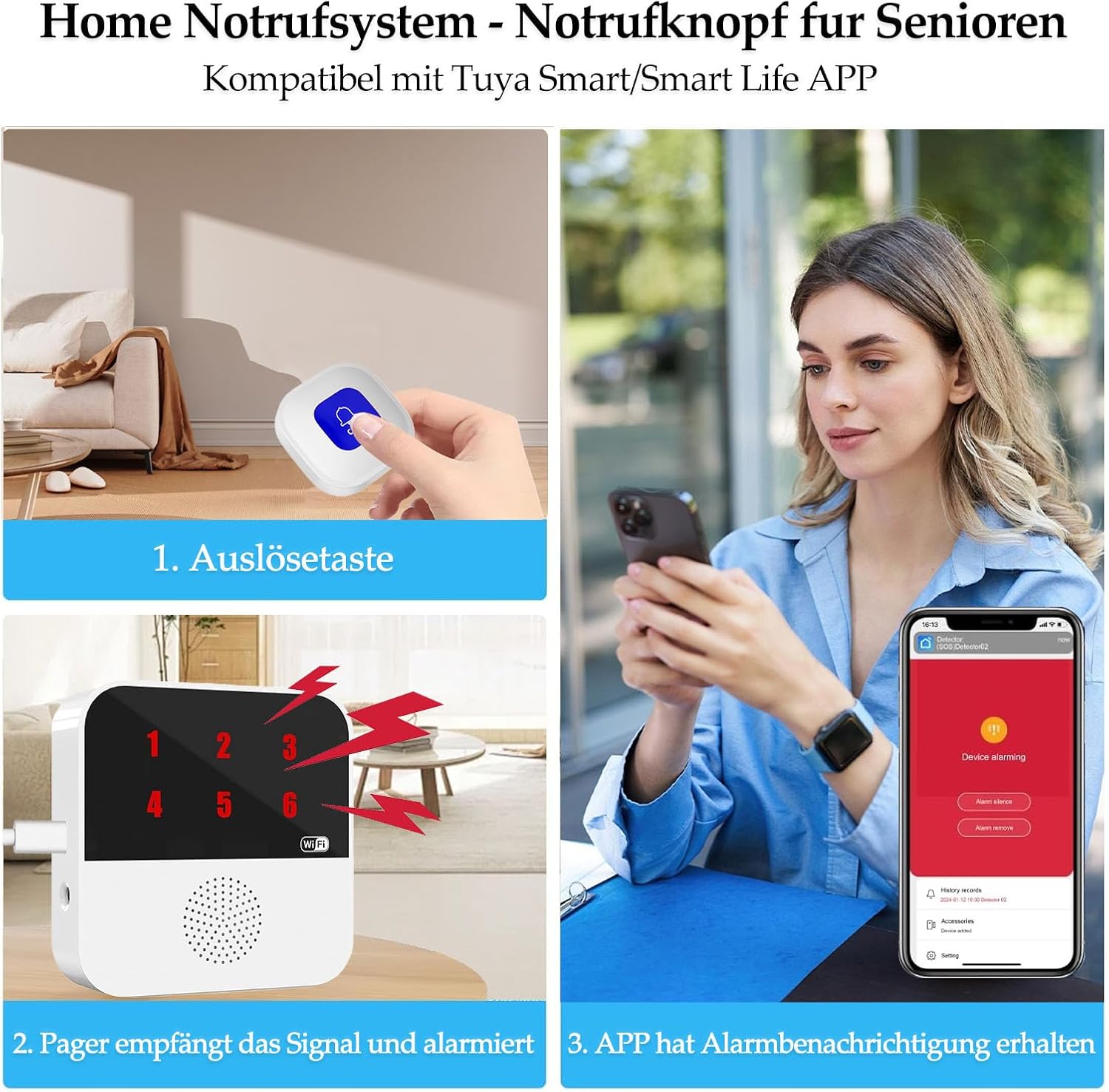
Image: Visual guide illustrating the sequence from button press to app notification.

Image: Illustration of the local wireless range between the SOS button and the receiver.
אַפּערייטינג ינסטראַקשאַנז
The WIOONI Caregiver Pager system is designed for simple and effective use:
- Triggering an Emergency: When the individual needing assistance presses the SOS emergency call button, the signal is immediately sent to the receiver.
- לאקאלע שרעק: Upon receiving the signal, the hub (receiver) will emit an audible alarm to alert caregivers within the vicinity.
- Remote Notification (via App): Simultaneously, if the receiver is connected to Wi-Fi, the 'Tuya Smart' or 'Smart Life' application on your smartphone will receive an instant alert. This notification is delivered regardless of your location, allowing you to respond even if you are in another city or province. The app also records each call for a history log.
- App Sharing Function: You can utilize the app's sharing function to allow multiple family members or caregivers to receive alarm messages. When the panic button is pressed, all shared users will receive the notification.
- System Expandability: The system is expandable. You can add additional receivers or SOS call buttons to cover larger areas or more individuals as needed.

Image: How the system provides global alarm notifications via the smartphone app.

Image: The app's device sharing feature, allowing multiple users to receive alerts.
אַפּפּליקאַטיאָן סינעריאָוז
This smart emergency call system is versatile and suitable for various environments where reliable 24/7 monitoring is essential:
- היימען: For elderly individuals, children, pregnant women, or those with disabilities living at home.
- Nursing Homes & Retirement Homes: Provides an efficient way for residents to call for assistance.
- Hospitals & Clinics: Can be used in patient rooms for quick calls to staff.
- Sanatoriums: Enhances safety and response times for patients.

Image: Various environments where the WIOONI Caregiver Pager can be effectively used.
וישאַלט
To ensure the longevity and optimal performance of your WIOONI Caregiver Pager system, follow these maintenance guidelines:
- רייניקונג: Wipe the receiver and buttons with a soft, dry cloth. Do not use abrasive cleaners or immerse in water.
- Button Battery Replacement: The SOS buttons are powered by CR2032 batteries. When a button's indicator light dims or it fails to transmit signals reliably, replace the battery. To replace, carefully open the button casing, remove the old battery, and insert a new CR2032 battery with the correct polarity.
- ופנעמער מאַכט: Ensure the receiver remains connected to a stable power source at all times, as it does not have an internal battery.
- Wi-Fi קאַנעקשאַן: Periodically check that your 2.4 GHz Wi-Fi network is stable to ensure continuous remote notification functionality.
טראָובלעשאָאָטינג
If you encounter issues with your WIOONI Caregiver Pager, refer to the following common problems and solutions:
- No Local Alarm from Receiver:
- Ensure the receiver is properly plugged into a power outlet and powered on.
- Check if the SOS button battery needs replacement.
- Verify that the SOS button is paired with the receiver. Refer to the setup section for pairing instructions.
- Ensure the button is within the effective wireless range of the receiver (up to 150m/500ft). Obstacles like thick walls can reduce range.
- No Remote Notification on App:
- Confirm the receiver is connected to a stable 2.4 GHz Wi-Fi network.
- קאָנטראָלירט אייער סמאַרטפאָון'ס אינטערנעט פֿאַרבינדונג.
- Ensure the 'Tuya Smart' or 'Smart Life' app has notification permissions enabled on your phone.
- Verify that the device is correctly added and online in the app.
- If using the sharing function, ensure the device is correctly shared with the relevant accounts.
- SOS Button Not Responding:
- Replace the CR2032 battery in the SOS button.
- Re-pair the button with the receiver if necessary.
וואָראַנטי און שטיצן
For warranty information or technical support, please refer to the product packaging or contact WIOONI customer service through the retailer where the product was purchased. Keep your purchase receipt as proof of purchase.