
הקדמה
Thank you for choosing the Oakcastle HIFI150 Stereo System. This manual provides essential information for setting up, operating, and maintaining your device. Please read it thoroughly before use and retain it for future reference.
זיכערקייַט אינפֿאָרמאַציע
כדי צו זיכער מאַכן זיכערע אָפּעראַציע און פאַרמייַדן שאָדן, ביטע אָבסערווירן די פאלגענדע זיכערהייט מיטלען:
- שטעלט נישט אויס דעם אַפּאַראַט צו רעגן, פייכטקייט, אדער עקסטרעמע טעמפּעראַטורן.
- נישט עפענען דעם סיasinז. איבערגעבן אלע סערוויסינג צו קוואַליפֿיצירטע פּערסאָנעל.
- זיכער מאַכן אַז עס איז דאָ געהעריקע ווענטילאַציע אַרום דעם אַפּאַראַט. בלאָקירט נישט קיין ווענטילאַציע עפענונגען.
- ניצן בלויז די מאַכט אַדאַפּטער סאַפּלייד מיט די אַפּאַראַט.
- Keep the unit away from heat sources such as radiators, stoves, or other heat-producing appliances.
- ריין די אַפּאַראַט בלויז מיט אַ טרוקן שטאָף.
פּעקל אינהאַלט
ביטע קאָנטראָלירט אַז אַלע זאכן זענען פאַראַן אין אייער פּעקל:
- Oakcastle HIFI150 Stereo System
- ווייַט קאָנטראָל
- באַטעריז פֿאַר רימאָוט קאָנטראָל
- מאַכט קאַבלע
- באַניצער מאַנואַל
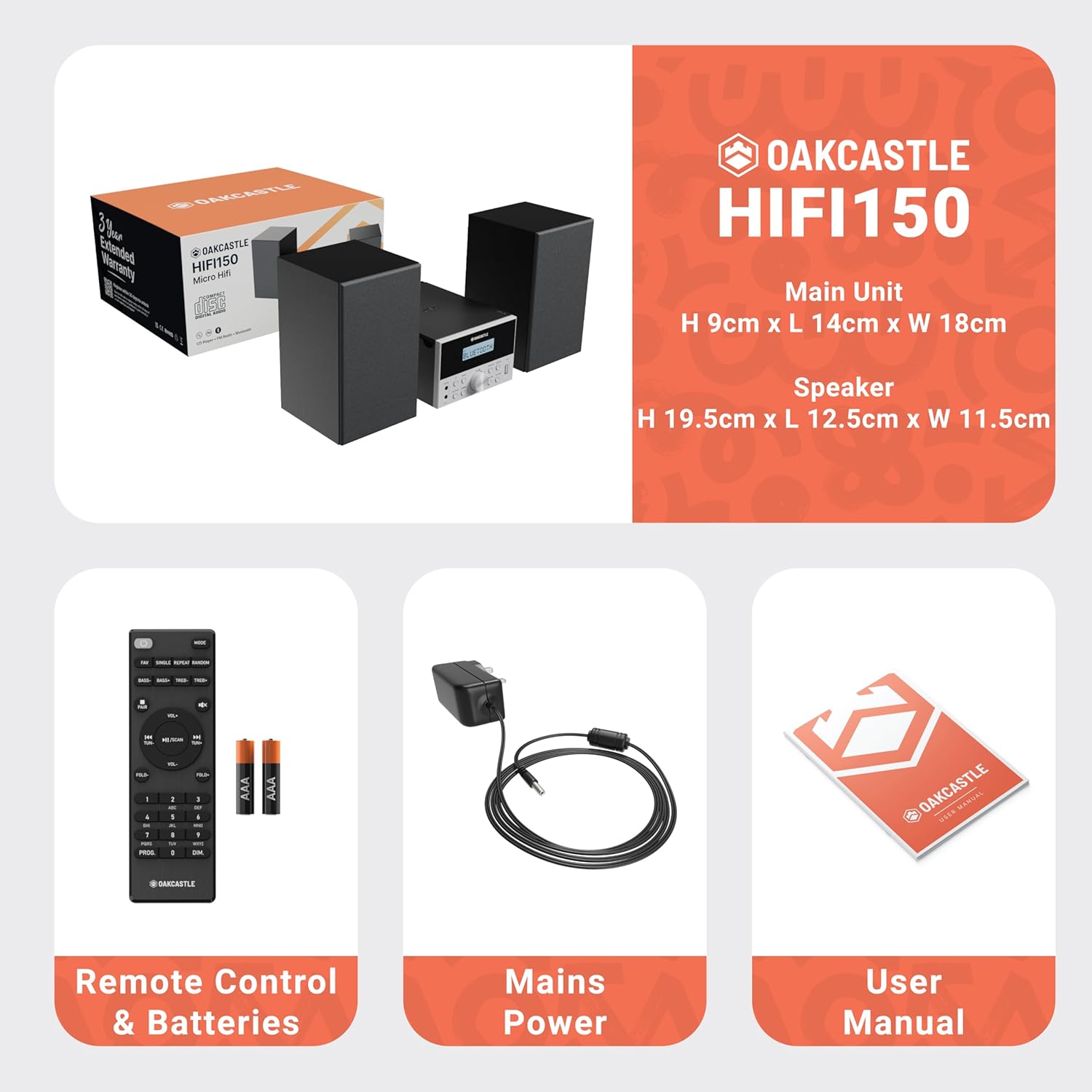
Image: The Oakcastle HIFI150 package contents, showing the main unit, two speakers, remote control with batteries, power adapter, and user manual.
פּראָדוקט איבערview
The Oakcastle HIFI150 features a compact design with intuitive controls and multiple connectivity options.
פראָנט פּאַנעל קאָנטראָלס און ווייַז

Image: A close-up of the Oakcastle HIFI150 main unit's front panel, highlighting the digital display, central volume knob, mode selection buttons, and front-facing AUX In and USB ports. The display shows 'BLUETOOTH'.
- ווייַז: ווײַזט איצטיקן מאָדע, טראַק אינפֿאָרמאַציע, און ראַדיאָ פֿרעקווענץ.
- מאַכט קנעפּל: טורנס די אַפּאַראַט אויף אָדער אַוועק.
- מאָדע קנעפּל: Cycles through input sources (CD, FM, Bluetooth, AUX, USB).
- באַנד קנעפּל: אַדדזשוסץ די בעל באַנד.
- שפּיל / פּויזע קנעפּל: קאָנטראָלירט ווידערשפּיל פֿאַר סי-די, יו-עס-בי, און בלועטוט.
- איבערשפּרינגען/אויפנעמען קנעפּלעך: Navigates tracks or tunes radio frequencies.
- AUX אין פּאָרט: פֿאַר פֿאַרבינדן עקסטערנע אַודיאָ דעוויסעס דורך אַ 3.5 מם קאַבל.
- וסב פּאָרט: פֿאַר שפּילן אַודיאָ fileס פון אַ וסב פאָר.
דערציען פּאַנעל קאַנעקשאַנז
The rear panel includes connections for speakers and power.
סעטאַפּ
1. קאַנעקטינג די ספּיקערז
Connect the included speakers to the speaker terminals on the rear of the main unit. Ensure correct polarity (red to red, black to black) for optimal sound quality.
2. מאַכט קאַנעקשאַן
Plug the power cable into the AC inlet on the rear of the main unit, then plug the other end into a standard wall outlet.
אַפּערייטינג ינסטראַקשאַנז
מאַכט אויף / אַוועק
דרוק די מאַכט קנעפּל אויף דער פראָנט פּאַנעל אָדער ווייַט קאָנטראָל צו דרייען די אַפּאַראַט אויף אָדער אויס.
מאָדע סעלעקציע
דרוק די מאָדע button on the front panel or remote control repeatedly to cycle through the available input sources: CD, עפעם ראַדיאָ, בלועטאָאָטה, AUX, און וסב.
בלועטאָאָטה אָפּעראַציע
- אויסקלייַבן בלועטאָאָטה mode using the Mode button. The display will show 'BLUETOOTH' and the unit will enter pairing mode.
- אויף אייער סמאַרטפאָון אָדער אַנדער בלוטוט מיטל, אַקטיוויזירט בלוטוט און זוכט פֿאַר פֿאַראַן דעוויסעס.
- Select 'OAKCASTLE HIFI150' from the list. Once connected, the unit will confirm the connection.
- You can now stream audio wirelessly from your device to the HIFI150.
קאָמפּאַקטדיסק פּלייַבאַקק

Image: The Oakcastle HIFI150 with its top-loading CD player mechanism open, revealing a compact disc placed inside. The display shows 'CD'.
- עפֿנט דעם דעקל פֿונעם סי-די אָפּטייל.
- Place a CD (MP3, CD, WMA, or CD-R format) onto the spindle with the label side facing up.
- נאָענט די קאָמפּאַקטדיסק אָפּטייל דעקן.
- אויסקלייַבן CD mode. The unit will read the disc and begin playback automatically.
- Use the Play/Pause and Skip buttons to control playback.
עפעם ראַדיאָ אָפּעראַציע

Image: The Oakcastle HIFI150 main unit with its telescopic antenna extended, displaying an FM radio frequency on its screen. The unit is placed between two speakers.
- אויסקלייַבן עפעם ראַדיאָ מאָדע.
- פֿאַרלענגערט די טעלעסקאָפּישע אַנטענע פֿאַר אַ בעסערן אָפּנאַם.
- אַוטאָ סקאַן: Press and hold the Play/Pause button to automatically scan and save available FM stations (up to 30 presets).
- מאַנואַל טונינג: Use the Skip/Tune buttons to manually adjust the frequency.
- צוריקרופן פּרעסעץ: Use the 'FAV/PROG' button on the remote to cycle through saved stations.
וסב פּלייַבאַקק
- אַרייַנלייגן אַ וסב פאָר אין די וסב פּאָרט אויף די פראָנט טאַפליע.
- אויסקלייַבן וסב mode. The unit will automatically detect and begin playing compatible audio fileס (MP3, WMA).
- Use the Play/Pause and Skip buttons to control playback.
AUX ינפּוט
- פֿאַרבינדט אַן עקסטערנעם אַודיאָ מיטל (למשל, MP3 שפּילער, סמאַרטפאָון) צום AUX אין port on the front panel using a 3.5mm audio cable (not included).
- אויסקלייַבן AUX מאָדע.
- קאָנטראָליר ווידערשפּיל פֿון דיין פֿאַרבונדענע עקסטערנע מיטל.
באַנד קאָנטראָל
דרייען די באַנד קנעפּל אויף דער פראָנט פּאַנעל אָדער נוצן די וואָל +/- קנעפּלעך אויף דער ווײַטקאָנטראָל צו סטרויערן דעם געזונט־ניוואָ.
רימאָוט קאָנטראָל באַניץ
The included remote control provides full functionality for the HIFI150. Ensure batteries are correctly inserted. Point the remote control towards the front panel of the main unit for optimal response.
וישאַלט
רייניקונג
- ווישט דעם אַפּאַראַט מיט אַ ווייכן, טרוקענעם שטאָף.
- ניצט נישט קיין שרײַבנדיקע רייניגער, וואַקסן אדער סאָלווענטן, ווײַל זיי קענען שאַטן די ענדיקונג.
סטאָרידזש
If the unit is not used for an extended period, unplug it from the power outlet and store it in a cool, dry place.
טראָובלעשאָאָטינג
If you encounter issues with your HIFI150, please refer to the following common problems and solutions:
| פּראָבלעם | מעגלעך סיבה | לייזונג |
|---|---|---|
| קיין מאַכט | שטראָם קאַבל נישט פארבונדן; שטראָם אַוטלעט דעפעקט | זיכער מאַכן אַז דער עלעקטרישער קאַבל איז זיכער פארבונדן; פּרוּווט אַן אַנדער עלעקטרישער אַוטלעט. |
| קיין געזונט | Volume too low; Incorrect input mode; Speakers not connected | פֿאַרגרעסערן די וואָלומען; אויסקלײַבן די ריכטיקע אַרײַנגאַנג מאָדע; קאָנטראָלירן די רעדנער פֿאַרבינדונגען. |
| סי-די שפּילט נישט | CD inserted incorrectly; Disc scratched/dirty; Incorrect format | Reinsert CD correctly; Clean or replace disc; Ensure disc is compatible (MP3, CD, WMA, CD-R). |
| בלועטאָאָטה איז נישט קאַנעקטינג | Bluetooth mode not selected; Device too far; Device already connected to another unit | Select Bluetooth mode; Move device closer; Disconnect from other devices and try again. |
| נעבעך עפעם אָפּטראָג | אַנטענע נישט אויסגעשטרעקט; שוואַך סיגנאַל | Fully extend the telescopic antenna; Try repositioning the unit. |
ספּעסאַפאַקיישאַנז
| מאָדעל נומער | 1000002971 |
| סאָרט | Oakcastle |
| קאַנעקטיוויטי | בלועטוט 5.2, יו-עס-בי, אוקס |
| אַודיאָ רעזולטאַט | 20 וו |
| שטיצט מידיאַ | CD, MP3, WMA, CD-R, USB |
| ראַדיאָ | FM Radio with 30 Presets |
| קאַמפּאַטאַבאַל דעוויסעס | MP3 שפּילער, סמאַרטפאָון, טאַבלעט |
| קאַבינעט מאַטעריאַל | האלץ |
| קאָליר | שוואַרץ |
| נומער דימענשאַנז (L X W X H) | 13.7 X 17.8 X 9 סענטימעטער |
| פּונקט וואָג | 2 קילאָגראַמס |
וואָראַנטי און שטיצן
The Oakcastle HIFI150 comes with an extended 3-year warranty. Registration is required to activate the full warranty period. Please refer to the warranty card included in your package or visit the official Oakcastle website for registration details and support information.
For technical assistance or further inquiries, please contact Oakcastle customer support through their official channels.