
1. הקדמה
Thank you for choosing the Hama DR2002BT Digital Radio. This device offers a comprehensive audio experience with FM, DAB/DAB+ digital radio reception, and Bluetooth connectivity. Its user-friendly design, featuring large buttons and a clear 4.3-inch TFT color display, makes it suitable for all users. This manual will guide you through the setup, operation, and maintenance of your new digital radio.
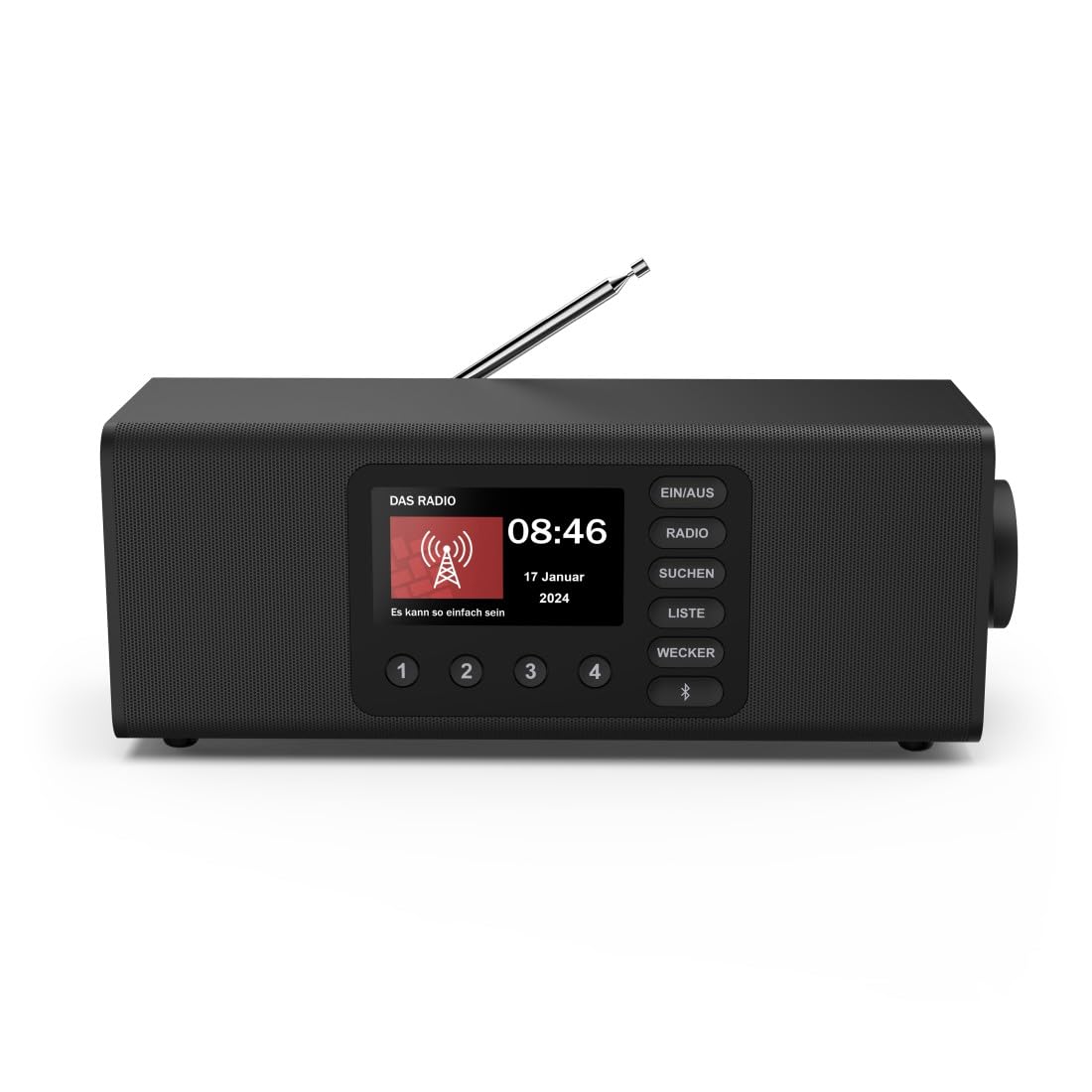
בילד: פראָנט view of the Hama DR2002BT Digital Radio, showcasinג זייַנע אַרויסווייַז און קאָנטראָל קנעפּלעך.
2. זיכערקייַט אינפֿאָרמאַציע
ביטע ליינט די זיכערהייט אינסטרוקציעס קערפֿול איידער איר ניצט דעם מיטל. האַלט דעם מאַנואַל פֿאַר צוקונפֿטיקע רעפֿערענץ.
- שטעלט נישט אויס דעם אפאראט צו פייכטקייט, רעגן, אדער עקסטרעמע טעמפעראטורן.
- ויסמיידן פּלייסינג די מיטל לעבן היץ קוואלן אָדער אין דירעקט זונשייַן.
- נישט עפענען דעם אפאראט casing. Repairs should only be performed by qualified personnel.
- ניצן בלויז די צוגעשטעלט מאַכט אַדאַפּטער.
- ענשור געהעריק ווענטאַליישאַן אַרום די מיטל.
3. פּעקל אינהאַלט
באַשטעטיקן אַז אַלע זאכן זענען פאַראַן ביים אויספּאַקן:
- Hama DR2002BT Digital Radio
- מאַכט אַדאַפּטער
- באַניצער מאַנואַל
4. פּראָדוקט איבערview
4.1 פראָנט פּאַנעל קאָנטראָלס און ווייַז

Image: Front panel of the radio highlighting the display and control buttons, with icons for Bluetooth, DAB+, and Alarm functions.
The front panel features a 4.3-inch TFT color display, large control buttons, and a rotary knob for easy navigation and selection. Key buttons include:
- EIN/AUS (ON/OFF): מאַכט אָן אָדער אויס דעם אַפּאַראַט.
- ראדיא: Switches between FM and DAB/DAB+ modes.
- SUCHEN (SEARCH): Initiates station scanning.
- LISTE (LIST): Accesses the list of available stations.
- WECKER (ALARM): Configures alarm settings.
- בלועטאָאָטה קנעפּל: אַקטיוויזירט בלועטוט פּערינג מאָדע.
- פאָראויסגעשטעלטע קנעפּלעך (1-4): שנעלער צוטריט צו געהיטענע באַליבטע סטאַנציעס.
- Rotary Knob (LAUTSTÄRKE/NAVIGIEREN): Controls volume and navigates menus.
4.2 דערציען פּאַנעל קאַנעקשאַנז
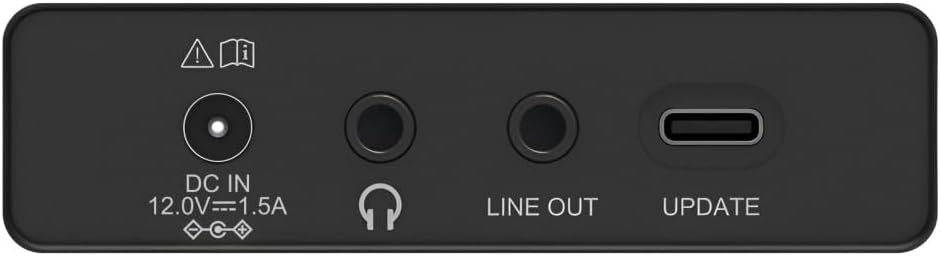
Image: Close-up of the rear panel showing the DC IN, Headphone, Line Out, and UPDATE (USB-C) ports.
די הינטערשטע פּאַנעל גיט וויכטיקע קאַנעקטיוויטי אָפּציעס:
- DC IN 12.0V --- 1.5A: Power input for the external adapter.
- כעדפאָון דזשאַק (3.5 מם): פֿאַר פּריוואַט צוגעהערט.
- LINE אָוט: אַודיאָ אַרויסגאַנג פֿאַר קאַנעקטינג צו פונדרויסנדיק ampליפיערס אָדער ספּיקערז.
- UPDATE (USB-C): פֿאַר פירמוואַרע דערהייַנטיקונגען.
- טעלאַסקאָפּיק אַנטענע: פֿאַר FM און DAB/DAB+ אָפּנאַם.

בילד: הינטערשטע view of the Hama DR2002BT Digital Radio with its telescopic antenna extended for optimal signal reception.
5. סעטאַפּ
5.1 מאַכט קאַנעקשאַן
- פֿאַרבינדט דעם צוגעשטעלטן מאַכט אַדאַפּטער צום DC IN port on the rear of the radio.
- צאַפּן די מאַכט אַדאַפּטער אין אַ פּאַסיק מאַכט ווענטיל.
- דער ראַדיאָ וועט זיך אויטאָמאַטיש אָנצינדן אָדער אַרייַן אין סטענדביי מאָדע.
5.2 אַנטענע פּאַזישאַנינג
For optimal FM and DAB/DAB+ reception, fully extend the telescopic antenna. Position the radio near a window if reception is poor.
5.3 ערשטע אויפשטעל (ערשטע באַנוץ)
Upon first power-on, the radio may guide you through an initial setup process, including language selection and an automatic DAB station scan. Follow the on-screen prompts.
6. אַפּערייטינג ינסטרוקטיאָנס
6.1 מאַכט אויף / אַוועק
דרוק די EIN/AUS קנעפּל צו דרייען דעם ראַדיאָ אָן אָדער אויס.
6.2 DAB/DAB+ Radio Mode
- דרוק די RADIO קנעפּל צו סעלעקטירן DAB מאָדע.
- If this is the first time in DAB mode or if you want to rescan, press SUCHEN to perform a full scan for available stations.
- Use the rotary knob to navigate through the station list. Press the knob to select a station.
- צו view the station list, press the ליסטע קנעפּל.
6.3 עפעם ראַדיאָ מאָדע
- דרוק די RADIO קנעפּל צו אויסקלייַבן FM מאָדע.
- דרוק SUCHEN צו אויטאָמאַטיש סקענען פֿאַר דער ווייַטער בנימצא FM סטאַנציע.
- Alternatively, use the rotary knob to manually tune to a frequency.
6.4 Storing and Recalling Presets
The radio allows you to store up to 4 favorite stations using the dedicated preset buttons (1-4).
- Tune to the desired station (DAB or FM).
- דריק און האלט איינע פון די פאָרגעשטעלטע קנעפּלעך (1-4) ביז דער עקראַן באַשטעטיקט אַז די סטאַנציע איז געראַטעוועט געוואָרן.
- To recall a preset station, simply press the corresponding preset button (1-4).
6.5 בלועטאָאָטה אָפּעראַציע

בילד: פראָנט view of the radio with Bluetooth and stereo speaker icons, indicating its wireless audio streaming capability.
The Hama DR2002BT can stream audio from your smartphone, tablet, or laptop via Bluetooth 5.0.
- Press the Bluetooth button on the front panel to enter Bluetooth pairing mode. The display will show a pairing indicator.
- On your external device (smartphone, tablet), enable Bluetooth and search for available devices.
- Select "Hama DR2002BT" from the list of devices to pair.
- Once paired, you can play audio from your device, and it will be output through the radio's speakers.
6.6 וועקער זייגער פונקציע

Image: A person waking up with the Hama DR2002BT Digital Radio placed on a bedside table, illustrating its alarm clock functionality.
The radio features two independent alarm settings.
- דרוק די WECKER button to access alarm settings.
- Use the rotary knob to select Alarm 1 or Alarm 2.
- Configure the alarm time, source (buzzer or radio station), and repetition (once, daily, weekdays, weekends, or specific days).
- Press the rotary knob to confirm each setting.
- To quickly activate/deactivate an alarm, press the WECKER button and use the rotary knob to toggle the alarm status.

Image: A person interacting with the Hama DR2002BT Digital Radio, demonstrating its ease of use for setting functions like alarms or tuning stations.
7. וישאַלט
To ensure the longevity and optimal performance of your Hama DR2002BT Digital Radio, follow these maintenance guidelines:
- רייניקונג: Use a soft, dry, lint-free cloth to clean the exterior of the radio. Do not use abrasive cleaners, waxes, or solvents.
- שטויב: Regularly dust the device to prevent accumulation in vents and ports.
- סטאָרידזש: If storing the radio for an extended period, disconnect it from the power supply and store it in a cool, dry place.
- אַנטענע: Handle the telescopic antenna carefully to avoid bending or breaking.
8. טראָובלעשאָאָטינג
אויב איר טרעפט פּראָבלעמען מיט אייער ראַדיאָ, זעט די פאלגענדע געוויינטלעכע פּראָבלעמען און לייזונגען:
| פּראָבלעם | מעגלעך סיבה | לייזונג |
|---|---|---|
| קיין מאַכט | שטראָם אַדאַפּטער נישט פארבונדן; שטראָם אַוטלעט דעפעקטיוו | Check power adapter connection; Try a different power outlet. |
| שלעכטע ראַדיאָ אָפּנאַם (DAB/FM) | Antenna not extended; Weak signal area; Interference | Fully extend the telescopic antenna; Reposition the radio (e.g., near a window); Perform a new station scan. |
| בלועטאָאָטה פּערינג פיילז | Bluetooth not enabled on external device; Radio not in pairing mode; Device too far | Ensure Bluetooth is on and visible on your device; Press the Bluetooth button on the radio; Move devices closer (within 10m). |
| קיין געזונט | קול צו נידעריג; שטום אַקטיוויזירט; אומרעכטע מקור אויסגעקליבן | Increase volume using the rotary knob; Check if mute is active; Ensure the correct mode (DAB, FM, Bluetooth) is selected. |
| שרעק טוט נישט געזונט | Alarm not activated; Incorrect alarm time/day set | Verify alarm is enabled in settings; Check alarm time and repetition settings. |
9. ספּעסאַפאַקיישאַנז

Image: Diagram showing the dimensions of the Hama DR2002BT Digital Radio: 35 cm (width), 12.5 cm (depth), and 13 cm (height).
| שטריך | דעטאַל |
|---|---|
| מאָדעל נומער | DR2002BT (00054298) |
| אָפּטראָג | DAB, DAB+, FM |
| בלועטאָאָטה ווערסיע | 5.0 |
| רעזולטאַט מאַכט (RMS) | 10 W (Stereo) |
| ווייַז | 4.3" TFT קאָליר דיספּלעי |
| קאַנעקשאַנז | 3.5mm Jack (Headphone), USB-C (Update), Line Out, DC IN |
| מאַכט צושטעלן | פונדרויסנדיק מאַכט אַדאַפּטער |
| דימענשאַנז (ב x ד x ה) | 35 X 12.5 X 13 סענטימעטער |
| וואָג | 1788 גראַמז |
| מאַטעריאַל | פּלאַסטיק |
| קאָליר | שוואַרץ |
| נאָך פֿעיִקייטן | Alarm Function (2 alarms), Direct Selection Keys |
10. וואָראַנטי און שטיצן
Hama GmbH & Co KG provides a warranty for this product. Please refer to the warranty card included in your package or visit the official Hama webזייטל פֿאַר דעטאַלירטע וואָראַנטי טערמינען און באדינגונגען.
For technical support, troubleshooting assistance, or spare parts, please contact Hama customer service or visit their website. The availability of spare parts in the EU is guaranteed for 7 years.
- פאַבריקאַנט: Hama GmbH & Co KG
- לאַנד פון אָריגין: דייטשלאנד
- EU Spare Parts Availability: 7 יאר