
1. הקדמה
The Varstrom EKD01 is a 2.4-inch IPS color TFT LCD display designed for electric bicycle motor kits. This display provides essential riding data, offers multiple language options, and includes Bluetooth connectivity for enhanced functionality. It is specifically engineered for compatibility with certain BAFANG motor systems.

Image: The Varstrom EKD01 Display installed on an e-bike, providing a clear view פון זיין אינטערפייס.
2. קאַמפּאַטאַבילאַטי און סעטאַפּ
2.1 קאַמפּאַטאַבילאַטי
- Motor Protocol: Exclusively compatible with BAFANG electric motors utilizing the UART communication protocol (versions 5.0 to 5.8). This includes models such as BBS02B, BBS01B, and HD.
- Incompatible Motors: Not compatible with BAFANG CAN series motors, BBS Wheel Hub Motors, or motors from other brands.
- קאַנעקטער טיפּ: Features a 5-PIN round female connector. Ensure your motor kit has a matching 5-PIN male connector.
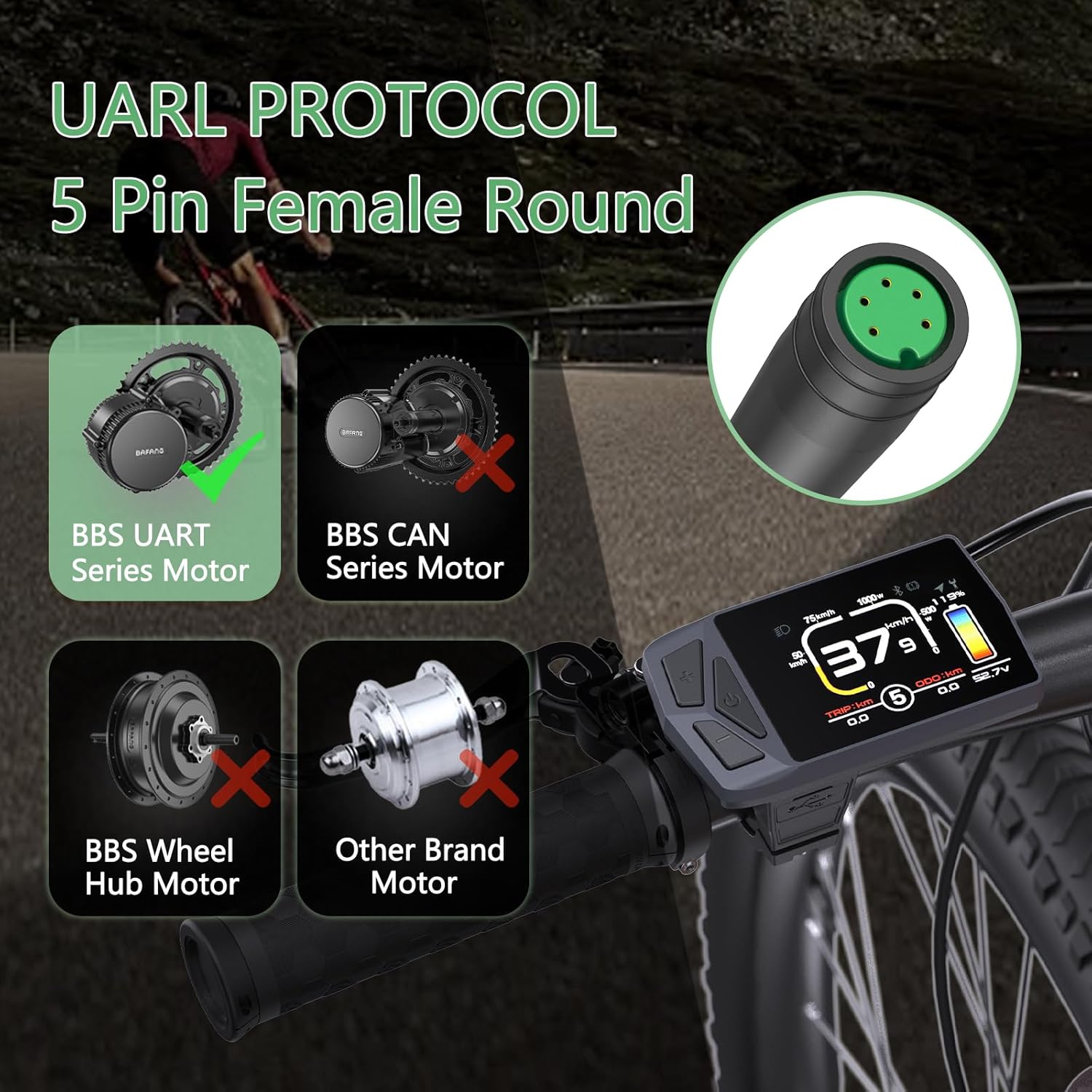
Image: Visual guide to motor compatibility and the 5-pin female round connector type.
2.2 ינסטאַלירונג
- האַנטלבאַר מאַונטינג: The display is designed to fit handlebars with a diameter of 22.2mm or 25.4mm. Securely mount the display to your preferred position on the handlebar using the provided bracket.
- קאַבלע קשר: Connect the display's 5-PIN female connector to the corresponding male connector from your BAFANG motor kit. Ensure the connection is firm and secure.
- וויירינג וועריפיקאַציע: It is crucial to confirm that the wiring diagram of your motor's cable matches the display's wiring. If the wiring diagrams are different, the display will not function correctly. Consult the detailed cable parameters section for reference.
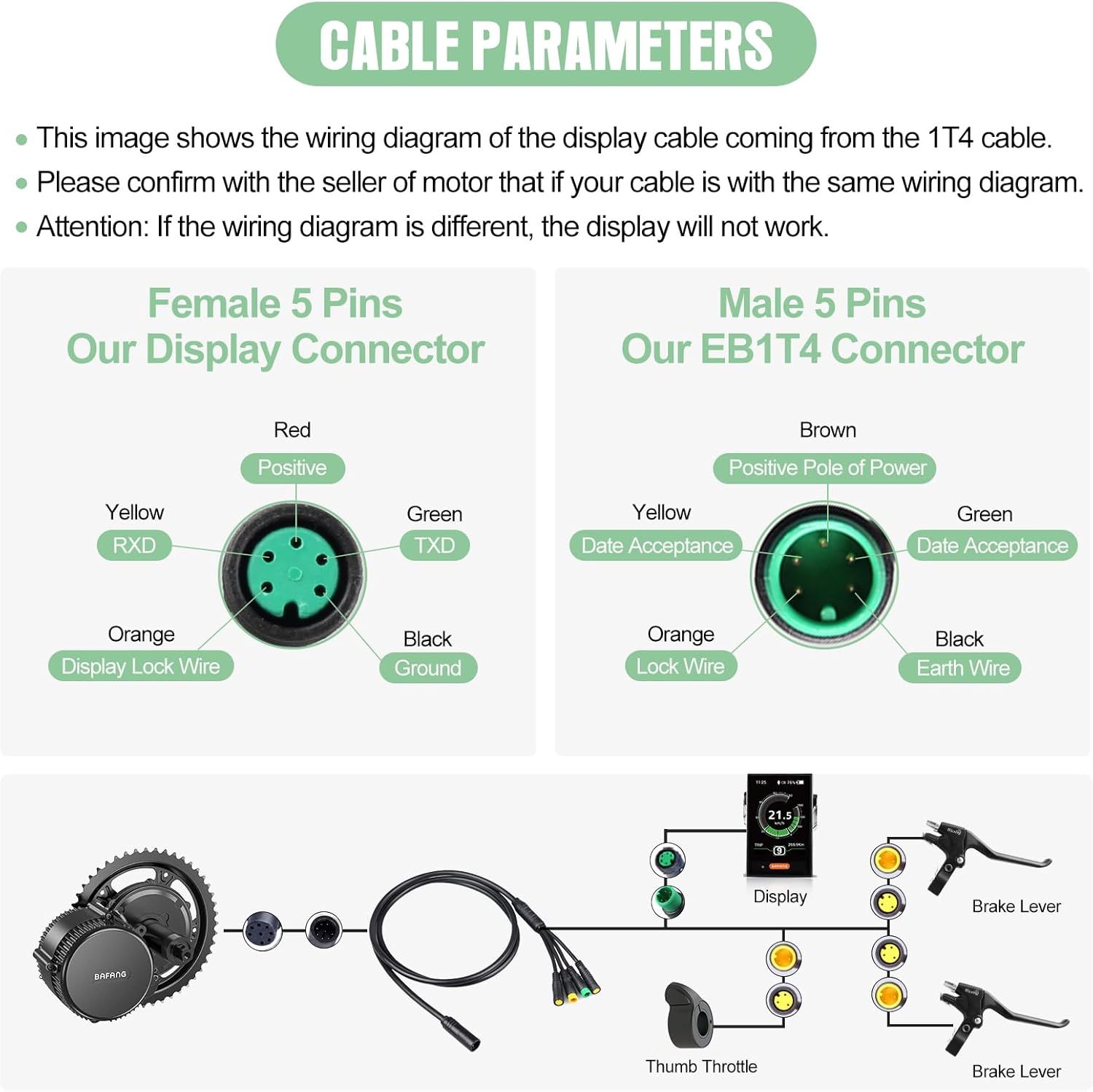
Image: Detailed cable parameters illustrating the wiring for the display and EB1T4 connectors.
3. אַפּערייטינג ינסטרוקטיאָנס
3.1 ווייַז פֿעיִקייטן
- פאַרשטעלן: 2.4-inch IPS color TFT LCD for clear visibility.
- קנעפּלעך: Three integrated buttons for easy navigation and control.
- PAS לעוועלס: Adjustable Power Assist System (PAS) levels from 0 to 9, allowing customization of motor assistance.
- וסב פּאָרט: Type-C charging port for convenience.
- Multilingual Support: Supports 8 languages: English, French, German, Spanish, Italian, Polish, Dutch, and Czech.
- בלועטאָאָטה קאַנעקטיוויטי: Enables real-time navigation and data synchronization with compatible devices.
- Navigation Function: Provides navigation assistance (initial 5 trials are free, continued use may require payment).
- ODO Reset: The odometer (total distance) can be reset.
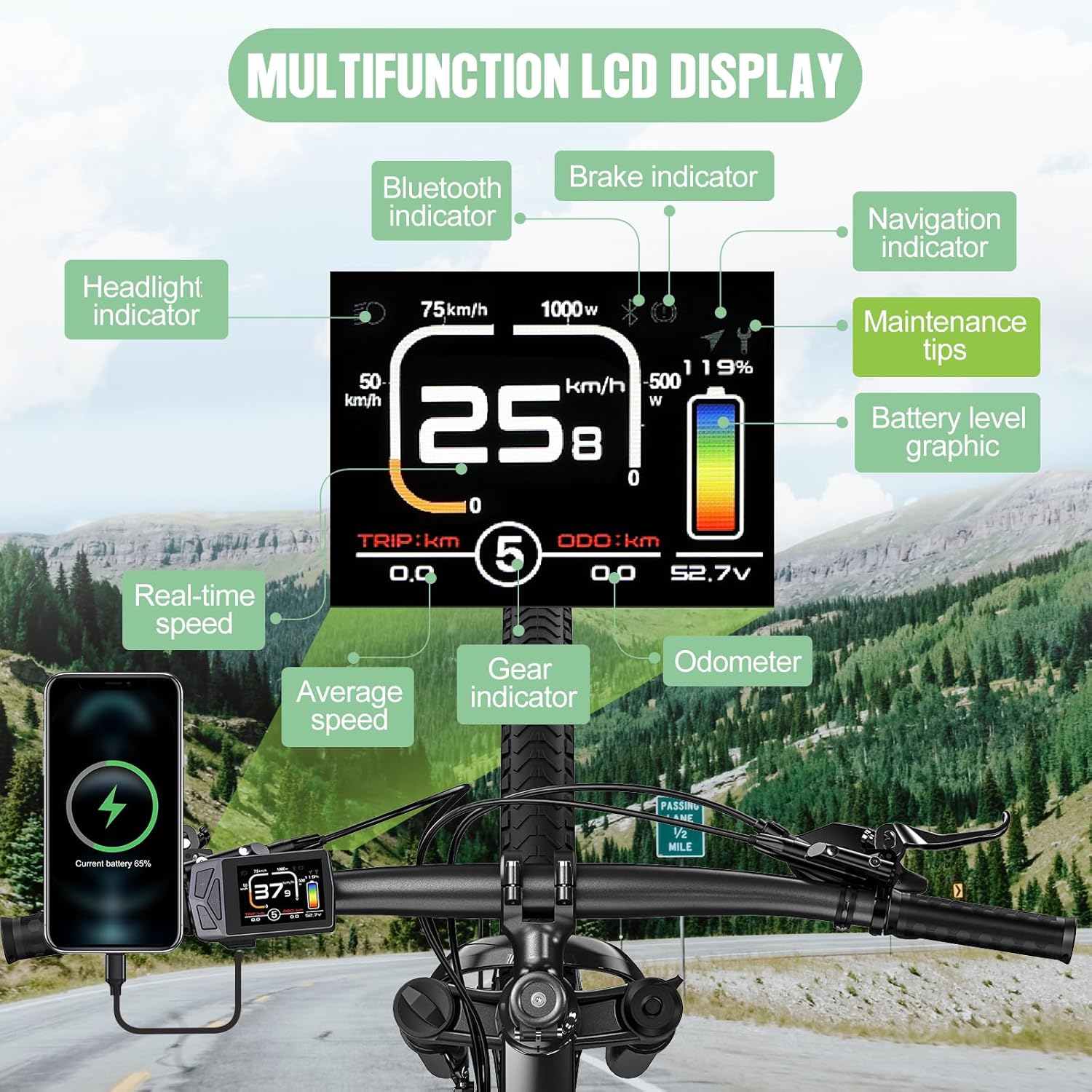
בילד: איבערview of the multifunction LCD display and its various indicators.
3.2 יקערדיק אָפּעראַציע
Detailed operating instructions for button functions and menu navigation will be provided in the full product manual. Generally, the integrated buttons allow you to power on/off, adjust PAS levels, access settings, and view different riding metrics.
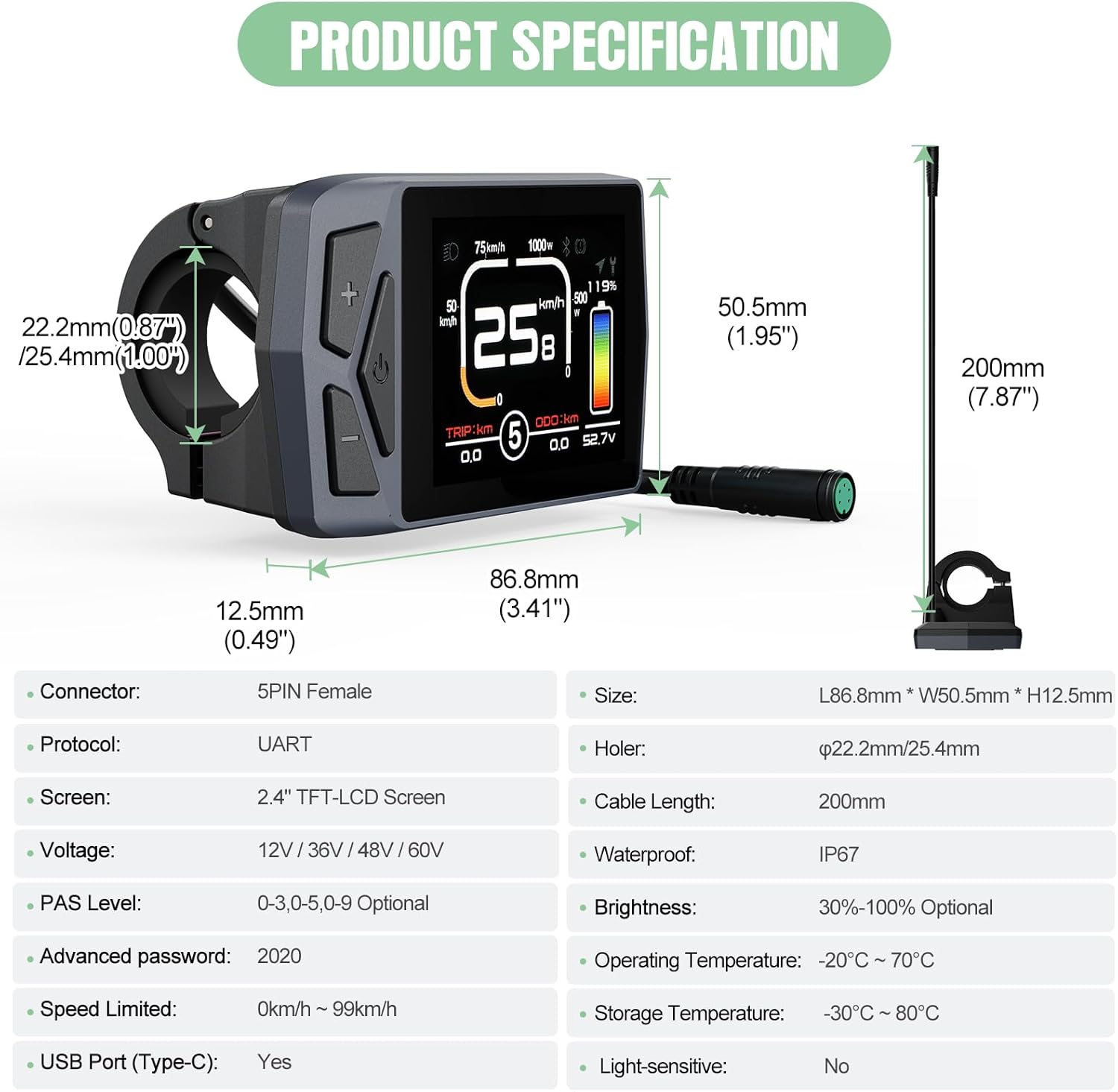
Image: Key features of the EKD01 display, including its technical specifications and user-configurable options.
4. פּראָדוקט ספּעסאַפאַקיישאַנז
| שטריך | באַשרייַבונג |
|---|---|
| קאַנעקטער טיפּ | 5-PIN Female |
| קאָמוניקאַציע פּראָטאָקאָל | UART |
| סקרין טיפּ | 2.4" TFT-LCD Color IPS |
| VoltagE קאַמפּאַטאַבילאַטי | 12 וו / 36 וו / 48 וו / 60 וו |
| PAS לעוועל אָפּציעס | 0-3, 0-5, 0-9 (Optional) |
| פעליקייַט פּאַראָל | 2020 |
| Speed Limit Range | 0 km/h - 99 km/h |
| וסב פּאָרט | טיפּ-C |
| דימענסיעס (L X W X H) | 86.8 מם רענטגענ 50.5 מם רענטגענ 12.5 מם |
| האַנדלעבאַר קלamp דיאַמעטער | 22.2 מם / 25.4 מם |
| קאַבלע לענג | 200 מם |
| וואָטערפּרוף רייטינג | IP67 |
| ברייטנאַס אַדזשאַסטמאַנט | 30% - 100% (Optional) |
| אַפּערייטינג טעמפּעראַטור | -20°C ~ 70°C |
| סטאָרידזש טעמפּעראַטור | -30°C ~ 80°C |
| ליכט-שפּירעוודיק | ניין |
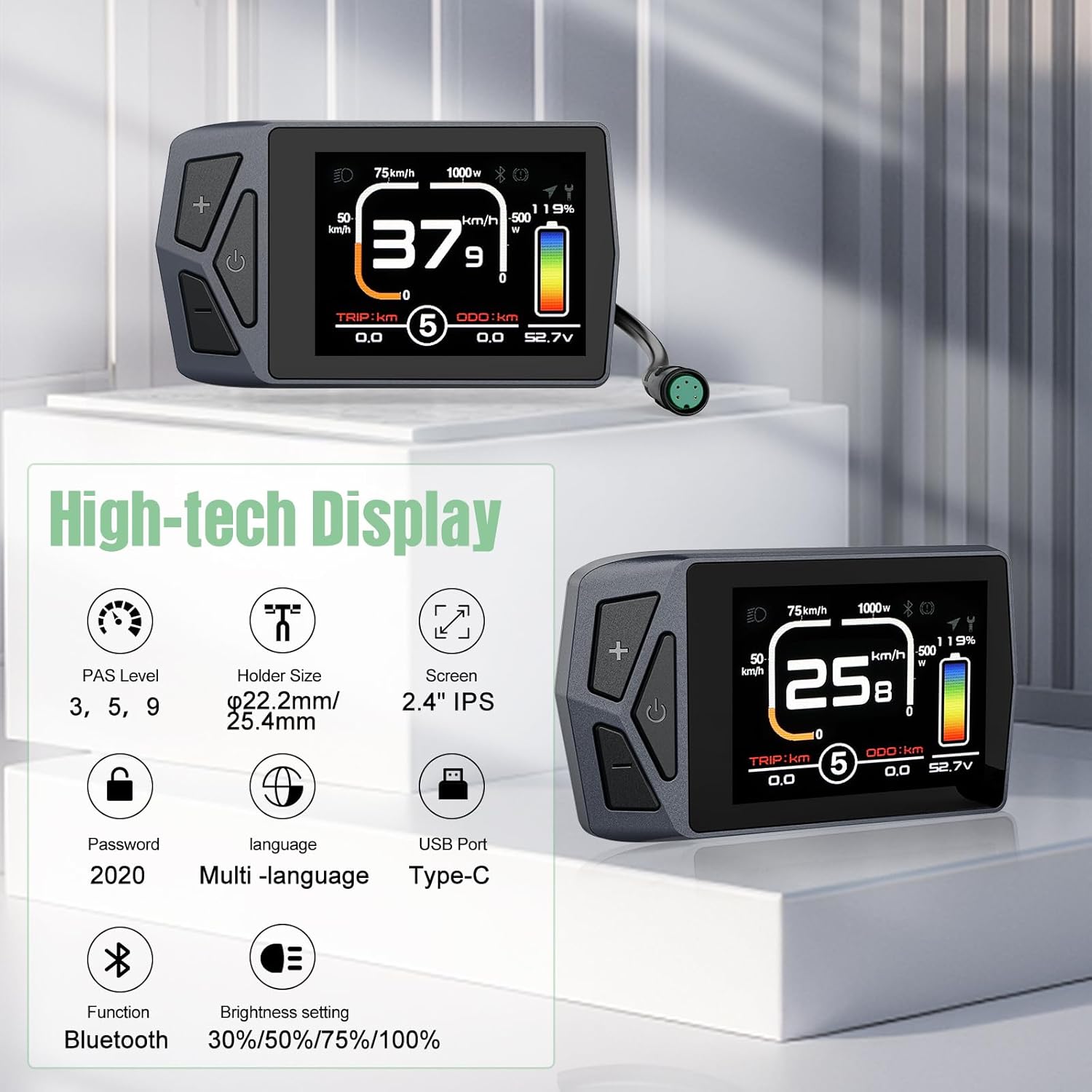
Image: Comprehensive product specifications and dimensions of the EKD01 display.
5. וישאַלט
- רייניקונג: The display housing is made of good quality ABS plastic with an IP67 waterproof rating. Clean the display regularly with a soft, damp cloth. Avoid using abrasive cleaners or solvents that could damage the screen or housing.
- ינווייראַנמענאַל טנאָים: While the display is designed for a wide range of operating and storage temperatures, avoid prolonged exposure to extreme heat or cold, and direct sunlight when not in use, to ensure longevity.
- קאַנעקטער זאָרגן: Keep the 5-PIN connector clean and free from dirt or moisture to ensure reliable electrical contact.
6. טראָובלעשאָאָטינג
- דיספּליי גייט נישט אָן:
- Check all cable connections, especially the 5-PIN connector, to ensure they are securely seated.
- Verify that your BAFANG motor kit is powered on and functioning correctly.
- Ensure the motor's communication protocol is UART (versions 5.0-5.8) and not CAN Bus.
- Incorrect Readings or Malfunctions:
- If the wiring diagram of your motor's cable does not match the display's, the display will not work correctly. Refer to the 'Cable Parameters' image in the Setup section and consult with your motor's seller for verification.
- Check for any physical damage to the display or cables.
- בלועטאָאָטה קאַנעקטיוויטי ישוז:
- Ensure Bluetooth is enabled on both the display and your pairing device.
- Move closer to the display to ensure a strong signal.
- נאַוויגאַציע אַרבעט נישט:
- Confirm that the navigation function has available trials or has been activated for continued use.
- Ensure your paired device has a stable GPS signal.
פֿאַר שטענדיקע פּראָבלעמען, ביטע קאָנטאַקטירט קונה שטיצע.
7. וואָראַנטי און שטיצן
7.1 פּראָדוקט וואָראַנטי
The Varstrom EKD01 Display comes with a איין יאָר לימיטעד וואָראַנטי פֿון דעם קויפֿדאַטום. די וואָראַנטי דעקט פֿאַבריקאַציע־דעפֿעקטן און מאַטעריאַל־פֿעלער אונטער נאָרמאַלן באַנוץ. ביטע באַהאַלטן אייער קויפֿבאַווײַז פֿאַר וואָראַנטי־קליימז.
7.2 קונה שטיצן
Varstrom is committed to providing excellent customer service. We have professional technical teams located in the UK and Poland to offer expert support both before and after your purchase. For technical assistance, troubleshooting, or warranty inquiries, please contact our support team through the official Varstrom webפּלאַץ אָדער דיין זיצער.