
sinocare iCan i3
sinocare iCan i3 Continuous Glucose Monitoring System User Manual
Model: iCan i3 | Brand: sinocare
1. הקדמה
The sinocare iCan i3 Continuous Glucose Monitoring (CGM) System is designed to provide continuous glucose readings for individuals managing diabetes. This system offers 15-day wear-life, automatically outputting glucose values every 3 minutes, and utilizes Bluetooth transmission for data transfer to the iCan CGM APP. It aims to reduce the need for frequent finger pricks and provides insights into how diet and exercise affect blood glucose levels.

פיגורע 1.1: איבערview of the sinocare iCan i3 CGM System, including the sensor, applicator, and the iCan CGM mobile application displaying glucose data.
2. וויכטיק סאַפעטי אינפֿאָרמאַציע
- Consult your healthcare professional before using this device to ensure it is appropriate for your specific health condition.
- Do not use the iCan i3 CGM System if the packaging is damaged or if the sensor appears compromised.
- Always follow the application instructions carefully to ensure proper sensor placement and function.
- The iCan i3 CGM System is intended to supplement, not replace, professional medical advice and treatment.
- If you experience any discomfort, irritation, or adverse reactions at the sensor site, remove the sensor and contact your healthcare professional immediately.
- האַלטן די מיטל אויס פון דערגרייכן פון קינדער.
3. וואָס איז אין דער קעסטל
Each sinocare iCan i3 Continuous Glucose Monitoring System package typically includes:
- iCan i3 Sensor
- Sensor Applicator
- שנעל אָנהייב גייד
- ינסטרוקטיאָן מאַנואַל (דעם דאָקומענט)
4. Setup and Sensor Application
Follow these steps to properly apply the sinocare iCan i3 sensor:
- Prepare the Application Site: Choose a clean, dry area on your body, typically the back of the upper arm or abdomen, as recommended by your healthcare professional. Clean the skin with an alcohol wipe and allow it to air dry completely.
- Prepare the Sensor Applicator: Remove the sensor and applicator from its sterile packaging.
- Align the Sensor and Applicator: Line up the blue mark on the Sensor Applicator with the corresponding mark on the Transmitter tray.
- Press the Applicator: Firmly press the Sensor Applicator down into the tray until you hear a click and it comes to a stop.
- Unlock the Safety Switch: Gently turn the safety switch from the "locked" icon to the "unlocked" icon until you hear a loud click and it cannot turn further.
- Insert the Sensor: Place the armed Sensor-Applicator over the chosen site on your skin. Press the button in the middle until you hear an injection sound. The sensor is now applied.
- אַקטאַווייט די סענסער: After application, the sensor will begin a warm-up period. Refer to the iCan CGM APP for activation instructions and to monitor the warm-up progress.

פיגורע 4.1: Detailed steps for sensor application. Top left: Aligning the applicator. Top right: Pressing the applicator. Bottom left: Unlocking the safety switch. Bottom right: Inserting the sensor onto the skin.
5. אַפּערייטינג ינסטרוקטיאָנס
5.1. iCan CGM APP Installation and Pairing
The sinocare iCan i3 CGM System operates in conjunction with the iCan CGM APP. This application is essential for viewing glucose data, receiving alerts, and managing your monitoring. The app is available for both iOS and Android devices.
- אראפקאפיע די אַפּ: זוכן פֿאַר "iCan CGM" in the Apple App Store (for iOS devices) or Google Play Store (for Android devices) and install it.
- שאַפֿן אַ חשבון: Follow the on-screen instructions to create your user account.
- Pair the Sensor: Once the sensor is applied and the app is installed, follow the app's instructions to pair your iCan i3 sensor via Bluetooth. Ensure Bluetooth is enabled on your smartphone.

פיגורע 5.1: The iCan CGM APP interface showing glucose measurements and links to download the app from the Apple App Store and Google Play Store.
5.2. Continuous Glucose Monitoring
Once paired, the iCan i3 sensor will automatically transmit glucose readings to your smartphone every 3 minutes. The system provides 15 days of continuous monitoring.
- פאַקטיש-צייט דאַטן: View your current glucose levels and trends directly on the iCan CGM APP.
- No Scanning Required: Data is transmitted automatically via Bluetooth, eliminating the need to scan the sensor.
- דאַטן סטאָרידזש: The app stores your glucose history, allowing you to review past trends and patterns.
- קיין קאַלאַבריישאַן: The iCan i3 system does not require manual calibration with finger-prick blood glucose tests.
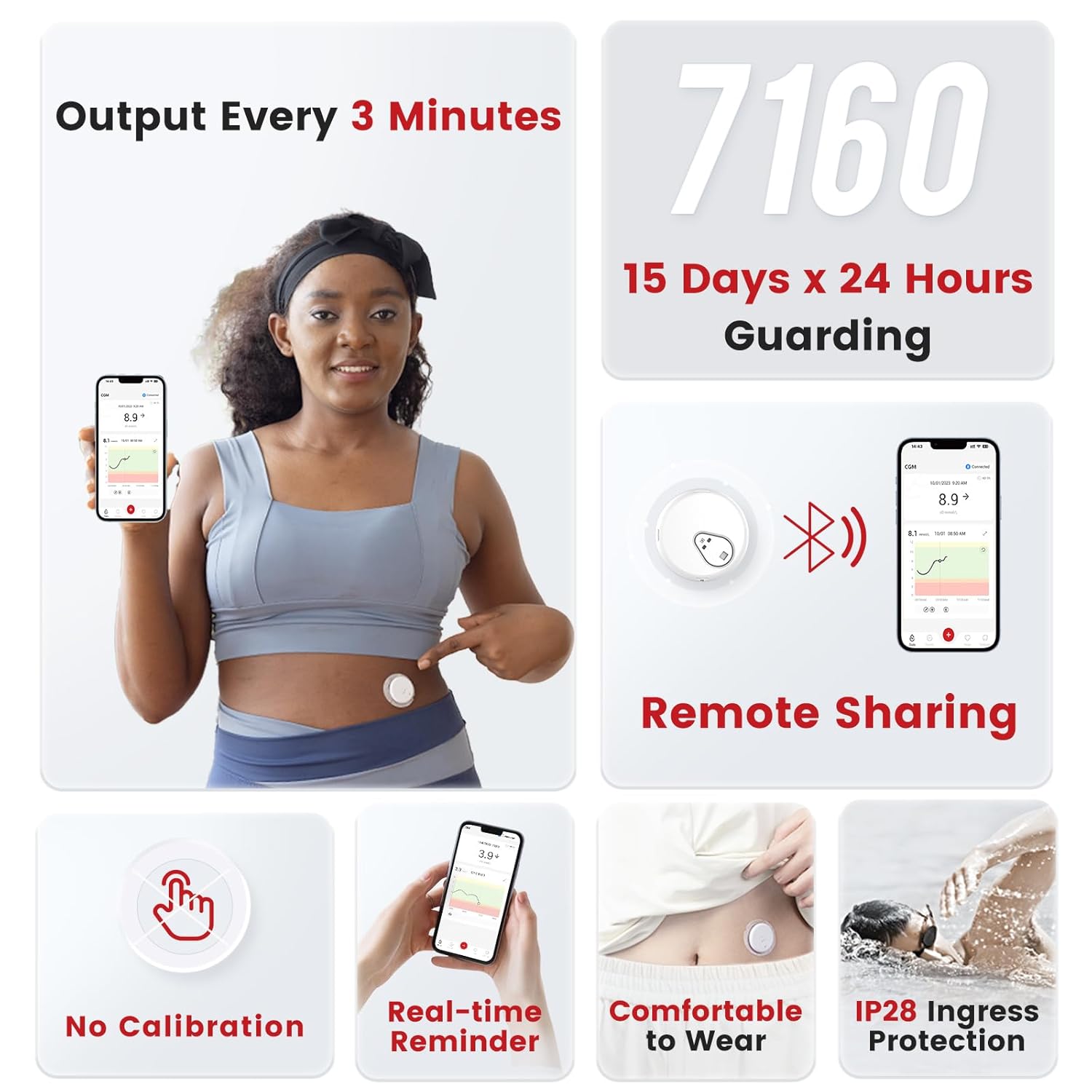
פיגורע 5.2: Key operational features of the iCan i3 CGM, including its 3-minute data output, 15-day wear-life, remote sharing capabilities, and user comfort.
5.3. Remote Sharing (iCan Reach APP)
The iCan Reach APP allows you to share your glucose data with family, friends, or caregivers. This feature enables others to monitor your health status remotely and provide support.
- Download iCan Reach: Instruct your family or friends to download the "iCan Reach" APP.
- Connect Accounts: Follow the instructions within the iCan CGM APP to share your data with designated contacts on the iCan Reach APP.
5.4. Monitoring Lifestyle Impact
The continuous data provided by the iCan i3 CGM System can help you understand how various activities and events affect your blood glucose levels.
- Dietary Impact: Observe glucose responses to different foods and meal timings.
- Medication Effects: Track how medication dosages and timings influence your glucose levels.
- Exercise Response: Understand the impact of physical activity on your blood glucose.

פיגורע 5.3: Examples of monitoring glucose levels in relation to daily activities such as eating, taking medication, and exercising.
6. וישאַלט און קער
- סענסאָר זאָרגן: Once applied, avoid excessive rubbing or bumping of the sensor. The sensor is designed to be water-resistant (IP28), allowing for showering and swimming, but prolonged submersion should be avoided.
- רייניקונג: Keep the sensor site clean and dry. Do not attempt to clean the sensor itself with harsh chemicals.
- סטאָרידזש: Store unused sensors in their original packaging in a cool, dry place, away from direct sunlight and extreme temperatures. The shelf life is 18 months without opening.
- באַזייַטיקונג: Dispose of used sensors and applicators according to local regulations for medical waste.
7. טראָובלעשאָאָטינג
- No Glucose Readings:
- Ensure the sensor is properly applied and activated.
- Check if Bluetooth is enabled on your smartphone and the sensor is paired with the iCan CGM APP.
- Verify that the sensor's 15-day wear-life has not expired.
- Ensure your smartphone is within Bluetooth range of the sensor.
- ומפּינקטלעך רידינגז:
- Compare readings with a traditional blood glucose meter if you suspect inaccuracies.
- Ensure the sensor site is not irritated or inflamed.
- Contact customer service if discrepancies persist.
- אַפּ קאַנעקטיוויטי ישוז:
- Restart the iCan CGM APP.
- Toggle your phone's Bluetooth off and on.
- ריסטאַרט דיין סמאַרטפאָנע.
- ענשור אַז די אַפּ איז דערהייַנטיקט צו די לעצטע ווערסיע.
- Sensor Detachment:
- If the sensor detaches prematurely, remove it and apply a new one. Contact customer service for assistance.
8. ספּעסאַפאַקיישאַנז
| שטריך | דעטאַל |
|---|---|
| מאָדעל נומער | iCan i3 |
| סאָרט | sinocare |
| Monitoring Duration | 15 טעג |
| Data Output Frequency | יעדער 3 מינוט |
| Measurement Accuracy (MARD) | 8.71% |
| קאַנעקטיוויטי | בלועטאָאָטה |
| וואַסער קעגנשטעל | IP28 ינגרעסס פּראַטעקשאַן |
| Shelf Life (unopened) | 18 חדשים |
| פּונקט וואָג | 150 גראַמז |
| פּעקל דימענשאַנז | 3.82 X 3.82 X 3.11 אינטשעס |

פיגורע 8.1: Visual representation of the iCan i3's 15-day wear-life.

פיגורע 8.2: Indication of the iCan i3's high performance with a MARD value of 8.71%.
9. וואָראַנטי אינפֿאָרמאַציע
Specific warranty details for the sinocare iCan i3 Continuous Glucose Monitoring System may vary. Please refer to the warranty card included in your product packaging or visit the official sinocare website for the most current and detailed warranty information. Keep your purchase receipt as proof of purchase for any warranty claims.
10. קונה שטיצן
If you encounter any problems during the use of your sinocare iCan i3 CGM System or have questions, please contact sinocare customer service. Refer to the Quick Start Guide or the sinocare official website for contact details, including phone numbers, email addresses, or online support portals.
פֿאַר נאָך רעסורסן, קענט איר אויך באַזוכן די sinocare Store on Amazon.
Ask a question about this manual
Ask about setup, troubleshooting, compatibility, parts, safety, or missing instructions. Manuals+ will review the question and use this page’s manual context to help answer it.