
1. הקדמה
Thank you for choosing the Riksion Walking Pad Electric Treadmill. This manual provides essential information for the safe and effective use of your new fitness equipment. Please read this manual thoroughly before operation and retain it for future reference.
2. וויכטיק סאַפעטי אינסטרוקציעס
- שטעלט שטענדיק דעם גיין-פּאַד אויף אַ גלאַטער, סטאַבילער ייבערפלאַך.
- Ensure there is adequate clear space (at least 1 meter) around the walking pad during use.
- This walking pad is designed for adult use. Keep children and pets away from the equipment during operation.
- באַראַט זיך מיט אַ דאָקטער איידער איר הייבט אָן קיין נייע געניטונג פּראָגראַם, ספּעציעל אויב איר האָט שוין פאַר-עקסיסטירנדיקע מעדיצינישע צושטאנדן.
- טראָגט פּאַסיקע אַטלעטישע שיך בעת באַניץ.
- The maximum user weight capacity for this device is 120.2 kg (265 lbs). Do not exceed this limit.
- Do not use the walking pad if it is damaged or malfunctioning. Contact customer support for assistance.
- נעמט ארויס דעם שפּאַציר-פּאַד פֿון דער עלעקטרישער אַוטלעט ווען איר ניצט עס נישט אָדער פֿאַר רייניקונג.
3. פּעקל אינהאַלט
Your Riksion Walking Pad Electric Treadmill comes fully assembled. Please check the package for the following items:
- Riksion Walking Pad Electric Treadmill (fully assembled)
- ווייַט קאָנטראָל
- מאַכט שנור
- באַניצער מאַנואַל

Image: The Riksion Walking Pad Electric Treadmill as it appears in its shipping box, indicating its compact packaging.
4. סעטאַפּ
The Riksion Walking Pad is designed for immediate use with no assembly required.
- אַנפּאַק: נעמט פֿאָרזיכטיק אַרויס דעם גיין-פּאַד פֿון זײַן פּאַקעט.
- אָרט: Place the walking pad on a firm, level surface in your desired exercise area. Ensure there is sufficient space around the unit for safe operation.
- מאַכט קשר: Plug the power cord into the walking pad and then into a standard electrical outlet.
5. אַפּערייטינג ינסטרוקטיאָנס
5.1. LED Display and Remote Control
The walking pad features an integrated LED display and is controlled via a wireless remote. The display shows key workout metrics.

בילד: נאָענט-אַרויף view of the walking pad's LED display showing speed, time, distance, and calories, alongside the remote control for operation.
5.2. סטאַרטינג און סטאָפּפּינג
- צו אָנהייבן: Press the 'Start' button on the remote control. The walking pad will begin at a low speed.
- אויף הערן: Press the 'Stop' button on the remote control. The walking pad will gradually slow down and come to a complete stop.
5.3. אַדזשאַסטינג ספּיד
- ניצט די '+' און '-' קנעפלעך אויף דער ווײַטקאָנטראָל צו פֿאַרגרעסערן אָדער פֿאַרקלענערן די גײַ־גיכקייט.
- The speed range is from 1 km/h to 6 km/h. Adjust the speed to a comfortable and safe level for your workout.
5.4. Monitoring Your Workout
דער LED דיספּלעי גיט רעאַל-צייט באַמערקונגען וועגן דיין וואָרקאַוט:
- צייט: Duration of your exercise session.
- גיכקייַט: איצטיקע גיין-געשווינדיקייט.
- דיסטאַנסע: Total distance covered during the session.
- קאַלאָריעס: עסטימאַטעד קאַלאָריעס פארברענט.
6. פֿעיִקייטן
6.1. קאָמפּאַקט און פּאָרטאַטיוו פּלאַן
The Riksion Walking Pad is designed for space-saving convenience. Its ultra-thin profile allows for easy storage under furniture like sofas or beds. Integrated transport wheels enable effortless relocation.
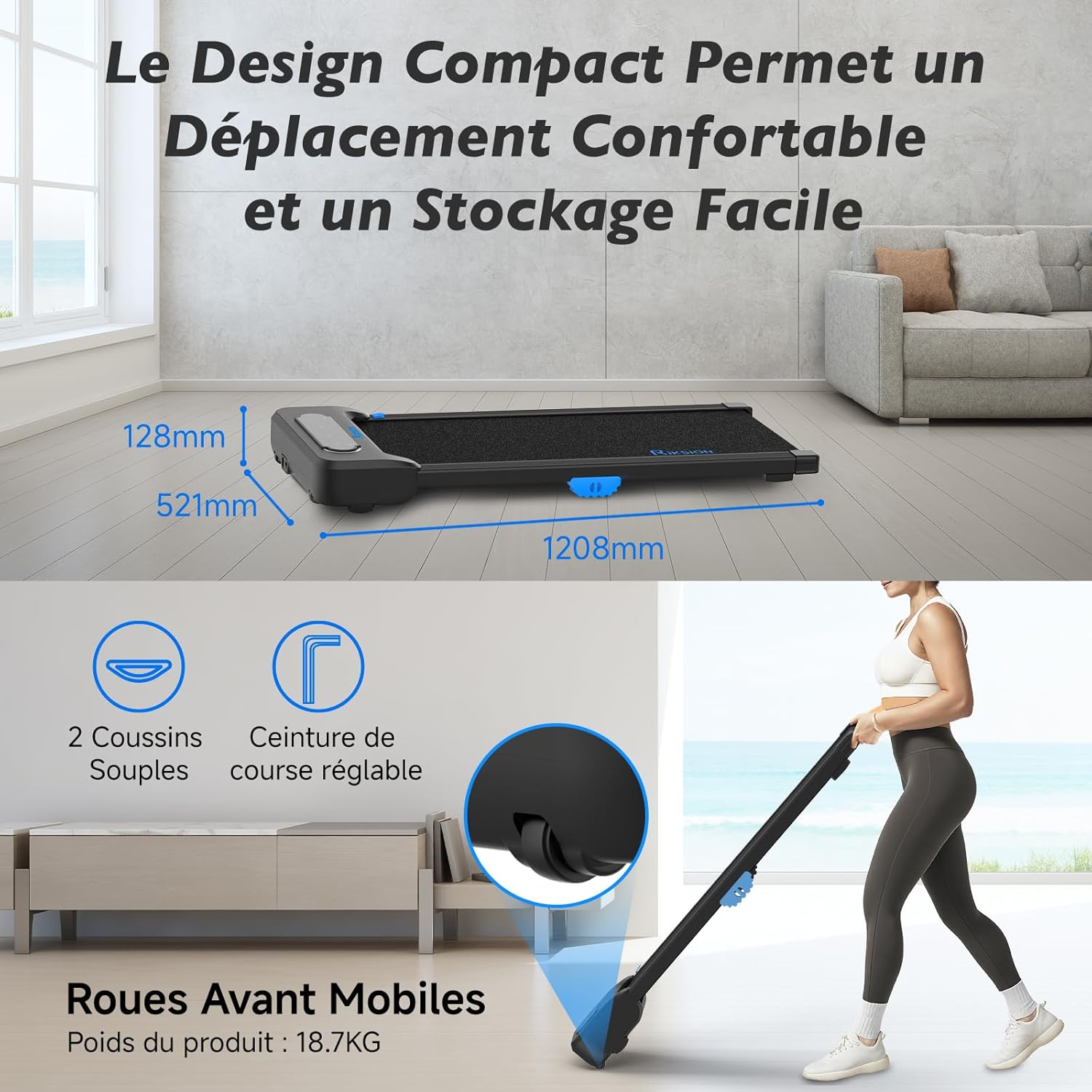
Image: Illustration of the walking pad's compact dimensions (1208mm length, 521mm width, 128mm height) and the front mobile wheels for easy movement.
6.2. Advanced Shock Absorption System
Equipped with a 5-layer running belt and two soft cushions, the dual-layer shock absorption system protects your knees and joints during exercise, providing a comfortable walking experience.

Image: Visual representation of the walking pad's shock absorption technology, highlighting the protection for knees and joints, and an exploded view of the 5-layer running belt construction.
6.3. Silent and Powerful Motor
The walking pad features a silent and powerful 2 HP motor, allowing for quiet operation suitable for home or office environments without disturbing others. It supports speeds from 1 to 6 km/h and a maximum user weight of 120.2 kg.

Image: An internal diagram illustrating the powerful and quiet motor, along with icons indicating the 1-6 km/h speed range, 2 HP motor power, and 120 kg / 265 lbs weight capacity.
6.4. Wide Walking Surface
The 400mm wide running belt provides ample space for comfortable walking or jogging, ensuring a natural stride.

Image: A person using the walking pad, illustrating its use for both active work and exercise, with an overlay showing the 400mm belt width and 1000mm walking length.
7. וישאַלט
רעגולערע אויפהאלטונג גאראנטירט די לאנגעוויטי און אפטימאלע פאָרשטעלונג פון אייער גיין-פּלאַט.
- רייניקונג: ווישט אַראָפּ דעם גיין-פּלאַט מיט אַדamp טוך נאך יעדן באניץ צו באזייטיגן שווייס און שטויב. ניצט נישט קיין שווארצע רייניגער.
- גאַרטל לובריקיישאַן: Periodically check the running belt for proper lubrication. Refer to the specific instructions for your model regarding lubrication frequency and type of lubricant.
- סטאָרידזש: When not in use, store the walking pad in a dry, cool place, away from direct sunlight and moisture. Utilize its compact design for convenient storage.
- דורכקוק: Regularly inspect all parts for wear and tear. Tighten any loose screws or bolts.
8. טראָובלעשאָאָטינג
If you encounter any issues with your Riksion Walking Pad, please refer to the following common troubleshooting steps:
- Walking Pad Not Turning On:
- Ensure the power cord is securely plugged into both the walking pad and a working electrical outlet.
- Check if the power switch on the walking pad (if present) is in the 'ON' position.
- באַשטעטיקן אַז די עלעקטרישע ווענטיל אַרבעט דורך אַרײַנשטעקן אַן אַנדער דעוויס.
- רימאָוט קאָנטראָל ניט ריספּאַנדינג:
- קאָנטראָלירט און פאַרבייט די באַטעריעס אין דער ווײַטקאָנטראָל.
- Ensure there are no obstructions between the remote control and the walking pad's receiver.
- לויף גאַרטל גליטשט אָדער קלעפּט זיך:
- The belt may require lubrication. Refer to the maintenance section.
- The belt tension may need adjustment. Consult customer support if you suspect this is the issue.
- ומגעוויינטלעך נויזיז:
- Stop the walking pad immediately.
- Inspect for any foreign objects caught in the belt or motor area.
- אויב דער ראַש בלייבט, שטעלט אפ דעם באַניץ און קאָנטאַקטירט קונה שטיצע.
If these steps do not resolve the issue, please contact Riksion customer support for further assistance.
9. ספּעסאַפאַקיישאַנז
| שטריך | באַשרייַבונג |
|---|---|
| סאָרט | Riksion |
| מאָדעל | JF-H-40J-4 |
| קאָליר | שוואַרץ |
| פּראָדוקט דימענשאַנז (L x W x H) | 120.8P x 52.1L x 12.8H סענטימעטער |
| מאַטעריאַל | אַללוי סטיל |
| מאַקסימום גיכקייַט | 6 קילאָמעטער פּער שעה |
| ספּעציעלע פֿעיִקייטן | Shock Absorbing, With Wheels, Compact Design, Portable |
| ציל וילעם | דערוואַקסן |
| מאַקסימום מאַכט | 2 כאָרספּאַוער |
| אַסעמבלי פארלאנגט | ניין |
| ווייַז טיפּ | געפירט |
| ברייט פון לויפן גאַרטל | 400 מם |
| מאַקסימום באַניצער וואָג | 120.2 קג (265 לבס) |
10. וואָראַנטי און שטיצן
For warranty information or technical support, please refer to the documentation included with your purchase or contact Riksion customer service directly. Ensure you have your product model number (JF-H-40J-4) and purchase details available when seeking support.