
1. הקדמה
Thank you for choosing the RIKSION JF-H-40JD Under-Desk Treadmill. This manual provides essential information for the safe and effective use, setup, operation, and maintenance of your new fitness equipment. Please read this manual thoroughly before initial use and retain it for future reference.
The RIKSION JF-H-40JD is designed for home and office use, offering a compact and portable solution for walking, jogging, and light running. Its foldable design and transport wheels make it ideal for small spaces, allowing for convenient storage and movement.
2. זיכערקייַט אינפֿאָרמאַציע
ווארענונג: כדי צו רעדוצירן דעם ריזיקע פון ערנסטע שאָדן, לייענט אלע וויכטיגע פאָרזיכטיקייטן און אינסטרוקציעס אין דעם מאַנואַל איידער איר ניצט דעם טרעדמיל.
- שטענדיק באַראַטן זיך מיט אַ דאָקטער איידער איר אָנהייבן קיין געניטונג פּראָגראַם.
- האַלטן קינדער און פּעץ אַוועק פון די טרעדמיל בעשאַס אָפּעראַציע.
- Place the treadmill on a flat, stable surface with at least 2 meters (6.5 feet) of clear space behind it and 0.6 meters (2 feet) on each side.
- Ensure the safety clip is properly attached to your clothing before starting the treadmill. In case of an emergency, the safety clip will stop the machine.
- ניצט נישט דעם טרעדמיל אויב עס האט א צעבראכענעם עלעקטרישן שנור אדער פלאג, אדער אויב עס ארבעט נישט ריכטיג.
- טראָגט פּאַסיקע אַטלעטישע שיך און קליידער. פֿאַרמייַדט לויזע קליידער וואָס קענען זיך פֿאַרהאַנגען אין באַוועגלעכע טיילן.
- טרעט נישט ארויף אדער אראפ פון דער טרעדמיל בשעת דער גאַרטל באוועגט זיך.
- The maximum user weight capacity for this treadmill is 120 kg (264 lbs).
- נעמט ארויס דעם טרעדמיל פון דער עלעקטרישער אַוטלעט ווען עס איז נישט אין באַנוץ, איידער איר רייניגט עס, און איידער איר פירט אויס וישאַלט.
3. פּראָדוקט איבערview
3.1 קאַמפּאָונאַנץ
- Running Belt (100 cm x 40 cm)
- געפירט ווייַז
- Control Panel (on armrest)
- ווייַט קאָנטראָל
- Foldable Armrests with Device Holder
- זיכערהייט קליפּ
- אַריבערפירן ווהעעלס
- מאַכט שנור
3.2 שליסל פֿעיִקייטן
- אַדזשאַסטאַבאַל ינקליין: Features a manual incline adjustment of 5% and 10% (2 to 4 degrees) to simulate uphill training, enhancing workout intensity and calorie burn.
- Dual Shock Absorption: Equipped with a 5-layer anti-slip running belt and 2 soft rubber cushions for a stable and comfortable experience, reducing joint impact.
- שטיל אָפּעראַציע: Designed with multiple layers of anti-slip textures and noise-absorbing coatings, ensuring quiet operation (under 45dB) suitable for home or office environments.
- סאָליד און פאָלדאַבלע פּלאַן: Ready to use out of the box with no installation required. Armrests fold down, reducing dimensions to 136.5 x 64.5 x 13 cm for easy storage under tables or sofas.
- טראנספארט ווהעעלס: Integrated wheels allow for easy relocation and vertical storage, making it ideal for small apartments or offices.
- געפירט דיספּליי און ווײַט קאָנטראָל: Clearly displays distance, speed, time, and calorie data. Speed can be adjusted, and the treadmill can be started, stopped, or paused via the remote control or the Fitshow app.
- 3-אין-1 פאַנגקשאַנאַליטי: Supports walking (1-6 km/h), jogging/workstation mode (1-6 km/h), and running (1-14 km/h).
4. סעטאַפּ
4.1 אַנפּאַקינג און פּלייסמאַנט
- Carefully remove the treadmill from its packaging. The unit comes pre-assembled.
- Place the treadmill on a firm, level surface. Ensure adequate clearance around the unit as described in the Safety Information section.
4.2 אויסלייגן דעם טרעדמיל
- Gently lift the armrests from their folded position until they lock securely into place.
- ענשור אַז אַלע לאַקינג מעקאַניזאַמז זענען פאַרקנאַסט איידער נוצן.
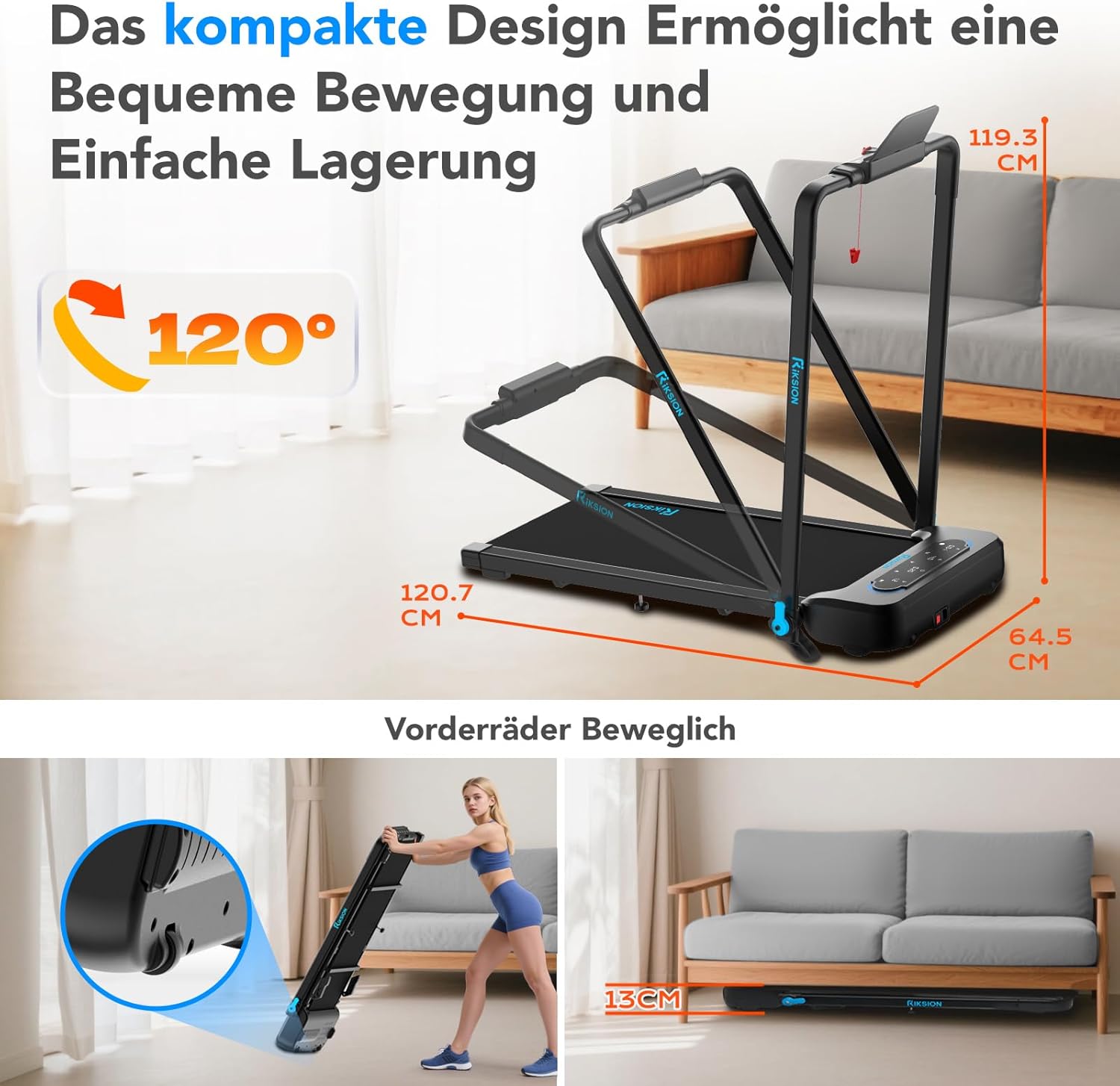
Image: The compact design allows for easy movement and storage. The treadmill can be folded to a height of 13 cm and features front wheels for transport.
4.3 מאַכט קאַנעקשאַן
- פֿאַרבינדט דעם מאַכט שנור צום טרעדמיל'ס מאַכט אַרייַנגאַנג.
- צאַפּן די אנדערע סוף פון די מאַכט שנור אין אַ גראָונדעד עלעקטריקאַל ווענטיל.
4.4 שיפּוע אַדזשאַסטמאַנט
The incline is manually adjustable. To change the incline, lift the rear of the treadmill and adjust the support legs to the desired 5% or 10% incline level. Ensure both sides are set equally.

Image: Illustration of the manual incline feature, demonstrating 5% and 10% incline settings and their impact on calorie expenditure.
5. אַפּערייטינג ינסטרוקטיאָנס
5.1 פּאַוערינג אויף / אַוועק
- Press the power button on the treadmill's control panel or remote control to turn the unit on.
- To turn off, press the power button again or unplug the unit.
5.2 Attaching the Safety Clip
Before each use, attach the safety clip to the designated slot on the control panel and secure the other end to your clothing. The treadmill will not operate without the safety clip in place.
5.3 ניצן דעם קאָנטראָל פּאַנעל און ווײַטקאָנטראָל

Image: The treadmill's LED display shows workout data, and the remote control provides convenient speed adjustment and start/stop functions.
- אָנהייב / האַלטן: Use the 'Start' and 'Stop' buttons on the control panel or remote to begin and end your workout.
- גיכקייט אַדזשאַסטמאַנט: Use the '+' and '-' buttons on the control panel or remote to increase or decrease the speed. The treadmill offers a speed range of 1-14 km/h.
- מאָדע סעלעקציע: The treadmill supports different modes: walking (1-6 km/h), workstation (1-6 km/h), and running (1-14 km/h). Select the appropriate mode based on your activity.
5.4 געפֿירט ווייַז
The integrated LED display automatically shows your workout data, including:
- דיסטאַנסע
- ספּיד
- צייט
- קאַלאָריעס פארברענט
5.5 App Connectivity (Fitshow)
The treadmill can connect to the Fitshow application. Refer to the Fitshow app's instructions for pairing and advanced control features.

Image: A user exercising on the RIKSION treadmill, demonstrating the device holder for tablets and the remote control for operation.
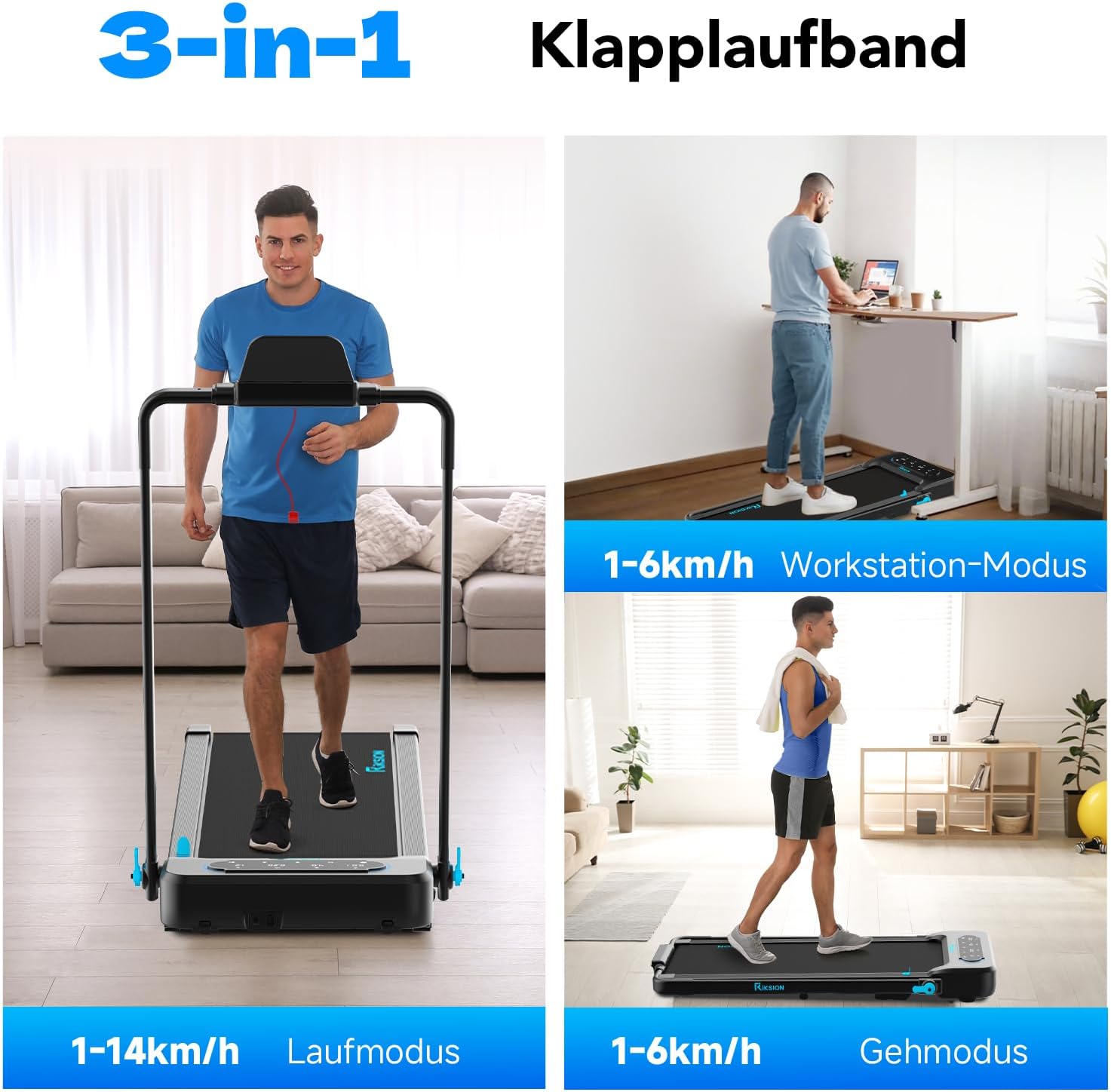
Image: Illustration of the treadmill's versatility, showcasing its use for running, as an under-desk walking pad, and for general walking.
6. וישאַלט
רעגולערע אויפהאלטונג גאראנטירט די לאנגעוויטי און אפטימאלע פערפארמאנס פון אייער טרעדמיל.
- רייניקונג: ווישט אַראָפּ די טרעדמיל מיט אַדamp טוך נאך יעדן באניץ צו פארמיידן שווייס און שטויב. ניצט נישט קיין שווארצע רייניגער אדער לייזונגען.
- גאַרטל לובריקיישאַן: The running belt requires periodic lubrication to reduce friction and extend its lifespan. Refer to the specific instructions provided with your lubricant or contact customer support for guidance. Generally, apply silicone lubricant under the belt every 3-6 months depending on usage.
- גאַרטל שפּאַנונג און אַליינמאַנט: Check the running belt tension and alignment regularly. If the belt slips or drifts to one side, adjust it according to the instructions in the troubleshooting section or consult customer support.
- סטאָרידזש: When not in use, fold the treadmill and store it in a dry, cool place away from direct sunlight.
7. טראָובלעשאָאָטינג
If you encounter any issues with your RIKSION treadmill, refer to the following common problems and solutions:
- טרעדמיל גייט נישט אן:
- Ensure the power cord is securely plugged into a grounded outlet and the treadmill.
- Check if the safety clip is properly inserted.
- באַשטעטיקן אַז דער מאַכט קנעפּל איז אין דער 'ON' פּאָזיציע. - Running belt slips or stops:
- The running belt may be too loose. Refer to the manual for instructions on adjusting belt tension.
- The belt may require lubrication. See the Maintenance section. - Running belt drifts to one side:
- The running belt may be misaligned. Use the adjustment bolts at the rear of the treadmill to center the belt. Turn the bolt on the side the belt is drifting towards clockwise, or the opposite side counter-clockwise, in small increments (quarter turns) while the treadmill is running at a low speed. - אומגעוויינטלעכע גערוישן בעתן אפעראציע:
- Check for any loose parts or foreign objects under the belt.
- The belt may need lubrication.
- Ensure the treadmill is on a level surface. - די LED דיספּלעי אַרבעט נישט:
- Check all cable connections.
- Power cycle the treadmill (turn off, unplug, wait 30 seconds, plug in, turn on).
אויב די פראבלעם בלייבט נאך פרובירן די לייזונגען, ביטע קאנטאקטירט קאסטומער סופארט.
8. ספּעסאַפאַקיישאַנז
| שטריך | באַשרייַבונג |
|---|---|
| מאָדעל נומער | JF-H-40JD |
| סאָרט | Riksion |
| מאָטאָר כאָרספּאַוער | 2.25 הפּ |
| ספּיד ראַנגע | 1 - 14 קילאָמעטער פּער שעה |
| מאַקס וואָג קאַפּאַסיטי | 120 קילאָגראַמס |
| שפּיצן לעוועלס | Manual 5% and 10% (2-4 degrees) |
| דימענסיעס פון לויפן גאַרטל | 100 סענטימעטער רענטגענ 40 סענטימעטער |
| ווייַז טיפּ | געפירט |
| פאָולדיד דימענשאַנז (L x W x H) | 136.5 X 64.5 X 13 סענטימעטער |
| אויסגעפאָלטענע דימענסיעס (L x B x H) | 120.7 x 64.5 x 115.3 cm (approximate, based on image) |
| פּונקט וואָג | 22.5 קילאָגראַמס |
| מאַטעריאַל | אַללוי סטיל |
| ספּעציעלע פֿעיִקייטן | Foldable, LED Display, Double Shock Absorption, Armrests with Device Holder |
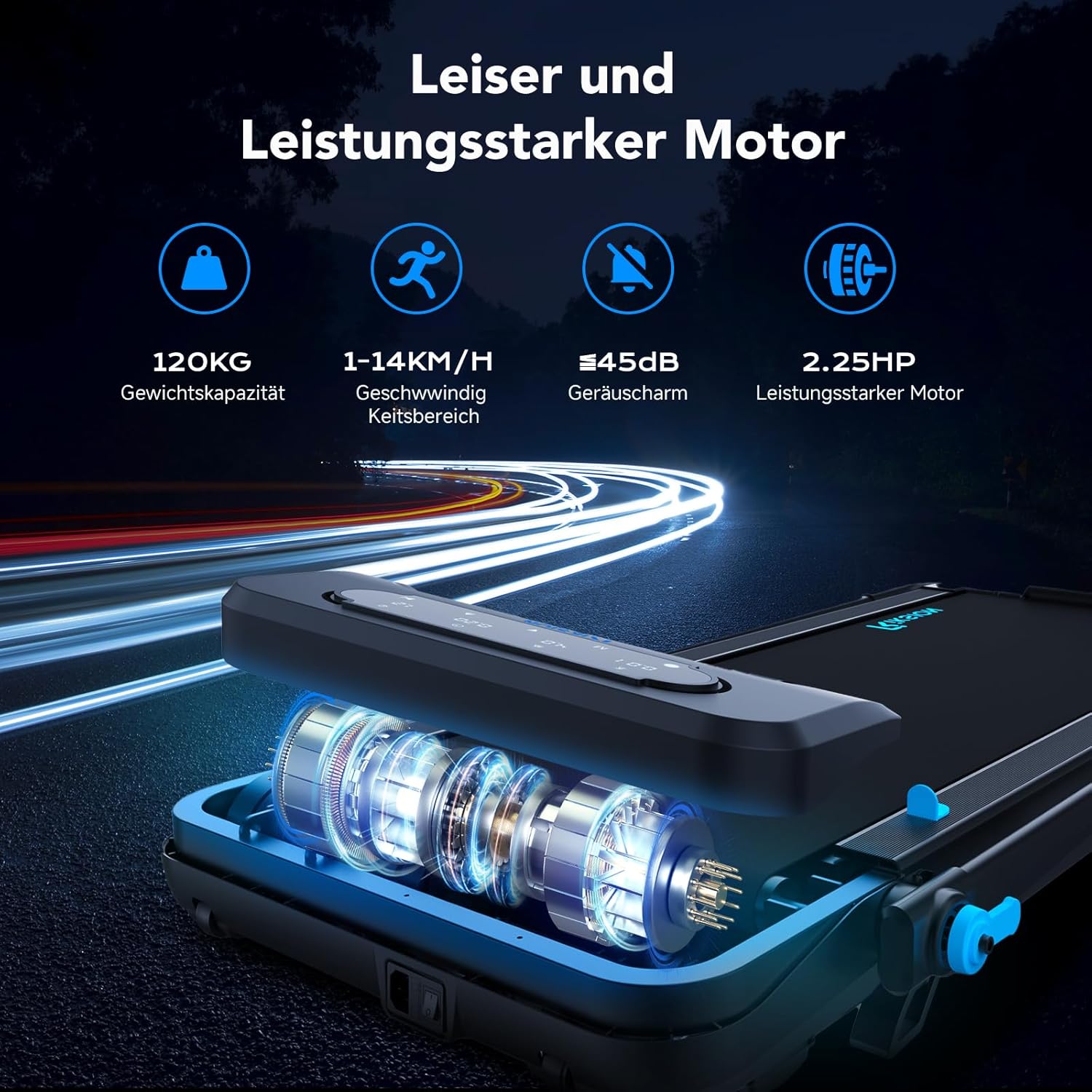
Image: Illustration of the treadmill's quiet and powerful 2.25 HP motor, capable of speeds up to 14 km/h and supporting up to 120 kg.

בילד: דעטאַלירט view of the running belt's construction, highlighting its five layers for abrasion resistance, noise reduction, reinforcement, EVA cushioning, and high-strength compression.
9. וואָראַנטי און שטיצן
For warranty information and customer support, please refer to the documentation included with your purchase or contact the retailer/manufacturer directly. Keep your proof of purchase for warranty claims.