
1. הקדמה
This manual provides detailed instructions for the safe and effective operation of your VAR TECH V92S Smart Digital Multimeter. The V92S is a True RMS, fully auto-ranging digital multimeter designed for precise measurements across various electrical parameters. Please read this manual thoroughly before use and retain it for future reference.
2. זיכערקייַט אינפֿאָרמאַציע
Always adhere to basic safety precautions when using this multimeter to prevent personal injury or damage to the instrument. Improper use can result in electric shock or fire.
- נישט איבערשרייטן די מאקסימום איינגאבע ווערטן ספעציפיצירט פאר יעדער פונקציע.
- זיכער מאַכן אַז די טעסט דראָטן זענען ריכטיק פֿאַרבונדן און אין גוטן צושטאַנד איידער איר מאַכט מעסטונגען.
- Do not use the multimeter if it appears damaged or if the battery cover is not securely closed.
- געניטונג עקסטרעם וואָרענען ווען ארבעטן מיט וואָלtagהעכער 60V DC אדער 30V AC RMS, ווייל די שטעלן פאר א שאק געפאר.
- שטענדיק אָפּשטעקן די מאַכט צו דער קרייַז אונטער טעסט איידער איר מעסטן קעגנשטעל, קאַפּאַסיטאַנס, אָדער קאָנטינויִטעט.
- טוישט די באַטעריעס גלייך ווען דער נידעריק-באַטעריע אינדיקאַטאָר דערשיינט צו ענשור גענויע מעסטונגען.
- Do not operate the multimeter in explosive atmospheres or near flammable materials.
3. שליסל פֿעיִקייטן
The VAR TECH V92S Smart Digital Multimeter offers a range of advanced features for comprehensive electrical testing:
- Smart Digital Multimeter with Auto Detection TRMS (True Root Mean Square)
- 600 V AC/DC & 10 A AC/DC measurement capabilities
- 6000 Counts HD Display with Primary & Secondary display and Analog bar graph
- Capacitance Test: 6 nF to 60 mF
- Frequency Test: 6 Hz to 10 MHz
- Temperature Test: -40 ºC to 1000 ºC
- Diode & Continuity Test
- NCV (ניט-קאָנטאַקט Voltage) test for live wire detection
- Integrated Torch for illumination in dark environments
- Auto Power Off function to conserve battery life
- Data Hold function to freeze readings on the display
- נידעריק באַטאַרייע גראדן
- Jack Prompt for correct test lead insertion
- Burnt Fuse Prompt for safety and easy maintenance
- Resistance measurement: 600 Ω to 60 MΩ

פיגורע 3.1: פראָנט view of the VAR TECH V92S Smart Digital Multimeter, showcasinג זייַנע אַרויסווייַז און קאָנטראָל קנעפּלעך.

Figure 3.2: The VAR TECH V92S Multimeter held in hand, illustrating its compact and ergonomic design.
4. פּראָדוקט קאַמפּאָונאַנץ
The VAR TECH V92S Smart Digital Multimeter package includes the following items:
- VAR TECH V92S Digital Multimeter
- טעסט דראָטן (רויט און שוואַרץ)
- ינסטרוקטיאָן מאַנואַל (דעם דאָקומענט)
- קעריינג טאַש
- 4 AAA באַטעריעס (פאַר-אינסטאַלירט אָדער אַרייַנגערעכנט באַזונדער)

Figure 4.1: Contents of the VAR TECH V92S package, including the multimeter, test leads, manual, and carrying pouch.
5. סעטאַפּ
5.1. באַטאַרייע ייַנמאָנטירונג
The VAR TECH V92S requires 4 AAA batteries for operation. If batteries are not pre-installed, or if replacement is needed:
- זייט זיכער אז דער מולטימעטער איז אויסגעלאשן.
- געפֿינען די באַטאַרייע אָפּטייל אויף די צוריק פון די מיטל.
- ניצן אַ שרויפנ - ציער צו עפענען די באַטאַרייע אָפּטייל דעקן.
- אַרײַנשטעלן 4 AAA באַטעריעס, אָבסערווירנדיק די ריכטיקע פּאָלאַריטעט (+/-) ווי אָנגעוויזן אינעווייניק אין דעם אָפּטייל.
- נאָענט די דעקן פון די באַטאַרייע אָפּטייל סיקיורלי.
5.2. פֿאַרבינדן טעסט דראָטן
ריכטיקע פֿאַרבינדונג פֿון טעסט־לידער איז קריטיש פֿאַר גענויע און זיכערע מעסטונגען.
- Insert the black test lead into the “COM” (Common) jack.
- פֿאַר רובֿ באַנדtage, resistance, continuity, capacitance, frequency, and temperature measurements, insert the red test lead into the “INPUT” jack.
- For current measurements (mA/A), insert the red test lead into the “mA/A” jack.

Figure 5.1: The input jack prompt light feature. When turning on or changing ranges, the corresponding input socket light flashes to indicate where to insert the probe.
6. אַפּערייטינג ינסטרוקטיאָנס
6.1. מאַכט אויף / אויסגעלאשן
דרוק די מאַכט button (red circle with line) to turn the multimeter on or off.
6.2. פונקציע סעלעקציע
The V92S features an auto-ranging function, automatically detecting the measurement type in “SMART” mode. For specific functions, use the SEL און FUNC קנעפּלעך:
- SEL (אויסקלייבן) קנעפל: Used to switch between different measurement types within a primary mode (e.g., AC VoltagE און DC Voltage, or Diode and Continuity).
- FUNC (Function) Buttons: Used to directly select specific measurement functions like Capacitance, Frequency, or Temperature.
6.3. מעזשערמאַנט מאָדעס
Ensure test leads are correctly inserted for the desired measurement.
6.3.1. חלקtagמעסטונג (AC/DC)
- Insert the red lead into the “INPUT” jack and the black lead into the “COM” jack.
- Turn on the multimeter. It will typically default to auto-ranging voltage מעזשערמאַנט.
- אויב נייטיק, דריקן SEL to switch between AC and DC voltage.
- פֿאַרבינדט די טעסט פּראָובז פּאַראַלעל צום קרייַז אָדער קאָמפּאָנענט וואָס מען דאַרף מעסטן.
6.3.2. קראַנט מעסטונג (AC/DC)
- Insert the red lead into the “mA/A” jack and the black lead into the “COM” jack.
- Turn on the multimeter. The device automatically enters the current measurement function when the probe is inserted into the mA/A socket.
- אויב נייטיק, דריקן SEL to switch between AC and DC current.
- פֿאַרבינדט די טעסט פּראָובז אין סעריע מיטן קרייַז וואָס מע וויל מעסטן.
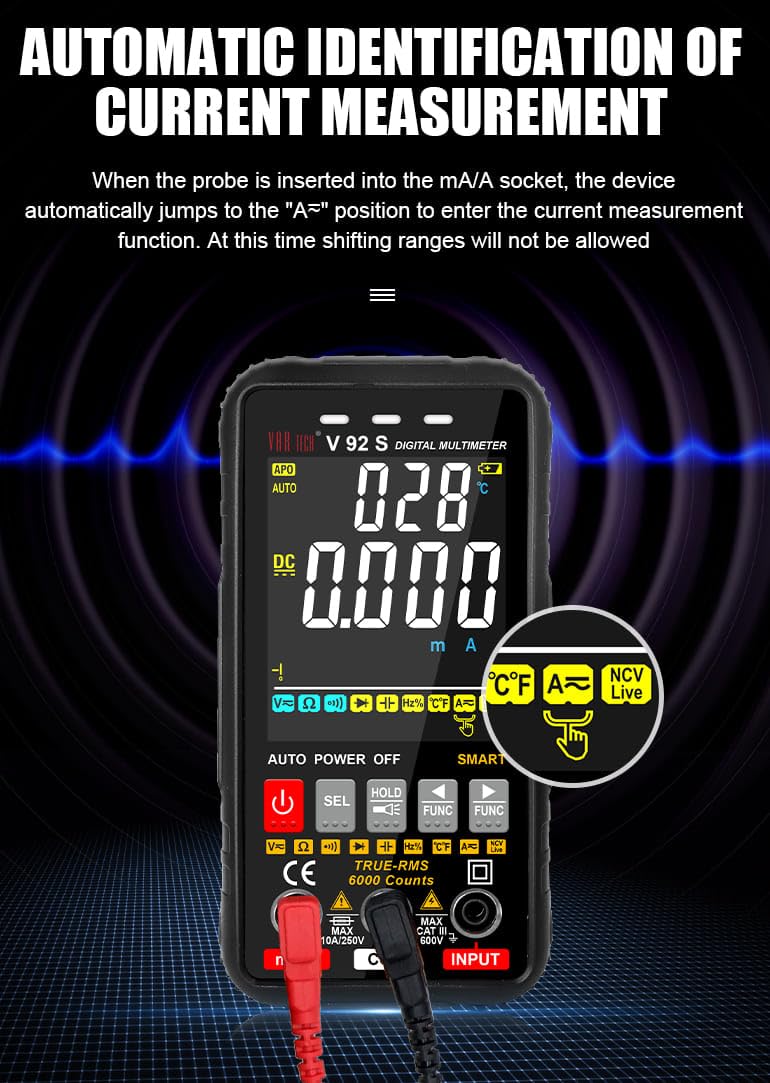
Figure 6.1: Automatic identification of current measurement. The multimeter automatically adjusts to the current measurement function when the probe is inserted into the mA/A socket.
6.3.3. Resistance, Capacitance, Frequency, Temperature, Diode, Continuity
For these measurements, ensure the red lead is in the “INPUT” jack and the black lead in the “COM” jack. Use the SEL or FUNC buttons to select the desired mode. Connect probes to the component or circuit as appropriate for each measurement type.
6.3.4. NCV (ניט-קאָנטאַקט חלקtagה) טעסט
די NCV פונקציע ערמעגליכט דעטעקציע פון AC וואָלומעןtagע אָן דירעקטן קאָנטאַקט מיט קאָנדוקטאָרן.
- Select the NCV function using the appropriate button.
- Bring the top of the multimeter near the conductor or outlet.
- The instrument will emit an audible beep and the alarm indicator light will illuminate when AC signals are detected. A “-H” display indicates a strong signal, while “-L” indicates a weak signal.

Figure 6.2: Auditory and visual alarm during NCV (Non-Contact Voltage) testing, indicating the presence of AC voltage.
6.4. דאַטן האַלטן פונקציע
דרוק די האַלטן קנעפל צו איינפרירן די איצטיקע לייענונג אויפן דיספלעי. דריק עס נאכאמאל צו באפרייען די האלט פונקציע.
6.5. פלאַשליכט פונקציע
The multimeter includes a built-in flashlight for illuminating work areas. Activate the flashlight using the designated button (often integrated with the HOLD button or a separate light icon). Press again to turn it off.

Figure 6.3: The integrated flashlight function, useful for working in dimly lit environments.
7. וישאַלט
7.1. רייניקונג
ווישן די פאַל מיט אַדamp cloth and mild detergent. Do not use abrasives or solvents. Ensure the multimeter is powered off and disconnected from all circuits before cleaning.
7.2. באַטערי פאַרבייַט
ווען דער נידעריגער באַטעריע אינדיקאַטאָר דערשיינט אויפן עקראַן, זאָל מען טוישן די באַטעריעס ווי באַשריבן אין סעקציע 5.1.
7.3. קאָריק פאַרבייַט
The V92S features an intelligent anti-burn function with a built-in safety fuse to protect the circuit. If the safety fuse burns out, the display screen will show a “FUSE” symbol to prompt replacement.
- זייט זיכער אז דער מולטימעטער איז אויסגעלאשן און אלע טעסט דראטן זענען אפגעטיילט.
- עפענען די באַטאַרייע אָפּטייל דעקן אויף די צוריק פון די מיטל.
- פֿאָרזיכטיק געפֿינט און אַרויסגענומען די צעבראָכענע פֿיוז.
- Replace it with a fuse of the same type and rating (refer to specifications for fuse type).
- נאָענט די דעקן פון די באַטאַרייע אָפּטייל סיקיורלי.

Figure 7.1: The intelligent anti-burn function prompt, indicating the location of the fuse for replacement.
8. טראָובלעשאָאָטינג
If you encounter issues with your VAR TECH V92S, refer to the following common problems and solutions:
- קיין ווייַז: קאָנטראָלירט די אינסטאַלאַציע פון די באַטעריעס און זיכערט זיך אַז זיי זענען נישט אויסגעשעפּט. טוישט אויס אויב נייטיק.
- פאַלש רידינגז: Verify test lead connections. Ensure the correct measurement function is selected. Check if the fuse is intact for current measurements.
- “OL” or Overload Indication: The measured value exceeds the range of the selected function. Select a higher range if available, or ensure the input is within the multimeter’s capabilities.
- “FUSE” Display: The fuse has blown. Refer to Section 7.3 for fuse replacement.
If the problem persists, contact VAR TECH customer support for assistance.
9. טעכניש ספּעסאַפאַקיישאַנז
| פּאַראַמעטער | באַשרייַבונג |
|---|---|
| מאָדעל | V92S |
| ווייַז | 6000 Counts HD Display |
| אמת RMS | יא |
| DC Voltage | אַרויף צו 600 V |
| AC Voltage | אַרויף צו 600 V |
| DC Current | אַרויף צו 10 אַ |
| AC קראַנט | אַרויף צו 10 אַ |
| קעגנשטעל | 600 Ω to 60 MΩ |
| קאַפּאַסיטאַנס | 6 נף צו 60 מף |
| אָפטקייַט | 6 הז צו 10 מהז |
| טעמפּעראַטור | -40 ºC צו 1000 ºC |
| קאָנטינויטי טעסט | יא |
| דייאָוד טעסט | יא |
| NCV (ניט-קאָנטאַקט Voltage) | יא |
| מאַכט מקור | 4 AAA באַטעריז (אַרייַנגערעכנט) |
| פּונקט וואָג | 300 ג |
| פּראָדוקט דימענשאַנז (L x W x H) | 14 X 7 X 5 סענטימעטער |
| זיכערקייַט רייטינג | קאַץ III 600 וו |
| סערטיפיקאַטיאָנס | סע, ISO 9001 |

Figure 9.1: A comparison table illustrating the features of various VAR TECH multimeter models, including the V92S.
10. וואָראַנטי און שטיצן
The VAR TECH V92S Smart Digital Multimeter comes with a 1-year warranty against manufacturing defects. For warranty claims or technical support, please contact VAR TECH directly.
Manufacturer: V A R TECH, www.var-tech.com