
1. הקדמה
This manual provides detailed instructions for the installation, operation, and maintenance of your Reobiux D20-1P 2K Outdoor Surveillance Camera. Please read this manual thoroughly before using the product to ensure proper functionality and safety.
2. פּעקל אינהאַלט
באַשטעטיקט אַז אַלע זאכן וואָס זענען אויסגערעכנט אונטן זענען אַרייַנגערעכנט אין אייער פּעקל. אויב עפּעס פעלנדיק אָדער צעבראָכן, ביטע קאָנטאַקטירט קונה שטיצע.
- 1x Reobiux D20-1P Solar PTZ Camera
- 1x Solar Collector
- 1x באַניצער מאַנואַל
- 1x מאַונטינג באַזע
- 1x Power Supply (for initial charging)
- 1x Screws Bag (for installation)
- 1x Type-C Charging Line
3. פּראָדוקט איבערview
The Reobiux D20-1P is a 2K outdoor surveillance camera designed for comprehensive home security. It features dual lenses, 360° Pan-Tilt-Zoom (PTZ) capabilities, and operates wirelessly via Wi-Fi. Key features include PIR motion detection, color night vision, two-way audio, and an IP66 weatherproof rating, powered by a solar panel and rechargeable battery.
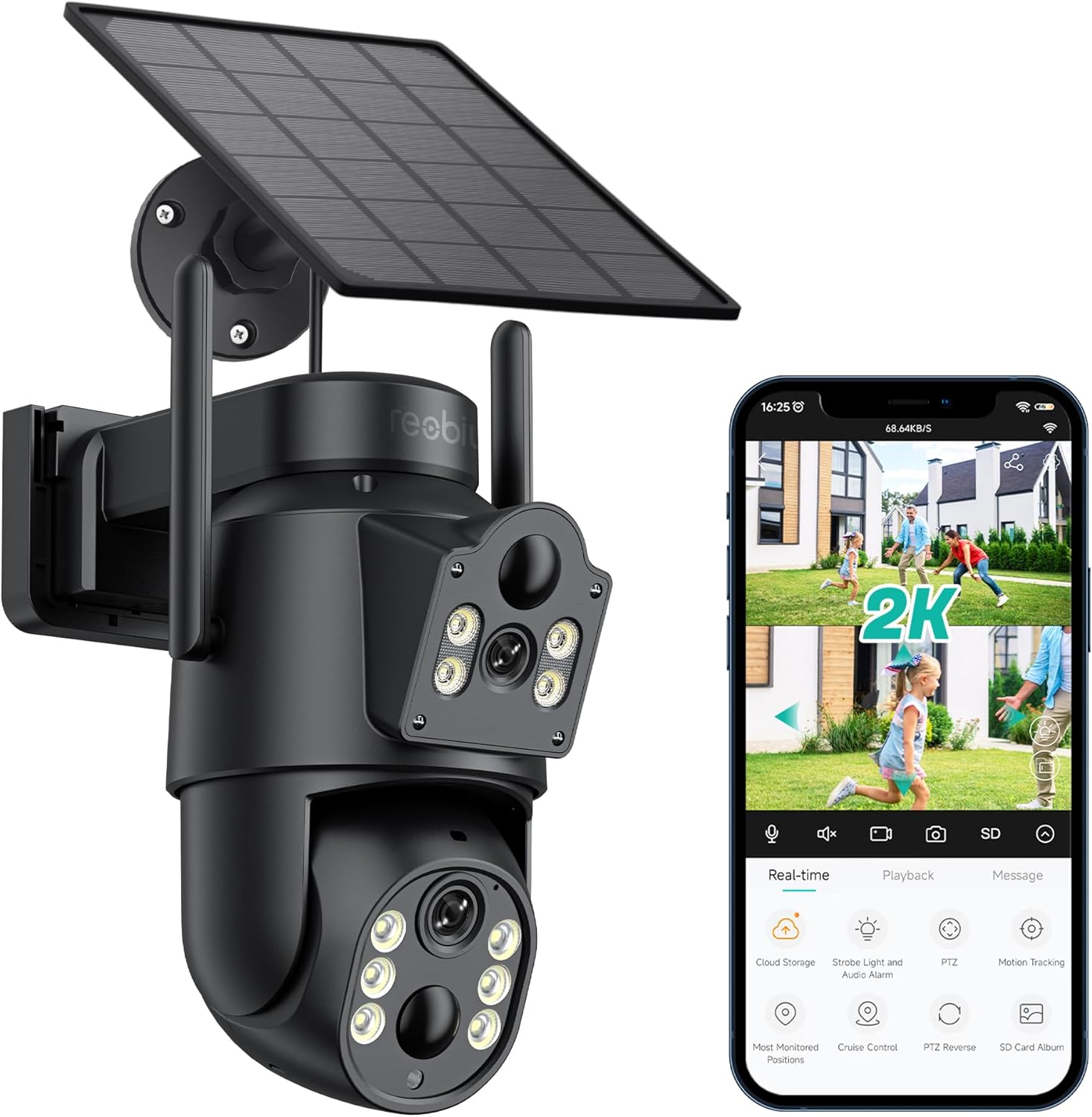
פיגורע 3.1: Reobiux D20-1P Solar PTZ Camera and its mobile application interface showing real-time monitoring, playback, and various control options.
שליסל פֿעיִקייטן:
- 2K QHD High Resolution: גיט קלאָר און דיטיילד ווידעא פאָאָtage.
- צוויי-לינז פּלאַן: Combines a fixed lens with a rotating lens for comprehensive coverage.
- 360° PTZ פונקציאָנאַליטעט: Allows remote control of pan, tilt, and zoom for flexible viewינג אַנגלעס.
- Solar Powered with Rechargeable Battery: Ensures continuous operation with minimal manual charging.
- PIR באַוועגונג דעטעקשאַן: Intelligently detects human movement to reduce false alarms.
- קאָליר נאַכט זעאונג: Offers full-color video even in low-light conditions, alongside infrared night vision.
- צוויי-וועג אַודיאָ: Enables communication with visitors or deterrence of intruders.
- IP66 וועטערפּרוף: דיזיינד צו וויטשטיין פארשידענע דרויסנדיקע וועטער באדינגונגען.
- Wireless Wi-Fi Connectivity: Easy setup and remote access via smartphone.
4. סעטאַפּ גייד
4.1 ערשט טשאַרדזשינג
Before first use, fully charge the camera's internal battery using the provided Type-C charging line and power supply. This ensures the camera has sufficient power for initial setup and operation, especially if solar charging conditions are not optimal immediately after installation.
4.2 אַפּ אינסטאַלאַציע און אַקאַונט שאַפונג
- אָפּלאָדירן די iCSee אַפּ פֿון דיין סמאַרטפֿאָן'ס אַפּ סטאָר (iOS אַפּ סטאָר אָדער גוגל פּליי סטאָר).
- ינסטאַלירן די אַפּ און עפענען עס.
- פֿאָלגט די אינסטרוקציעס אויף דעם עקראַן צו שאַפֿן אַ נײַעם חשבון אָדער לאָגט זיך אײַן אויב איר האָט שוין אײנס.
4.3 קאַמעראַ פֿאַרבינדונג צו Wi-Fi
- Ensure your camera is powered on.
- In the iCSee app, tap the "+" icon to add a new device.
- Select the option for "Wi-Fi Camera" or "Add Device by AP Hotspot" (refer to app for exact wording).
- Follow the app's instructions to connect the camera to your 2.4GHz Wi-Fi network. You may need to scan a QR code displayed on your phone with the camera, or listen for a sound prompt.
- אַמאָל פארבונדן, קענט איר געבן א נאמען פאר אייער קאַמעראַ און אָנהייבן מאָניטאָרינג.
4.4 מאָונטינג די אַפּאַראַט
Choose a location that provides optimal surveillance coverage and receives direct sunlight for the solar panel. Ensure the camera is within range of your Wi-Fi network.
- אויסקלייַבן אָרט: Identify a suitable wall or surface for mounting. Consider the camera's viewing angle (355° pan, 90° tilt) and the solar panel's exposure to sunlight.
- מאַרקירן דרילינג פונקטן: Use the mounting base as a template to mark the screw holes on the wall.
- בויער האָלעס: Drill pilot holes at the marked positions. Insert wall anchors if necessary.
- צוטשעפּען די מאָנטירונג באַזע: Secure the mounting base to the wall using the provided screws.
- צוטשעפּען קאַמעראַ: Mount the camera onto the secured base.
- סטרויערן זונ פּאַנעל: Position the solar panel to maximize sunlight exposure throughout the day.

פיגורע 4.1: Illustration of the camera mounted with its solar panel, highlighting the fixed and rotating lenses and the benefit of continuous solar power.
5. אַפּערייטינג ינסטרוקטיאָנס
5.1 לעבן View און פּלייַבאַקק
Open the iCSee app and select your camera to access the live view. From here, you can:
- פאַקטיש-צייט מאָניטאָרינג: View לעבעדיגע ווידעא פיד.
- PTZ קאָנטראָל: Use the on-screen joystick to pan (355°) and tilt (90°) the camera.
- דיגיטאַל פארגרעסער: Pinch to zoom on the live feed.
- פּלייבאַק: אַקסעס רעקאָרדעד פאָאָtagע סטאָרד אויף די SD קאַרטל אָדער וואָלקן סטאָרידזש.

פיגורע 5.1: Demonstrates the superior clarity of 2K QHD resolution compared to 1080P, providing more details for monitoring.
5.2 באַוועגונג דעטעקציע און וואָרענונגען
The camera utilizes PIR (Passive Infrared) intelligent detection to identify human movement, minimizing false alarms from pets or swaying branches.
- געבן / דיסייבאַל: Activate or deactivate motion detection in the app settings.
- סענסיטיוויטי אַדזשאַסטמאַנט: Adjust the PIR sensor's sensitivity to suit your environment.
- שרעק נאָטיפיקאַטיאָנס: באַקומען רעגע פּוש נאָוטאַפאַקיישאַנז אויף דיין סמאַרטפאָון ווען באַוועגונג איז דעטעקטעד.
- געזונט און ליכט שרעק: Configure the camera to trigger a strobe light and audible alarm upon detection.

פיגורע 5.2: The camera's PIR intelligent detection distinguishes human movement from other objects, reducing unnecessary alerts.

פיגורע 5.3: When motion is detected, the camera can send real-time push notifications and activate a sound and light alarm to deter intruders.
5.3 נאַכט זעאונג מאָדעס
The camera offers two night vision modes for clear visibility in the dark:
- Spotlight Full Color Night Vision: Utilizes built-in spotlights to provide full-color video in low-light conditions.
- Spotlight Infrared Night Vision: Uses infrared LEDs for black-and-white video in complete darkness, with a range of up to 30 meters.
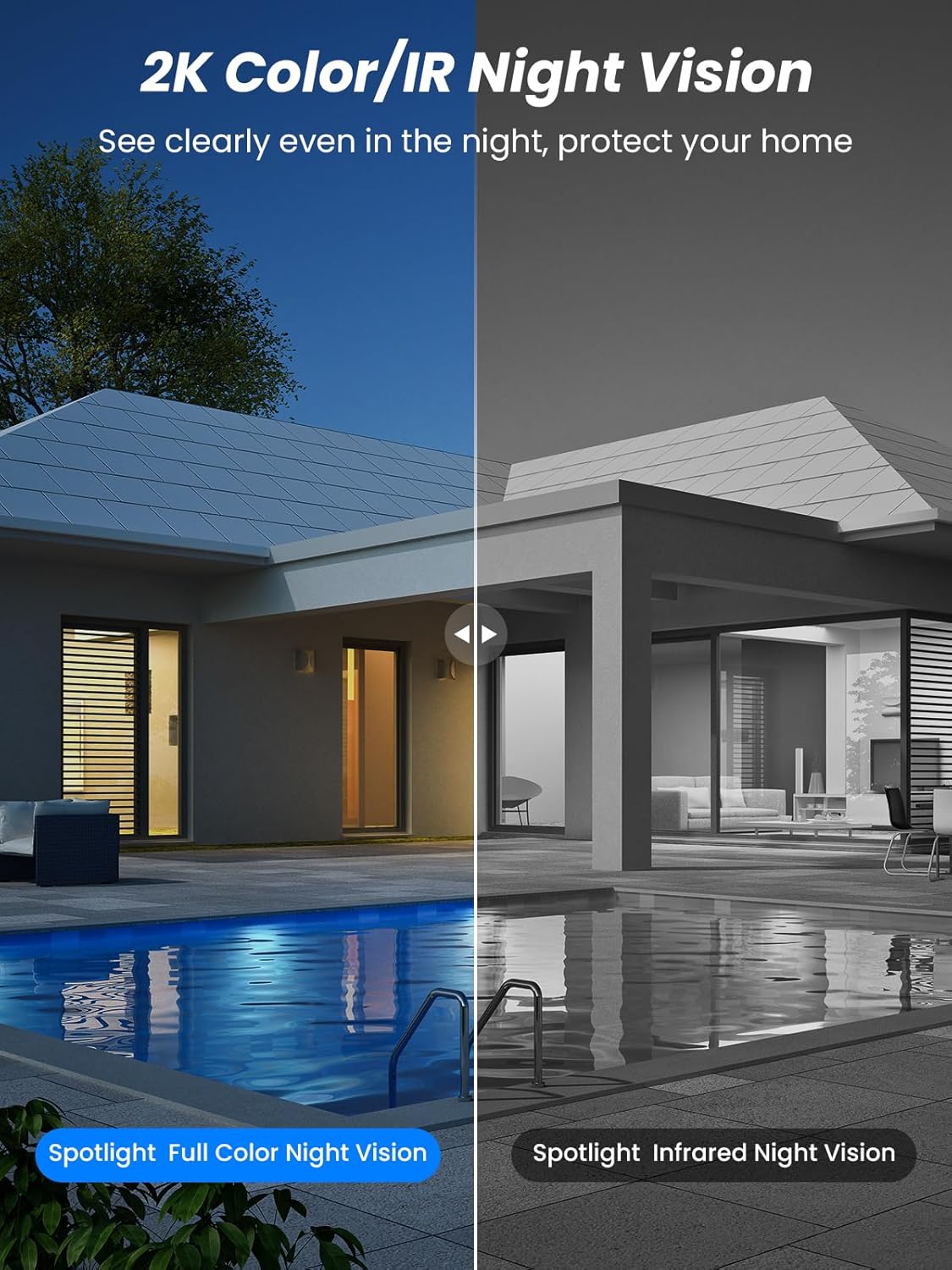
פיגורע 5.4: Illustrates the difference between full-color night vision, enabled by spotlights, and traditional infrared night vision.
5.4 צוויי-וועג אַודיאָ
The integrated microphone and speaker allow for two-way communication.
- רעדן: צאַפּן אויף דעם מיקראָפאָן בילדל אין דער אַפּ צו רעדן דורך דער קאַמעראַ'ס רעדנער.
- הערן: The camera's microphone captures audio from its surroundings.

פיגורע 5.5: The two-way audio function allows for direct communication through the camera, useful for interacting with visitors or delivery personnel.
6. וישאַלט
- רייניקונג: רייניקן פּעריִאָדיש די קאַמעראַ לינז און זונ פּאַנעל מיט אַ ווייכן, דamp cloth to ensure optimal performance and clear image quality. Avoid abrasive cleaners.
- באַטערי געזונט: While solar-powered, extreme weather or prolonged periods of low sunlight may require manual charging. Monitor battery levels via the app.
- Firmware דערהייַנטיקונגען: Check the iCSee app regularly for available firmware updates to ensure your camera has the latest features and security enhancements.
- וועטער שוץ: The camera is IP66 weatherproof, designed to withstand rain, snow, and sun. However, ensure all connections are secure to maintain water resistance.

פיגורע 6.1: The IP66 rating ensures the camera's durability and functionality in various outdoor weather conditions, including snow, rain, and direct sunlight.
7. טראָובלעשאָאָטינג
- קאַמעראַ פֿאַרבינדט זיך נישט צו Wi-Fi:
- Ensure the camera is within range of your 2.4GHz Wi-Fi network. 5GHz networks are not supported.
- באַשטעטיקן אַז אייער Wi-Fi פּאַראָל איז ריכטיק.
- ריסטאַרט דיין ראַוטער און די קאַמעראַ.
- If issues persist, try resetting the camera (refer to app or product for reset button location).
- Battery not charging or draining quickly:
- Ensure the solar panel is clean and receives direct sunlight for several hours daily.
- קאָנטראָלירט די פֿאַרבינדונג צווישן דעם זונ - פּאַנעל און דער קאַמעראַ.
- If in a low-light environment, manually charge the camera using the Type-C cable.
- אָפטע באַוועגונג דעטעקציע געשעענישן אָדער לעבן view streaming can consume battery faster. Adjust settings if needed.
- False motion detection alarms:
- Adjust the PIR motion detection sensitivity in the iCSee app.
- Ensure the camera is not pointed at areas with constant movement (e.g., busy roads, swaying trees) if not intended for monitoring.
- נעבעך בילד קוואַליטעט:
- ריין די אַפּאַראַט אָביעקטיוו.
- Ensure sufficient lighting for optimal image capture, especially at night.
- קאָנטראָלירט די שטאַרקייט פון אייער Wi-Fi סיגנאַל; אַ שוואַכער סיגנאַל קען אַפעקטירן די קוואַליטעט פון ווידעאָ סטרימינג.
8. ספּעסאַפאַקיישאַנז
| שטריך | דעטאַל |
|---|---|
| מאָדעל נאָמען | D20-1P |
| ווידעא קאַפּטורע רעסאָלוטיאָן | 2.5K |
| עפעקטיוו ווידעא האַכלאָטע | 2K QHD |
| ווירעלעסס קאָמוניקאַציע טעכנאָלאָגיע | ווי-פי (2.4 גהז) |
| פאָרם פאַקטאָר | קופּאָל |
| Viewינג אַנגלע | 355 גראַד (פּאַן), 90 גראַד (טילט) |
| ייַנמאָנטירונג טיפּ | וואנט-מאָונטעד |
| נאַכט וויזשאַן ראַנגע | 30 מעטער |
| ראַם קורס | 25 fps |
| מאַטעריאַל | פּלאַסטיק |
| Voltage | 12 וואלטס (דק) |
| וואָסtage | 5 וואטס |
| מאַכט מקור | באַטעריע-געטריבן, זונ -געטריבן |
| באַטעריז | 3 ליטהיום יאָן באַטעריז (אַרייַנגערעכנט) |
| קאַנעקטיוויטי פּראָטאָקאָל | ווי-פי |
| קאָנטראָללער טיפּ | iCSee אַפּ |
| ספּעציעלע פֿעיִקייטן | Night Vision (Color/IR), PIR Motion Detection, Two-Way Audio, IP66 Weatherproof |
| פּונקט וואָג | 1.06 קג |
| פּעקל דימענשאַנז | 21.7 X 19.5 X 13.8 סענטימעטער |
9. וואָראַנטי און שטיצן
Reobiux offers a 1 יאָר וואָראַנטי for this product. For any issues or inquiries, please do not hesitate to reach out to our customer service. We provide 20 hours of online service to assist you.
For support, please refer to the contact information provided with your purchase or within the iCSee application.