
הקדמה
This manual provides detailed instructions for the AULCMEET RC80B replacement remote control, designed for use with Edifier R1280DBs active speakers. Please read this manual carefully to ensure proper operation and to maximize your experience with the product.
פּראָדוקט איבערview
The AULCMEET RC80B remote control offers a comprehensive set of functions for your Edifier R1280DBs speakers. Its ergonomic design ensures comfortable handling and intuitive button placement.
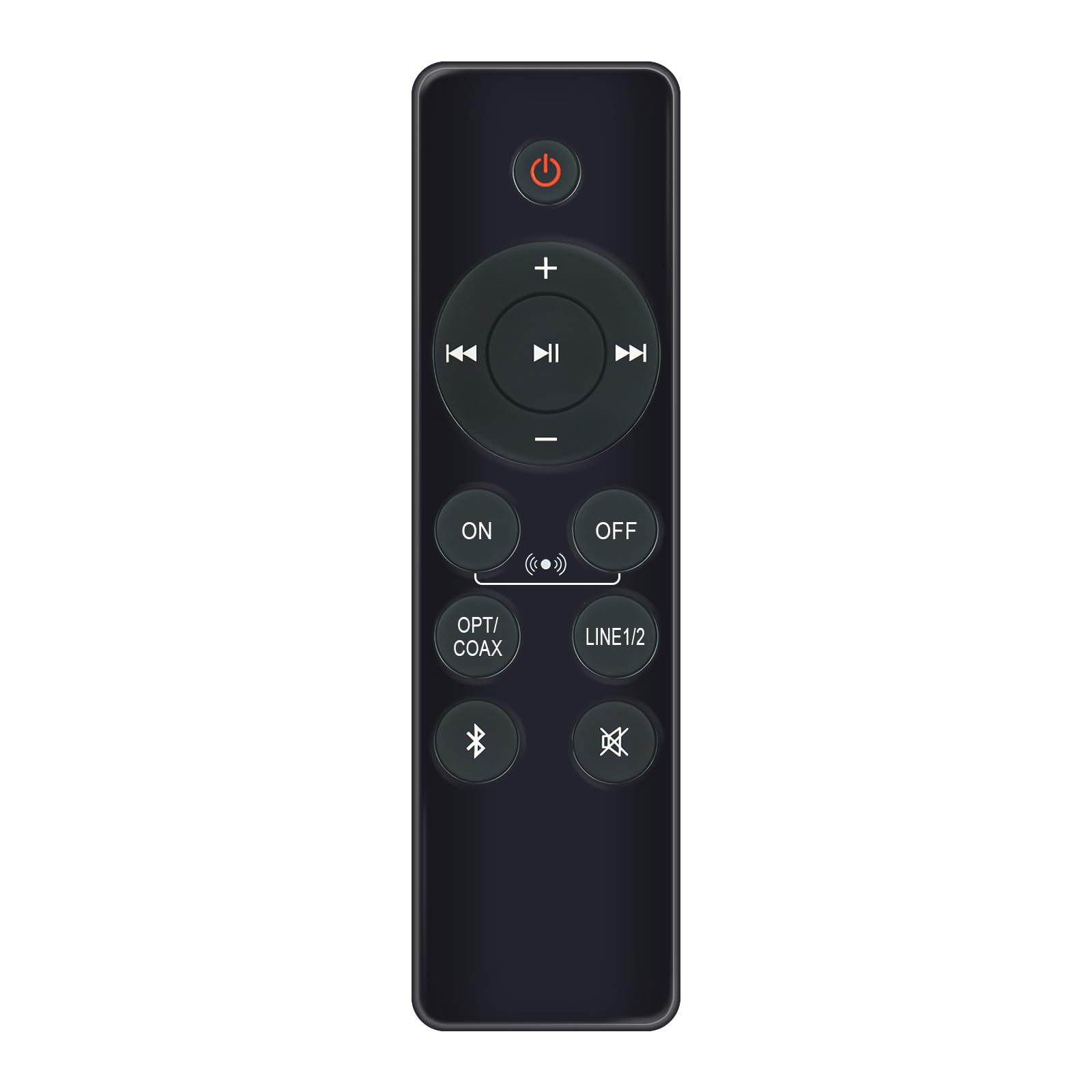
Image: AULCMEET RC80B Replacement Remote Control. The remote measures approximately 13.8 cm (5.43 inches) in length and 3.8 cm (1.5 inches) in width.
קנעפּל פאַנגקשאַנז:
- מאַכט קנעפּל (⏻): Turns the speakers ON or OFF.
- באַנד אַרויף (+) / באַנד אַראָפּ (-): Adjusts the speaker volume.
- פֿריִער שפּירט (⏮) / Next Track (⏭): Skips to the previous or next audio track.
- שפּיל / פּויזע (⏯): Plays or pauses audio playback.
- ON / OFF (Input Selection): Toggles between different input modes.
- אָפּט / קאָאַקס: Selects Optical or Coaxial input.
- ליניע 1/2: Selects Line In 1 or Line In 2 input.
- בלועטאָאָטה (☋): Activates or selects Bluetooth input.
- שטום (🛇): Mutes or unmutes the speaker audio.
סעטאַפּ
The AULCMEET RC80B remote control is designed for immediate use without complex setup procedures. Simply install the batteries, and it is ready to operate your compatible Edifier R1280DBs speakers.
ייַנמאָנטירונג פון באַטאַרייע:
- געפֿינען די באַטאַרייע אָפּטייל אויף די צוריק פון די ווייַט קאָנטראָל.
- עפענען די באַטאַרייע אָפּטייל דעקן.
- Insert two AAA alkaline batteries, ensuring the correct polarity (+ and -) as indicated inside the compartment.
- פאַרמאַכן די באַטאַרייע אָפּטייל דעקן סיקיורלי.
באַמערקונג: No programming or pairing is required for this replacement remote control. It functions directly with the specified Edifier R1280DBs active speakers.
אַפּערייטינג ינסטראַקשאַנז
To operate your Edifier R1280DBs speakers using the AULCMEET RC80B remote control, point the remote directly towards the speakers' infrared receiver. Ensure there are no obstructions between the remote and the speakers.
- מאַכט אויף / אַוועק: דרוק די ⏻ button to turn the speakers on or off.
- באַנד אַדזשאַסטמאַנט: ניצן די + און - buttons to increase or decrease the volume.
- אַרייַנשרייַב סעלעקציע: דרוק די ON/OFF, אָפּט / קאָאַקס, ליניע 1/2, אָדער בלועטאָאָטה buttons to switch between the available audio input sources.
- פּלייבאַק קאָנטראָל: When using Bluetooth or other compatible sources, use the ⏮ (פֿריִער), ⏭ (ווייטער), און ⏯ (Play/Pause) buttons to control media playback.
- שטום פֿונקציע: דרוק די 🛇 button to temporarily silence the audio. Press it again to restore the sound.
ספּעסאַפאַקיישאַנז
| סאָרט | AULCMEET |
| מאָדעל | RC80B |
| קאַמפּאַטאַבאַל דעוויסעס | Edifier R1280DBs Active Speakers |
| קאָליר | שוואַרץ |
| פֿעיִקייטן | ערגאַנאַמיק פּלאַן |
| קאָמוניקאַציע צובינד | ינפרערעד (IR) |
| נומער פון קנעפּלעך | 30 |
| מאַקסימום קייט | בעערעך 33 פֿיס (10 מעטער) |
| באַטערי טיפּ | 2 x AAA אַלקאַליין באַטעריעס (נישט אַרייַנגערעכנט) |
| דימענשאַנז (L X W) | 13.8 סענטימעטער רענטגענ 3.8 סענטימעטער (5.43 רענטגענ 1.5 אינטשעס) |
טראָובלעשאָאָטינג
If you encounter issues with your AULCMEET RC80B remote control, please refer to the following common solutions:
- רימאָוט נישט ריספּאַנדינג: Ensure the batteries are correctly installed and are not depleted. Replace batteries if necessary.
- קורץ אַפּערייטינג קייט: Check for any obstructions between the remote and the speaker's IR receiver. Ensure the remote is pointed directly at the speakers. Low battery power can also reduce range.
- א ספעציפישער קנעפל ארבעט נישט: Clean the remote control surface and buttons. If the issue persists, the button may be faulty, or the remote may require battery replacement.
- Speakers not responding to any remote: Ensure the speakers are powered on and functioning correctly. Try using the manual controls on the speaker unit if available.
וישאַלט
געהעריגע זאָרג און וישאַלט וועט פֿאַרלענגערן די לעבן פֿון אייער ווײַטקאָנטראָל:
- רייניקונגווישט אָפּ די ווײַטקאָנטראָל מיט אַ ווייכן, טרוקענעם שטאָף. ניצט נישט קיין שרײַבנדיקע רייניגער אָדער סאָלווענטן.
- באַטערי קער: Remove batteries if the remote control will not be used for an extended period to prevent leakage.
- סטאָרידזש: Store the remote control in a cool, dry place, away from direct sunlight and extreme temperatures.
- ויסמיידן דראָפּס: Protect the remote from physical impact, as drops can damage internal components.
וואָראַנטי און שטיצן
Specific warranty information for this AULCMEET RC80B replacement remote control is not provided in the product details. For warranty claims, technical support, or further assistance, please contact the seller or manufacturer directly through your purchase platform. Keep your purchase receipt or order number handy for faster service.