
1. הקדמה
This manual provides essential information for the safe and effective operation of your Pretul NL-12P Rechargeable Green Laser Level. Please read these instructions thoroughly before first use and keep them for future reference. This device is designed for precise leveling and alignment tasks in various applications.
2. זיכערקייַט אינסטרוקציעס
WARNING: Laser Radiation. Avoid direct eye exposure.
- דו זאלסט נישט גלאָצן גלייַך אין די לאַזער שטראַל.
- דו זאלסט נישט פונט די לאַזער שטראַל אויף מענטשן אָדער אַנימאַלס.
- דו זאלסט נישט אַרבעטן די מיטל אין יקספּלאָוסיוו אַטמאָספערעס.
- האַלטן די מיטל אויס פון דערגרייכן פון קינדער.
- Use only the charger provided with the device.
- Do not attempt to modify or disassemble the laser level. This can lead to hazardous laser exposure and voids the warranty.
- Ensure the work area is clear of obstructions and potential hazards.
3. פּעקל אינהאַלט
באַשטעטיקן אַז אַלע זאכן זענען פאַראַן אין פּעקל:
- Pretul NL-12P Laser Level
- לי-יאָן באַטערי
- טשאַרדזשער
- מאַגנעטיק באַסע
- וואנט בארג
- Quick-Release Tripod
- קעריינג קאַסע

Figure 3.1: Included accessories: carrying case and quick-release tripod.
4. פּראָדוקט איבערview
Familiarize yourself with the components of your Pretul NL-12P laser level:

Figure 4.1: Key components of the Pretul NL-12P Laser Level.
- לייזער רעזולטאַט פֿענצטער: Emits the green laser beams.
- מאַגנעטיק באַזע: Allows for secure attachment to metallic surfaces.
- לי-יאָן באַטערי: Rechargeable power source for the device.
- אן/אויס קנעפל: Controls the power and locking mechanism.
- Quick-Release Tripod: Provides a stable base for the laser level.
- בלאָז מדרגה: Assists in manual leveling when self-leveling is not active.
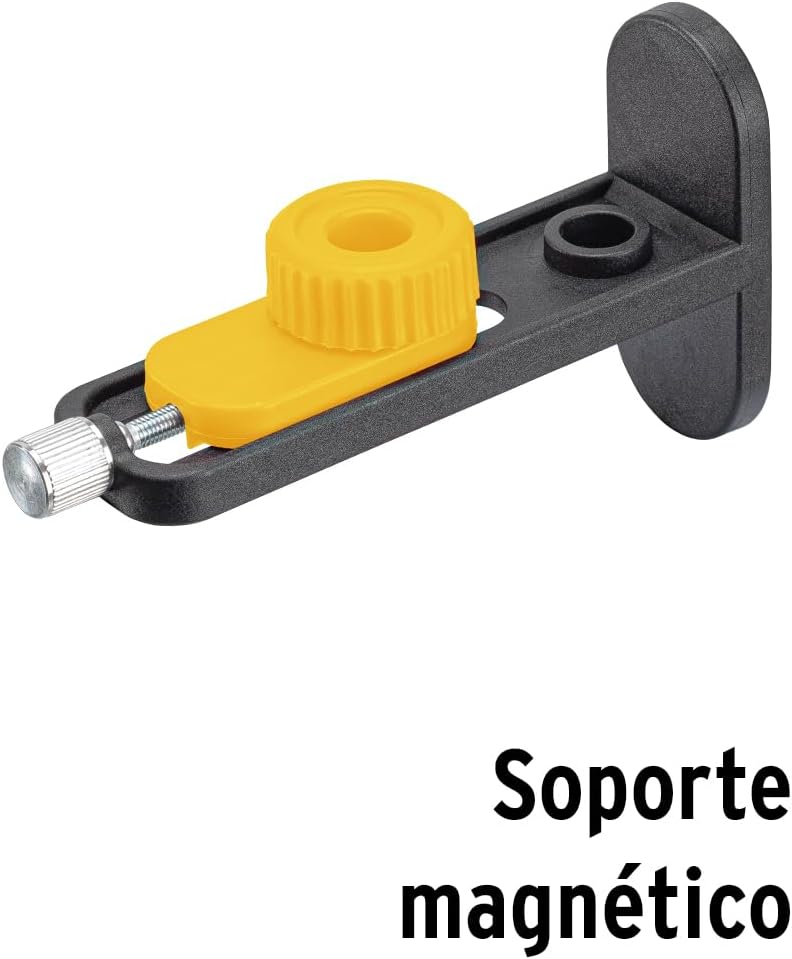
פיגורע 4.2: זייַט view showing the magnetic base.

פיגורע 4.3: צוריק view of the laser level.
5. סעטאַפּ
5.1 טשאַרדזשינג די באַטאַרייע
Before first use, fully charge the Li-ion battery. Connect the charger to the laser level and plug it into a power outlet. The charging indicator will show the charging status. Once fully charged, disconnect the charger.
5.2 Attaching the Tripod and Magnetic Base
The laser level can be mounted on the quick-release tripod or attached to metallic surfaces using the magnetic base.
- For Tripod: Screw the laser level onto the 1/4" thread of the quick-release tripod. Adjust the tripod legs for stability.
- For Magnetic Base: Attach the magnetic base to the bottom of the laser level. The base can then be secured to suitable metallic surfaces.
Figure 5.1: Laser level with magnetic base.
6. אָפּעראַציע
6.1 Powering On/Off and Self-Leveling
- To power on the device and activate self-leveling mode, rotate the On/Off knob to the unlocked position. The laser lines will automatically level within ±3°. If the device is outside this range, the laser lines will flash to indicate it cannot self-level.
- To power off, rotate the On/Off knob to the locked position. This also locks the pendulum for safe transport.
6.2 Switching Laser Lines
The NL-12P projects 12 lines (3 x 360° planes). Use the control buttons on the top of the device to switch between horizontal and vertical lines:
- Press the 'H' button to activate/deactivate horizontal laser lines.
- Press the 'V' button to activate/deactivate vertical laser lines.
- Multiple lines can be active simultaneously.
6.3 מאַנועלע מאָדע (פאַרשלאָסענע פּענדזשאַלאַם)
For projecting lines at an angle, you can use the manual mode:
- With the device powered off (knob in locked position), press and hold the 'H' or 'V' button for a few seconds to activate the laser lines in manual mode.
- In this mode, the self-leveling function is deactivated, and the laser lines can be projected at any angle. The lines will not flash.
- To exit manual mode, turn the device off using the On/Off knob.
Video 6.1: Demonstration of Pretul NL-12P Laser Level features, including setup and operation of laser lines.
7. וישאַלט
- רייניקונג: ניצן אַ ווייך, דamp cloth to clean the device. Do not use abrasive cleaners or solvents. Keep the laser output windows clean for optimal performance.
- באַטערי זאָרגן: Store the battery in a cool, dry place. If storing for extended periods, charge the battery every 3-6 months to maintain its lifespan.
- סטאָרידזש: When not in use, store the laser level in its carrying case in a dry, dust-free environment. Ensure the pendulum is locked before storage or transport.
8. טראָובלעשאָאָטינג
| פּראָבלעם | מעגלעך סיבה | לייזונג |
|---|---|---|
| Laser lines are flashing. | דאָס אַפּאַראַט איז אַרויס פֿון זײַן זעלבסט-ניוועלירנדיקן ראַם (±3°). | Place the laser level on a more level surface. |
| לאַזער ליניעס זענען טונקל אָדער נישט קענטיק. | נידעריגע באַטעריע אדער העל אַמביאַנט ליכט. | Recharge the battery. Use the laser level in a less brightly lit environment or use a laser receiver (sold separately) for outdoor use. |
| די מיטל איז נישט קער אויף. | די באַטעריע איז אויסגעשעפּט אָדער נישט ריכטיק אַרײַנגעשטעלט. | Ensure the battery is charged and correctly inserted. Check the On/Off knob is in the unlocked position. |
| Laser lines are not level in self-leveling mode. | Device is damaged or requires calibration. | קאָנטאַקטירט קונה שטיצע פֿאַר הילף. פּרוּווט נישט צו פאַרריכטן זיך. |
9. ספּעסאַפאַקיישאַנז
| שטריך | דעטאַל |
|---|---|
| מאָדעל | NL-12P |
| סאָרט | פּרעטול |
| לאַזער קאָליר | Green (4X greater visibility than red laser) |
| נומער פון שורות | 12 lines (3 x 360° planes) |
| זיך-לעוועלינג ראַנגע | ± 3° |
| טאָלעראַנץ | 0.2 מם / עם |
| קייט | אַרויף צו 25 מעטער |
| מאַכט מקור | רעטשאַרגעאַבלע לי-יאָן באַטאַרייע |
| מאַטעריאַל | פּלאַסטיק, אַקרילאָניטרילע בוטאַדיענע סטירענע (אַבס) |
| קאָליר | געל |
| פּראָדוקט דימענשאַנז | 12 סענטימעטער (לענג) X 10 סענטימעטער (ברייט) |
| פּונקט וואָג | 1 קילאָ |
| IP שאַץ | IP54 (Splash Resistant, Protected against limited dust ingress) |
| אַרייַנגערעכנט עלעמענטן | Charger, Wall mount, Magnetic base, Laser level, Case, Li-ion battery, Quick-release tripod |

Figure 9.1: IP54 Protection Rating details.
Figure 9.2: Product packaging highlighting key features and specifications.
For additional information and videos, please visit: Truper Product Page
10. וואָראַנטי און שטיצן
Grupo Truper offers a comprehensive warranty covering over 25,000 accessories and spare parts, with minimal or no labor cost. There are 177 service centers in Mexico and 15 Latin American countries. No purchase receipt is required to validate the warranty.
For warranty claims or technical support, please contact your local Pretul service center or visit the official Pretul webפּלאַץ פֿאַר מער אינפֿאָרמאַציע.
For more information about Pretul products, visit the Pretul Store on Amazon.