
FLEXISPOT OC4-PRO
FLEXISPOT OC4-PRO Office Chair User Manual
Model: OC4-PRO
1. הקדמה
Thank you for choosing the FLEXISPOT OC4-PRO Office Chair. This ergonomic chair is designed to provide maximum comfort and support for extended periods, featuring multiple adjustment points including headrest, lumbar support, armrests, and seat height. This manual provides essential information for assembly, operation, maintenance, and troubleshooting to ensure optimal use and longevity of your chair.
2. זיכערקייַט אינפֿאָרמאַציע
- לייענען אַלע ינסטראַקשאַנז קערפאַלי איידער פֿאַרזאַמלונג און נוצן.
- Ensure all components are securely fastened before using the chair.
- שטיי נישט אויפן שטול און נוץ עס נישט ווי א טרעפּ־בענקל.
- Do not exceed the maximum weight capacity of 400 LBS (181.44 kg).
- האַלט קינדער און חיות אַוועק פון דעם שטול בעת די פֿאַרזאַמלונג.
- ניצט דעם שטול אויף אַ פלאַכער, סטאַבילער ייבערפלאַך.
- פֿאַרמײַדט אויסשטעלן דעם שטול צו דירעקטער זון אָדער עקסטרעמע טעמפּעראַטורן.
3. פּעקל אינהאַלט
ביטע איבערצייגן אז אלע קאמפאנענטן זענען פאראן איידער איר הייבט אן צוזאמענשטעלן. אויב עפעס טיילן פעלן אדער זענען געשעדיגט, קאנטאקטירט קאסטומער סערוויס.
- אַרמרעסץ
- לאַמבאַר שטיצן
- קאַסטערס
- גאַז ליפט
- העאַדרעסט
- באַניצער גייד (דיזער מאַנואַל)
- אַסעמבלי מכשירים
- שטול באַסע
- אַוועקזעצן קישן
- באַקרעסט
4. אַסעמבלי אינסטרוקציעס
Assembly of the FLEXISPOT OC4-PRO chair is designed to be straightforward and can typically be completed within 30 minutes. A detailed user manual with step-by-step diagrams and all necessary assembly tools are included in the package. Please follow the specific instructions provided in the separate assembly guide for your model.
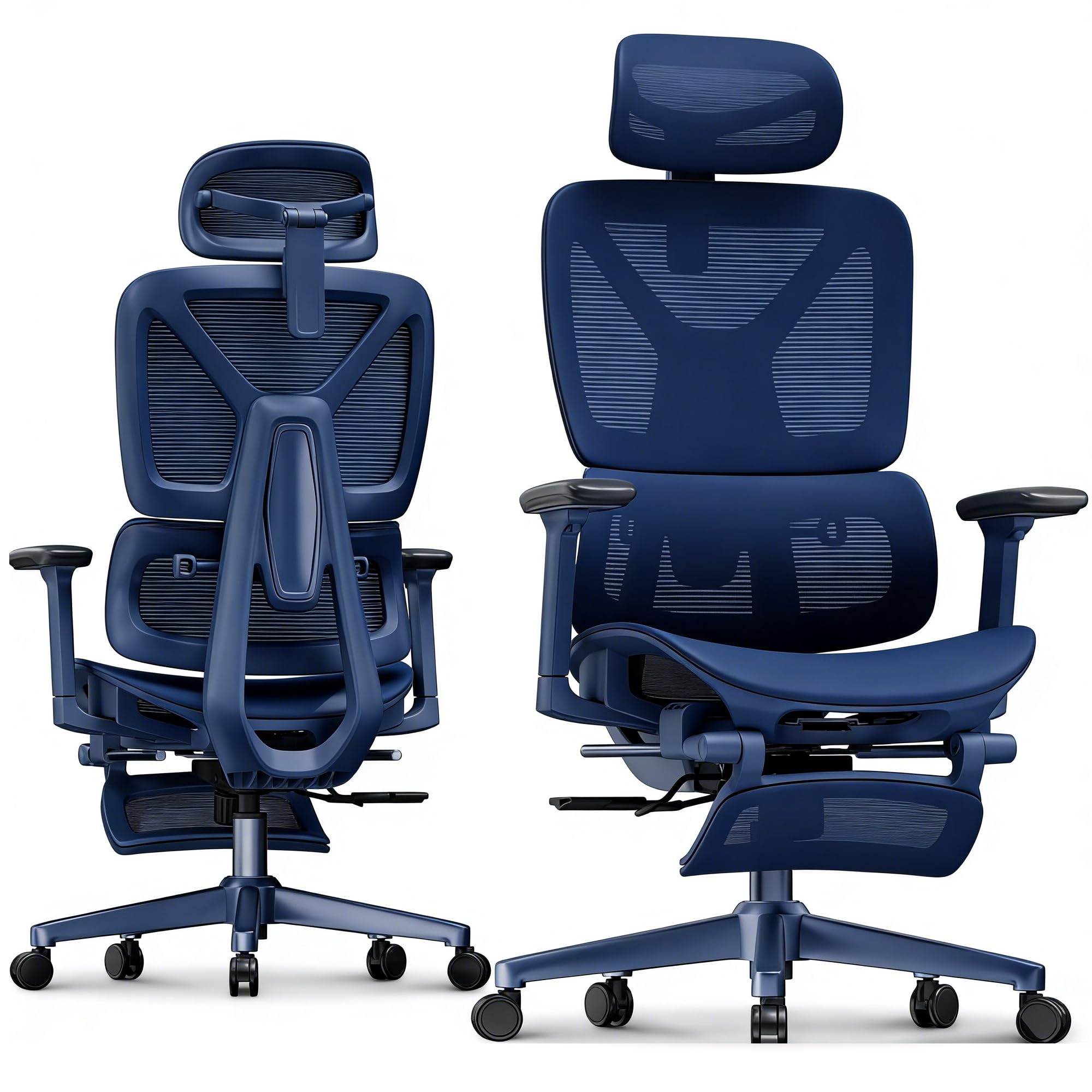
Image: FLEXISPOT OC4-PRO Office Chair. This image shows the fully assembled chair, highlighting its ergonomic design and mesh backrest.
5. אַפּערייטינג ינסטרוקטיאָנס
The FLEXISPOT OC4-PRO chair offers multiple adjustment features to customize your seating experience.
5.1. אַוועקזעצן הייך אַדזשאַסטמאַנט
Locate the lever on the right side beneath the seat. To raise the seat, lift the lever while taking your weight off the chair. To lower the seat, lift the lever while seated. Release the lever at the desired height.
5.2. Recline and Tilt Adjustment
The chair features an adjustable back angle and tilt tension. Use the lever on the left side to lock or unlock the recline function. Rotate the knob located beneath the seat, usually at the front, to adjust the tilt tension. Turn clockwise to increase tension (making it harder to recline) and counter-clockwise to decrease tension (making it easier to recline).
5.3. לאַמבאַר שטיצן אַדזשאַסטמאַנט
The multi-functional lumbar support system can be adjusted vertically and horizontally to fit the curve of your lower back. Locate the adjustment controls on the backrest to position the lumbar support for optimal comfort.
5.4. אָרעם-שטיצע אַדזשאַסטמענט
The 3D armrests can be adjusted in three dimensions: height, forward/backward, and pivot (inward/outward). Use the buttons or levers on the armrests to unlock and adjust them to your preferred position. Ensure they are locked securely after adjustment.
5.5. קאָפּשטיצע אַדזשאַסטמענט
The headrest can be adjusted for height and angle. Gently push or pull the headrest to move it up or down, and tilt it to find the most comfortable position for your neck and head.
5.6. 360° Rotation and Casters
The chair is equipped with a 360° swivel mechanism and smooth-rolling casters for easy movement. Ensure the casters are clean and free of debris for optimal performance on hard floors.
6. וישאַלט
- רייניקונג: For general cleaning, wipe the chair with a damp cloth. For mesh and fabric areas, dry clean as needed. Avoid harsh chemical cleaners that may damage the material.
- דורכקוק: קאָנטראָלירט פּעריִאָדיש אַלע שרויפן און באָלטן צו זיכער מאַכן אַז זיי זענען פֿעסט. פֿעסטשטײַערט ווידער אויב נייטיק.
- קאַסטער קער: האַלט די ראָדלעך פריי פון האָר און שמוץ צו ענשור אַ גלאַט באַוועגונג.
- סטאָרידזש: האַלט דעם שטול אין אַ קיל, טרוקן אָרט אַוועק פון דירעקט זונשייַן ווען עס איז נישט אין באַנוץ פֿאַר לענגערע פּעריאָדן.
7. טראָובלעשאָאָטינג
| פּראָבלעם | מעגלעך סיבה | לייזונג |
|---|---|---|
| שטול שטעלט נישט צו די הייך | גאז ליפט איז נישט גוט אדער דער הייבער איז נישט איינגעארבעט. | זיכער מאַכן אַז דער הייך אַדזשאַסטמענט הייבער איז גאָר איינגעלאָדן. אויב די פּראָבלעם בלייבט, דאַרף מען מעגלעך אויסטוישן דעם גאַז ליפט. קאָנטאַקטירט קונה שטיצע. |
| דער שטול קוויטשט אדער וואקלט | לויזע שרויפן אדער קאמפאנענטן. | Check and tighten all screws and bolts, especially those connecting the seat, backrest, and base. |
| ראָדלעך דרייען זיך נישט גלאַט | דעבריס געכאפט אין ראָדלעך אדער געשעדיגטע ראָדלעך. | אַראָפּנעמען אַלע האָר אָדער שמוץ פֿון די ראָדלעך. אויב די ראָדלעך זענען געשעדיגט, קען מען דאַרפֿן זיי אויסטוישן. |
| Backrest does not recline or lock | Recline mechanism locked or tilt tension too high. | Ensure the recline lock lever is disengaged. Adjust the tilt tension knob counter-clockwise to reduce tension. |
8. ספּעסאַפאַקיישאַנז
| סאָרט | FLEXISPOT |
| מאָדעל נאָמען | OC4-PRO (Ergonomic office chair) |
| קאָליר | שוואַרץ |
| מאַטעריאַל | Mesh & Nylon & Steel (Fill Material: Memory Foam) |
| פּראָדוקט דימענשאַנז (ד רענטגענ וו רענטגענ ה) | 73.9D x 73.9W x 133.1H סענטימעטער |
| פּונקט וואָג | 40 פונט (18.14 קג) |
| מאַקסימום וואָג רעקאָממענדאַטיאָן | 400 לבס (181.44 קג) |
| ספּעציעלע פֿעיִקייטן | Ergonomic, Adjustable Headrest, 3D Arm Rest, Adjustable Lumbar, Tilt, Back Support, Adjustable Recliner, Adjustable Height, Tilt Tension Control |
| אַסעמבלי פארלאנגט | יא |
| סערטיפיקאַטיאָנס | ביפמא, עס-דזשי-עס |
9. וואָראַנטי און שטיצן
FLEXISPOT stands behind the quality of its products. For warranty information, technical support, or assistance with parts, please contact FLEXISPOT customer service. Refer to the official FLEXISPOT webוועבזייטל אדער אייער קויפן דאקומענטאציע פאר ספעציפישע גאראנטיע באדינגונגען און קאנטאקט דעטאלן.
קונה סערוויס: For any questions or concerns, please reach out to FLEXISPOT's professional customer service team.
Ask a question about this manual
Ask about setup, troubleshooting, compatibility, parts, safety, or missing instructions. Manuals+ will review the question and use this page’s manual context to help answer it.