
1. הקדמה
This manual provides detailed instructions for the installation, operation, and maintenance of your Avtech DGD2017AX 16-Channel XVR Pentabrid Video Recorder. Please read this manual thoroughly before using the device to ensure proper functionality and safety. Keep this manual for future reference.
2. פּראָדוקט איבערview
The Avtech DGD2017AX is a versatile 16-channel XVR (eXtreme Video Recorder) designed for advanced surveillance systems. It supports a pentabrid configuration, functioning as both a Digital Video Recorder (DVR) for analog cameras and a Network Video Recorder (NVR) for IP cameras. This device is capable of recording high-resolution video up to 8MP and utilizes H.265 video compression for efficient storage.
שליסל פֿעיִקייטן:
- 16-Channel Pentabrid Support: Compatible with Analog HD, TVI, CVI, and 960H analog signals, as well as IP cameras.
- H.265 ווידעא קאַמפּרעשאַן: Advanced compression for optimized storage and bandwidth usage.
- הויך רעזאָלוציע רעקאָרדינג: Supports up to 8MP Lite resolution in analog mode and 5MP in IP mode.
- קייפל ווידעא אויסגאבעס: Features BNC, VGA, and HDMI (4K2K display) outputs for versatile monitoring.
- ווייַט אַקסעס: Access your surveillance system remotely via web browsers (Windows Edge, Google Chrome, Mozilla Firefox, Opera on Windows 10+; Google Chrome, Mozilla Firefox on Mac) and the dedicated mobile app.
- Mobile Surveillance: Utilize the EagleEyes app for iOS and Android devices, including Push Video (16 channels) and Push Status notifications.
- רעקאָרדינג מאָדעס: Manual, Timer, Motion Detection, Alarm, and Remote Control.
- באַוועגונג דעטעקשאַן: Configurable 16 x 12 grid per channel.
- Event Notification: Push Video (1CH), Push Status, FTP, and E-mail.
- PTZ שטיצע: Pan/Tilt/Zoom camera control.
- דיגיטאַל פארגרעסער: 2x digital zoom capability.
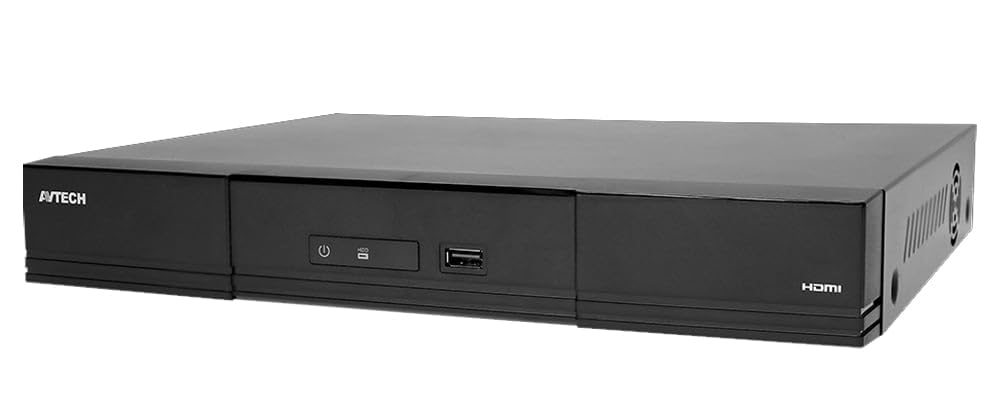
פיגורע 1: פראָנט view of the Avtech DGD2017AX 16-Channel XVR Pentabrid Video Recorder. This image shows the compact design and front panel indicators of the device.
3. סעטאַפּ און ייַנמאָנטירונג
Before beginning installation, ensure all components are present and undamaged. It is recommended to install the XVR in a secure, well-ventilated area, away from direct sunlight, heat sources, and moisture.
3.1 פּעקל אינהאַלט
באַשטעטיקן אַז דיין פּעקל כּולל די פאלגענדע זאכן:
- Avtech DGD2017AX XVR Unit
- Power Adapter (12V 5Ah)
- באַניצער מאַנואַל (דעם דאָקומענט)
- Mounting Screws (if applicable for HDD installation)
- Remote Control (optional, if included)
- וסב מאַוס
3.2 ייַזנוואַרג קאַנעקשאַנז
- פֿאַרבינדן קאַמעראַס: Connect your analog HD, TVI, CVI, or 960H cameras to the BNC video input ports on the rear panel. For IP cameras, ensure they are connected to the same network as the XVR.
- פֿאַרבינדן דיספּליי: Connect a monitor to the XVR using either the VGA or HDMI output port. For 4K resolution, use the HDMI output with a compatible 4K monitor.
- פאַרבינדן נעץ: Connect an Ethernet cable from the XVR's LAN port to your network router or switch.
- פאַרבינדן וסב דעוויסעס: Plug in the included USB mouse to a USB port for local control. Additional USB devices (e.g., for backup) can be connected to other available USB ports.
- אינסטאַלירן האַרט דרייוו (אפציאָנעל): If not pre-installed, open the XVR casing, connect the SATA data and power cables to a compatible 3.5-inch surveillance hard drive, and secure it with screws. Close the casing.
- פאַרבינדן מאַכט: Connect the 12V 5Ah power adapter to the XVR's power input port, then plug the adapter into a power outlet. The device will power on automatically or via the front panel power button.
3.3 ערשט קאַנפיגיעריישאַן
Upon first power-on, the system will guide you through an initial setup wizard. This typically includes setting the date/time, network settings, and creating an administrator password. Follow the on-screen prompts.
4. אַפּערייטינג ינסטרוקטיאָנס
This section covers the basic operation of the Avtech DGD2017AX XVR, including live view, recording, playback, and remote access.
4.1 לעבן View
After successful setup, the XVR will display the live feed from connected cameras on the connected monitor. You can switch between single-camera view, מולטי-קאַמעראַ גריד view, and use the digital zoom function (2x) as needed.
4.2 רעקאָרדינג פאַרוואַלטונג
The XVR supports various recording modes:
- מאַנואַל רעקאָרדינג: אָנהייבן און אָפּשטעלן רעקאָרדינג מאַנועל.
- טיימער רעקאָרדינג: Schedule recording for specific times and days.
- רעקאָרדינג פון באַוועגונג דעטעקטיאָן: Recording starts automatically when motion is detected in the configured areas.
- שרעק רעקאָרדינג: Recording triggered by external alarm inputs (if connected).
Configure recording settings, including resolution, frame rate, and quality, through the system's menu interface.
4.3 פּלייבאַק
אַקסעס רעקאָרדעד פאָאָtage through the playback menu. You can search by date, time, and event type. The system allows for fast forward, rewind, and frame-by-frame playback.
4.4 רימאָוט אַקסעס
The Avtech DGD2017AX supports remote viewing and management:
- Web בלעטערער: עפענען אַ קאַמפּאַטאַבאַל web browser (Windows Edge, Google Chrome, Mozilla Firefox, Opera on Windows 10+; Google Chrome, Mozilla Firefox on Mac) and enter the XVR's IP address or domain name. Log in with your credentials.
- Mobile App (EagleEyes): Download the "EagleEyes" app from the iOS App Store or Google Play Store. Add your XVR device using its ID or IP address. The app provides live view, playback, and Push Video/Status notifications.
Ensure your network is properly configured for remote access, including port forwarding if necessary, or use cloud services provided by Avtech for easier setup.
5. וישאַלט
Regular maintenance ensures the longevity and optimal performance of your Avtech DGD2017AX XVR.
- רייניקונג: Periodically clean the exterior of the XVR with a soft, dry cloth. Do not use liquid or aerosol cleaners. Ensure ventilation openings are free from dust and obstructions.
- Firmware דערהייַנטיקונגען: Check the official Avtech website for firmware updates. Keeping your firmware updated can improve performance, add new features, and enhance security. Follow the update instructions carefully to avoid damaging the device.
- האַרט דרייוו געזונט: Monitor the health of your hard drive through the system's menu. Replace the hard drive if any errors or warnings are reported to prevent data loss.
- שפּריכוואָרט זיכערהייט: Regularly change your administrator password and use strong, unique passwords to protect your system from unauthorized access.
6. טראָובלעשאָאָטינג
This section addresses common issues you might encounter with your Avtech DGD2017AX XVR.
| פּראָבלעם | מעגלעך סיבה | לייזונג |
|---|---|---|
| קיין ווידעא ארויסגאנג אויף מאָניטאָר. | Loose cable connection, incorrect input selected on monitor, XVR not powered on. | Check VGA/HDMI cable connections. Ensure monitor is set to the correct input source. Verify XVR power. |
| קיין קאַמעראַ בילד. | Camera not powered, cable issue, incorrect camera type selected, IP camera not configured. | Check camera power and video cables. Ensure camera is compatible with XVR. For IP cameras, verify network connection and configuration. |
| Cannot access XVR remotely. | Network configuration issues, incorrect IP address/port, firewall blocking. | Verify network cable connection. Check XVR's IP address and port settings. Ensure port forwarding is correctly configured on your router or use Avtech's cloud service. Disable local firewall temporarily for testing. |
| די רעקאָרדירונג אַרבעט נישט. | Hard drive not installed/formatted, recording schedule not set, motion detection not configured. | Ensure a hard drive is installed and formatted. Check recording schedule and motion detection settings. Verify hard drive health. |
If you encounter issues not listed here or if the suggested solutions do not resolve the problem, please contact Avtech technical support.
7. ספּעסאַפאַקיישאַנז
| שטריך | דעטאַל |
|---|---|
| מאָדעל | DGD2017AX |
| ווידעא אַרייַנשרייַב | 16 Channels (Pentabrid: Analog HD / TVI / CVI / Analog HD / 960H) |
| ווידעא קאַמפּרעשאַן | ה.265 |
| ווידעא רעזולטאַט | BNC, VGA, HDMI (4K2K display) |
| אַנאַלאָג האַכלאָטע | 8MP Lite / 5MP / 5MLITE / 4MP / 4MLITE / FHD (1080P) / HD / 960H / Frame / CIF |
| IP Resolution | 2592 x 1944 (5MP) / 2048 x 1536 (3MP) / 1920 x 1080 (FHD) / 1280 x 720 (HD) / 720 x 480 / 352 x 240 |
| Max. Analog Recording Speed | Up to 112 IPS @ 8MP Lite, 96 IPS @ 5MP, 120 IPS @ 4MP, 240 IPS @ FHD (1080P) |
| Max. IP Recording Speed | Up to 480 IPS @ 2592 x 1944 (5MP) / 2048 x 1536 (3MP) / 1920 x 1080 |
| רעקאָרדינג מאָדעס | Manual / Timer / Motion / Alarm / Remote Control |
| באַוועגונג דעטעקטיאָן שטח | 16 × 12 grids per channel |
| געשעעניש אָנזאָג | Push Video (1CH) / Push Status / FTP / E-mail |
| דיגיטאַל פארגרעסער | 2x |
| PTZ שטיצן | יא |
| Remote Access (PC) | Windows Edge, Google Chrome, Mozilla Firefox & Opera on Windows 10+; Google Chrome & Mozilla Firefox on MAC |
| מאָביל סערוויילאַנס אַפּ | EagleEyes (iOS & Android) with Push Video (16 channels) & Push Status |
| מאַקס. אָנליין יוזערז | 40 |
| מאַכט צושטעלן | 12 וו 5 אַה |
| Dimensions (L x P x A) | 319.5 מם רענטגענ 254.9 מם רענטגענ 52 מם |
| ווייכווארג דערהייַנטיקונגען געראַנטיד ביז | אומבאַקאַנט |
8. וואָראַנטי און שטיצן
For warranty information, please refer to the warranty card included with your product or visit the official Avtech website. Avtech provides technical support for its products. If you require assistance with installation, configuration, or troubleshooting, please contact Avtech customer service through their official channels. Ensure you have your product model number (DGD2017AX) and serial number ready when contacting support.
פֿאַר די לעצטע אינפֿאָרמאַציע און שטיצע רעסורסן, ביטע באַזוכט: www.avtech.com.tw