
1. הקדמה
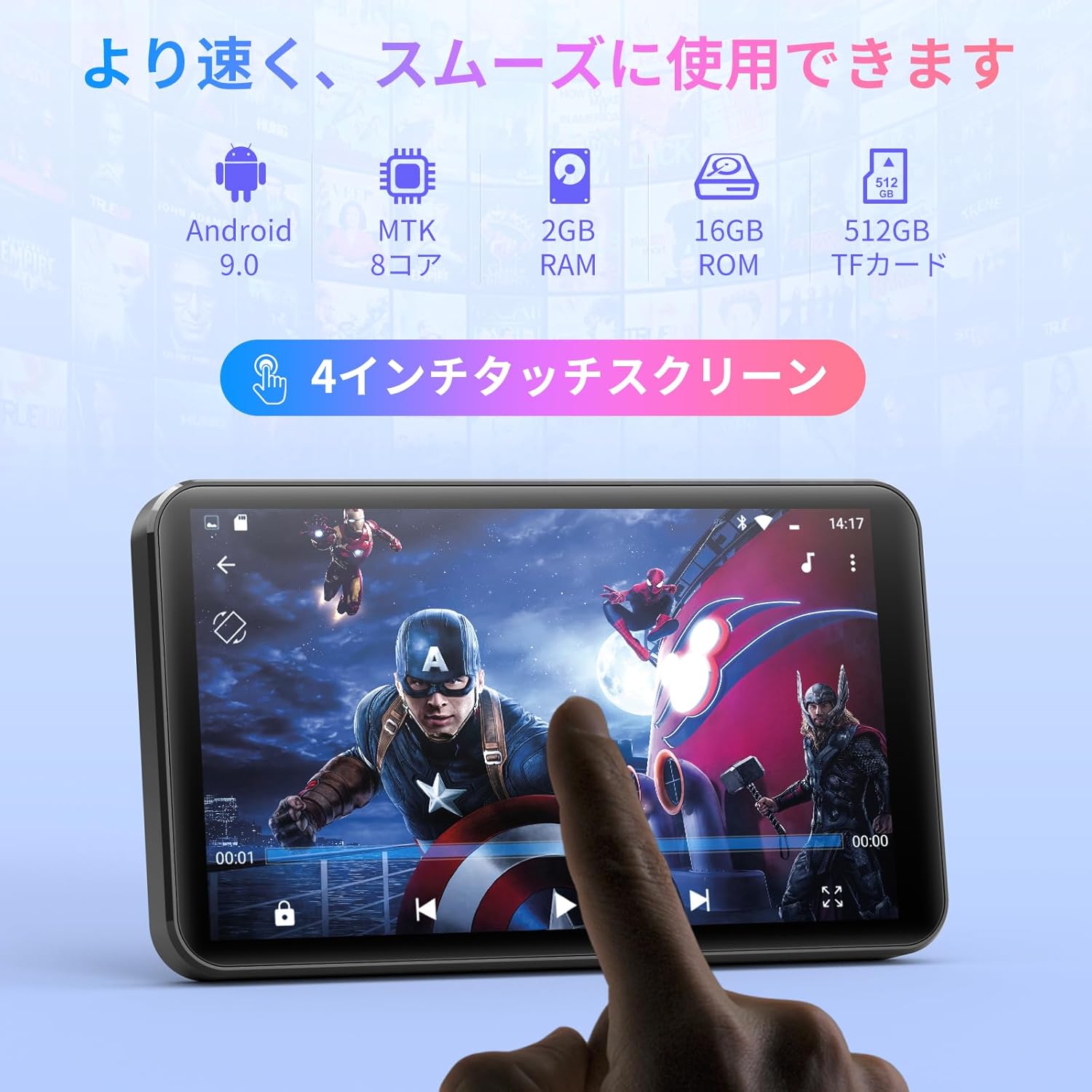
Thank you for choosing the MECHEN H1-Pro Bluetooth MP3 Player with WiFi. This device is designed to provide a versatile and enjoyable audio and video experience. Featuring a 4-inch touchscreen and running on Android 9.0, it supports various applications and connectivity options. This manual provides essential information for setting up, operating, and maintaining your device.
2. פּעקל אינהאַלט
באַשטעטיקט אַז אַלע זאכן וואָס זענען אויסגערעכנט אונטן זענען אַרייַנגערעכנט אין אייער פּעקל. אויב עפּעס פעלנדיק אָדער צעבראָכן, ביטע קאָנטאַקטירט קונה שטיצע.
- MECHEN H1-Pro MP3 Player
- וסב קאַבלע
- כעדפאָונז
- פּראַטעקטיוו פילם
- פּראַטעקטיוו קאַסע
- באַניצער מאַנואַל

Image: The MECHEN H1-Pro MP3 Player displayed with its accessories, including a USB cable, headphones, protective film, and a clear protective case.
3. דיווייס איבערview
Familiarize yourself with the physical components and controls of your MECHEN H1-Pro MP3 Player.
בילד: פראָנט view of the MECHEN H1-Pro MP3 Player, showcasinזײַן 4-אינטש טאָוטשסקרין דיספּליי.

בילד: זייט view of the MECHEN H1-Pro MP3 Player, highlighting the power button and volume controls.

בילד: אויבן און אונטן views of the MECHEN H1-Pro MP3 Player, illustrating the USB-C charging port, headphone jack, and Micro SD card slot.
4. סעטאַפּ
4.1 ערשט טשאַרדזשינג
Before first use, fully charge the device. Connect the provided USB cable to the player's USB-C port and the other end to a USB power adapter (not included) or a computer's USB port. The charging indicator will show the charging status.
4.2 מאַכט אויף / אַוועק
- צו מאַכט אויף: Press and hold the Power button on the side of the device until the screen lights up.
- צו מאַכט אַוועק: Press and hold the Power button until a power-off menu appears on the screen. Select 'Power Off' to shut down the device.
4.3 קאַנעקטינג צו Wi-Fi
To access online features and download apps, connect your device to a Wi-Fi network.
- גיין צו סעטטינגס > נעץ & אינטערנעט > ווי-פי.
- טוישן Wi-Fi On.
- אויסקלייבן אייער געוואונטשענע Wi-Fi נעץ פון דער ליסטע.
- אַרייַן די פּאַראָל אויב געבעטן און צאַפּן פאַרבינדן.

Image: The MECHEN H1-Pro MP3 Player screen showing Wi-Fi settings and available networks.
4.4 ינסערטינג אַ מיקראָ סד קאָרט
The device supports Micro SD cards for expanded storage. Locate the Micro SD card slot on the side of the device. Gently insert the card with the gold contacts facing down until it clicks into place.
5. אַפּערייטינג ינסטרוקטיאָנס
5.1 Basic Navigation (Touchscreen)
The MECHEN H1-Pro features a responsive 4-inch touchscreen. Use standard touch gestures:
- צאַפּן: צו אויסקלײַבן אַן אייטעם אָדער עפֿענען אַן אַפּ.
- לאַקכענען: To scroll through lists or switch between screens.
- קניפּ: To zoom in or out (in supported applications).
5.2 מוזיק פּלייבאַק
The device supports various audio formats including MP3, WAV, WMA, APE, OGG, and FLAC for high-fidelity music playback.
- עפענען די מוזיק אַפּלאַקיישאַן.
- Browse your music library by artist, album, song, or playlist.
- Tap on a song to begin playback.
- Use the on-screen controls for play/pause, skip tracks, and volume adjustment.

Image: The MECHEN H1-Pro MP3 Player screen showing a music playback interface with album art and controls.
5.3 ווידעא פּלייַבאַקק
Enjoy 720P/1080P full-format HD video playback without conversion. Supported formats include RM, RMVB, FLV, MP4, DAT, MKV, MPG, MOV, TS, etc.
- עפענען די ווידעא שפּילער אַפּלאַקיישאַן.
- אויסקלייַבן אַ ווידעא file from your storage.
- Tap to play. Use on-screen controls for playback options.

Image: The MECHEN H1-Pro MP3 Player screen showing a video playing in full-screen mode.
5.4 בלועטוט קאָנעקטיוויטי
Connect to Bluetooth headphones, speakers, or other compatible devices.
- גיין צו סעטטינגס > קאָננעקטעד דעוויסעס > בלועטאָאָטה.
- באַשטימען בלועטאָאָטה On.
- זיכער מאַכן אַז אייער בלועטוט אַקסעסאָרי איז אין פּערינג מאָדע.
- Select the accessory from the list of available devices to pair.

Image: The MECHEN H1-Pro MP3 Player shown alongside a pair of wireless headphones, indicating Bluetooth connectivity.
5.5 Wi-Fi Connectivity & App Downloads
With Android 9.0 and Wi-Fi, you can download and install various applications from the Google Play Store.
- Ensure the device is connected to Wi-Fi (see Section 4.3).
- עפענען די שפּיל סטאָר אַפּלאַקיישאַן.
- קלאָץ אין מיט דיין Google חשבון.
- זוכן פֿאַר and download desired applications (e.g., Spotify, Amazon Music, Audible).

Image: The MECHEN H1-Pro MP3 Player screen showing a variety of installed applications, including music streaming services and web בראַוזערז.
5.6 עפעם ראַדיאָ
הערט צו אייערע באַליבסטע FM ראַדיאָ סטאַנציעס.
- Connect wired headphones to the 3.5mm audio jack; they act as the antenna.
- עפענען די עפעם ראַדיאָ אַפּלאַקיישאַן.
- Use the on-screen controls to scan for stations or tune manually.
5.7 File פאַרוואַלטונג
ניצן די געבויט-אין file מענעדזשער צו אָרגאַניזירן דיין files on internal storage and the Micro SD card.
- עפענען די File פאַרוואַלטער אַפּלאַקיישאַן.
- Navigate through folders to view, copy, move, or delete files.
6. וישאַלט
6.1 רייניקונג
Wipe the device with a soft, dry, lint-free cloth. Do not use liquid cleaners or abrasive materials.
6.2 סטאָרידזש
Store the device in a cool, dry place away from direct sunlight and extreme temperatures. If storing for an extended period, ensure the battery is partially charged (around 50%) to prolong its lifespan.
6.3 באַטערי קער
To maximize battery life, avoid fully discharging the battery frequently. Use the original charging cable for optimal performance.
7. טראָובלעשאָאָטינג
| פּראָבלעם | מעגלעך לייזונג |
|---|---|
| די מיטל טוט נישט מאַכט אויף. | Ensure the battery is charged. Connect to a charger for at least 30 minutes. If unresponsive, perform a hard reset by holding the power button for 10-15 seconds. |
| קענען ניט פאַרבינדן צו ווי-פי. | Check if Wi-Fi is enabled. Verify the Wi-Fi password. Restart your router and the MP3 player. |
| בלוטוט דעווייס נישט פארבינדן. | Ensure Bluetooth is enabled on both devices and the accessory is in pairing mode. Move devices closer together. |
| אַפּפּס זענען פּאַמעלעך אָדער קראַכן. | Close unnecessary background apps. Clear app cache (Settings > Apps > [App Name] > Storage > Clear Cache). Restart the device. Too many apps can lead to slowdowns. |
| קיין קלאַנג פֿון די כעדפאָונז. | קאָנטראָלירט די פֿאַרבינדונג פֿון די קאָפּהערער. מאַכט זיכער אַז די וואָלומען איז נישט שטיל אָדער צו נידעריק. פּרובירט מיט אַנדערע קאָפּהערער. |
8. ספּעסאַפאַקיישאַנז
| שטריך | דעטאַל |
|---|---|
| סאָרט | MECHEN |
| מאָדעל נאָמען | H1-Pro (EU-H11) |
| אָפּערייטינג סיסטעם | אַנדרויד 9.0 |
| פּראַסעסער | MTK 8-קאָר |
| באַראַן | 2 גיגאבייט |
| אינערלעכער סטאָרידזש | 16 גיגאבייט |
| יקספּאַנדאַבאַל סטאָרידזש | מיקראָ סד (אַרויף צו 512 גיגאבייט) |
| פאַרשטעלן גרייס | 4 אינטשעס |
| סקרין טעכנאָלאָגיע | לקד |
| קאַנעקטיוויטי | בלועטוט, יו-עס-בי, וויי-פיי |
| ספּעציעלע פֿעיִקייטן | FM Radio, Equalizer, Video Playback |
| שטיצט אַודיאָ פֿאָרמאַטירונגען | MP3, WAV, WMA, APE, OGG, FLAC |
| שטיצט ווידעא פֿאָרמאַטירונגען | RM, RMVB, FLV, MP4, DAT, MKV, MPG, MOV, TS, אאז"וו. |
| באַטאַרייע קאַפּאַציטעט | 2000 מאַה |
| באַטעריע לעבן (מוזיק) | אַרויף צו 50 שעה |
| באַטעריע לעבן (ווידעא) | אַרויף צו 8 שעה |
| דימענשאַנז (די רענטגענ וו x ה) | 10.5 X 6.2 X 1.2 סענטימעטער (4.14 X 2.44 X 0.46 אינטשעס) |
| פּונקט וואָג | 97.5 גראַמז (3.45 אַז) |

Image: The MECHEN H1-Pro MP3 Player shown with its physical dimensions and weight specifications.
9. וואָראַנטי און שטיצן
For warranty information and technical support, please refer to the warranty card included in your package or visit the official MECHEN webזייטל. האַלט אייער קויף קוויטל ווי אַ באַווייַז פון קויפן פֿאַר וואָראַנטי קליימז.