
פּראָדוקט איבערview
The Studebaker SB3720 is a portable and compact audio player designed for versatile music playback. It combines classic CD functionality with modern features such as Bluetooth connectivity, MP3 playback via USB, and an FM stereo radio. Its built-in rechargeable battery ensures portability, while the clear LCD display and intuitive controls provide ease of use. This unit also includes an auxiliary input and a headphone jack for private listening or connecting external audio sources.
וואָס איז אין די קעסטל
- SB3720 CD Player
- באַניצער מאַנואַל
- Type-C Charging Cable & USB-C Adaptor
שליסל פֿעיִקייטן
- בלועטוט קאָנעקטיוויטי פֿאַר וויירלעס מוזיק סטרימינג
- MP3 CD and CD-R/RW Compatible CD Player
- עפעם סטערעאָ ראַדיאָ
- USB MP3 Player for digital audio files
- Built-in Rechargeable Battery for portability
- LCD Display for clear information
- 2.0 ספּיקערז סיסטעם
- Aux-In & Headphone Jacks
- Autoplay & Autostop upon CD Door Close and Open
Product Layout and Controls

פיגורע 1: שפּיץ View. This image displays the top of the SB3720 unit, highlighting the CD compartment with its clear cover, the control buttons for playback and mode selection, the volume knob, and the integrated stereo speakers.

פיגור 2: הינטערשטע פּאַנעל. דאס view shows the rear connections of the SB3720, including the USB-MP3 port for playing files from a USB drive, the AUX IN jack for external audio devices, the DC IN 5V==1A port for power and charging, and the RESET button.
קאָנטראָל פּאַנעל פאַנגקשאַנז:
- מאַכט / וואָלום קנופּ: Rotate to adjust volume, press to power on/off.
- מאָדע קנעפּל: Cycles through CD, Bluetooth, FM Radio, USB, and AUX modes.
- שפּיל / פּויזע קנעפּל: סטאַרץ אָדער פּאָזאַז פּלייבאַק.
- האַלטן קנעפּל: סטאַפּס פּלייבאַק.
- איבערשפרינגען פאָרויס/צוריק קנעפּלעך: Skips tracks or tunes radio frequencies.
- איבערחזרן קנעפּל: Repeats current track or all tracks.
- MEM/M+ Button: Used for programming CD tracks or saving FM radio stations.
- +10 קנעפּל: Skips forward by 10 tracks on CD/USB or for quick tuning.
- Bluetooth/Pair Button: Activates Bluetooth mode and initiates pairing.
ערשט סעטאַפּ
טשאַרדזשינג די באַטאַרייע
- Connect the provided Type-C charging cable to the DC IN 5V==1A port on the rear of the unit.
- Plug the USB-C adaptor into a standard wall outlet.
- The unit will begin charging. The battery indicator on the LCD display will show charging status.
- A full charge typically takes several hours. Disconnect the charger once fully charged for optimal battery life.
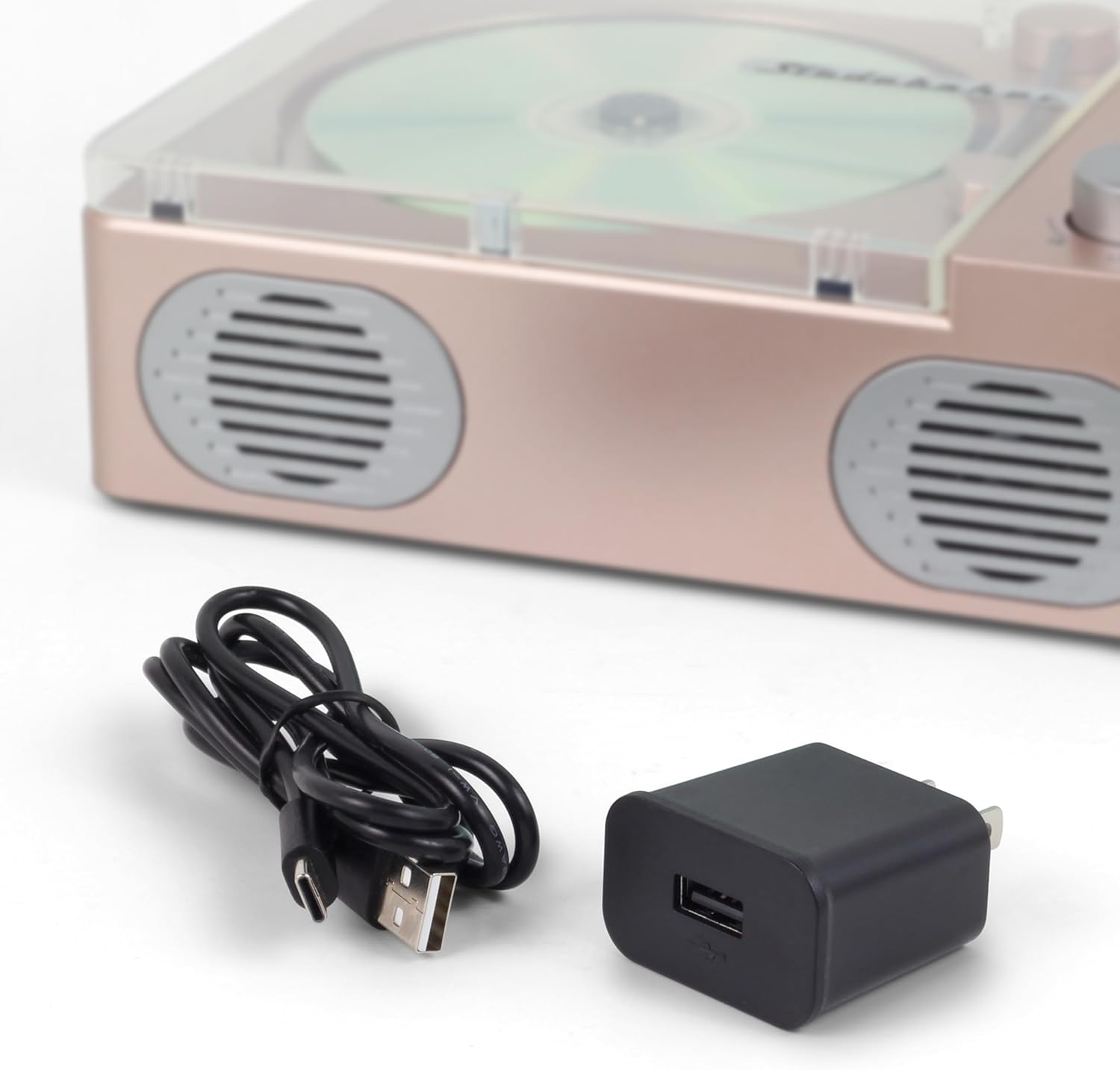
Figure 3: Charging Accessories. The image shows the Type-C charging cable and USB-C adaptor used to power and charge the SB3720 unit.
מאַכט אויף / אַוועק
- To power on the unit, press and hold the Power/Volume knob for a few seconds.
- To power off, press and hold the Power/Volume knob again until the display turns off.
אַפּערייטינג ינסטראַקשאַנז
קאָמפּאַקטדיסק פּלייַבאַקק
- Gently lift the clear CD compartment cover.
- Place a CD (standard audio CD, MP3 CD, or CD-R/RW) onto the center spindle with the label side facing up.
- Close the CD compartment cover. The unit will automatically detect the CD and begin playback.
- Use the Play/Pause, Stop, Skip Forward/Backward, and Repeat buttons to control playback.
- אַדזשאַסטירן דעם באַנד מיטן מאַכט/וואָלומען קנעפּל.
ווידעא 1: פּראָדוקט פֿעיִטשערס איבערview. This video demonstrates various features of the Studebaker SB3720, including CD playback, FM radio, Bluetooth connectivity, and its portable design. It shows how to insert a CD, switch modes, and connect via Bluetooth.
בלועטאָאָטה מאָדע
- Press the Mode button until "bt" appears on the LCD display, indicating Bluetooth mode.
- The unit will automatically enter pairing mode, and "bt" will flash.
- אויף אייער בלוטוט-פארשטארקטע דעווייס (סמאַרטפאָן, טאַבלעט, אאז"וו), אַקטיווירט בלוטוט און זוכט פֿאַר פֿאַראַן דעווייסעס.
- Select "SB3720" from the list of devices to pair. Once connected, "bt" will stop flashing and remain solid.
- You can now stream audio wirelessly from your device to the SB3720.
עפעם ראַדיאָ
- Press the Mode button until "rad" appears on the LCD display, indicating FM radio mode.
- To automatically scan and save stations, press and hold the Play/Pause button. The unit will scan and store available FM stations.
- To manually tune, use the Skip Forward/Backward buttons to adjust the frequency.
- To recall saved stations, press the MEM/M+ button and then use the Skip Forward/Backward buttons to navigate through presets.
יו-עס-בי MP3 שפּיל
- אַרייַנלייגן אַ וסב בליץ פאָר מיט mp3 files into the USB-MP3 port on the rear of the unit.
- Press the Mode button until "USB" appears on the LCD display.
- די אַפּאַראַט וועט אויטאָמאַטיש דעטעקטירן און אָנהייבן שפּילן MP3 fileס פון די USB דרייוו.
- Use the Play/Pause, Stop, Skip Forward/Backward, and Repeat buttons to control playback.
אַגזיליערי אַרייַנשרייַב
- Connect an external audio device (e.g., an older MP3 player, smartphone without Bluetooth) to the AUX IN jack on the rear of the unit using a 3.5mm audio cable (not included).
- Press the Mode button until "AUX" appears on the LCD display.
- Start playback on your connected external device. The audio will be played through the SB3720 speakers.
- Adjust the volume using the Power/Volume knob on the SB3720 and/or the volume control on your external device.
כעדפאָון נוצן
- Plug a standard 3.5mm headphone jack into the headphone port on the rear of the unit.
- Audio will automatically switch from the speakers to the headphones.
- אַדזשאַסטירן דעם באַנד מיטן מאַכט/וואָלומען קנעפּל.
זאָרגן און וישאַלט
- רייניקונג: ניצט אַ ווייכע, טרוקענע שטאָף צו רייניקן די אויסערלעכע זייט פון דעם אַפּאַראַט. ניצט נישט קיין שרײַבנדיקע רייניגער אָדער סאָלווענטן.
- CD באַהאַנדלונג: Handle CDs by their edges. Keep them clean and free of scratches. Use a soft, lint-free cloth to wipe CDs from the center outwards.
- סטאָרידזש: When not in use for extended periods, store the unit in a cool, dry place.
- באַטערי: To maintain the rechargeable battery's life, avoid fully discharging it frequently and recharge it periodically if stored for a long time.
טראָובלעשאָאָטינג גייד
| פּראָבלעם | מעגלעך סיבה | לייזונג |
|---|---|---|
| דער אַפּאַראַט טוט נישט מאַכט אויף | די באַטעריע איז אויסגעשעפּט; די מאַכט קאַבל איז נישט ריכטיק פארבונדן. | Charge the unit using the provided Type-C cable and adaptor. Ensure the power cable is securely connected. |
| סי-די שפּילט נישט אָדער שפּרינגט איבער | CD is dirty, scratched, or inserted incorrectly; CD compartment cover is open. | Clean the CD with a soft cloth. Ensure the CD is inserted correctly with the label side up. Close the CD compartment cover completely. |
| קיין געזונט פון ספּיקערז | Volume is too low; Headphones are connected; Incorrect mode selected. | Increase the volume. Disconnect headphones. Ensure the correct mode (CD, Bluetooth, FM, USB, AUX) is selected. |
| בלוטוט דעווייס קען נישט פארבינדן | Unit is not in pairing mode; Device is too far; Bluetooth is off on your device. | Ensure the SB3720 is in Bluetooth pairing mode ("bt" flashing). Move your device closer to the unit. Enable Bluetooth on your device and search for "SB3720". |
| נעבעך עפעם ראַדיאָ אָפּטראָג | Weak signal; Unit's position. | Adjust the position of the unit to improve reception. Try moving it closer to a window or away from other electronic devices. |
טעכניש ספּעסאַפאַקיישאַנז
| שטריך | באַשרייַבונג |
|---|---|
| פּראָדוקט דימענשאַנז | 8.27 X 6.3 X 2.75 אינטשעס |
| פּונקט וואָג | 2.1 פונט |
| מאָדעל נומער | SB3720 |
| סאָרט | סטודבעקער |
| קאַנעקטיוויטי טעכנאָלאָגיע | בלועטאָאָטה |
| ספּעציעלע פֿעיִקייטן | Auto Power-Off, Bluetooth, Lightweight, Portable, Rechargeable |
| מאַכט אַרייַנשרייַב | DC 5V, 1A (USB-C) |
| שטיצט מידיאַ | CD, CD-R/RW, MP3 CD, USB (MP3) |
| ראַדיאָ טונער | עפעם סטערעאָ |
וואָראַנטי און קונה שטיצן
For warranty information, please refer to the warranty card included with your product or contact Studebaker customer support directly. If you encounter any issues not covered in this manual or require further assistance, please reach out to the manufacturer's customer service department. Contact details can typically be found on the product packaging or the official Studebaker webפּלאַץ.