
iKF iKF Alive
iKF Alive Wireless Noise-Cancelling Neckband Earphones User Manual
Model: iKF Alive
1. פּראָדוקט איבערview
The iKF Alive Wireless Noise-Cancelling Neckband Earphones offer an immersive audio experience with advanced features. Designed for comfort and durability, these earphones are suitable for daily use, sports, and gaming.
- אַקטיוו ראַש קאַנסאַליישאַן: Up to -49dB noise reduction for undisturbed listening.
- Magnetic Neckband Design: Prevents loss and offers convenient storage.
- IPX5 וואָטערפּרוף: Resistant to sweat and rain, ideal for workouts.
- עקסטענדעד שפּיל צייט: Up to 20 hours of playback (16 hours with ANC).
- הי-פיי סטערעאָ געזונט: Equipped with 13mm composite speakers for superior audio quality.
- נידעריק לייטאַנס מאָדע: Ensures seamless audio synchronization for gaming and videos.
- מולטיפּוינט קשר: Connects to two devices simultaneously for easy switching.

Figure 1: iKF Alive Wireless Noise-Cancelling Neckband Earphones.
2. וואָס איז אין דער קעסטל
ביטע טשעק די אינהאַלט פון די פּאַקעט ווען איר עפֿנט עס אויס:
- iKF Alive Earphones x 1
- וסב טשאַרדזשינג קאַבלע רענטגענ 1
- באַניצער מאַנואַל x 1
3. סעטאַפּ
3.1 אויפלאָדן די אויערפאָונז
Before first use, fully charge the earphones. A full charge takes approximately 1.5 hours.
- Connect the provided USB charging cable to the charging port on the neckband and a power source.
- די געפירט גראדן וועט ווייַזן די טשאַרדזשינג סטאַטוס.
- Once fully charged, the earphones provide up to 20 hours of playtime (16 hours with Active Noise Cancellation enabled).

Figure 2: Battery life and charging indication.
3.2 בלועטאָאָטה פּערינג
The iKF Alive earphones use Bluetooth 5.4 for stable connectivity.
- זיכער מאַכן אַז די אויערפאָונז זענען אויפגעלאָדן און אויסגעלאָשן.
- דריק און האלט דעם מולטי-פונקציע קנעפּל ביז דער LED אינדיקאַטאָר בלינקט בלוי און רויט, וואָס ווײַזט אויף פּערינג מאָדע.
- אויף אייער דעווייס (סמאַרטפאָן, טאַבלעט, אאז"וו), אַקטיווירט בלועטוט און זוכט פֿאַר פֿאַראַן דעווייסעס.
- Select "iKF Alive" from the list of devices to connect.
- אַמאָל קאָננעקטעד, די געפירט גראדן וועט ווערן האַרט בלוי.
3.3 מולטיפונקט פֿאַרבינדונג
The earphones support connecting to two devices simultaneously.
- Pair the earphones with the first device as described above.
- דיאַקטיווירן בלועטוט אויף דער ערשטער דעווייס.
- Put the earphones back into pairing mode and connect to the second device.
- Re-enable Bluetooth on the first device. The earphones should automatically connect to both devices.

Figure 3: Multipoint connection via the iKF App.
4. אַפּערייטינג ינסטרוקטיאָנס
4.1 יקערדיק קאָנטראָלס
The earphones feature a 3-button control panel on the neckband for easy management of music and calls.
- מאַכט אויף / אַוועק: דריק און האַלט דעם מולטי-פונקציע קנעפּל.
- שפּיל / פּויזע: דריק איין מאל דעם מולטי-פונקציע קנעפל.
- באַנד אַרויף / אַראָפּ: דריק די '+' אדער '-' קנעפלעך.
- ווייַטער / פרייַערדיק שפּור: לאַנג דריקן די '+' אָדער '-' קנעפּלעך.
- ענטפֿערן / סוף רופן: דריק איין מאל דעם מולטי-פונקציע קנעפל.
- אָפּוואַרפן רופן: Long press the multi-function button.
- אַקטאַווייט קול אַססיסטאַנט: דריקט צוויי מאָל דעם מולטי-פונקציע קנעפּל.
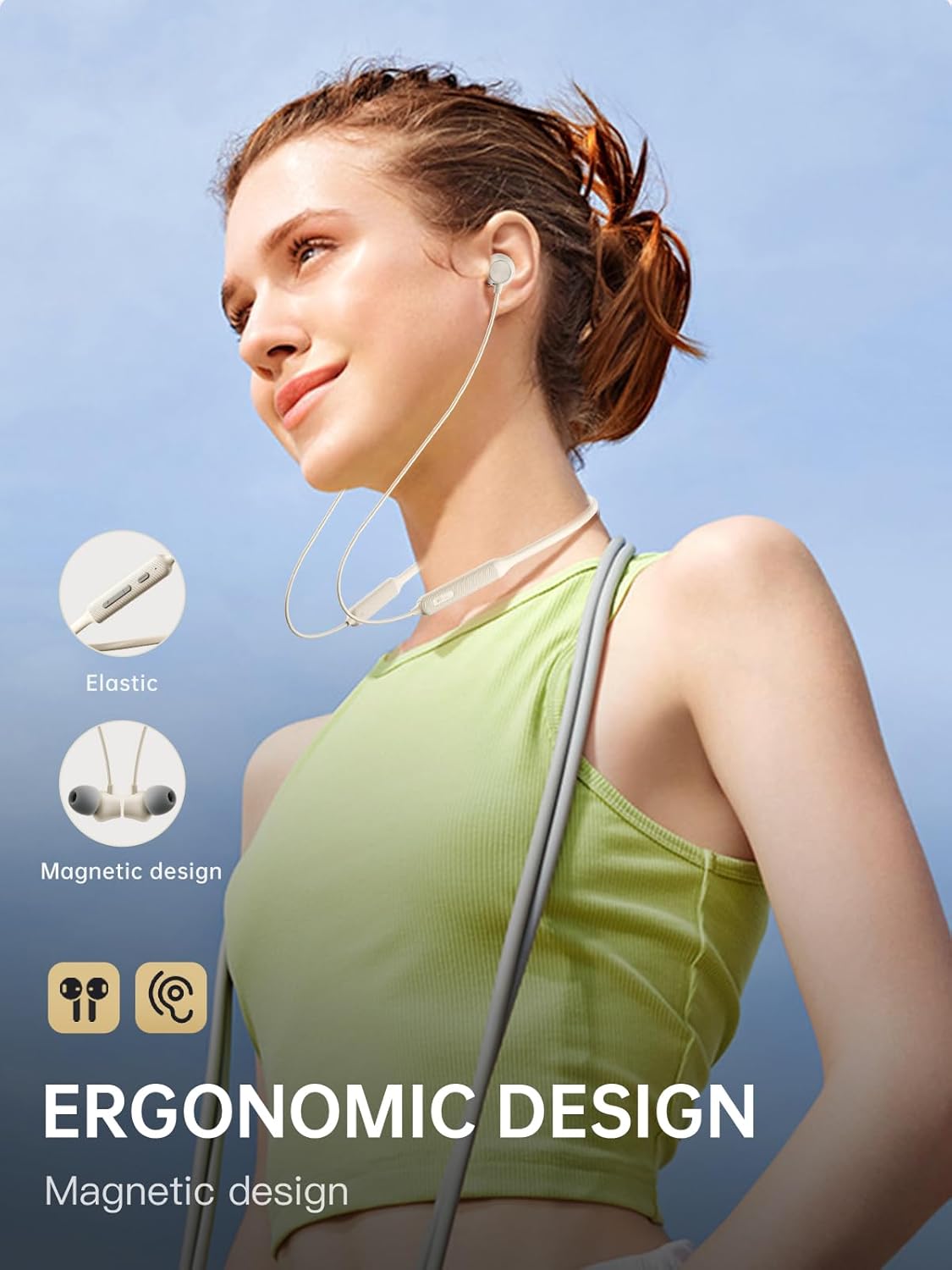
Figure 4: Ergonomic design and magnetic earbud feature.
4.2 אַקטיוו ראַש קאַנסאַליישאַן (ANC)
The iKF Alive earphones feature up to -49dB Active Noise Cancellation to minimize ambient noise.
- טוישן ANC: Use the dedicated ANC button on the neckband or control via the iKF App.
- The iKF App allows for three adjustable noise reduction gears to suit different environments.

פיגור 5: אַקטיווע ראַש קאַנסאַליישאַן אין אַקציע.
4.3 HiFi Stereo Sound and Low Latency
Experience high-fidelity audio and seamless synchronization.
- The 13mm composite speakers deliver rich, detailed HiFi stereo sound.
- Activate the low latency mode (38ms) for gaming and video streaming to ensure audio and visuals are perfectly synchronized.

Figure 6: Internal structure of the 13mm HiFi speaker driver.
4.4 iKF App Control
Enhance your experience with the iKF App, available for both Android and iOS devices.
- Customize noise cancellation levels.
- Access headphone positioning features.
- Manage in-ear detection settings.
- Configure sleep mode and custom touch controls.
5. וישאַלט
5.1 וואַסער קעגנשטעל
The iKF Alive earphones are IPX5 waterproof, providing protection against sweat and light rain.
- Avoid submerging the earphones in water.
- זיכער מאַכן אַז די דעקל פון די טשאַרדזשינג פּאָרט איז זיכער פֿאַרמאַכט צו פֿאַרמייַדן וואַסער אַרײַנגיין.
- Wipe off any sweat or moisture after use with a soft, dry cloth.

Figure 7: Designed for sports with IPX5 water resistance.
5.2 רייניקונג און סטאָרידזש
- Regularly clean the ear tips and earphone surfaces with a soft, slightly damp שטאָף.
- דו זאלסט נישט נוצן האַרב קעמיקאַלז אָדער אַברייסיוו מאַטעריאַלס.
- האַלט די אויערפאָונז אין אַ קיל, טרוקן אָרט אַוועק פון דירעקט זונשייַן און עקסטרעמע טעמפּעראַטורן.
- The magnetic earbuds help keep the neckband tidy and prevent tangling when not in use.
6. טראָובלעשאָאָטינג
אויב איר טרעפט זיך מיט פראבלעמען, ביטע באציעט זיך צו די פאלגנדע אלגעמיינע לייזונגען:
| פּראָבלעם | מעגלעך לייזונג |
|---|---|
| די אויערפאָונז ווערן נישט אנגעצינדן | זיכער מאַכן אַז די אויערפאָונז זענען גאָר אויפגעלאָדן. |
| קען נישט צוזאמענשטעלן מיטן אפאראט | Make sure earphones are in pairing mode (flashing blue/red). Turn off and on Bluetooth on your device. Forget previous pairings and try again. |
| ניט געזונט אָדער נידעריק באַנד | קאָנטראָלירט די וואָלומען אויף ביידע אויערפאָנען און פֿאַרבונדענע דעווייס. מאַכט זיכער אַז די אויערפאָנען זענען ריכטיק פֿאַרבונדן. |
| ANC אַרבעט נישט עפֿעקטיוו | Ensure ANC is enabled. Adjust ear tips for a secure seal. Clean any debris from the microphone ports. |
| ינטערמיטאַנט קשר | Ensure no obstacles between earphones and device. Move closer to the device. Avoid strong electromagnetic interference. |
אויב די פראבלעם בלייבט, ביטע קאנטאקטירט קאסטומער סופארט.
7. ספּעסאַפאַקיישאַנז
| שטריך | דעטאַל |
|---|---|
| מאָדעל נאָמען | iKF Alive |
| סאָרט | iKF |
| קאַנעקטיוויטי | ווירעלעס (בלוטוט 5.4) |
| אויער פּלייסמאַנט | אין אויער |
| פאָרם פאַקטאָר | האַלדזבאַנד |
| אַקטיוו ראַש קאַנסאַליישאַן | אַרויף צו -49 דב |
| וואַסער קעגנשטעל מדרגה | IPX5 |
| פּלייַטימע | ביז 20 שעה (16 שעה מיט ANC) |
| טשאַרדזשינג צייט | בעערעך. 1.5 שעה |
| אַודיאָ לייטאַנס | 38 מיליסעקאַנדז |
| דרייווער טיפּ | Dynamic Driver (13mm composite speakers) |
| ימפּידאַנס | 32 Ohm |
| קאָנטראָל טיפּ | Button, Touch (via App) |
| ספּעציעלע פֿעיִקייטן | Multipoint Pairing, Noise Cancellation, Fast Charging |
| קאַמפּאַטאַבאַל דעוויסעס | Cellular Phones, Phones |
| מאַטעריאַל | סיליקאָנע |
8. וואָראַנטי און שטיצן
iKF provides a standard warranty for this product. Please refer to the warranty card included in your package for specific terms and conditions.
For technical support, troubleshooting assistance, or warranty claims, please contact iKF customer service through the official webפּלאַץ אָדער דיין זיצער.
Ask a question about this manual
Ask about setup, troubleshooting, compatibility, parts, safety, or missing instructions. Manuals+ will review the question and use this page’s manual context to help answer it.