
1. הקדמה
This manual provides essential information for the installation, operation, and maintenance of your Varstrom 36V 250W E-Bike Conversion Kit. This kit is designed to transform a standard bicycle into an electric bicycle, offering enhanced riding capabilities with a powerful rear hub motor and an intuitive LCD display. Please read this manual thoroughly before installation and use to ensure safe and optimal performance.
2. זיכערקייַט אינפֿאָרמאַציע
Always prioritize safety when operating an electric bicycle. Failure to follow safety guidelines can result in serious injury or damage to the product.
- טראָגן אַ העלם: Always wear an approved bicycle helmet while riding.
- פאר-פאָר קאָנטראָלן: Before each ride, check the brakes, tire pressure, and ensure all connections are secure.
- פאָלגן פאַרקער געזעצן: Follow all local traffic laws and regulations for bicycles and electric bicycles.
- וועטער טנאָים: זייט פארזיכטיג ווען איר פארט אין נאסע אדער שלעכטע וועטער באדינגונגען.
- וואַסער ויסשטעלן: Avoid submerging the motor or electrical components in water.
- פאַכמאַן ינסטאַלירונג: If you are unsure about any installation steps, seek assistance from a qualified bicycle mechanic.
3. פּעקל אינהאַלט
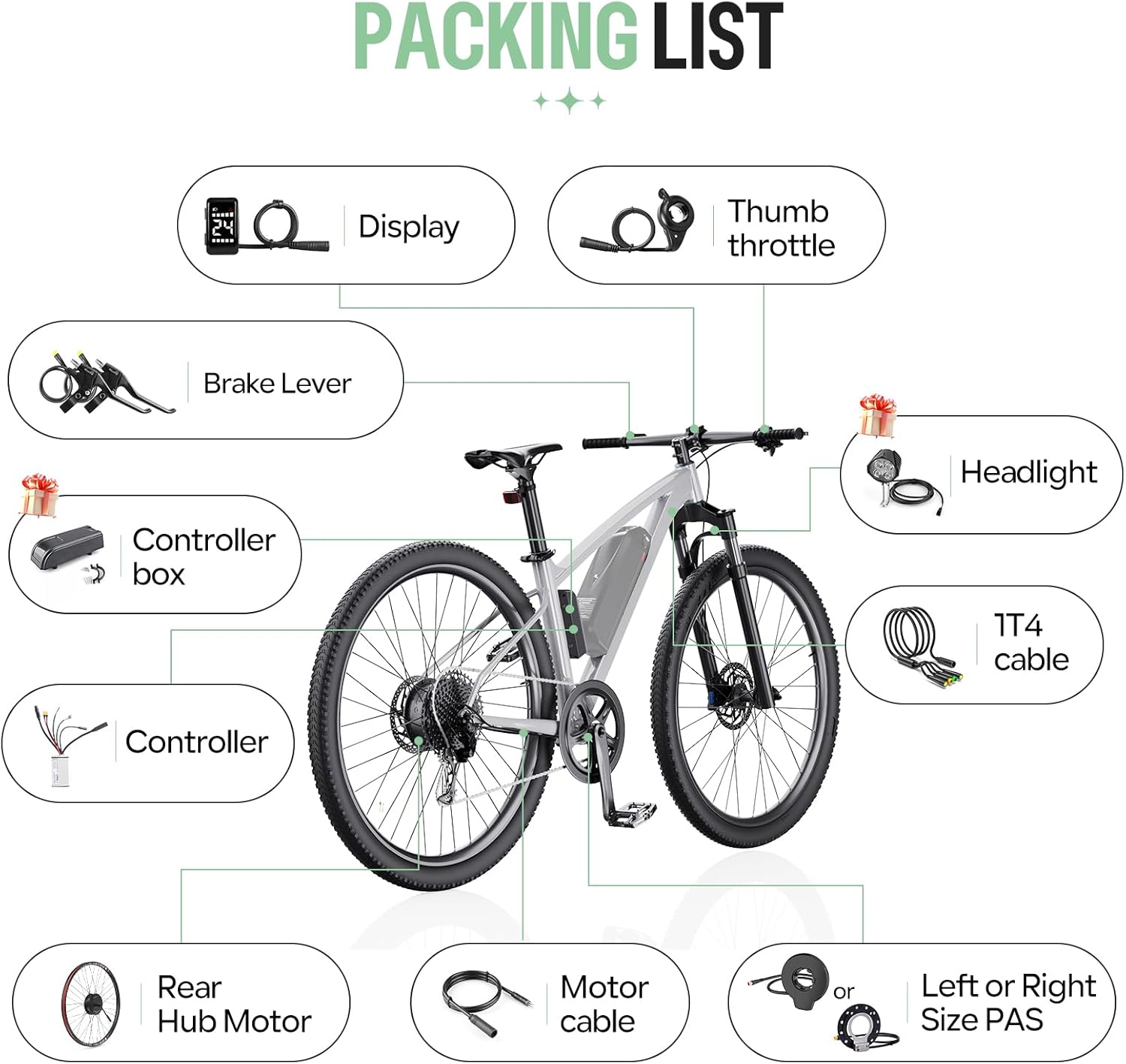
באַשטעטיקן אַז אַלע קאָמפּאָנענטן זענען פאַראַן און נישט געשעדיגט ווען איר עפֿנט דעם פּאַקעט.
- 1 x 36V 250W Rear Hub Motor
- 1 רענטגענ קאָנטראָללער
- 1 x DZ40 LCD Display
- 1 x Pair of Hydraulic Brake Sensors (or Mechanical Brake Levers, depending on selection)
- 1 x Thumb Throttle
- 1 x 1T4 Cable
- 1 x PAS Sensor (Left or Right side)
- Necessary mounting accessories
4. ספּעסאַפאַקיישאַנז
4.1. מאָטאָר ספּעסאַפאַקיישאַנז
- Voltage: 36V
- מאַכט: 250 וו
- מאַקסימום טאָרק: 35 נם
- מאָטאָר טיפּ: Brushless Geared Hub Motor
- עפעקטיווקייַט: ≥78%
- מאַקסימום גיכקייַט: Up to 30 km/h (470 rpm)
- ראָד גרייס קאַמפּאַטאַבילאַטי: 26", 27.5", 28"/29"/700C
4.2. קאָנטראָללער ספּעסאַפאַקיישאַנז
- Voltage: 36V
- מאַכט: 250 וו
- מאַקסימום קראַנט: 14 א
4.3. DZ40 LCD Display Specifications
- פאַרשטעלן גרייס: 1.3-אינטש לקד
- וויזאַביליטי: Clear visibility even in sunlight
- פאַנגקשאַנז: Displays speed, battery status, headlight indicators, PAS level (0-5)
- האַנדלעבאַר דיאַמעטער: 22.2 מם


5. ינסטאַללאַטיאָן גייד
5.1. קאָמפּאַטאַביליטי רעקווייערמענץ
- Rear Dropout (OLD): Your bicycle's rear dropout must be between 135-138 mm.
- טאָרמאָז טיפּ: Compatible with bicycles equipped with disc brakes.
- ראָד גרייס: Ensure you select the correct wheel size (26", 27.5", 28"/29"/700C) for your bicycle.

5.2. ינסטאַלירונג סטעפּס
The conversion kit is designed for straightforward installation. Follow these general steps:
- צוגרייטן דיין וועלאָסיפּעד: Remove the existing rear wheel and any associated components that will be replaced.
- Install the Hub Motor: Mount the new rear hub motor wheel into the bicycle's rear dropout, ensuring it is securely fastened.
- שטעלן די קאָנטראָללער: Find a suitable location on your bike frame for the controller. Secure it using the provided mounting accessories.
- Install the DZ40 Display: Attach the DZ40 LCD display to your handlebar (22.2mm diameter).
- Install Brake Sensors/Levers: Replace your existing brake levers with the provided brake sensors or mechanical brake levers. Ensure they are properly aligned and functional.
- אינסטאַלירן טאַמב טראָטל: Mount the thumb throttle on the handlebar in a comfortable position.
- אינסטאַלירן PAS סענסאָר: Attach the Pedal Assist Sensor (PAS) to the crank arm area, ensuring proper alignment with the magnet disc.
- פאַרבינדן וויירינג: Use the 1T4 cable to connect the display, throttle, and brake sensors to the controller. Connect the motor cable to the controller. Ensure all connections are firm and waterproof.
- זיכער קאַבלעס: Route and secure all cables neatly along the bicycle frame to prevent snagging or damage.

6. אַפּערייטינג ינסטרוקטיאָנס
6.1. פּאָווערינג אויף / אויסגעלאשן
To power on the system, press and hold the power button on the DZ40 display. To power off, press and hold the power button again.
6.2. DZ40 Display Functions
The DZ40 display provides real-time information about your ride:
- גיכקייַט: איצטיקע ריידינג גיכקייט.
- באַטערי סטאַטוס: ווײַזט אָן די פֿאַרבליבענע באַטאַריע־לאָדונג.
- Headlight Indicators: Shows if the headlights are on (if connected).
- PAS מדרגה: Displays the current level of pedal assistance (0-5). Use the '+' and '-' buttons to adjust the PAS level.
6.3. ריידינג מאָדעס
The Varstrom E-Bike Conversion Kit offers three flexible riding modes:
- ריין עלעקטריש מאָדע: Engage the thumb throttle to propel the bicycle without pedaling.
- פּעדאַל אַסיסטעד מאָדע (PAS): The motor provides assistance as you pedal. The level of assistance can be adjusted via the DZ40 display.
- Physical Riding Mode: The motor is off, and the bicycle operates as a standard pedal bike.

7. וישאַלט
Regular maintenance ensures the longevity and safe operation of your e-bike conversion kit.
- מאָטאָר: The brushless motor design requires low maintenance, contributing to its durability. Keep the motor free from excessive dirt and debris.
- פֿאַרבינדונגען: Periodically check all electrical connections for tightness and signs of wear or corrosion.
- בראַקעס: Regularly inspect brake pads and cables (or hydraulic fluid) for wear and proper function. Adjust or replace as necessary.
- טירעס: Maintain correct tire pressure as specified on your tire sidewall. Inspect tires for cuts or punctures.
- רייניקונג: רייניקן דעם עלעקטרישן וועלאָסיפּעד מיט אַדamp שטאָף. פֿאַרמײַדט צו ניצן הויך-דרוק וואַשערס גלייך אויף עלעקטרישע קאָמפּאָנענטן.
- סטאָרידזש: When storing the e-bike for extended periods, ensure the battery is charged to approximately 50-70% and stored in a cool, dry place.
8. טראָובלעשאָאָטינג
If you encounter issues with your e-bike conversion kit, refer to the following common problems and solutions:
| פּראָבלעם | מעגלעך סיבה | לייזונג |
|---|---|---|
| מאָטאָר נישט אַקטיוויזירט | Loose electrical connection, low battery, PAS sensor issue, brake sensor engaged | Check all cable connections. Charge the battery. Ensure PAS sensor is correctly installed and not obstructed. Verify brake levers are fully released. |
| ווייַז נישט אויסגעדרייט אויף | Loose display cable, no power from battery, faulty display | Check display cable connection to controller. Ensure battery is connected and charged. If problem persists, contact support. |
| Inconsistent pedal assist | PAS sensor misalignment, dirty PAS sensor, incorrect PAS level setting | Check PAS sensor alignment and clean it. Adjust PAS level on the display. |
| בראַקעס נישט ארבעטן יפעקטיוולי | Worn brake pads, loose cables, air in hydraulic system (for hydraulic brakes) | Inspect and replace worn brake pads. Adjust brake cable tension. For hydraulic brakes, bleeding may be required by a professional. |
If you cannot resolve an issue using this guide, please contact Varstrom customer support for further assistance.
9. וואָראַנטי און שטיצן
For warranty information and customer support, please refer to the documentation provided with your purchase or contact your retailer. Keep your proof of purchase for warranty claims.
Manufacturer: Shenzhen Yihang Cross-border E-commerce Co., Ltd.